How a three-person startup runs on agents, not a pile of apps
Paul Graham says new startups will be AI-native from the start. Here's what that looks like for a three-person studio: one workspace, a few agents doing the repeat work, and people keeping the calls that matter.
It's Monday at 9. Maya opens the CRM to check renewals, the project tool to see what's late, the notes app for last week's calls, and a spreadsheet for the numbers. Jordan does the same thing ten minutes later, in a different order. Sam is still in the inbox. By 10 they've spent an hour finding out what they already knew on Friday.
That's a three-person studio paying for a stack built for a fifty-person company. Nobody chose it. Each app was the right answer to one problem, one month at a time.
Why this is the week to rethink it
Paul Graham put it simply this week: established companies will at best adapt to AI, while newly founded startups will be AI-native from the start. On Hacker News, a thread asking why OpenAI doesn't just start 100 companies drew hundreds of replies, and the best ones were humbling. One said running one business is easier than running 100, because it takes a lot more than good software. Another said building software is only one part of building a business, and the bottleneck is everything else.
Both are true at once. Agents make the busywork cheap. They don't make the business. So the question for a small team isn't "how many tools can agents replace?" It's "which work should a person still own, and where does everything else live?"
What "AI-native" actually means for three people
It doesn't mean no software. It means fewer places, and the repeat work done for you.
One person on X described the shift well: a three-person company with good agents can answer every lead and follow up on every quote like a company ten times its size. Another put it as a marketer going from managing campaigns to managing a bunch of agents.

Three parts:
- Tables hold the facts: clients, tasks, the launch plan.
- Agents do the repeat work on those tables: a morning digest, follow-up drafts, the weekly numbers.
- People keep what can't be handed off: talking to customers, deciding what to build, saying yes to a deal.
What a Monday looks like now

8:00. An agent reads the Clients table and last week's meeting notes, then writes one short digest: renewals in the next 30 days, next steps that are due, what was said in each call.
9:00. The three of them read it together. Ten minutes, not an hour, because nobody had to go find anything.
During the day. Agents draft follow-ups, update rows when a client replies, and remind the owner of a task that's slipping. Each run is logged with what it changed.
Before anything leaves. A person reads it. A draft to a client gets a human yes. That's a rule, not a feeling.
How it runs in Team Brain
This is the setup in Team Brain, the workspace we built for exactly this.
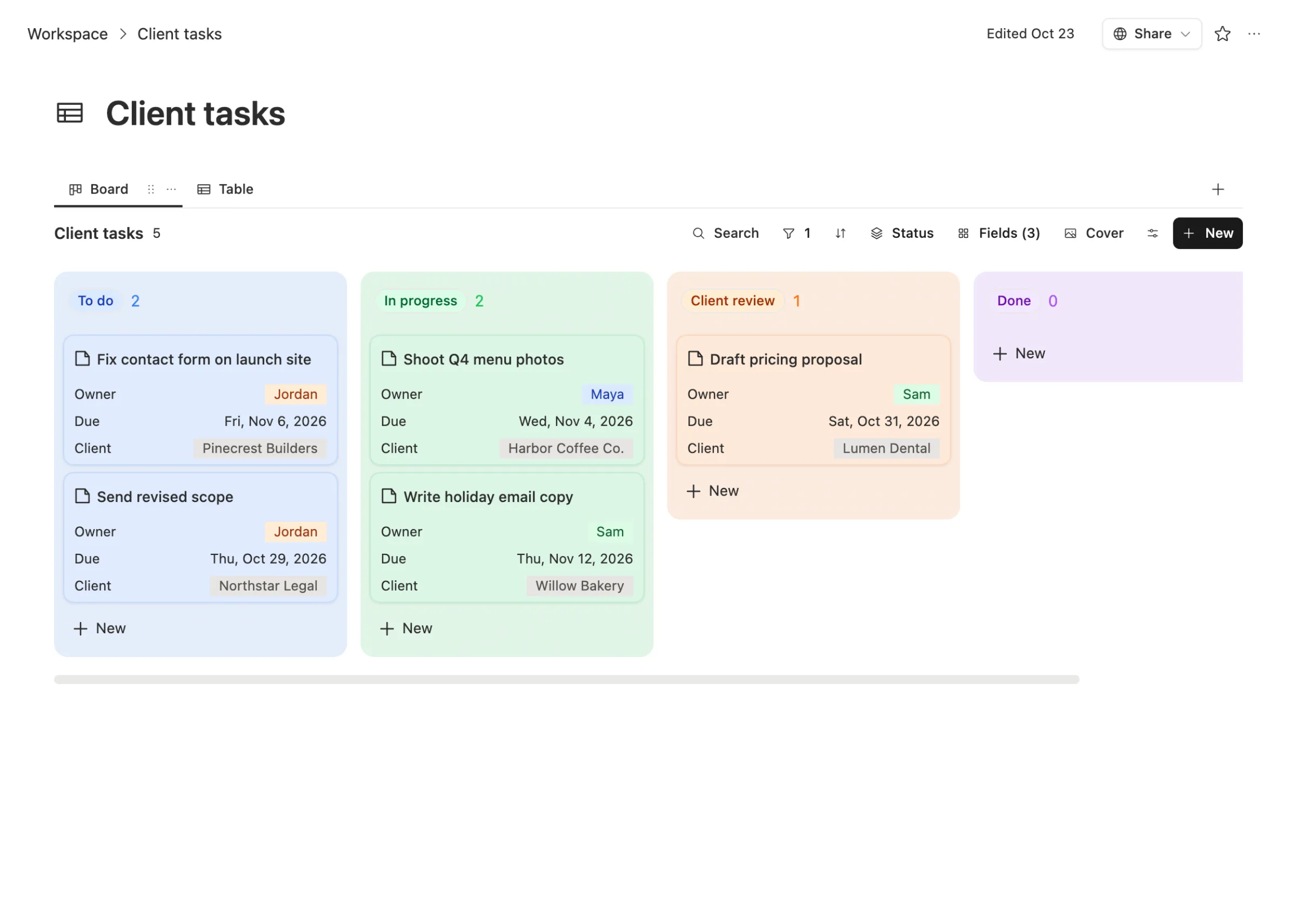
The work lives in tables everyone shares. Clients, meeting notes and tasks sit side by side and link to each other. The task board shows who owns what and when it's due.
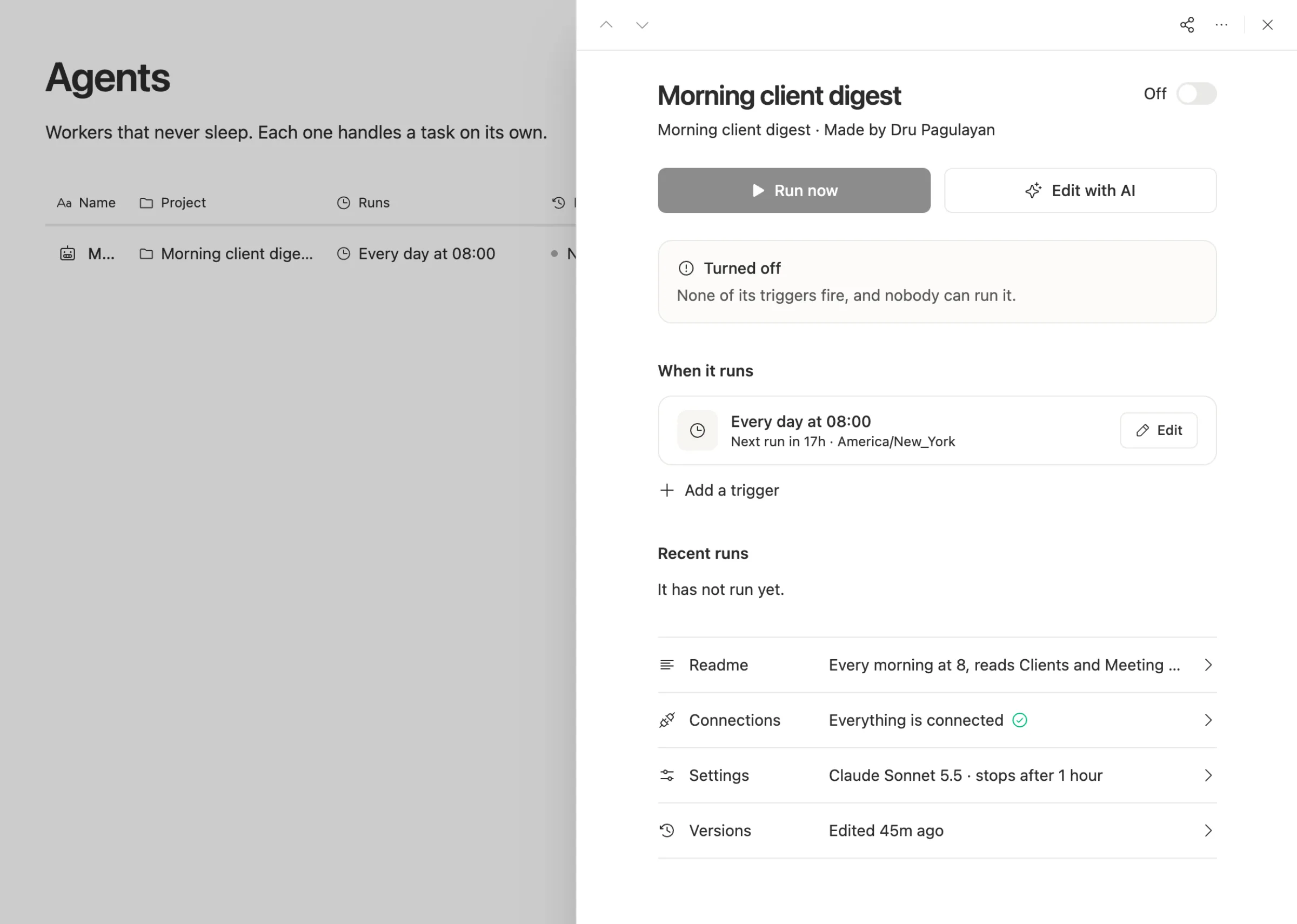
Agents are built by describing the job. "Every morning at 8, read Clients and Meeting notes and write one short digest." That's the whole spec. Each agent has a schedule, a cost cap per run, a time limit, and an on and off switch.
Agents can ask instead of guessing. When a run hits a judgment call, it can stop and ask a person, then carry on with the answer.
You pick the AI. Each agent picks its model. Run it on workspace credits, your own API key, or a ChatGPT, Grok, Gemini or GLM plan you already pay for.
What it costs
The Team Brain workspace is free for any number of people and agents, with 10 GB of storage. You pay only for the AI the agents use, or bring your own keys and pay the provider. There are no seats, so adding the fourth person costs nothing. See our pricing.
We won't tell you how much this saves. That depends on what you pay for today and which tools you really retire. Here's how to find out honestly: list every app the team pays for, mark the ones that are mostly a table plus a reminder, and try moving one of those first.
What to keep, and what to move
Keep the tools that do something hard and specific: your bank, your accounting software, your email, your design tools, anything with a regulator behind it.
Move the tools that are really a list with reminders: a simple CRM, a task tracker, a meeting notes app, a status report someone builds by hand every Friday.
Keep for people the work agents shouldn't own. As one HN reply put it, great companies come from people who care enough to see something through. An agent can draft the email. It can't care whether the client stays.
Common questions
Do I need to be technical to run a startup on agents? No. In Team Brain you describe the job in plain words, and you can open any agent to see what it did.
Will agents replace our CRM? For a small team with a simple pipeline, a shared Clients table plus a follow-up agent often covers it. For a big sales team with complex reporting, keep the CRM.
What should never be automated? Anything you'd be embarrassed to have a stranger send in your name. Keep a person on everything that reaches a customer.
How do we start? Pick the one report someone builds by hand every week. Make it an agent. Run it next to the manual version for two weeks before you trust it.