How a small landlord tracks maintenance requests without losing one
Repair requests arrive by text, email and a knock on the door, and the one you forget is the one that turns into a dispute. Here's how a landlord with a few buildings keeps every request on one table, from the first text to the plumber's bill.
It's 7:40 on a Tuesday night and your phone buzzes. "Water under the sink again. There's a bucket under it now." There's a photo. You reply "thanks, I'll get someone out," and then your kid needs help with homework.
By Friday you remember the bucket. You can't remember if you called the plumber.
That isn't you being careless. You manage a few buildings, maybe twenty units, and every tenant reaches you a different way: a text, an email, a note under the office door, a word in the hallway. None of those places has a "done" button. So the requests live in your head, and your head is also doing the books.
Why the forgotten request is the expensive one
Most repairs are small. The cost comes from the one that sits.
Tenants know this better than anyone. One tenant on X described sending every leaking tap and broken lock as a dated WhatsApp message with pictures, and three months later the landlord complained the flat had been left to fall apart without telling him. Another tenant, fined for paying rent a day late, answered by building a spreadsheet of every ignored repair request with dates and screenshots. A third was billed for a repair he'd spent three months asking for.
Whatever you think of those stories, notice what the tenants did. They kept a dated record. If they keep one and you don't, you lose the argument, even when you did nothing wrong.
A tenant-screening company put the fix plainly in a post this week: a request needs a repeatable workflow that tracks the issue, the urgency, the messages, the repair and how it ended. That's five things. A text thread holds one of them.
The usual tools, and why they don't fit
A notebook or a spreadsheet. It works on a slow week. On a busy one, nobody updates it, and a spreadsheet can't hold the tenant's photo next to the row.
Property management software. Buildium starts at $65 a month for Essential, which includes its basic accounting, maintenance and leasing features. Growth starts at $202 and Premium at $420. AppFolio starts at $1.49 a unit a month on its Core plan, with a 50-unit minimum. These are good tools if you want rent collection, owner statements and leasing in one place. If what's broken for you is only the repair requests, it's a lot of software for one table.

One table, one row per request
Here's how it runs in Team Brain. Every request becomes one row in a table called Maintenance requests. The columns are the five things that matter: which unit, how urgent, where it stands, which vendor, and whether the tenant knows what's happening.
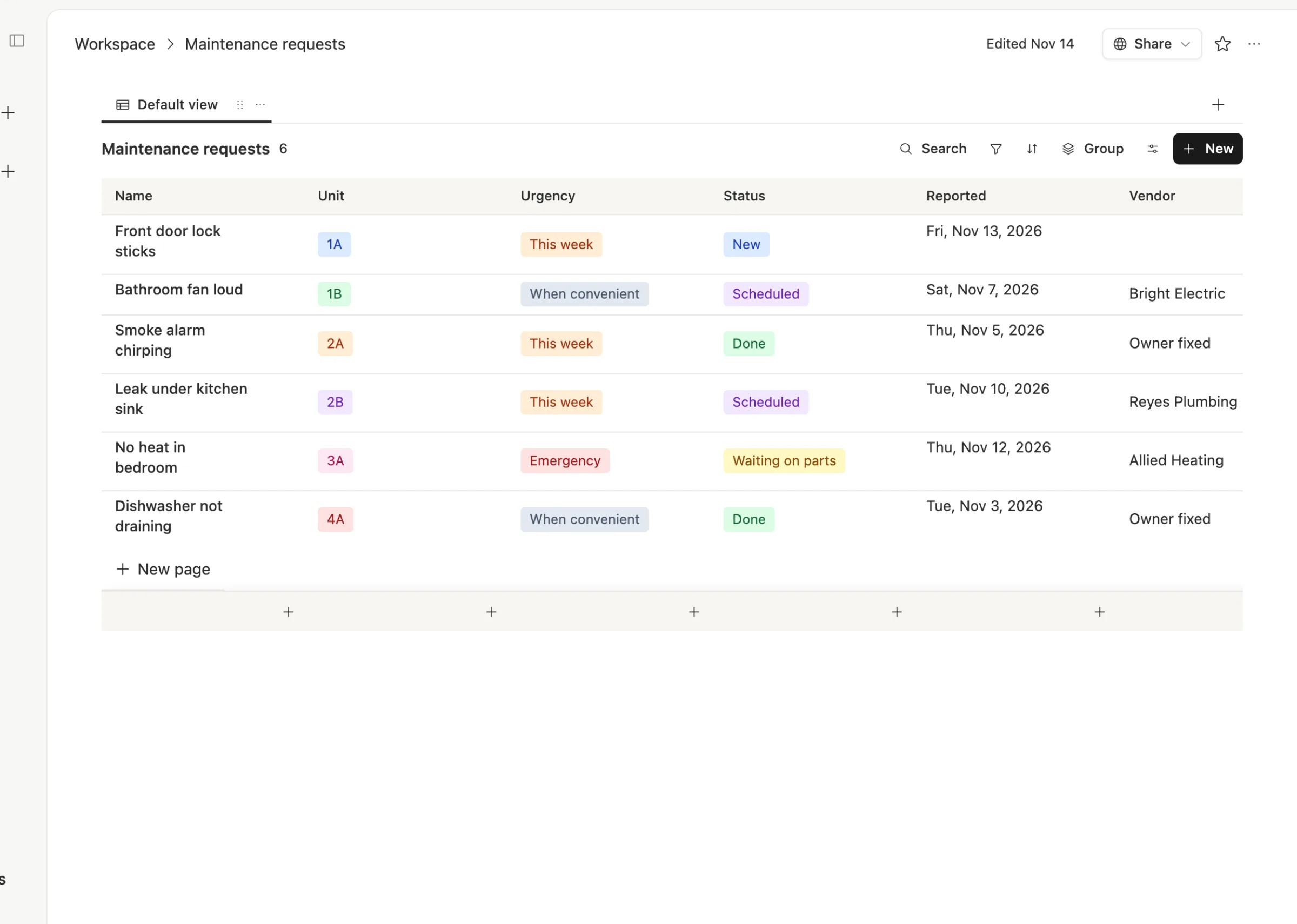
The steps are the same for every leak, lock and heater:

Log it. Tenants keep texting or emailing the way they do now. You don't need them to learn a portal. When a request comes in, it becomes a row, with their exact words and the photo on the row's page. If requests come by email, an agent can file them for you when each one lands, so you only check the table.
Sort it. Three choices: Emergency, This week, When convenient. No heat in November is an emergency. A loud bathroom fan isn't.
Book the vendor. Put the name and the time slot on the row. Now anyone who covers for you can see who's coming.
Tell the tenant. A checkbox that says the tenant knows the slot. It's the step that gets skipped, and it's the one tenants remember.
Close it. Write what was fixed and what it cost.
Every request keeps its own history
Open a row and the whole story is there: what the tenant said, when you called the plumber, when you told the tenant, what was found.
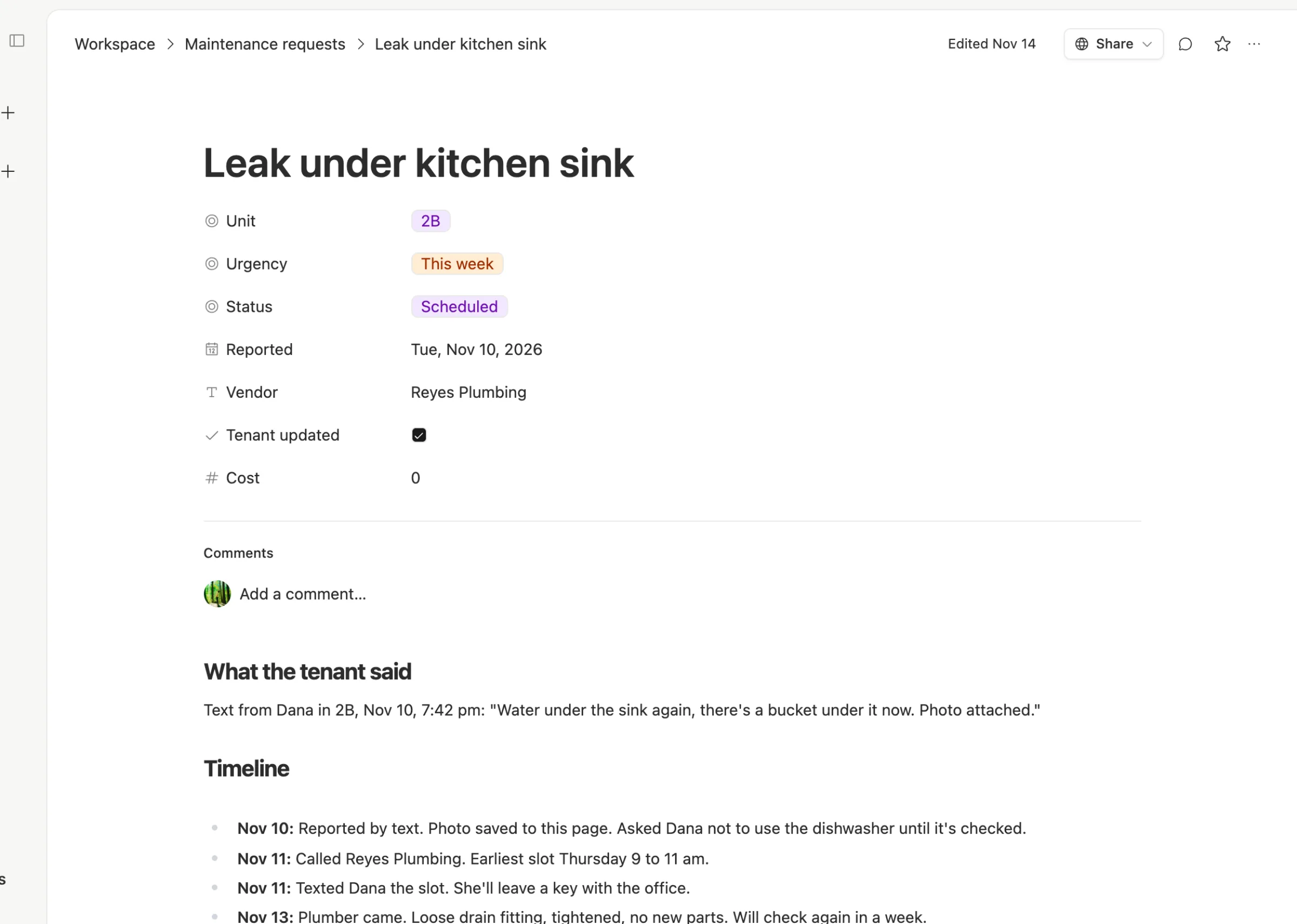
That page is your side of the record. If a tenant says you ignored them, you can show the date they wrote, the date you booked the vendor and the date you texted them back. If it's a repeat problem, you can see the last fix and who did it.
It also makes it easy to hand off. When you're on holiday, someone else can open the table, sort by urgency, and see exactly what's waiting.
What it costs
The workspace is free for any number of people, so your handyman and your bookkeeper can see the table too, at no extra cost. You only pay for AI when you use it, for example an agent that reads incoming emails and files them, or one that writes you a short list each morning of requests marked New or Emergency. You can bring your own AI account if you already pay for one. See our pricing page.
When property software is the better choice
We'd rather you pick right than pick us.
- You want rent, leases and owner reports in one system. Buildium and AppFolio are built for that, and a requests table isn't.
- You manage a lot of units for other owners. Owner statements and trust accounting are real work, and dedicated software handles them.
- You want a tenant portal. If you'd like tenants to submit requests through an app instead of texting, property software has that built in.
If repairs are the part that keeps slipping, start with the table. You can always add the rest later.
Common questions
Do tenants need to sign up for anything? No. They keep texting or emailing you. You, or an agent, turn each message into a row.
Can I see which requests are still open? Yes. Sort or filter the table by Status or Urgency, and everything marked New or Emergency sits at the top.
Can my handyman see the list? Yes. Add them to the workspace. There's no charge per person.
What should every request record? The unit, the date reported, the urgency, the vendor and time slot, whether the tenant was told, and what it cost. Those six facts answer almost every question later.
Start a free workspace at Team Brain and make the first row tonight, for the request you're trying to remember right now.