How a small accounting firm collects client documents at year end
Getting bank statements, payroll reports and receipts out of every client is what eats December. Here's how a small firm keeps one checklist per client and chases only what's missing.
You call a client to ask for their documents so you can get a head start on next year's books. He laughs and says he thought you'd already done his taxes. You did, for last year. A bookkeeper on X told exactly that story this week, and it's funny until you have forty of those calls to make.
The bookkeeping itself isn't the slow part. Getting the paper is. Someone building tools for small firms said it plainly: after talking to accountants, the bigger frustration wasn't making reports, it was chasing clients for missing receipts and documents.
That's not your clients being difficult, and it isn't you being disorganized. It's a list of six things, spread across forty people, tracked in your inbox.
Why year-end paperwork stalls
Every client needs roughly the same things: bank statements, a payroll report, receipts for anything big, forms for contractors they paid. Each one arrives on its own day, through its own channel. A PDF by email. A photo by text. A link to a folder that needs a login.
So the real question every morning is "who am I still waiting on, and for what?" A designer building a document tool for chartered accountants named the same gap: the hard part isn't seeing the documents, it's quickly seeing what still needs to come in.
And when they do arrive, half the battle is that they're usable. As one person who talks to bookkeepers every day put it, the hard part is still the messy input: faded receipts, invoices sent as links.
One row per client, one box per document
Here's how it runs in Team Brain. One table called Year-end documents. Each client is a row. Each document you need is a checkbox. The last two columns are the date of the last reminder and a status.
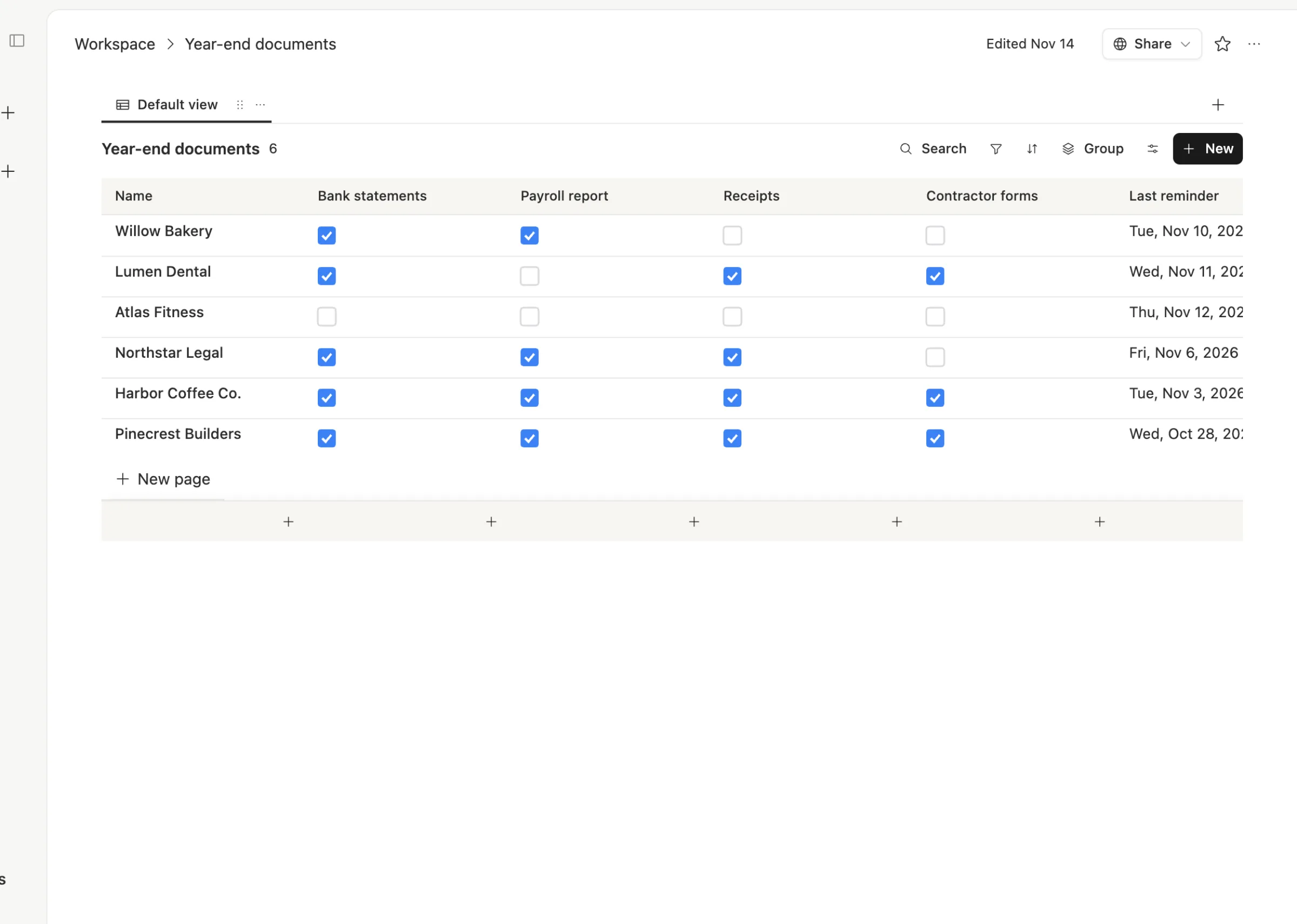
At a glance you can see that Harbor Coffee and Pinecrest Builders are ready, Northstar Legal is missing one thing, and Atlas Fitness hasn't sent anything. Filter by "Waiting on client" and that's your call list for the morning.
Open a client and the details sit on their page: exactly what's missing, what you already have, and every reminder you've sent.
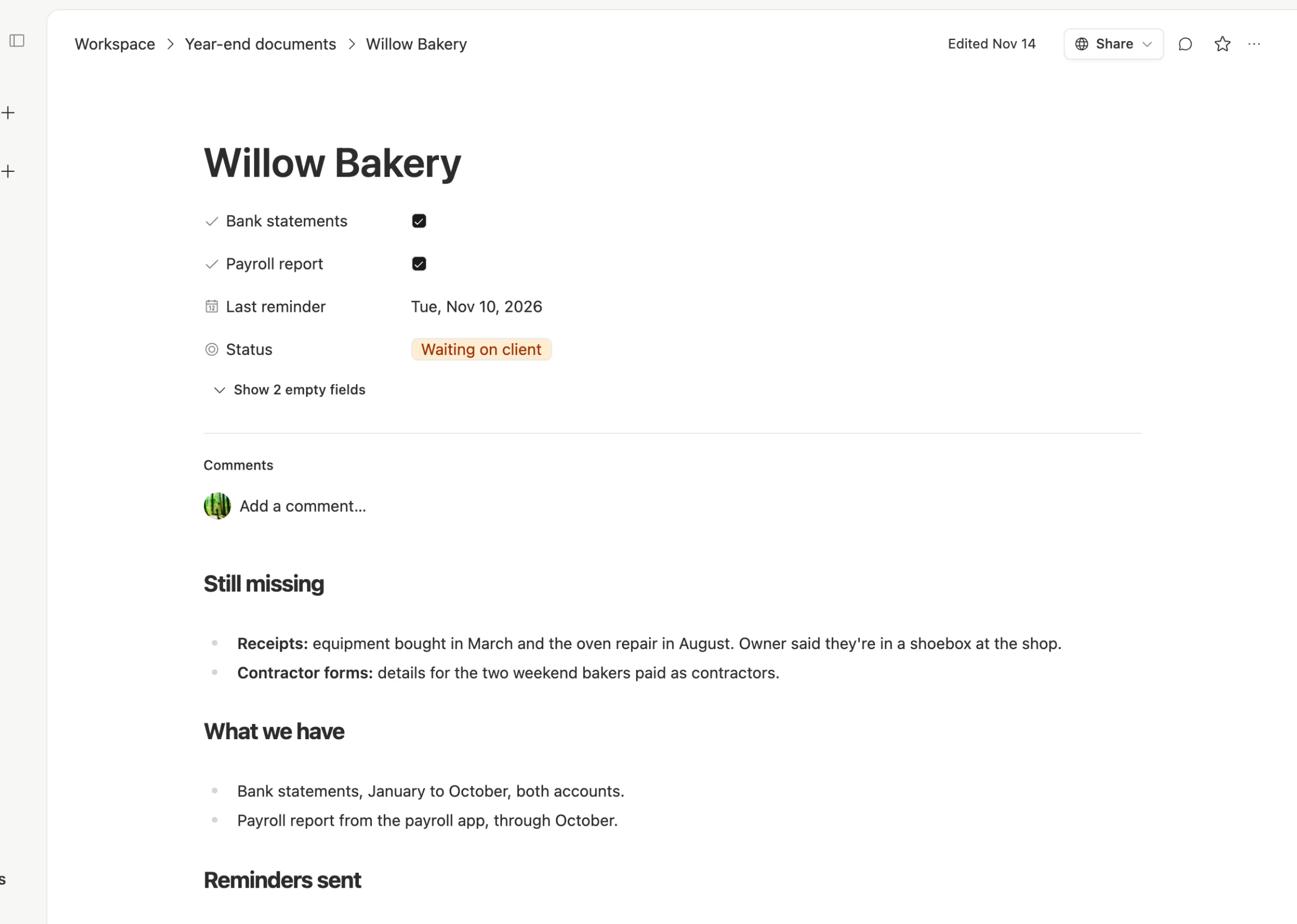
That page is what makes the next reminder easy. You don't send "please send your documents" again. You send "we still need the March equipment receipt and the oven repair in August."
Ask only for what's missing
The same four steps for every client:

Send one list. Everything you need, in one message, at the start. Clients would rather get one clear list than six separate asks.
Tick what arrives. When a statement lands, tick the box. If it's blurry or the wrong month, leave it unticked and note why on the page.
Ask only for the gaps. Each reminder names the specific items still missing. Short reminders get answered. Long ones get saved for later.
Start when it's complete. When every box is ticked, the status changes to Ready to start, and the job moves to the top of your list.
This is where an agent earns its keep. Once a week it can read the table and draft a short reminder for each client still waiting, listing only their missing items, for you to check and send. It can also tell you who hasn't heard from you in more than a week. A CPA on X said they're building an agent to read tax documents and list the missing information to request from each client. The table is where that list lives.
What it costs
The Team Brain workspace is free for any number of people, so a seasonal helper can work the same table at no extra cost. You pay only for the AI you use, like that weekly reminder draft, or connect your own AI account. See our pricing page.
For comparison, TaxDome is a full practice platform built for tax and bookkeeping firms. Its one plan starts at 150 active clients, which comes to $1,500 a year billed annually, or about $0.83 a client a month, with 20 seats included. Its AI add-on is $200 a month for the whole team.

When a practice platform is the better choice
We'd rather you pick right than pick us.
- You want clients to upload into a portal. TaxDome includes a client app for web and mobile, document requests, and e-signatures. A checklist table doesn't give clients a login of their own.
- You file a lot of returns. TaxDome connects to tax software and pulls IRS transcripts. That's work a general workspace doesn't do.
- You bill and collect through the same system. Proposals, engagement letters and payments in one place are worth paying for at volume.
If you have fewer clients than TaxDome's starting tier, or your clients will never log into a portal anyway, start with the table. It solves the "who am I waiting on" problem today.
Common questions
What documents should a small business send its bookkeeper at year end? Usually bank and credit card statements for every account, a payroll report, receipts for large purchases, and details for any contractors paid during the year. Your list may differ by country and client.
How do I remind clients without nagging? Name the exact items still missing, keep it short, and space reminders about a week apart. After two emails, call.
Can my whole team see which clients are ready? Yes. Everyone in the workspace sees the same table, and there's no charge per person.
Do clients need a Team Brain account? No. Clients keep sending documents the way they do now. Your team tracks what arrived. Start a free workspace at Team Brain.