How a small agency keeps track of client requests
Client requests arrive by email, Slack and voice note, and the small ones get lost. Here's how a small design agency puts every request in one table, with one owner and one date, and lets agents do the filing.
It's Thursday afternoon. A client asks on a call, "Did you get my note about the poster?" You say yes. You're not sure. You search your inbox, then Slack, then the voice notes on your phone, and find it in a reply-all from Monday, under a thread about invoices.
Every designer knows the feeling. One put it well this week: the client sends feedback in an email, then a Slack message, then a voice note, then a comment that contradicts the email, and by Friday you're not designing anymore. You're sorting.
That's not a discipline problem. Clients write where it's easy for them, and that's fine. The trouble is that nothing turns those messages into a list.
This is how a small agency can fix that. We'll use Northwind Studio, a made-up five-person design agency we keep for demos, so you can see real screens without anyone's private data.
Why requests slip through

They arrive everywhere. Gmail for the formal ones, Slack for the quick ones, a voice note from the car. Each place has its own search, and none of them know about the others.
Nobody owns them. When a request lands in a shared thread, two people reply, or nobody does. Both feel like the other one has it.
The due date lives in a head. "Before the 4th" is in the email. It's not on any calendar.
Clients use AI now too. Corey Haines noticed clients now run the agency's work through AI before they give feedback, and that AI never saw the kickoff call. So feedback arrives longer, faster and from more places than before.
The usual fix is a project tool. It helps, but it needs someone to copy every message into it, and that someone is the busiest person in the room. Another agency owner made the same point about AI tools: people pay for them, then do the work again themselves because nobody told the tool what good looks like.
One table for every request
Northwind keeps every request in one table called Client requests. Each row is one job, with five things: a due date, a stage, the client, labels like Design or Copy, and one owner.
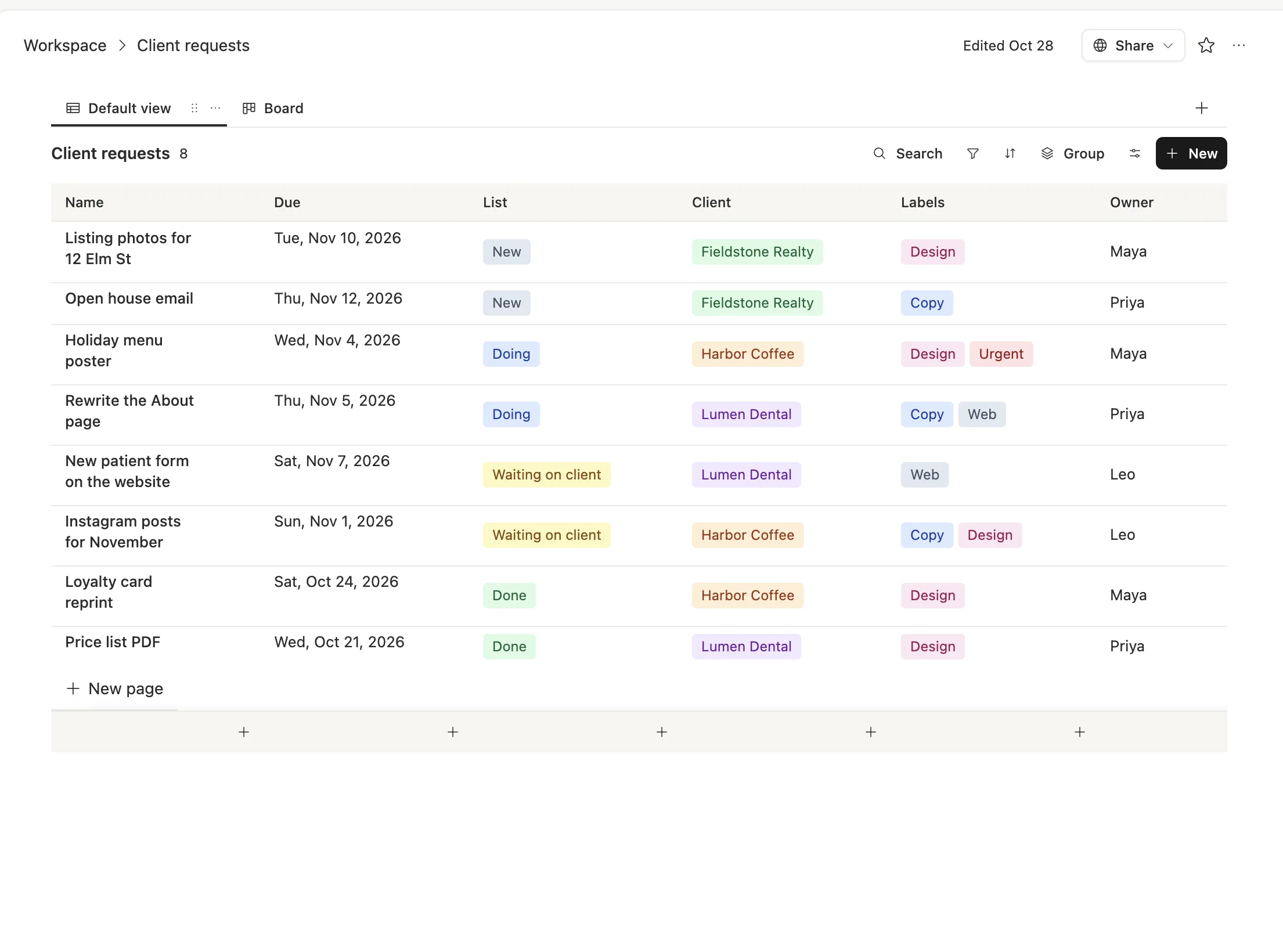
The stages are simple on purpose: New, Doing, Waiting on client, Done. "Waiting on client" matters most. It's the stage where requests used to die, because everyone assumed the ball was in someone else's court. Now there's a column that says so, and a date next to it.
The same rows show as a board, so you can drag a request from Doing to Waiting on client during the Monday call.
Each request keeps its own story
Open a row and everything about that job is in one place: the brief, what the client actually said, the open questions and the next steps.
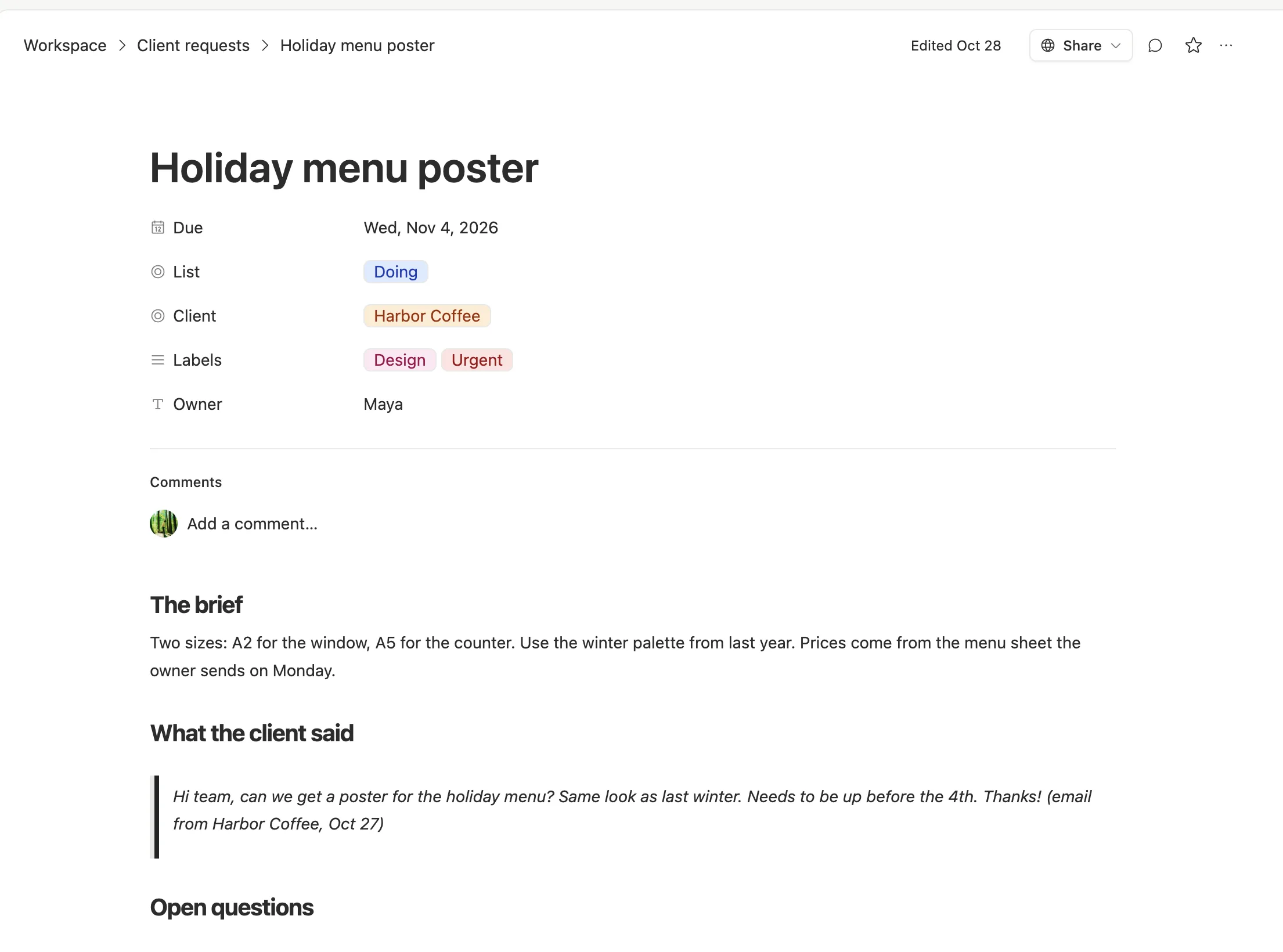
When Harbor Coffee asks on Thursday's call about the poster, Maya opens this page. The client's own words are right there, quoted, with the date. Nobody has to search four apps.
Let agents do the filing
A table only works if requests get into it. That's the part nobody wants to do by hand, so it's the part we hand to agents.

1. An agent files new emails. In Team Brain, an agent can run when a new email lands in a connected Gmail inbox. It reads the message, works out which client it's from and what they want, and adds a row with the due date and the email quoted inside. If it's not sure, it marks the row New and leaves the owner empty for a person to pick.
2. A person owns it. Every row gets one owner. The agent doesn't decide who; your team does, on Monday.
3. An agent nudges late work. A second agent runs every morning, finds rows past their due date and reminds the owner once.
4. An agent drafts the Friday update. On Friday, an agent reads each client's rows and drafts a short note: done this week, in progress, waiting on you. A person reads it before it goes out.
Each agent has a cost cap per run and a time limit, and each one runs on the model that fits its job. Sorting an email is a small job, so it can run on a small, cheap model.
What it costs
The workspace is free for any number of people, so the whole team sees the same table without paying for a seat each. You pay only for the AI the agents use, or connect your own AI account and pay your provider directly. See our pricing.
We won't promise you a number of hours saved. What changes is simpler: when a client asks "did you get my note?", the answer is a row, with a date and a name on it.
Getting started in an afternoon
- Make the table. Five columns: Due, Stage, Client, Labels, Owner.
- Paste in this week's requests by hand. Go through your inbox and Slack once. It's the last time you'll have to.
- Run the Monday call from the board. Give every row one owner.
- Add the agents one at a time. Start with the morning nudge. Add email filing when you trust the table.
Common questions
Do clients need to change how they send requests? No. They keep emailing like they always do. The agent does the filing.
What if the agent files something wrong? Fix the row, like you would a teammate's. Keep it on New until a person has checked it, at least for the first few weeks.
Can clients see their own requests? You can share a filtered view of the table with a client, so they see their own requests and the stage each one is in.
Is this a replacement for a project tool? For a small agency, often yes. If you run large projects with dependencies and timelines across many teams, keep your project tool and use this for the requests that come in between.