How a small law firm keeps track of new client inquiries
A voicemail, a web form, a referral email. Each one is a possible client, and each one needs a conflict check, a consult and a signed engagement letter. Here's how a three-lawyer firm tracks every inquiry from first call to signed.
It's Thursday afternoon. There's a voicemail from someone with a lease to sign by December 1. A web form asks about a will. A past client emails to say their friend needs help with a partnership deal. You mean to call all three back tomorrow.
Tomorrow you're in court. By Monday the lease caller has hired someone else.
Nobody did anything wrong. Small firms lose clients in the gap between "I'd like to hire a lawyer" and "here's my signed engagement letter," because that gap has a lot of small steps and none of them bill.
This is how a three-lawyer firm (made up for this example) keeps every new inquiry on one list.
The steps nobody bills for
One person on X listed them well: enquiries, gathering information, conflict checks, engagement documents, signatures, payments, follow-ups and internal assignments, all before someone is actually a client. Each step is small. Together they're a part-time job.
For a small firm, the risk is in the handoffs. The receptionist takes the call. A lawyer is supposed to run the conflict check. Someone books the consult. Someone else sends the engagement letter. If any one of those waits a day too long, the inquiry goes cold.

Why the usual tools don't fit
Practice software saves its best intake tools for the top plan. Clio is the name most small firms know. Its pricing page lists plans starting at $49 per user, and puts online intake forms, consultation booking and lead tracking with Clio Grow in the Elite plan, which asks you to get a quote. For a three-lawyer firm that already tracks matters somewhere else, that's a big step for one list.
Legal AI is priced for big firms. One person on X said the industry promised AI would level the field for solo lawyers and small firms, then priced it so only BigLaw could afford it.
A spreadsheet has no memory. It can hold the names. It can't tell you whose conflict check is still "Not run," or nudge anyone when an engagement letter has sat unsigned for three days.
How it runs in Team Brain
The firm keeps one New inquiries table in Team Brain. Matters still live in the firm's case system. This table is everything before that.
Every inquiry is a row. Name and what they need, the stage, the matter type, the conflict check result, the other party, and the date of the next follow-up.
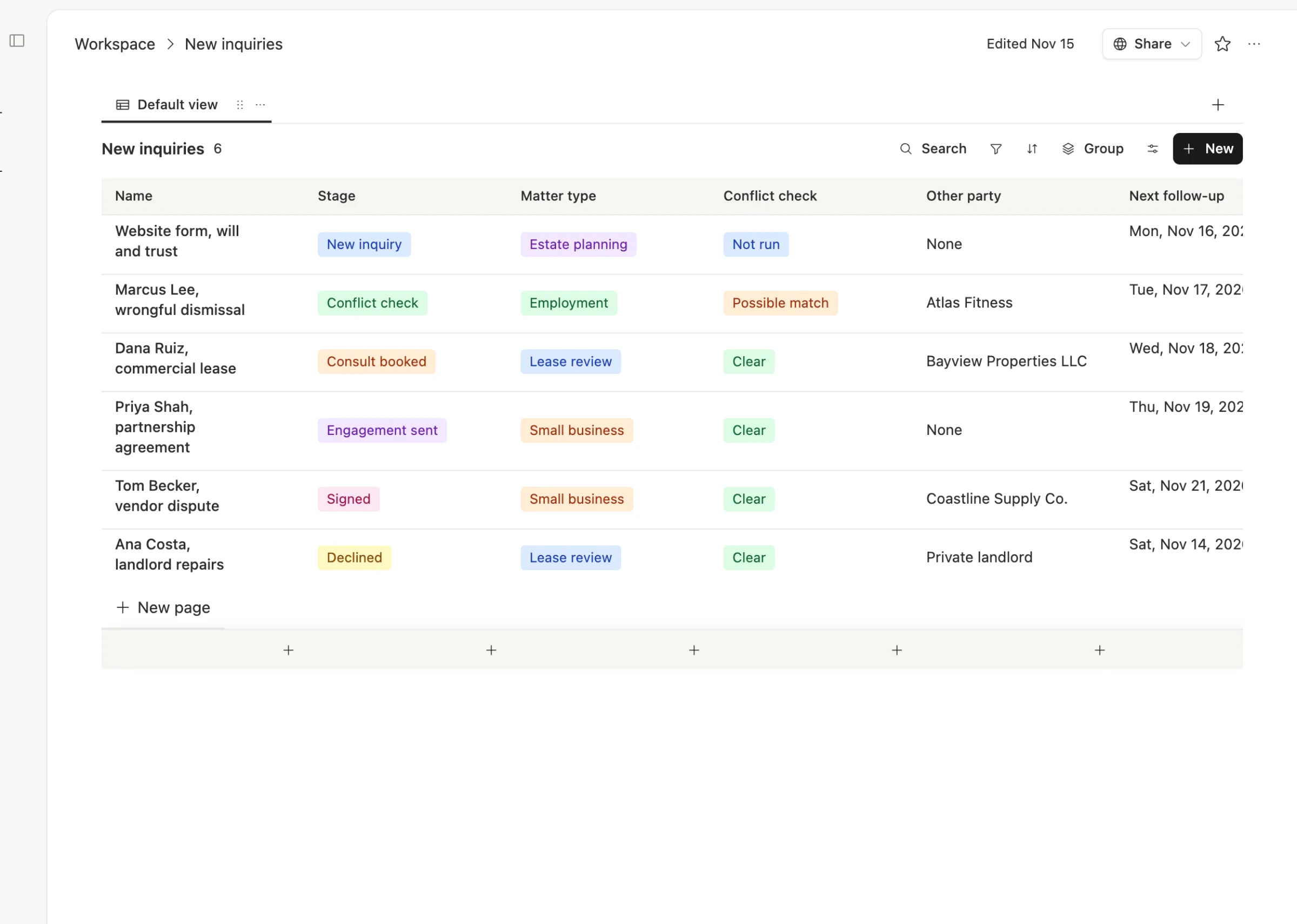
One look tells you the job for today. A web form nobody has checked yet. A possible conflict waiting for a lawyer. An engagement letter that needs a nudge.
Each row holds the whole story. How they found the firm, what they need, who ran the conflict check and what they searched for, when the consult is, and a short checklist of next steps.
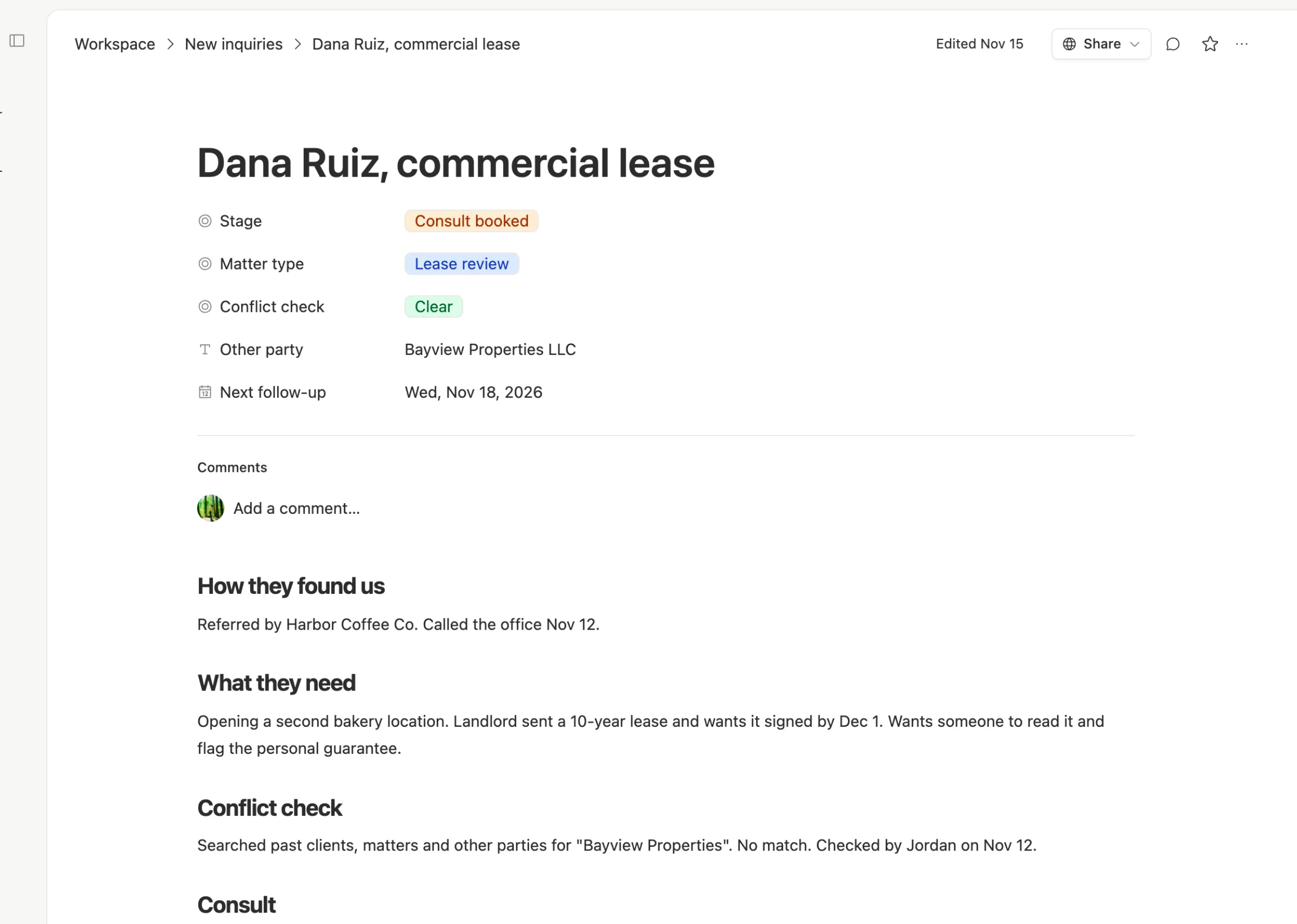
The stages never change. Every inquiry walks the same five steps, so anyone in the office can pick one up.

One law tech consultant described the goal as one intake that runs the conflict check, sends the engagement letter, and opens the matter the same day the client says yes. That's the target this table is built for.
Agents do the chasing, lawyers do the deciding. In Team Brain, agents can run on a schedule, when a row changes, or when an email lands. This firm could use one to file each web form as a new row, one to search past clients and other parties across the workspace and mark "Possible match" for a lawyer to look at, and one to list every engagement letter older than three days each morning. A lawyer always makes the conflict call. The agent only finds names to look at.
Keep it private. Pages and tables in Team Brain have their own access. The firm keeps New inquiries visible only to the people who handle intake. Check your bar's rules on where client information may be stored before you put any in.
What it costs
The Team Brain workspace is free, and there are no seats. All three lawyers, the receptionist and the part-time paralegal can use it without adding to the bill. You pay only for the AI the agents use, or bring your own AI account. See pricing.
We don't have a number for how many clients this saves, and we won't make one up. What changes is that on Monday morning, every inquiry from last week has a stage and a date.
Set it up this week
- Make a New inquiries table with: stage, matter type, conflict check, other party, next follow-up.
- Add every inquiry from the last 30 days. Mark the ones you never called back. That list is your first hour on Monday.
- Agree on one rule: no row without a next follow-up date.
- Run the conflict check before the consult, every time, and write down what you searched for.
- When someone signs, open the matter that day in your case system, and mark the row Signed.
Common questions
Does Team Brain replace our practice management software? No. Keep your case system for matters, billing and trust accounting. Team Brain is for the steps before someone becomes a client.
Can an agent run the conflict check? It can search and flag possible matches. A lawyer reviews every flag and makes the call.
Can clients fill in a form that lands in the table? Team Brain's site builder includes forms, and agents can file what comes in. You can also paste a web form email into the chat and ask it to add the row.
What does it cost to start? Nothing. The workspace is free for any number of people. You pay only for the AI you use.