How a small nonprofit tracks donors before Giving Tuesday
Three staff, a few hundred donors, and gift history split between a payment tool, a spreadsheet and one person's memory. Here's how a small nonprofit keeps every donor on one table, thanks first-time givers fast, and knows who to call next.
A $50 gift came in on Thursday night. The payment email says "Rosa D." and nothing else. Priya thinks Rosa came to the book drive with her daughter. Maya thinks that was someone else. By the time anyone checks, it's been two weeks and the thank-you never went out.
That's not a careless team. It's three people running programs, writing grants and planning Giving Tuesday, which is December 1 this year. The donor list lives wherever it landed: the payment tool has the amount, a spreadsheet has last year's campaign, and the story of who each person is lives in someone's head.
This is how a small nonprofit can keep every donor in one place, without paying for a big system it won't use.
Where donor history leaks
Each tool holds a piece. None holds the person.

The expensive gap is the one in someone's head. A fundraiser on X told the story of a major donor whose goal wasn't a dollar figure but a million people with clean water. He'd had about three donor reps in three years, and each change cost trust. When staff turn over, the relationship has to be written down somewhere the next person can read.
Another fundraiser made the point the other way: a database is good at holding names and gift dates, and AI is good at sorting them, but neither one builds the relationship. That's right. The table's job is to make sure a person never forgets to call.
The thank-you is the step that slips
Giving Tuesday brings a wave of first-time donors. Most small teams plan the ask carefully and the week after barely at all. One person put it simply: a quick, personal thank-you to every first-time donor is how one gift becomes two.
You don't need software to know that. You need a list that shows, at a glance, who gave and hasn't been thanked yet.
One table, one row per donor
In Team Brain, every donor is one row in a Donors table: their type (first gift, monthly, yearly or lapsed), the date and amount of their last gift, whether they've been thanked, who on the team knows them, and the date of the next touch.
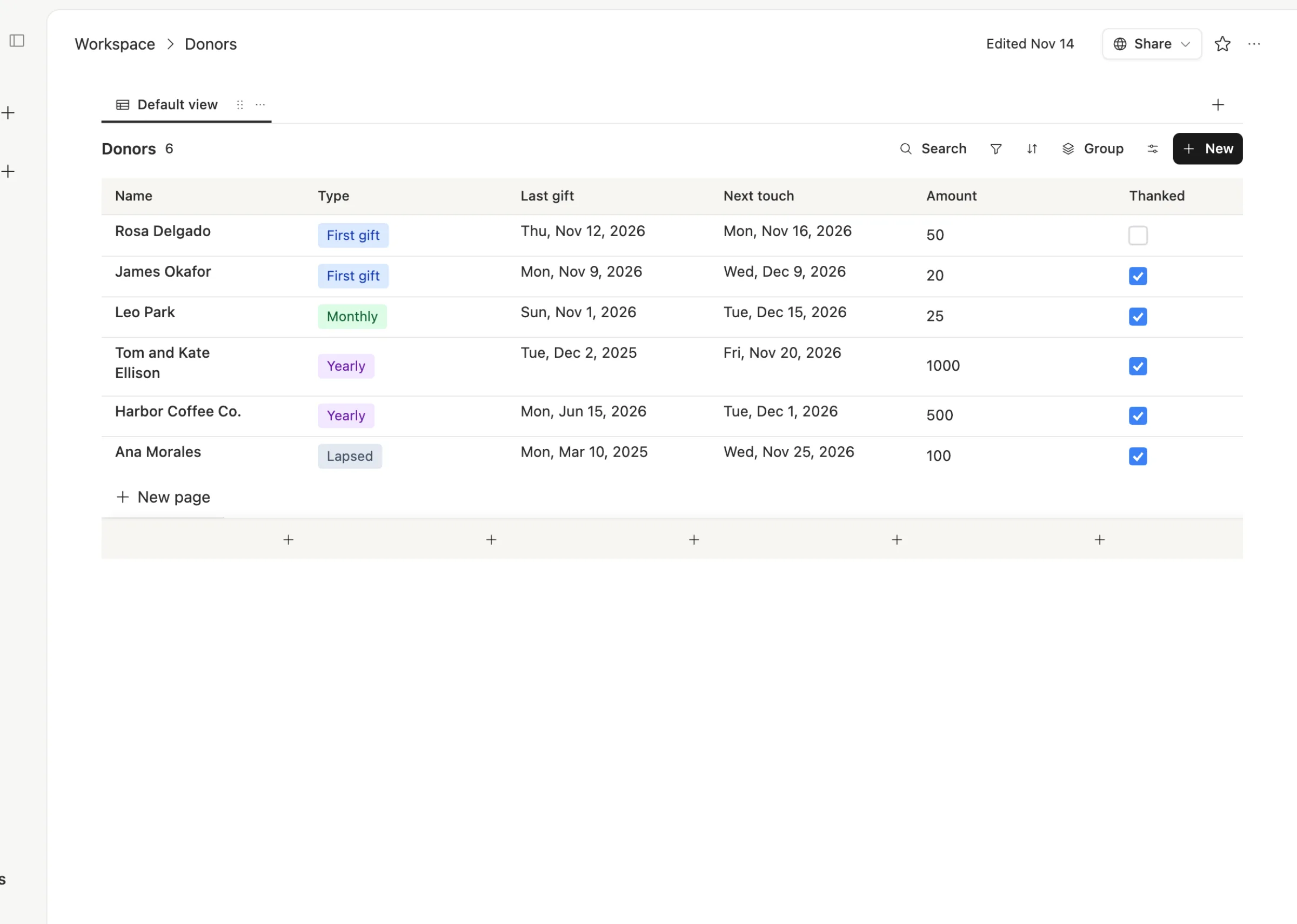
Sort by Thanked and the unthanked first-time donors sit at the top. Sort by Next touch and you see who to call this week. When the payment tool emails you about a new gift, an agent can add the row for you or update the existing one, so the list stays current without anyone retyping.
Open a row and the person is there, not just the gifts:
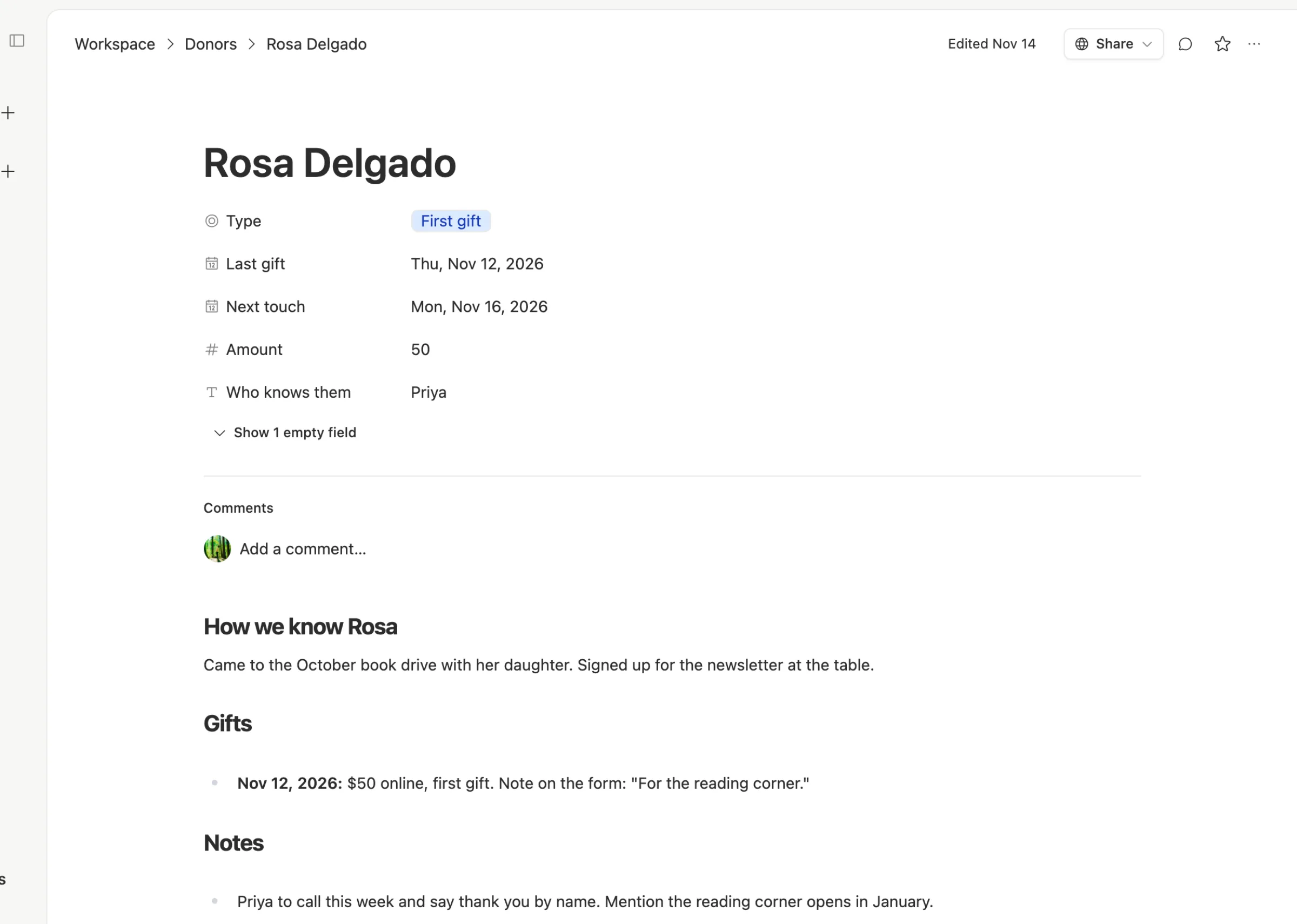
How you met them. What they gave for. What you promised them. When Priya is out, Maya can open Rosa's page and make the call herself without guessing.
From a first gift to a second one
The same four steps for every new donor:

Gift lands. One row: name, date, amount, and what it was for if they said.
Thank them by name. A call or a short note within a few days. Tick Thanked.
Note what you learned. How you met, what they care about. Two lines is plenty.
Set the next touch. A photo of what their gift paid for, an invite to an event, a short update. Not another ask.
An agent can help with the boring part. Every Monday morning it can read the table and write one short list: first-time donors not yet thanked, next touches due this week, and anyone who gave last December and hasn't given since. A person still makes every call.
What it costs, and when a donor CRM is better
The Team Brain workspace is free for any number of people, so volunteers and board members can see what they need. You pay only for the AI you use, like that Monday list, or you can connect your own AI account. See our pricing page.
To be fair, dedicated donor software is not expensive for a small team either. Little Green Light charges by the number of donor records: $45 a month for up to 2,500, $60 for up to 5,000, with unlimited users and every feature on every plan. Bloomerang also offers unlimited users, on annual pricing it quotes for each nonprofit.
Pick a donor CRM if:
- You need tax receipts and gift acknowledgments built in. Donor software is made for that, and getting receipts wrong is a real problem.
- You run online giving forms and want gifts to flow in on their own. A donor CRM connects those directly.
- You report to a board on retention and campaign results every quarter. Donor tools have those reports ready.
Pick Team Brain if your donors are one part of the work and the rest is grants, programs, volunteers and events, and you want all of it in one place with your donor list sitting next to the grant it helped win.
Common questions
What should a small nonprofit track for each donor? Name, type, last gift date and amount, whether they were thanked, who knows them, and the next touch date. Add how you met them and what they care about on their page.
How fast should we thank a first-time donor? Within a few days, by name, from a real person. Make it a column so nobody has to remember.
Can volunteers see the donor list? Yes. Add them to the workspace at no cost, and keep anything private in a separate table only staff can see.
Do we need to stop using our payment tool? No. Keep taking gifts the way you do now. The table is where you remember the person behind each gift. Start one free at Team Brain.