How a small online store keeps track of holiday returns
Shopify handles the refund. But returns also arrive by email, Instagram DM and at the market stall, and nobody writes down why things come back. Here's how a three-person shop keeps one returns log that catches all of it.
It's the second week of November. An email says "can I swap this for a large?" An Instagram DM says "my aunt gave me this scarf, can I return it?" A parcel shows up with no note inside. And somewhere in your Shopify admin, two return requests are waiting.
You handle each one as it comes. That's the problem. By January you can't say how many aprons came back, why, or whether the one from the market is back on the shelf or in a box under the counter.
None of that is you being disorganized. Returns just arrive in more places than any one tool watches.
This is how a three-person shop that sells linen, ceramics and candles online and at a weekend market (a made-up shop for this example) keeps one returns log for all of it.
Shopify already does the hard part
Let's be fair first. Shopify handles returns well for orders placed in your store. Per its returns and exchanges guide, you can create a return, send shipping instructions with an optional label, and refund in full or in part after you inspect the item. You can send a different size or color as an exchange. With self-serve returns on, customers can ask for a return from their order status page, and return rules set which items qualify and for how long.
If every return came through that page, you might not need anything else.
Why returns still slip through
Customers don't always use the return page. They reply to the shipping email. They DM you. They hand it back at the market. Those never show up as a return in Shopify until you create one by hand, and the ones with no order number may never show up at all.
Return flows can change under you. One store owner noticed customers could suddenly request returns through their Shop account, which then made the order ineligible in the returns app they paid for. Someone else posted where the self-serve returns setting lives. Small change, real confusion in the middle of the season.
Nobody writes down why. A refund records money. It doesn't record that this is the third "runs short" for the same apron, or that the mug set keeps arriving cracked. That's the part that saves you next season.

How it runs in Team Brain
The shop keeps one Returns table in Team Brain. Shopify still issues every refund and exchange. The table is where the shop remembers.
Every return is a row, however it came in. Order number if there is one, where it came in, the reason, the outcome, the date, and a box for "back on shelf."
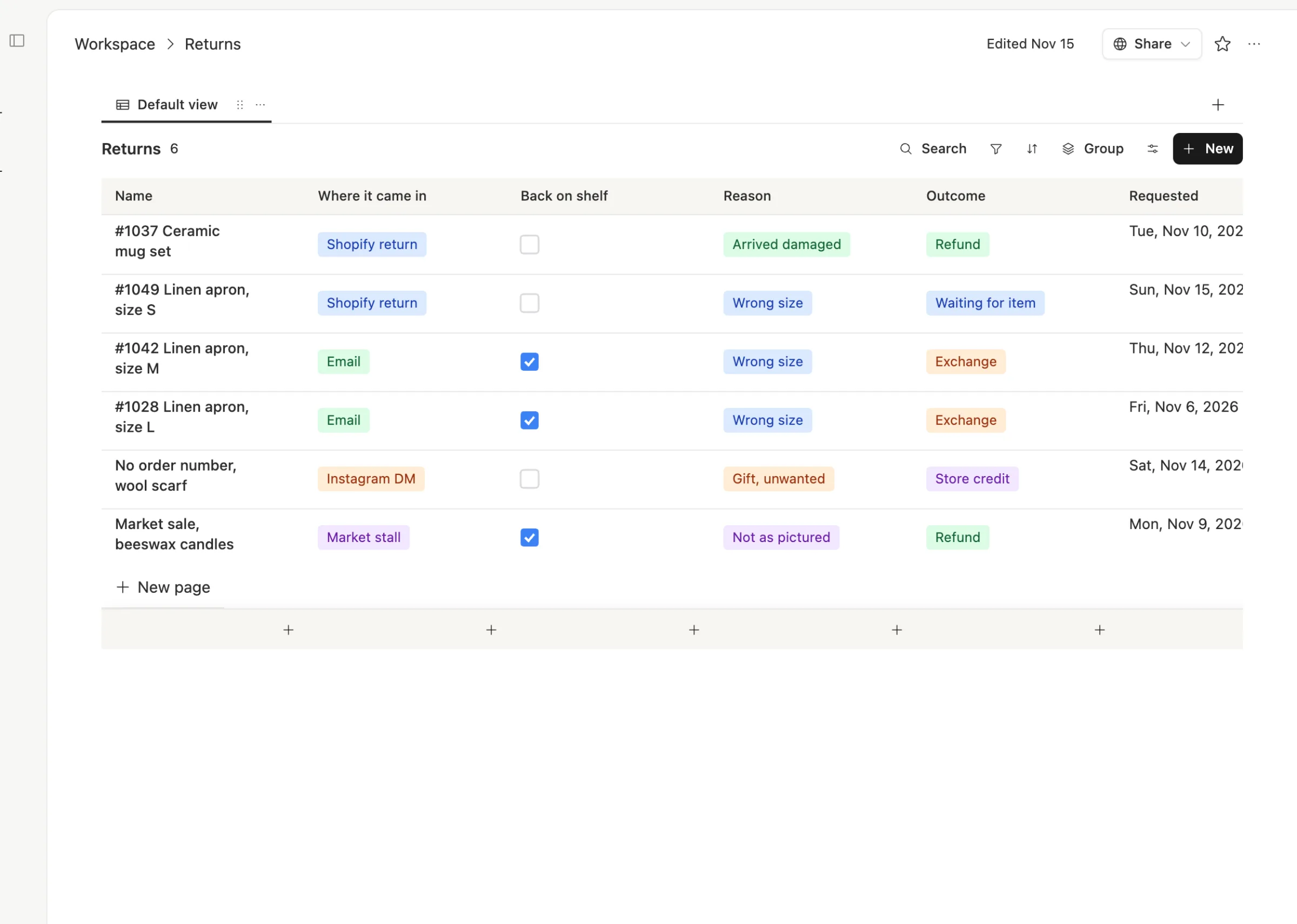
Look at the table and the pattern jumps out. Three linen aprons, all "Wrong size."
Each row keeps the story. Open one and you see what the customer said, what you did, the reply you sent, and a note for the product page. When the same customer writes again in March, it's all there.
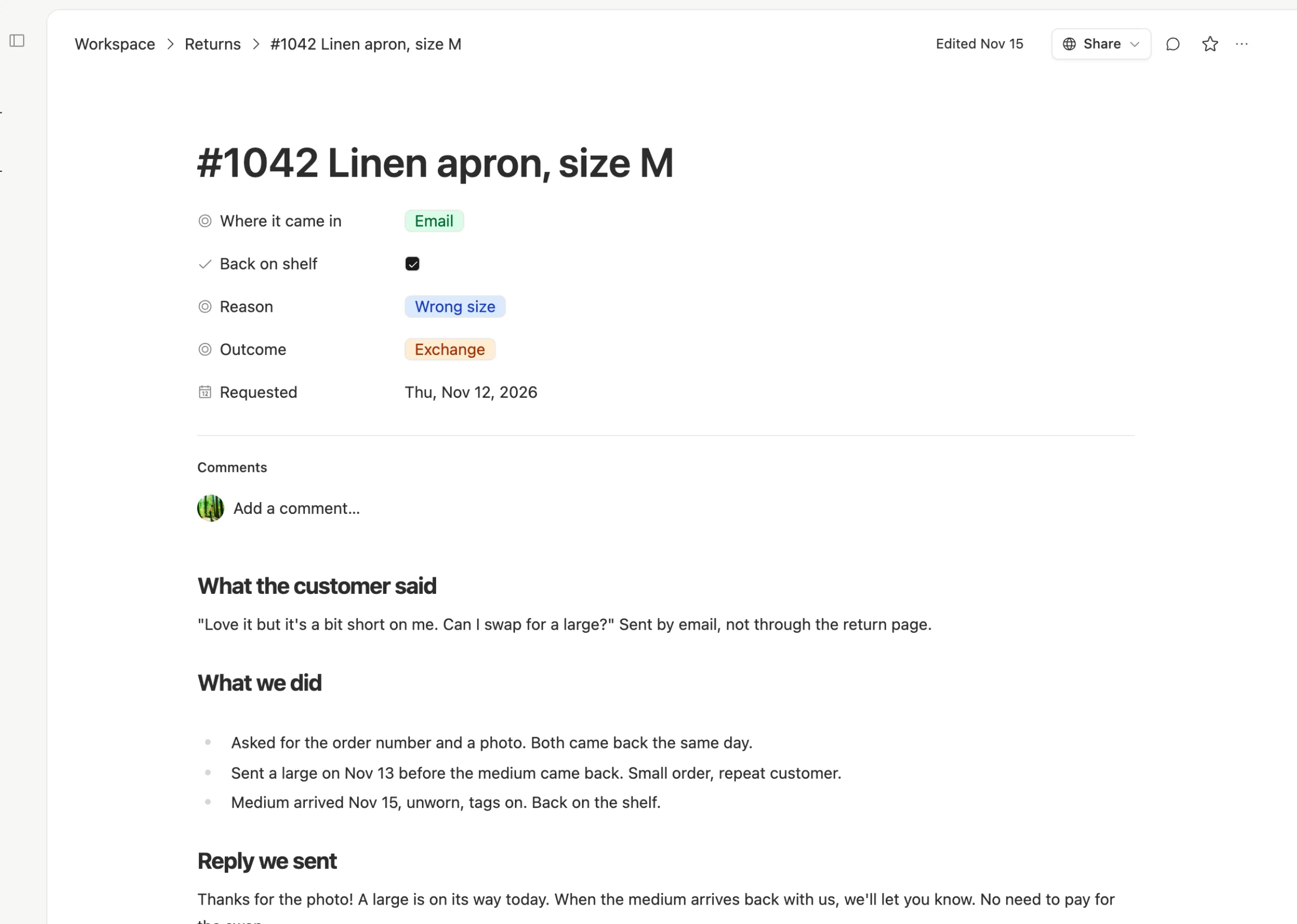
The same four steps, every time. Log it, settle it in Shopify, check whether it's sellable, and learn from it.

Agents take the boring parts. In Team Brain, agents can run when an email lands, on a schedule, or when a row changes. This shop could have one read emails sent to its returns address, file a row, and draft a friendly reply for someone to check. Another could run every Monday and write a short note: what came back last week, the top reasons, and any product that came back more than twice.
One rule matters here. An agent can draft a refund email. Issuing the refund is a decision. As one person on X put it, a chatbot that drafts a refund email and an agent that sends it and issues the refund are very different things. Keep refunds in Shopify, done by a person.
What it costs
The Team Brain workspace is free, and there are no seats. All three people in the shop, and the friend who helps at the market in December, can use it without adding to the bill. You pay only for the AI the agents use, or bring your own AI account. See pricing.
We don't have a number for how much this saves, and we won't invent one. What changes is that in January you can answer "what came back, and why?" in a minute.
Set it up before the rush
- Make a Returns table with: where it came in, reason, outcome, requested date, back on shelf.
- Pick four or five reasons and stick to them. "Wrong size", "Arrived damaged", "Gift, unwanted", "Not as pictured". Free-text reasons are impossible to count.
- Log every return the day it arrives, including DMs and market swaps. A row with no order number is fine.
- Rewrite your return policy in plain words. One shop owner's tip: put a short, plain version where people look and keep the legal one too.
- Read the table every Monday in December. Fix the product page that keeps sending things back.
Common questions
Does Team Brain replace Shopify returns? No. Shopify issues the refunds, labels and exchanges. Team Brain is the log that also catches returns from email, DMs and in person, and the notes on why.
Can an agent issue refunds? We'd keep that with a person. Let the agent file the row and draft the reply, then settle the money in Shopify.
Can I bring last season's returns in? Export them as CSV and import the file into a Team Brain table. Each file becomes one table.
What does it cost to start? Nothing. The workspace is free for any number of people. You pay only for the AI you use.