How a small software team tracks customer feedback without losing it
Feature requests land in support email, sales calls and Slack, and most of them vanish. Here's how a five-person software team keeps one list of what customers ask for, counts who asked, and tells them when it ships.
A customer emails on Monday: "Can I export my invoices?" On Wednesday, a prospect on a sales call asks the same thing. On Friday, someone in your Slack community asks again, a little more annoyed.
Three people asked. Nobody on your team knows that. Each one heard it once, nodded, and moved on. Six weeks later you build the feature, and none of the three ever hear about it.
That's not carelessness. It's what happens when feedback lands in three places and none of them is a list.
This is how Northwind, a five-person software company (made up for this example), keeps one list instead.
The day this goes wrong
Northwind sells invoicing software to small businesses. Two founders, one engineer, one designer, one person on support.
Requests come in all day. Support reads email and the chat widget. The founders hear things on sales calls. Customers post in a shared Slack. Each of those is a good place to talk. None of them is a good place to remember.

Why the usual fixes fall short
A spreadsheet works for two weeks. Then it has six tabs and nobody trusts the counts. One product person on X had good advice for exactly this: when a customer shows you their spreadsheet with six tabs, have them walk you through it before you write the spec. The same is true of your own.
A feedback tool costs more as you grow. Canny is a good, focused tool for this job. Its pricing page lists a free plan for 25 tracked users, and Pro from $79 a month billed yearly, from 100 tracked users. A tracked user is anyone tied to feedback, so the bill grows with the number of customers who speak up. One solo founder said they were moving off Canny once pricing reached about $100 a month.
Counting votes isn't deciding. A feedback board can tell you what's popular. It can't tell you what to build. As one founder put it, listening doesn't mean saying yes to every request. You still need a place to write down why.
How it runs in Team Brain
Northwind keeps one Feature requests table. One row per request, not one row per message.
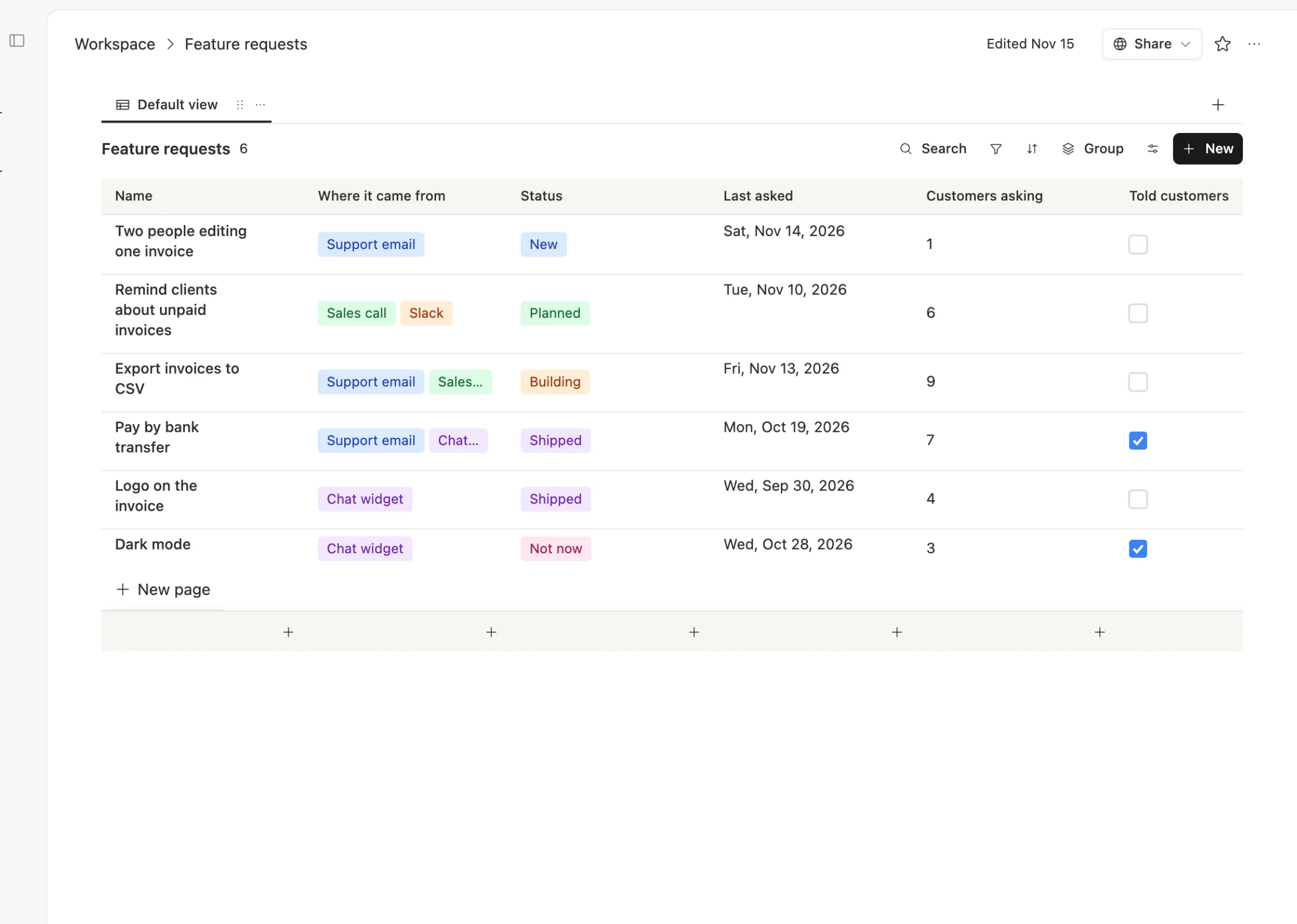
Each row has the same few columns. Where it came from, status, the date it was last asked, how many customers asked, and a box for "told customers." The count is the column that matters. When it climbs, the team looks.
Each row holds the customers' own words. Open a request and the body keeps a few short quotes, who said them, and what the team thinks they actually need. That's the spec, written by the people who'll use it.
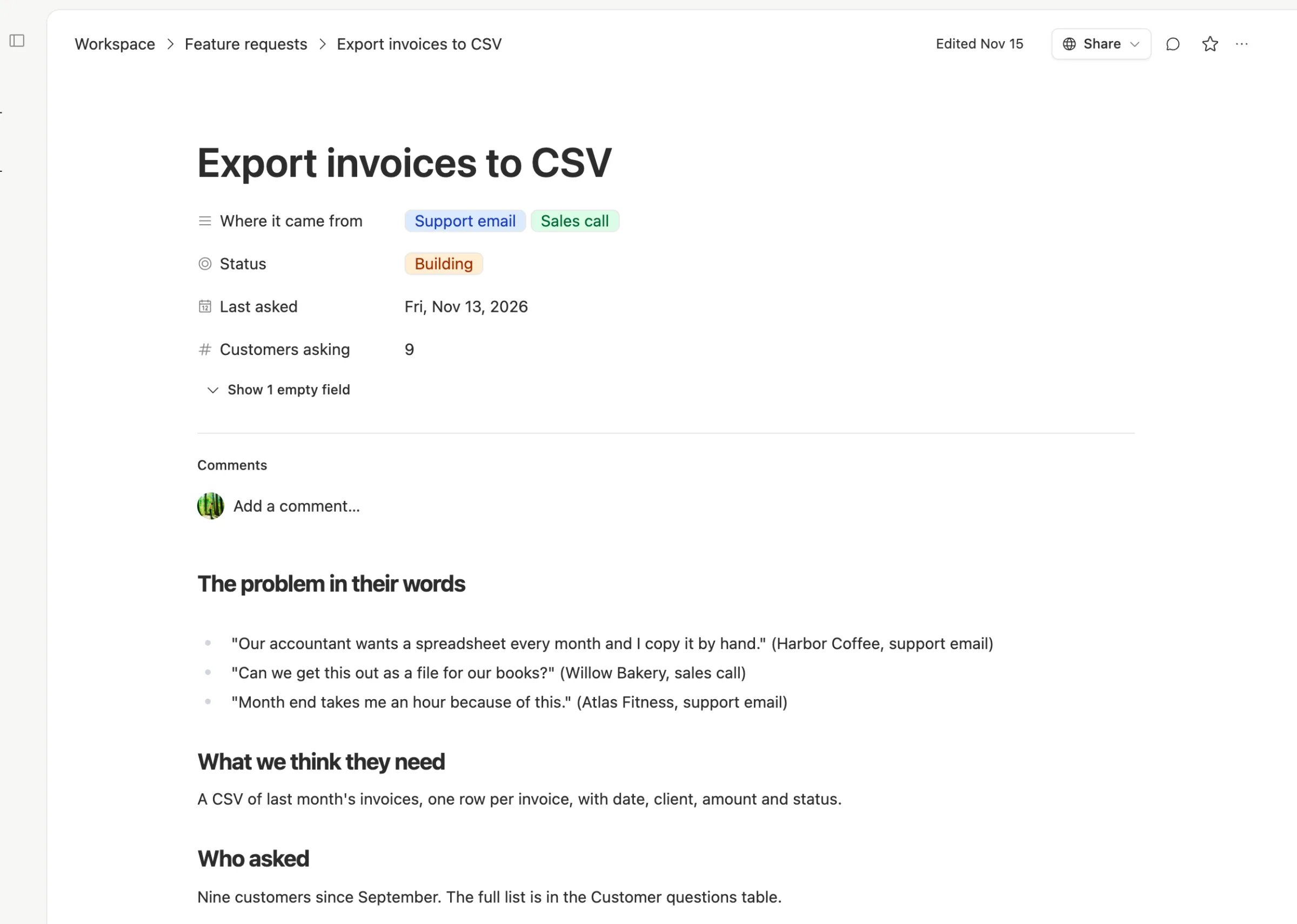
Catching a request takes one paste. When support gets a request, they paste the message into the AI chat and ask it to file it. The chat checks the table. If the request is already there, it adds one to the count, updates the date and adds the quote. If not, it makes a new row. Someone on the team checks the row it touched.
An agent can do the weekly roundup. In Team Brain, agents read tables on a schedule. Northwind can run one every Monday that lists the requests whose count went up last week, so the founders see what's heating up without reading every email. It's the same idea as the weekly product signals loop one product team described, just pointed at your own table.
Closing the loop is a checkbox. When something ships, the team emails the people who asked, then ticks "Told customers." Team Brain can send a page as email, so the note can be the request page itself. A Shipped row with an empty box is a promise you haven't kept yet.

What it costs
The Team Brain workspace is free, and there are no seats or tracked users. All five people at Northwind, and any customer you invite to comment, add nothing to the bill. You pay only for the AI the chat and agents use, or bring your own AI account. See pricing.

To be fair to Canny, it gives you something a table doesn't: a place where customers post, vote and comment on their own. If you want that, it's built for it.
We don't have numbers on how many requests this saves from the void, and we won't make one up. What changes is that every request has a row, and every row has a count.
Set it up this afternoon
- Make a Feature requests table with: status, where it came from, customers asking, last asked, told customers.
- Go back through the last month of support email and sales notes. Add a row for each request and a count for each repeat.
- Sort by Customers asking. The top three are your next conversation.
- For anything already shipped, email the people who asked. Tick the box.
Common questions
Can customers vote on requests themselves? Not like a public voting board. You can share a request page with a customer by link, and invite them to comment if they want. If public voting matters to you, a tool like Canny does that well.
Can the AI file requests on its own? It can match and file them when you paste a message into the chat. Read what it did before you move on, especially the match to an older request.
Does it work with Slack? Paste a Slack message into the chat the same way. Agents can also reach other apps through webhooks and API keys.
What does it cost to start? Nothing. The workspace is free for any number of people. You pay only for the AI you use.