How a small agency plans a week of client videos in one place
AI is making video editing fast, with CapCut coming to ChatGPT. The slow part is everything around the edit. Here's how a four-person agency keeps ideas, scripts, shoots and client approvals for a week of videos in one table.
Monday, 9 am. The agency has six short videos due this week for five clients. One idea lives in a voice memo. One script is in a Google Doc only its writer can find. One video is finished but waiting on a client who said "looks great, one small thing" on Friday and hasn't said what. And nobody's sure which one goes out tomorrow.
None of that is an editing problem. The editing is the part that's getting easy.
Editing is getting fast. Planning isn't.
This week CapCut said its new plugin is coming soon to ChatGPT: start with an idea in ChatGPT, build the video with CapCut's editing tools right there, then finish it in CapCut's web editor. Creators are already stringing tools together. One shared a flow that goes from an idea, to an agent in ChatGPT, to Claude for the script, to CapCut for the edit, and back to ChatGPT for a review.
That's real progress for the hour you spend cutting. But a short video has a lot of steps that aren't the edit:

One creator who posted eight times a day for 150 days said it plainly: posting isn't the hard part. The system behind it is.
Why the usual tools fail a small team
It's not that you picked bad tools. It's that each one holds one piece.
A shared calendar knows the date but not the script, the client or who's filming.
Docs hold the script, but nobody can see at a glance which of the six is stuck.
Chat is where approvals actually happen, and where they get lost under forty other messages.
The editor has the finished cut, with no idea who asked for it or whether the client said yes.
People who've fixed this all describe the same thing: one flow from plan to publish. One team pitched their product as going from content calendar to approval to publishing without moving files around. Another builder runs their whole back office on bots, with a Content Bot sitting next to a daily brief of which clients need attention.
How Northwind runs it in Team Brain
Here's how a four-person agency, Northwind Studio, plans its client videos in Team Brain. Northwind is made up, but every screen is real.

1. One table for every video. Each row is one video: what stage it's at, the day it posts, who owns it, where it goes, and which client it's for. The client column links to the agency's Clients table, so opening a client shows every video you're making for them.
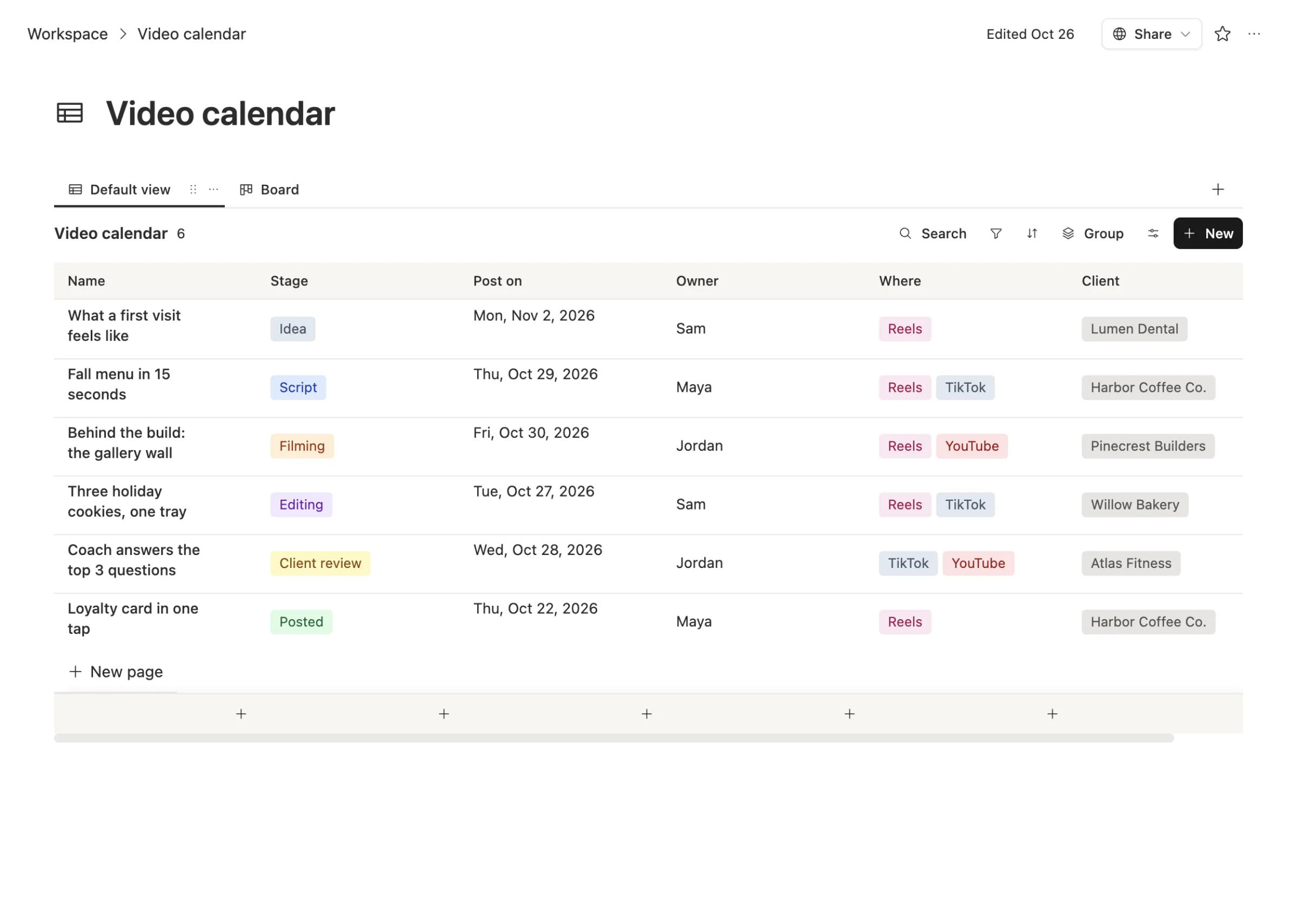
Monday's question, "what goes out tomorrow?", is one sort by the post date. "What's stuck?" is a filter on the stage.
2. The script lives inside the card. Open a row and the whole plan is right there: the one idea, the script, the shot list and what has to happen before it goes out.
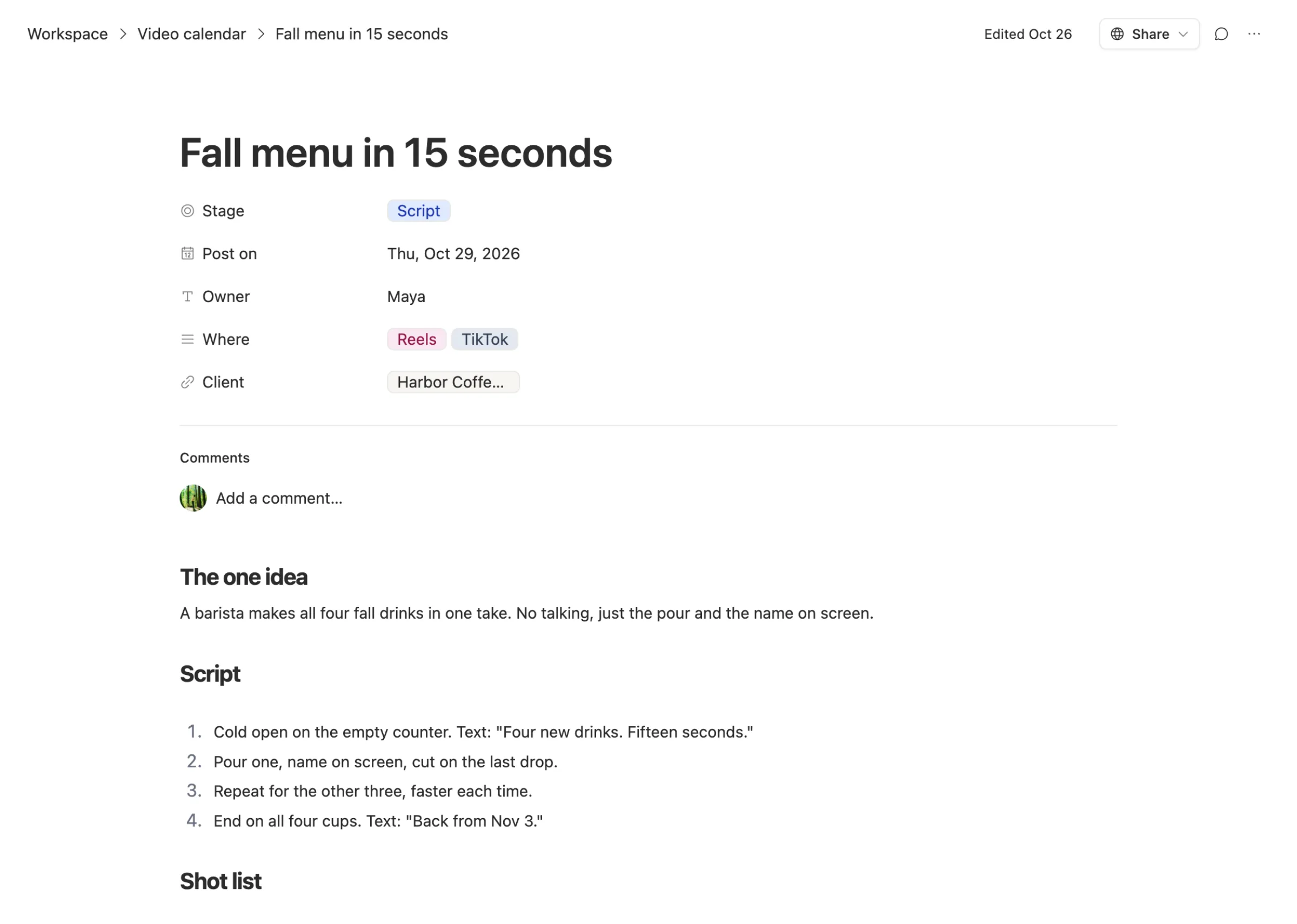
3. AI drafts the script where the team will read it. Ask the AI chat on the row to draft a 15-second script from the one-line idea. It writes into the card, not into a chat window you have to copy from. The owner edits it like any other page.
4. Film and edit anywhere. The shot list on the card tells whoever's filming exactly what to get. Edit in CapCut, in ChatGPT once the plugin arrives, or in whatever your editor likes. The calendar doesn't care where the cut happens.
5. Get the client's yes on the card. Move the row to Client review and invite the client to the workspace, which costs nothing. They leave feedback as comments on the card, next to the script it's about, not in a chat thread on someone's phone.
6. Close the loop. When it's posted, move the row to Posted and paste the link. Next month, when the client asks what you made for them, the answer is one filter.
Where an agent helps
Once the table exists, the routine checks are a good job for an agent. You can set up one that reads the calendar every morning and posts a short note: what's posting today, what's due tomorrow and still not past Script, and which videos have sat in Client review for more than two days. One message, so nothing slips quietly.
What it costs
The workspace is free for any number of people, so you can add every freelancer and even clients without a seat bill. You pay only for the AI you use, like script drafts and the morning note, or run it on your own AI account, including a ChatGPT or Claude plan you already pay for. See pricing.
We won't tell you how many hours this saves. That depends on how scattered your week is today. What changes is that every video has one home, and anyone can see where it's stuck.
Common questions
Do I have to edit videos in Team Brain? No. Team Brain holds the plan, the script and the approvals. Edit in CapCut, in OpenAI's ChatGPT once the CapCut plugin ships, or in any editor you like.
Can clients see their videos without paying? Yes. The workspace is free for any number of people, and you can share a single card with a client.
Can AI write the scripts? It can draft them from a one-line idea, right inside the card. A person should still read every script before it's filmed.
Can I see it as a board or a calendar? Yes. The same rows can show as a table, a board grouped by stage, or a calendar by post date.