How a small team runs its own customer help center
Apple is closing its support forum, and years of answers go with it. Here's how a small team keeps its own help center, answers the same question once, and lets agents spot what's missing.
A customer emails: "How many rounds of changes do we get?" You answer. Two days later, another customer asks the same thing. You find your old reply, copy it, fix the name, send. By the end of the month you've written the same answer nine times, in nine slightly different ways.
That's not a writing problem. The answer lives in your sent folder, where nobody else can find it, including you.
This week the biggest help forum on the internet reminded everyone how fragile that is. Apple announced its Support Community will permanently close on November 20, 2026, and it's already read-only. On Hacker News, one reader asked the question every small team should ask: if a good source of answers is going to exist, where should it live? Another put it more bluntly: it's never your profile on someone's platform. It's their profile with your handle, and their data.
Here's how a small team can run a help center it owns, shown with Northwind Studio, a made-up five-person design agency we keep for demos.
What a small help center needs

It has to be yours. A forum or a help desk on someone else's platform can change its rules or close. Your answers should live where your work lives.
It has to be current. One founder put it perfectly: the second you push a new pricing tier, your help centre is officially out of date. Most help centers aren't wrong on day one. They drift.
It has to answer real questions. Another founder's advice: your website FAQ is probably answering questions nobody asks. Look at your last ten customer emails and write those answers instead.
It can't depend on strangers. Apple's forum ran on volunteers. One commenter noted threads opened years ago that were never resolved. A small team can't wait for the crowd. Somebody on the team owns each answer.
Keep a table of the questions people actually ask
Northwind keeps one table called Customer questions. Each row is a question in the customer's own words, how many times it's been asked, when it was last asked, the article that answers it, and who owns it.
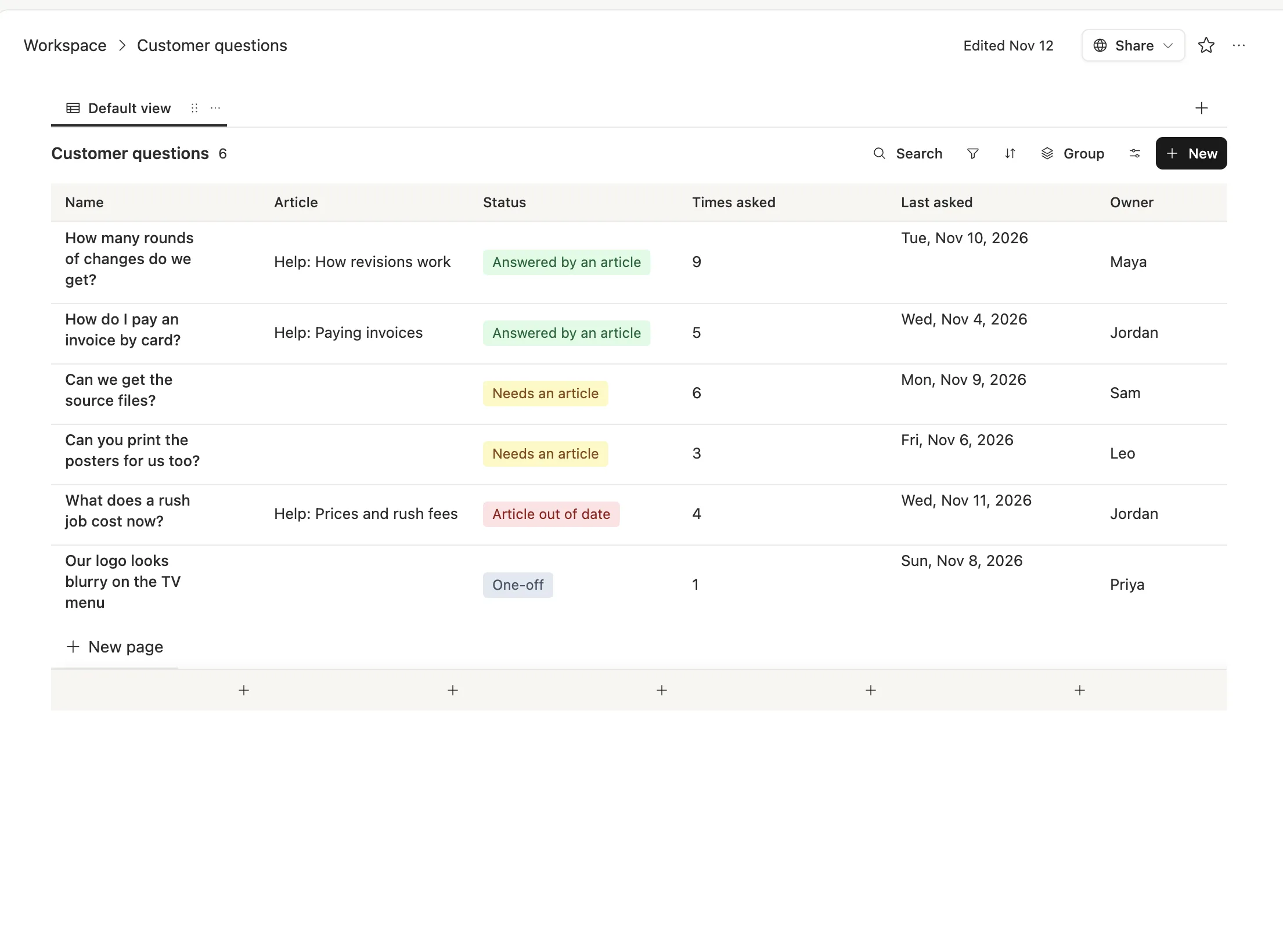
The status column does the real work. "Needs an article" means people keep asking and there's nothing to point them to. "Article out of date" means there's an answer, but it's wrong now. Those two lists are your to-do list for the help center, sorted by how often people ask.
Write each answer once, as an article
Each answer is a short doc in plain words, with a date at the bottom saying when someone last checked it.
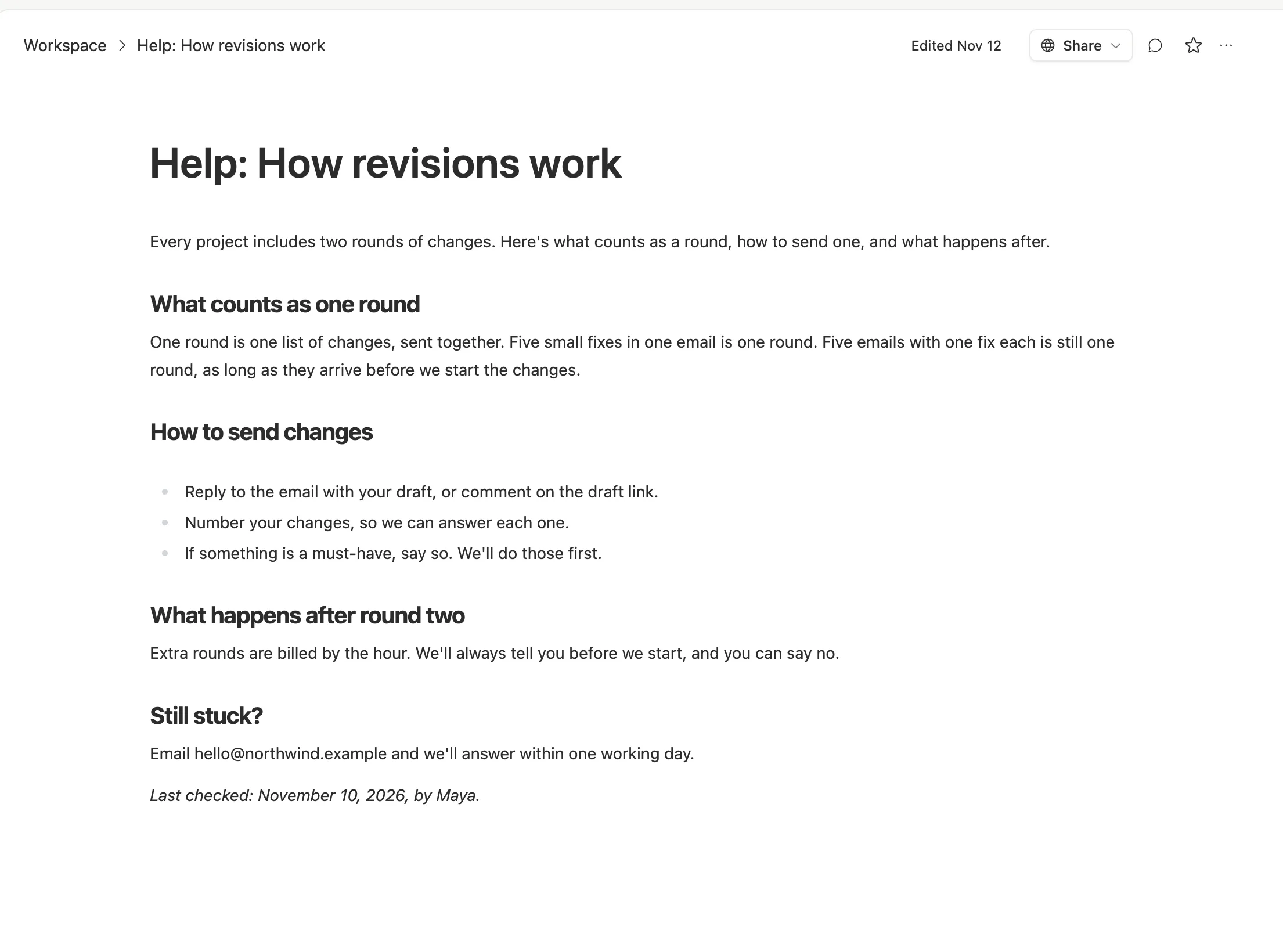
The "last checked" line is the cheapest habit in support. A reader can see whether to trust it, and your team can see which articles to look at first.
When an article is ready, publish it. A doc can have a public link, or you can put your articles on a small site with your own domain. Either way it stays in your workspace, next to the work it describes, and it's included when you back up the workspace from Settings.
Let agents do the sorting

1. A question arrives. Customers keep emailing like they always do.
2. An agent checks the articles. In Team Brain, an agent can run when a new email lands in a connected Gmail inbox. You give it your help articles as its knowledge sources. It looks for an answer, drafts a reply that links the right article, and adds the question to the table, or adds one to its count.
3. A person sends the reply. The draft waits for a teammate, who edits it if needed and sends it. Nothing goes to a customer without a person reading it first.
4. Friday: fill the gaps. An agent runs every Friday, lists the questions marked "Needs an article" that were asked three or more times, and drafts a first version of each article for the owner to finish.
One more agent pays for itself in trust: once a month, it lists every article whose "last checked" date is more than 90 days old and asks its owner to look again.
Each agent has a cost cap per run and a time limit, and sorting questions is a small job, so it can run on a small, cheap model.
What it costs
The workspace is free for any number of people, so everyone who answers customers can see the same table and the same articles. You pay only for the AI the agents use, or connect your own AI account and pay your provider directly. See our pricing.
We won't promise fewer support emails. What changes is that each answer gets written once, by the person who knows it best, and it's still there next year.
Getting started
- Read your last 30 customer emails. Write each question into the table, in the customer's words.
- Count the repeats. Anything asked three times gets an article this week.
- Put a date and an owner on every article.
- Add the agents one at a time. Start with the Friday gap list. Add email drafting when you trust the articles.
Common questions
Do we need a help desk tool? Not to start. A questions table and a few good articles cover most small teams. Add a help desk when you need queues and shifts.
Will an agent answer customers on its own? We'd keep a person on every reply. The agent drafts and files; your team decides what goes out.
Can customers read our articles without an account? Yes. Publish them as a small site or as public links, and anyone with the link can read them.
What happens if we stop using Team Brain? Your articles are docs in your workspace. You can back up the workspace from Settings and copy your answers anywhere.