How a small team runs hiring without an applicant tracking system
A six-person studio hires two or three people a year. An ATS is overkill and a spreadsheet loses the notes. Here's how it runs a whole hiring round in one shared table, and answers every candidate.
You posted the role on Monday. By Thursday there are forty applications in your inbox, three referrals in your DMs, and a teammate's notes on one portfolio in a chat thread you can't find. Someone asks "did we ever reply to the person Priya sent?" Nobody's sure.
That's not a people problem. Small teams hire a few times a year, so nobody builds a system, and every round starts from scratch. It shows on the other side too. This week a post with thousands of likes complained that nobody actually reads your résumé any more. A small team can be the exception. It just needs one place to keep track.
Why the usual tools don't fit a team of six
A spreadsheet works for one person. One commenter on Hacker News made the point that every applicant tracking system starts as a spreadsheet. It's fine until two people edit it, the interview notes end up somewhere else, and nobody can see who owes a reply.
A board works a bit better. Another person on Hacker News described screening candidates on a Trello board with a card per candidate, moving each one along the pipeline with the résumé attached. That's close to what a small team needs.
An applicant tracking system is built for volume. They're good at it: job boards, scheduling, sourcing, reports. They're also priced for it. Workable's pricing page lists its Standard plan at $299 a month, or $3,588 a year, for a company with 1 to 20 employees. For two hires a year, that's a lot of software sitting idle.

What a small team actually needs
Northwind Studio is a made-up six-person design studio hiring a senior designer. It needs four things:
- one list of everyone who applied, with a stage and an owner,
- every review and call written down next to the person,
- a date by which each person hears back,
- the whole team able to see it, without anyone paying for a seat.
How Northwind runs a hiring round in Team Brain

1. Write what matters before anyone applies. A short doc for the role: what someone must be able to do on day one, and what they can learn later. One hiring post on X put it well: the process gets easier once the team is clear on which skills are essential on day one. Everyone reviews against the same page.
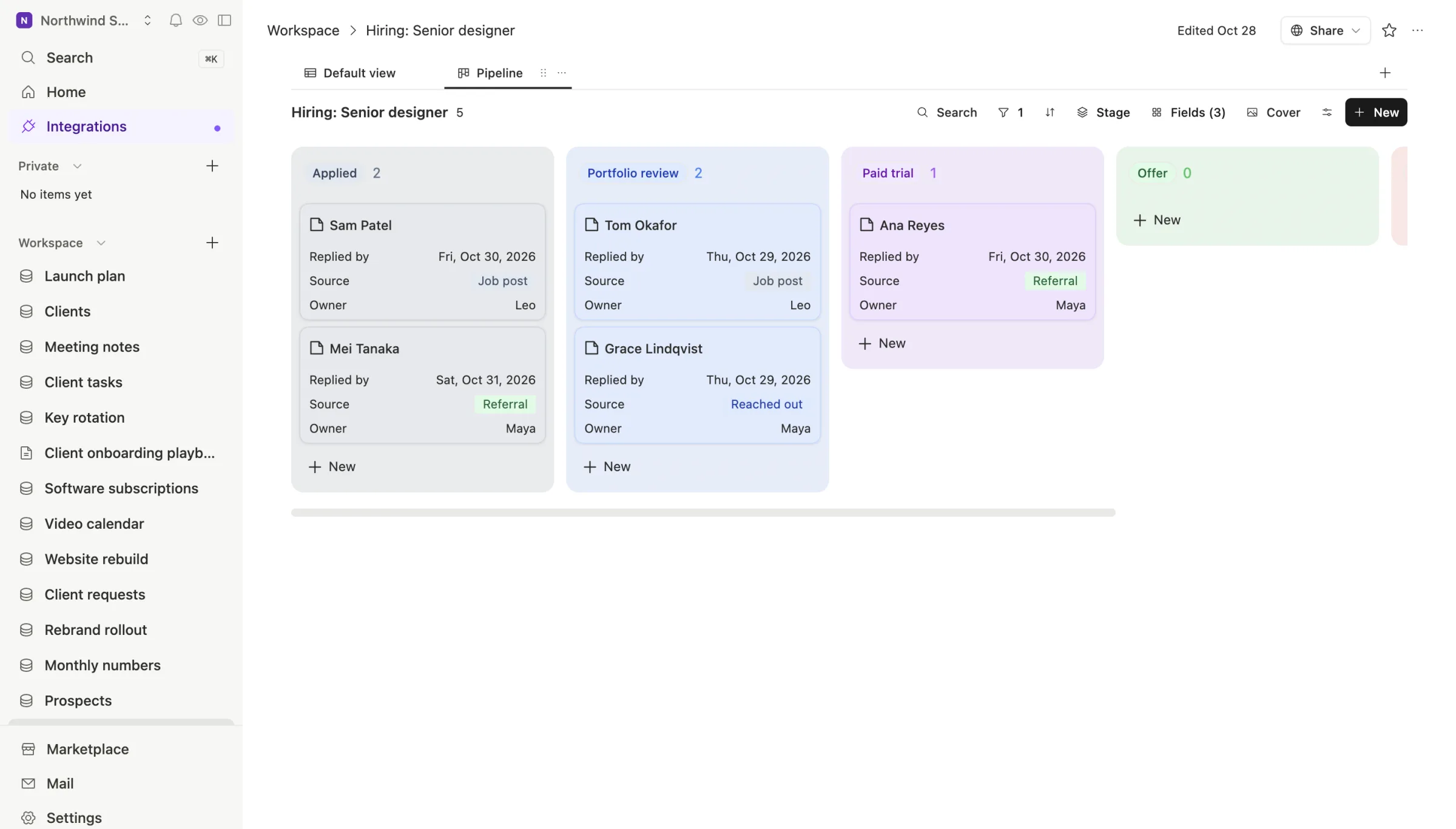
2. One row per person. The hiring table has a row for every candidate, with their stage, where they came from, who owns them and a "replied by" date. Applications come in from the job post, from referrals and from people the team reached out to. Each one becomes a row, pasted in by hand or added by an agent that reads the hiring inbox.
The board view groups the rows by stage, so the whole round fits on one screen:
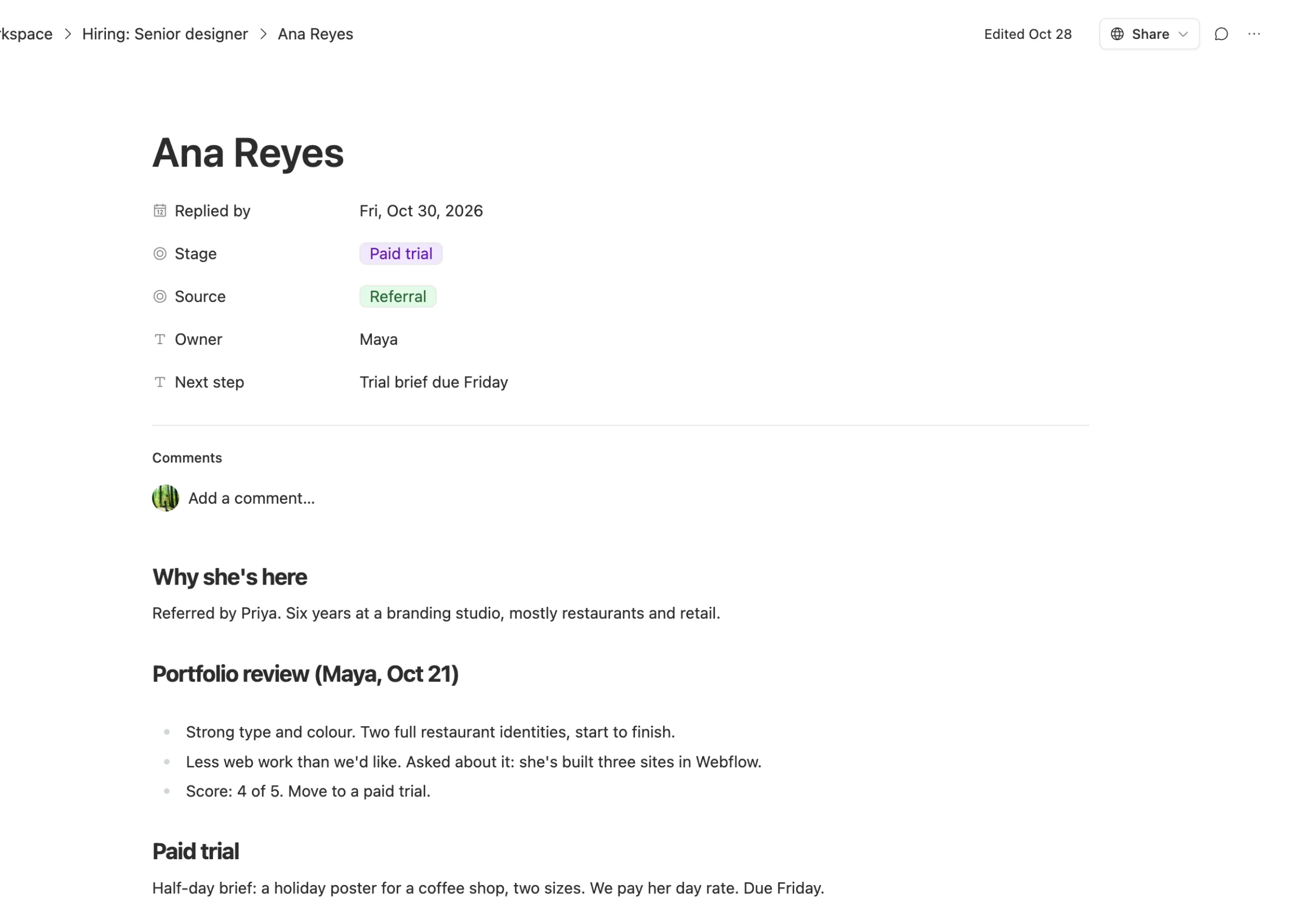
3. Notes live on the row. Every candidate's row is also a page. The portfolio review, the call notes, the trial brief and what the team promised the candidate all sit there, under the person's name. When someone asks "what did we think of Ana?", the answer is one click away, not in a chat thread.
4. Answer everyone, on a date. The "replied by" column is the one that matters most. Sort by it each morning and nobody waits more than a couple of days. When the answer is no, it's a kind, specific no, and the row moves to "Not now" so the board stays clean. Those people are often the best referrals next year.
Where AI helps, and where it doesn't
Hiring is one of the places where AI should do the boring parts and nothing else. The Harvard Business Review argued this year that AI has broken hiring, because polished résumés and rehearsed answers are now cheap to produce. That's a reason to keep people in charge of judgment.
So at Northwind, AI does the admin:
- An agent can turn an application email into a row with the name, the portfolio link and the role.
- Team Brain's chat can draft a reply from a candidate's row, in the studio's voice, for a person to read and send.
- It can summarize a long set of call notes into three lines on the row.
It doesn't score people, rank them or send rejections on its own. The paid trial and the portfolio review are human.
What it costs
The Team Brain workspace is free for any number of people, as our pricing page shows, so every interviewer can see the board without a seat. You pay only for the AI you use, like drafting replies or turning emails into rows, or you connect your own AI account.
Common questions
Is this a replacement for an ATS? For a team that hires a few people a year, often yes. If you post dozens of roles, need job board posting, interview scheduling and compliance reports, a real ATS like Workable is built for that.
Can candidates see their row? No. The table is private to your team unless you share it. Keep candidate notes private to the people on the hiring round.
What happens after the hire? Move the row's notes into an onboarding doc for the new person, and archive the rest of the round. Next time you hire, duplicate the table and start clean.