How a small team tracks every software subscription before it renews
Yearly plans renew quietly and cost a fee to leave early. Here's how a small agency keeps one list of every tool it pays for, gets a reminder a month before each renewal, and decides on purpose.
The card statement comes in. Somebody scrolls past a charge they don't recognize, then a second one. One is a design tool that two people used in the spring. The other is a project board the team stopped opening after it moved everything somewhere else. Both renewed last week, for a year.
Nobody was careless. Signing up takes a minute and a credit card. Leaving takes remembering a date eleven months away, and nobody's job is to remember it.
This week the problem had a famous face. DHH wrote that they'd moved their photo editing off Adobe and had zero use for the Creative Suite sub now, so they'd just pay the "$600 break-up fee". Another person put it more bluntly: six hundred quid just to dump Adobe.
Why yearly plans catch good teams out
Yearly plans are cheaper per month. That's the deal. The catch is that leaving early costs money, and the rules are in a help page nobody reads at sign-up.
Here are Adobe's own terms for a yearly plan paid monthly: you get a full refund within 14 days. After that, cancelling costs half of whatever is left on the contract. Their example uses a standard monthly fee of US$69.99 in North America. On a yearly prepaid plan, there's no refund at all if you cancel before the year ends.
So the date you decide matters more than the decision:

The fix isn't "never sign a yearly plan." It's knowing the date, and deciding a month before it, not a week after.
People feel the unfairness of the after-the-fact email. One post with thousands of likes asked simply for a warning before an annual plan renews, instead of a thank-you note after the money is gone. Even a founder on the other side admitted making thousands in what they called forgotten monthly recurring revenue, and said they refund people who ask.
The usual tools don't fix it, and that's not your fault
The card statement tells you what you paid, never what's coming or whether anyone still uses it.
A spreadsheet works until it doesn't. Someone makes it in January, adds eight tools, and it's out of date by March because nothing reminds anyone to look.
Each vendor's renewal email arrives after the charge, or lands in one person's inbox, or in the inbox of someone who left.
Nobody owns it. At a company with too many tools, this is how you end up like one person on Hacker News, who said their company pays for 100 tools, including three CRMs, and nobody can cut one.
How an agency runs it in Team Brain
Here's how a small agency, Northwind Studio, runs its software bill in Team Brain. Northwind is made up, but every screen is real.

1. One table of every tool. Each row is a subscription: how it's billed, what it costs a month, when it renews, who owns it, whether anyone still uses it, and what the team decided.
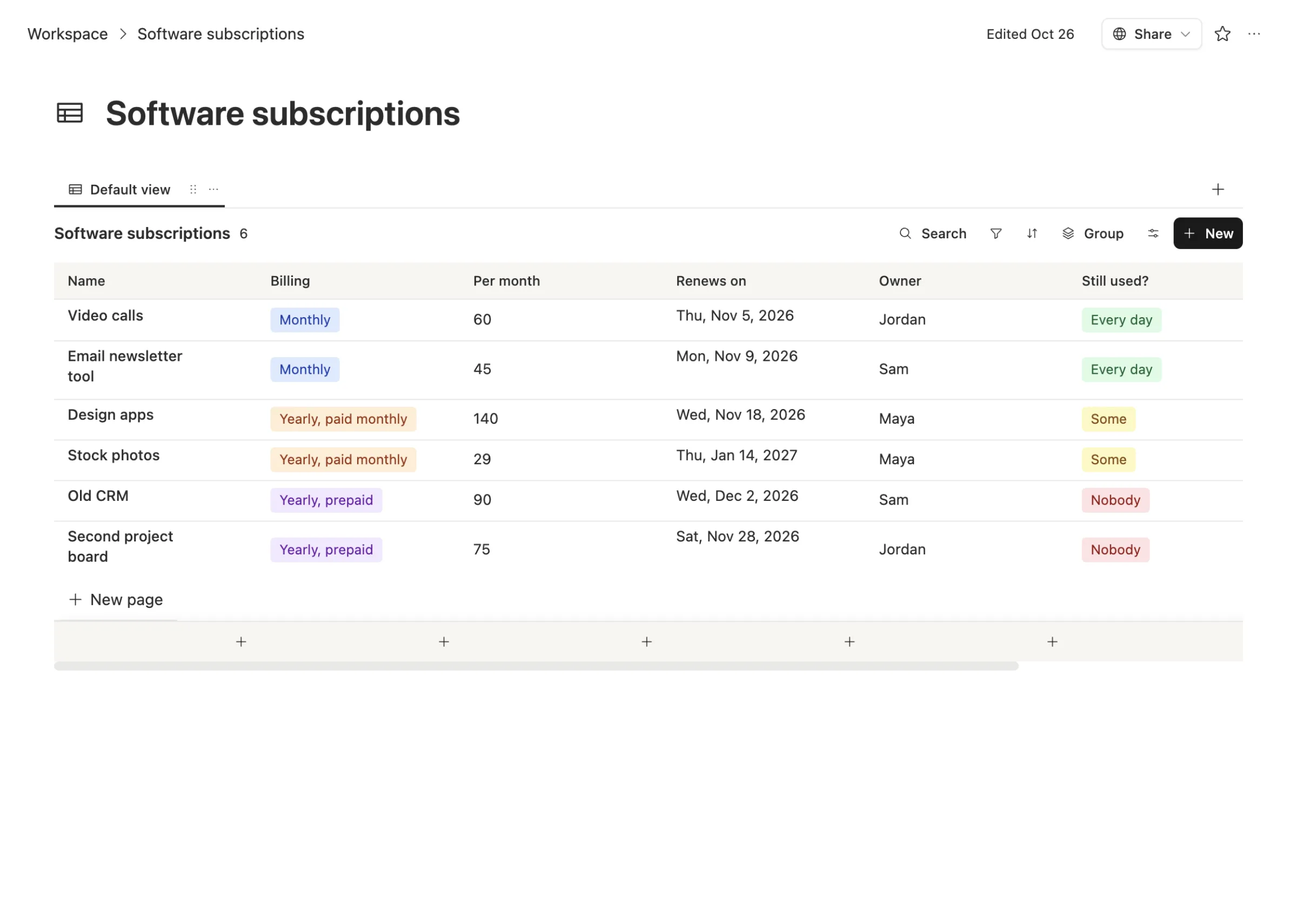
The Billing column is the one that saves money. "Monthly" can be cancelled any time. "Yearly, paid monthly" and "Yearly, prepaid" need a decision before the renewal date, so those rows get the attention.
2. Each tool gets its own page. Open a row and the terms, who uses it and the decision live right there. Nobody has to dig through email to remember why you kept it.
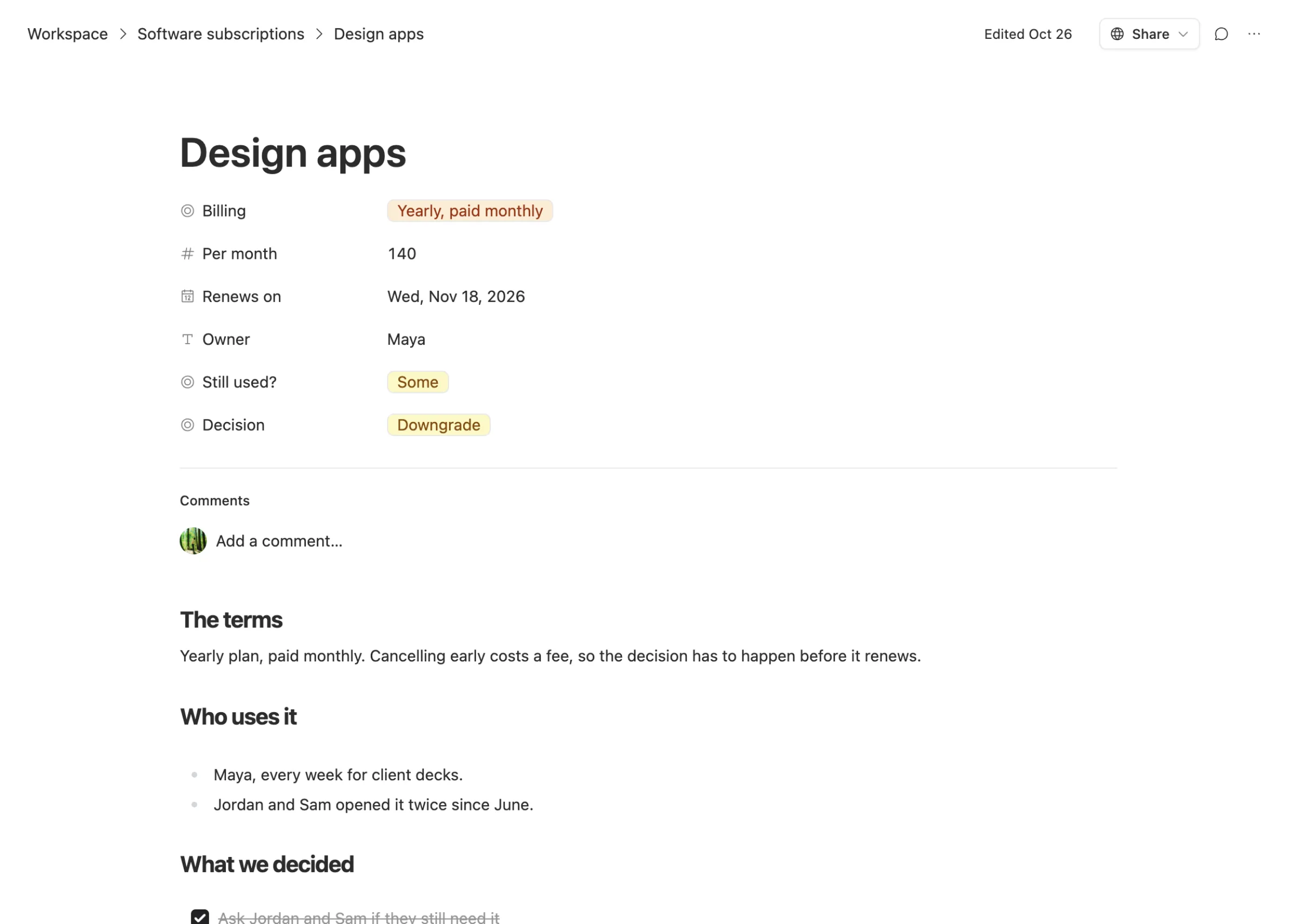
3. A reminder a month before. You set up an agent that reads the table every morning. When a yearly plan is 30 days from renewing, it messages the owner: here's the tool, here's the date, here's what it costs, keep it or not? The owner answers by updating the Decision column. One message per renewal, not a stream.
4. A short review once a quarter. Sort by "Still used?" and look at every "Nobody" and "Some." Those are the rows where money leaks. It takes ten minutes when the list is already there.
5. Cancel on the right day. When the decision is "Cancel before renewal," the owner cancels in the window, then writes the new state on the row. Next year nobody wonders what happened.
What it costs
The workspace is free for any number of people, so adding the whole team to the list doesn't add a bill. The morning reminder runs on AI you pay for by use, and a job this small fits a cheap model. You can also run it on your own AI account. See pricing.
We won't promise you'll save a set amount. That depends on what you're paying for today. What changes is that every renewal gets a decision a month early instead of a surprise a week late.
A checklist for this week
- Pull the last three months of card statements and list every software charge.
- For each one, write how it's billed and when it renews. The vendor's billing page has the date.
- Name one owner per tool.
- Mark every yearly plan, and read its cancellation terms once.
- Set a reminder 30 days before each renewal.
- Cancel anything nobody opened in the last 60 days, if the terms let you leave without a fee.
Common questions
Do I need Team Brain for this? No. The habit matters more than the tool. A table with renewal dates and one reminder per renewal is the whole idea. Team Brain just keeps the table, the notes and the reminder in one place.
Can the agent cancel subscriptions for me? We'd keep that with a person. The agent reminds the owner and the owner decides, because cancelling has terms and fees that are worth a human look.
What about tools only one person uses? They go on the list too. The person who signed up is the owner, and the reminder goes to them.