How an AI consultant keeps six client projects straight
You build automations for small businesses. Each one lives in a different client's tools, and the only full map is in your head. Here's how one consultant tracks every client, every automation and every check-in in one Team Brain workspace.
It's Tuesday. A dentist's office texts you: "the thing that texts patients stopped." You built it in August. You open your notes. There's a page for that client, but it says what you planned, not what you shipped. The login is in a DM from July. The fix takes ten minutes. Finding everything takes forty.
If you sell AI work to small businesses, you know this day. The work is good. The paperwork around it isn't there, because there was never a moment to write it.
This is how Maya, an AI consultant at Northwind Studio (a made-up company we use for examples), runs six clients without losing track of any of them.
Your day looks like this
Maya's clients are a dental office, a coffee chain, a builder, a gym, a bakery and a small law firm. Each one pays for a few automations and a monthly check-in.
Maya's week splits in two. Half is the work clients pay for: mapping how a job is done, building something small that does it, testing it with them. The other half is the work nobody pays for. One person on X listed it plainly: finding leads, writing proposals, chasing replies, sending reports, all the stuff that made them $0.
The second half is where things slip. Not because Maya is sloppy. Because each client's work lives in a different place.

Why the usual tools let you down
A notes app holds plans, not what's running. Most consultants start with a page per client in Notion or a doc folder. It works for a proposal. It doesn't tell you, six weeks later, which automations are live, which client is still testing, and when you promised to check in. That's a table, not a page.
Project tools are built for bigger teams. An agency owner on X said it well: they don't need 100 features when their delivery steps are the same every time. So they were building their own tool for client status, tasks and deliverables.
Clients can't see the value. The work happens inside their tools, quietly. If nothing breaks, nobody notices. One founder pointed out that a shared hub where clients can see what changed and what got automated makes the value much easier to understand. That's also what keeps a retainer going.
How it runs in Team Brain
Maya keeps one workspace. The clients, the automations, the call notes and the follow-ups all sit in it and link to each other.
Every automation is a row. The Client automations table has one row per thing Maya built or is building, linked to the client, with a stage and the next check-in date.
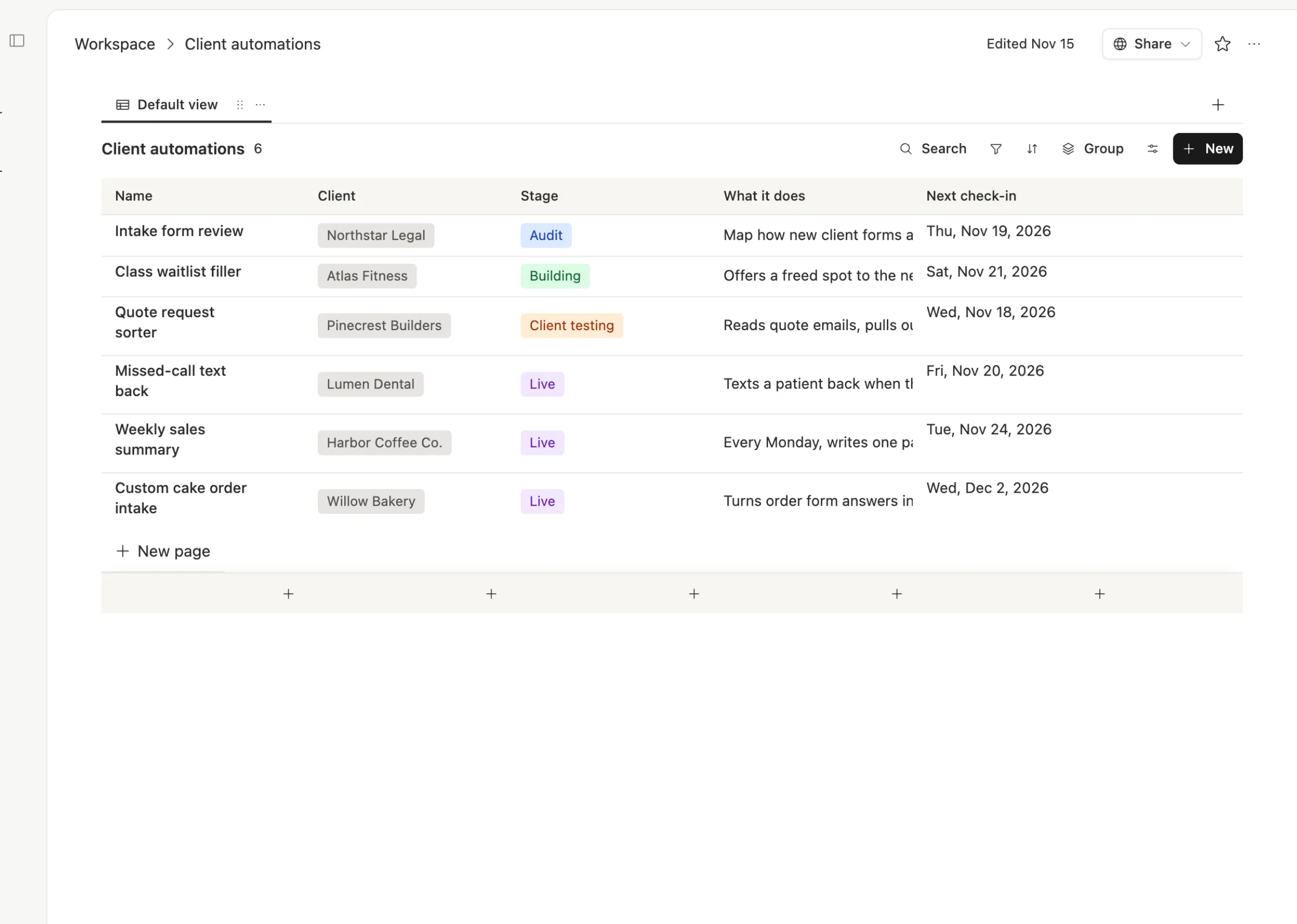
The stages are the same for every job, so Maya can see the whole business at a glance.

Every live automation has a page. Open a row and the body says what it does, what changed this month, and who to call if it breaks. When the dentist's office texts on a Tuesday, this is the page Maya opens first.
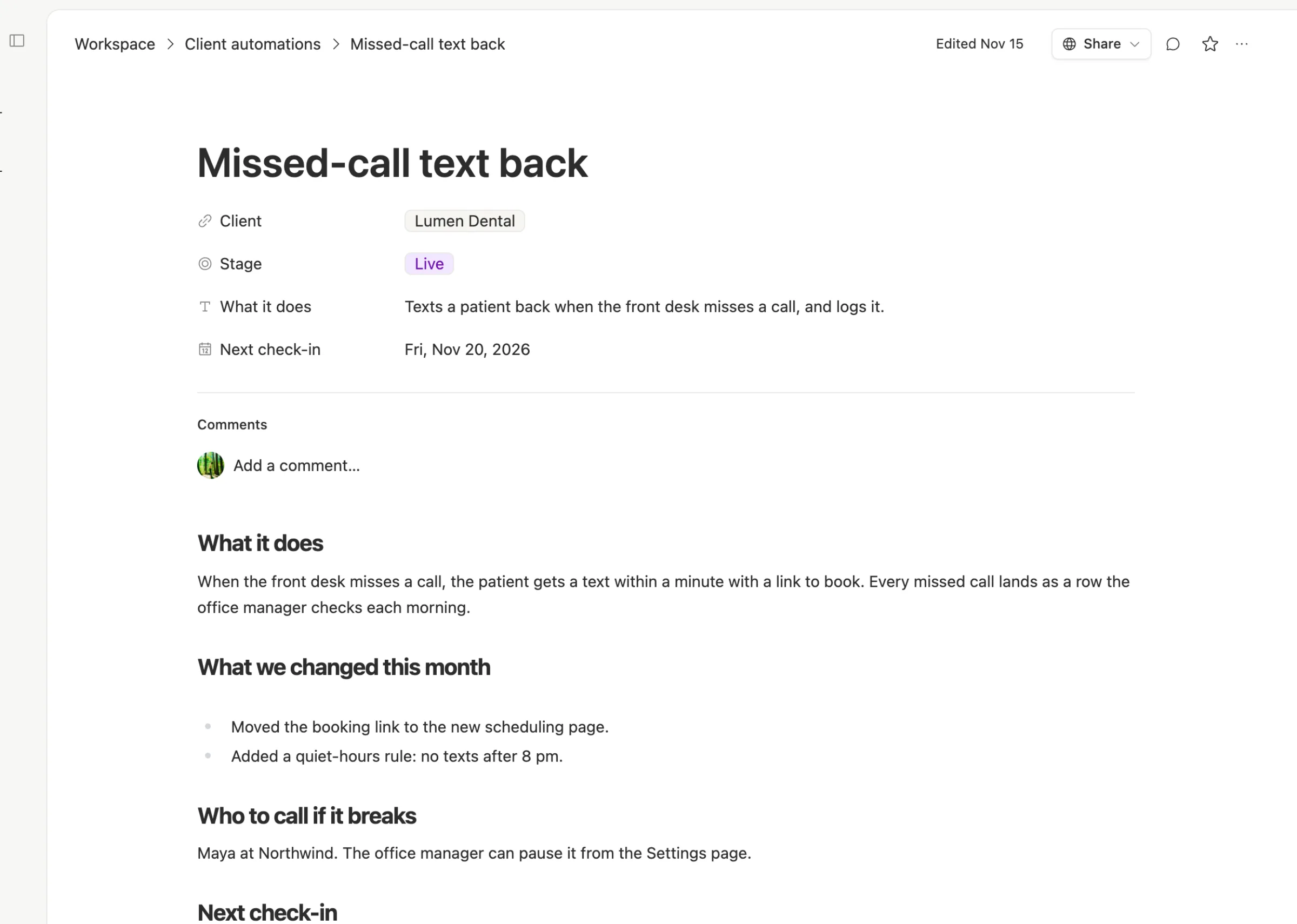
The client links back to all of it. Because the link goes both ways, opening Lumen Dental in the Clients table shows every automation and every meeting note for them. No hunting.
Logins live in one safe place. Instead of keys in DMs, Maya saves each client's credentials in the workspace. A private credential can be used only by the person who saved it and the agents they own, so a contractor can't wander into it.
Clients see their own page. For the monthly check-in, Maya shares the automation pages with the client by link. They see what's live and what changed, in plain words. That's the "value hub" without a separate tool.
Agents do the unpaid half. In Team Brain, agents read and update tables on a schedule. Maya can set one up to list every row whose check-in is this week each Monday morning, and another to draft each client's monthly note from the "what changed" sections. Maya reads both before anything goes out.
What it costs
The workspace is free, and there are no seats. Maya, a part-time contractor and any invited client add nothing to the bill. Maya pays only for the AI the agents use, or connects their own AI account. See pricing.
For comparison, Notion's pricing page lists Plus at $10 and Business at $20 per member a month, checked November 15, 2026. Guests are free there too, but they can only open the pages they're invited to. Notion's Custom Agents need Notion credits, at $10 per 1,000 a month after a free trial.
We don't have numbers for how much time this saves Maya, and we won't guess. What changes is where things are. On Tuesday, the page is there.
Start with one table
You don't need to move everything at once.
- Make a Client automations table. Name, client, stage, what it does, next check-in. Add one row for every automation you've shipped.
- Write the page for each live one. Three short sections: what it does, what changed, who to call. Ten minutes each.
- Put a date on every row. If a client has no next check-in, that's your first email this week.
- Share one page with one client. See how they react before you build anything else.
Then add the meeting notes, the logins and the agents when you need them.
Common questions
Do my clients need Team Brain accounts? No. Share a page by link, and they can read it. You can also invite them as members at no cost if they want to comment.
Can I keep each client separate? Yes. Pages and tables have their own access, so you can share one client's automations without showing the others. Some consultants use a separate workspace per client instead.
Does it replace the tools my clients already use? No. Their automations keep running where they are. Team Brain is where you keep track of them, and where your own agents can help with the paperwork.
What does it cost to start? Nothing. The workspace is free for any number of people. You pay only for the AI you use.