How to connect Claude to your Notion workspace
Stop pasting pages into Claude. Here's how to connect Claude to Notion with MCP, step by step from Notion's own docs, what to watch out for, and how the same thing works in Team Brain.
You open the project page in Notion, select everything, copy it, and paste it into Claude. Claude writes a great summary. Then you copy the summary back into Notion. Tomorrow you'll do it again, because the page changed.
You don't have to. Claude can read and write your workspace directly, through a plug called MCP. Think of it as a charger cable that fits lots of phones: one standard way for an AI tool to reach your pages and tables. Notion leaned into it this month, so ChatGPT, Claude and other agents can share one memory in Notion.
Below is Notion's way first, straight from Notion's own docs, then the same job in Team Brain.

The Notion way, step by step
Notion runs a hosted MCP server, so there's nothing to install for the chat app. These steps come from Notion's MCP help page and its developer guide.
In Claude on the web or desktop:
- Open Claude's connector settings and search for Notion.
- Pick it and approve access to your workspace.
- If Notion isn't listed, add a custom connector with this address:
https://mcp.notion.com/mcp.
You can also start from Notion: go to Settings, then Notion MCP, pick your assistant and follow what it says.
In Claude Code:
claude mcp add --transport http notion https://mcp.notion.com/mcp
Then type /mcp inside Claude Code and finish the sign-in. Notion's guide adds that --scope project shares the server with your team through a project file.
Try it. Ask Claude something only your workspace knows: "What did we decide in last week's launch meeting?" If it searches Notion and quotes the page, you're connected.
What to watch out for with Notion MCP
Notion is open about the limits. A few matter for a team.
It has your full access. Notion's page says MCP tools act with your full Notion permissions and can reach everything you can. That's handy, and it's also why you should be careful what you ask it to change.
Some parts need a bigger plan. Searching connected apps like Slack or Google Drive needs Business or Enterprise with Notion AI. Search filters such as last edited date are Business and Enterprise only, and other plans get a limited number of database queries. Guests can't connect at all.
It works best for one person. Notion's own help page says MCP works best for individual workflows.
Writes can be fiddly. People who build on it say so plainly. One builder found agents struggle to write data consistently in Notion's extended markdown format. Another said it can be slow and burns tool calls to do simple things. Nathan Baschez made a bigger point: just giving your agent access to Notion through MCP only gets you part of the way to a shared context your team's agents can learn from.
None of that is a reason not to do it. It's a reason to start with reading, and add writing once you trust it.
The Team Brain way, step by step
Team Brain has its own MCP server, and the setup is the same shape. It lives in Settings, under Developer tools.
In Claude on the web or desktop:
- In Team Brain, open Settings, then Developer tools, then Chat app under Connect an AI tool.
- Copy the server address,
https://api.team-brain.com/mcp. - In Claude, add a custom connector and paste it.
- Claude opens a Team Brain sign-in. Pick the workspace and say yes. Team Brain's tools show up in Claude.
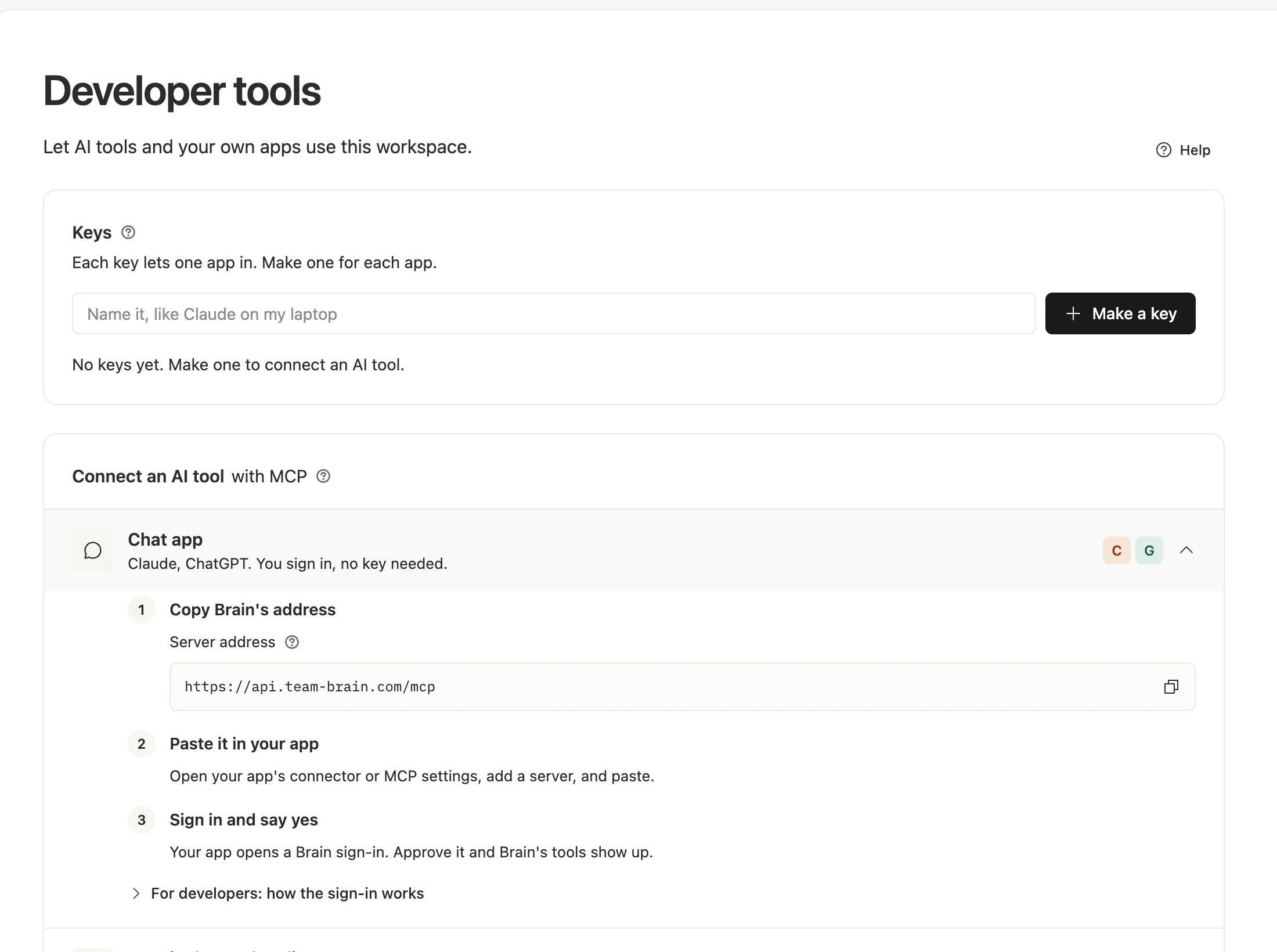
In Claude Code: make a key in the same Settings page, pick your tool from the list, copy the setup it shows you, and restart Claude Code. Each key lets one app in, so make one per app and name it, like "Claude on my laptop."
Every chat app you sign in from shows up under Apps you let in, on the same page, so you can see what's connected.
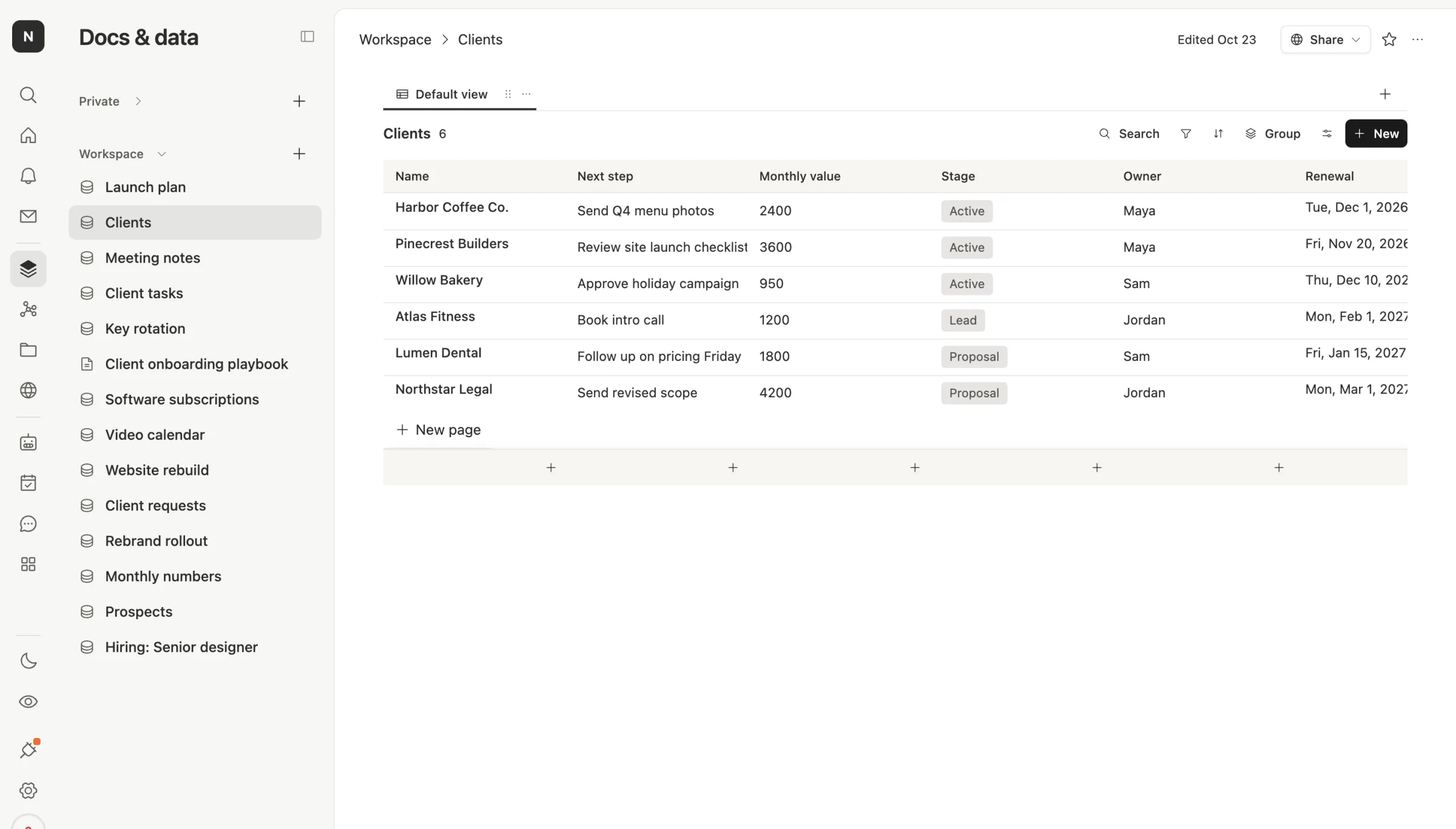
Try it. Ask Claude: "Which clients renew in the next 60 days, and what's the next step for each?" It reads your Clients table and answers from it.
What Claude can do once it's in

Once connected, Claude can search your docs, read a table, add or update rows and draft a doc. In Team Brain it can also start one of your agents, so "run the morning digest now" works from Claude's chat.
Here's what's different after that. In Notion, Claude does the work while your chat is open. In Team Brain, the same table also has agents that run on their own, on a schedule, when a row changes or when an email arrives. Claude is how you talk to your workspace. The agents are how it keeps moving when you close the tab.
One founder put the idea well: wire your own systems into Claude through MCP, so it reads your tracker, your docs and your database instead of asking you to paste them in.
Which one to use
If your team already lives in Notion, connect Notion. It's quick, and Notion's docs are clear.
If you're picking a home for your team's work and you want agents that keep it current on their own, try Team Brain. The workspace is free for any number of people, you pay only for the AI you use, and connecting Claude takes the same few minutes. You can also use Claude's models for your agents inside Team Brain, with your own Anthropic key if you like. See our pricing.
Common questions
Do I need a paid Notion plan for Notion MCP? Notion's search works on every plan, but some search filters, connected-app search and unlimited database queries need Business or Enterprise.
Is it safe to let Claude write to my workspace? It acts with your access in both tools. Start with read-only questions, then let it write to one table you check.
Can my whole team connect Claude to Team Brain? Yes. Each person signs in from their own Claude, and each one sees only what they can see in Team Brain.
Does this work with ChatGPT too? Yes. Both Notion and Team Brain list ChatGPT as a chat app that can connect.