How to export a Notion database to CSV (and what to check after)
Notion's export gives you a zip, not just a CSV, and it exports one view at a time. Here's Notion's own way step by step, what to check before you trust the file, and how to bring it into Team Brain if you're moving.
You want a copy of one database. Maybe for a spreadsheet, maybe for an accountant, maybe because this week's news made you want your data somewhere you control. You click Export, and Notion hands you a zip file full of folders.
That's not you doing it wrong. Notion's export is built for pages, so a database comes out as a CSV plus a Markdown file for every row. Once you know that, it takes a couple of minutes.
Why people are exporting this week
This week Notion published a security bulletin about an incident at a third-party AI vendor. Notion's co-founder said they had reached out to all affected customers. Notion says fewer than 1% of workspaces were affected, most leaked chats weren't tied to a user or a workspace, and if you weren't contacted, no action is needed.
So there's no reason to panic. But it's a good week to do what everyone means to do anyway: keep your own copy of the tables you'd hate to lose. One person put the general lesson plainly: data that a company can read is one breach away from someone else reading it. A CSV on your own drive is the simplest backup there is.
Notion's way, step by step
Here are the steps from Notion's export help page, checked November 13, 2026.

- Open the database as its own full page, in a Table view. Notion's page says a Form view can't be exported, so switch to Table first.
- Click the ••• menu at the top right of the page, then Export.
- Pick Markdown & CSV from the format dropdown.
- Turn on Include subpages if your rows have content inside them, like meeting notes or briefs. Each row's page comes out as its own Markdown file.
- Click Export and save the zip. Open the CSV in Excel, Numbers or Google Sheets.
On a phone it's the same: tap •••, then Export, pick Markdown & CSV, and Notion also emails you a download link.
If you're on Windows and the zip won't open, Notion suggests unchecking Create folders for subpages, or unzipping with 7-Zip.
Check the file before you trust it
A CSV is a flat grid. Notion databases aren't. Before you delete anything or cancel a plan, open the file and check these.

One view only. Notion's page says you can only export the current view or the default view, never all views at once. If your current view has a filter, the CSV only has the filtered rows. Clear filters first, or export the default view.
Relations and formulas. Notion's help page doesn't say how these come out in the CSV, so look. A link between two databases can't stay a link in a flat file. A formula can't keep its logic in a single cell.
Files and images. The help page says a full workspace export includes files you've uploaded. For a single database, check that the attachments you care about are in the zip.
Row content. If you forgot Include subpages, the CSV has the columns but none of the notes inside each row.
One person summed up the general pain of moving any tool: broken relationships and messy CSV exports. Another noted that putting notes back onto the right record restores the context a flat CSV erases. Plan for that part. It's the slow part.
The Team Brain way: bring the whole zip
If you're exporting because you're moving, you don't have to open the CSV at all. Team Brain imports the Notion export zip as it is.
- In the Team Brain sidebar, click the plus next to Workspace and choose Import.
- Drop in the zip Notion gave you. It takes Markdown, Word, CSV, text, or a Notion export .zip.
- Click Import.
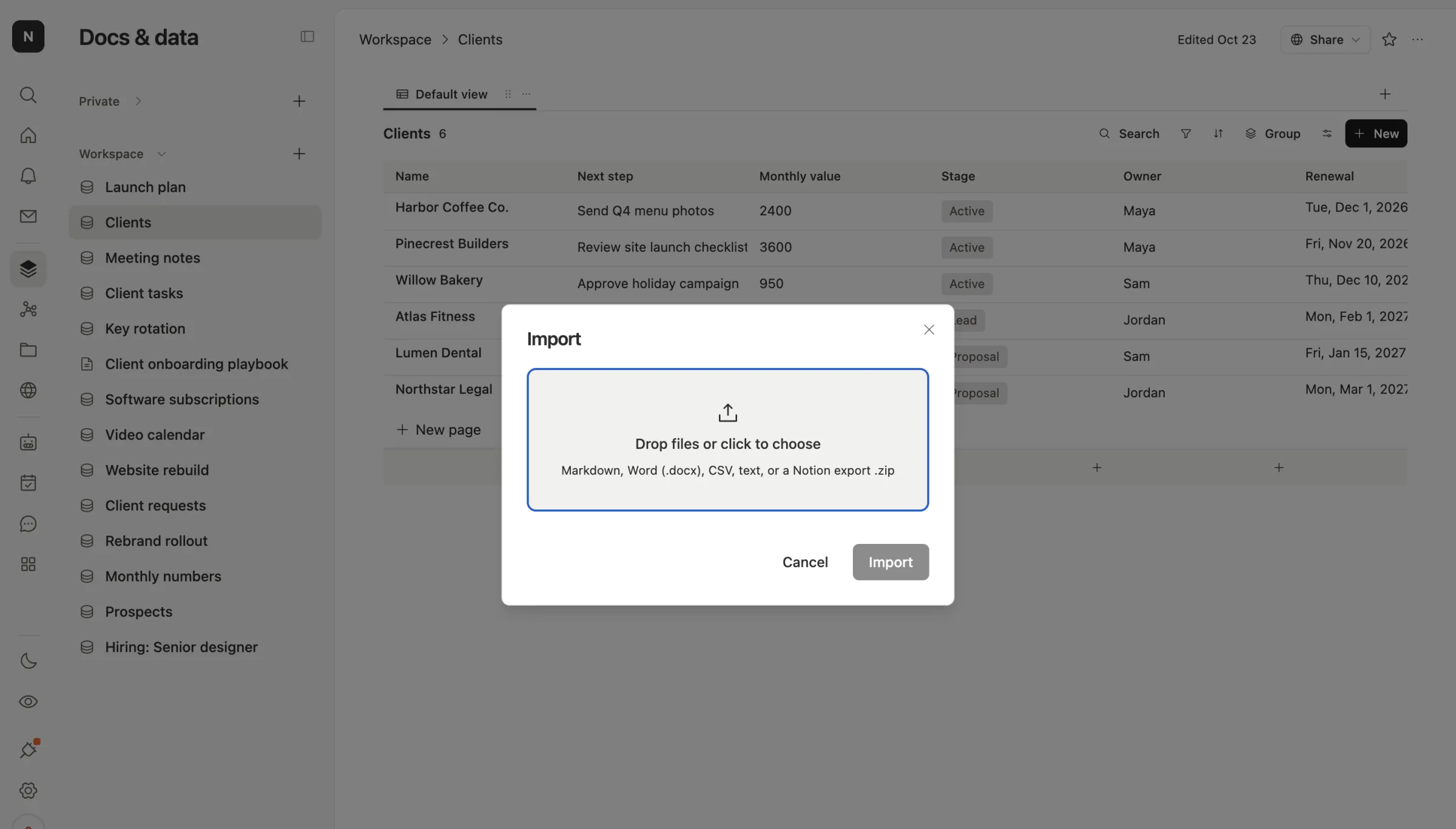
The CSV becomes a table you can sort, filter and group, and the Markdown pages in the zip come in as pages, with their images. One honest limit: Import brings in the first 1,000 rows and 60 columns of each CSV, and it tells you if it stopped early.
Here's what a row looks like in Team Brain once it's set up: the fields on top, the notes underneath, and a real link to the client it's about.
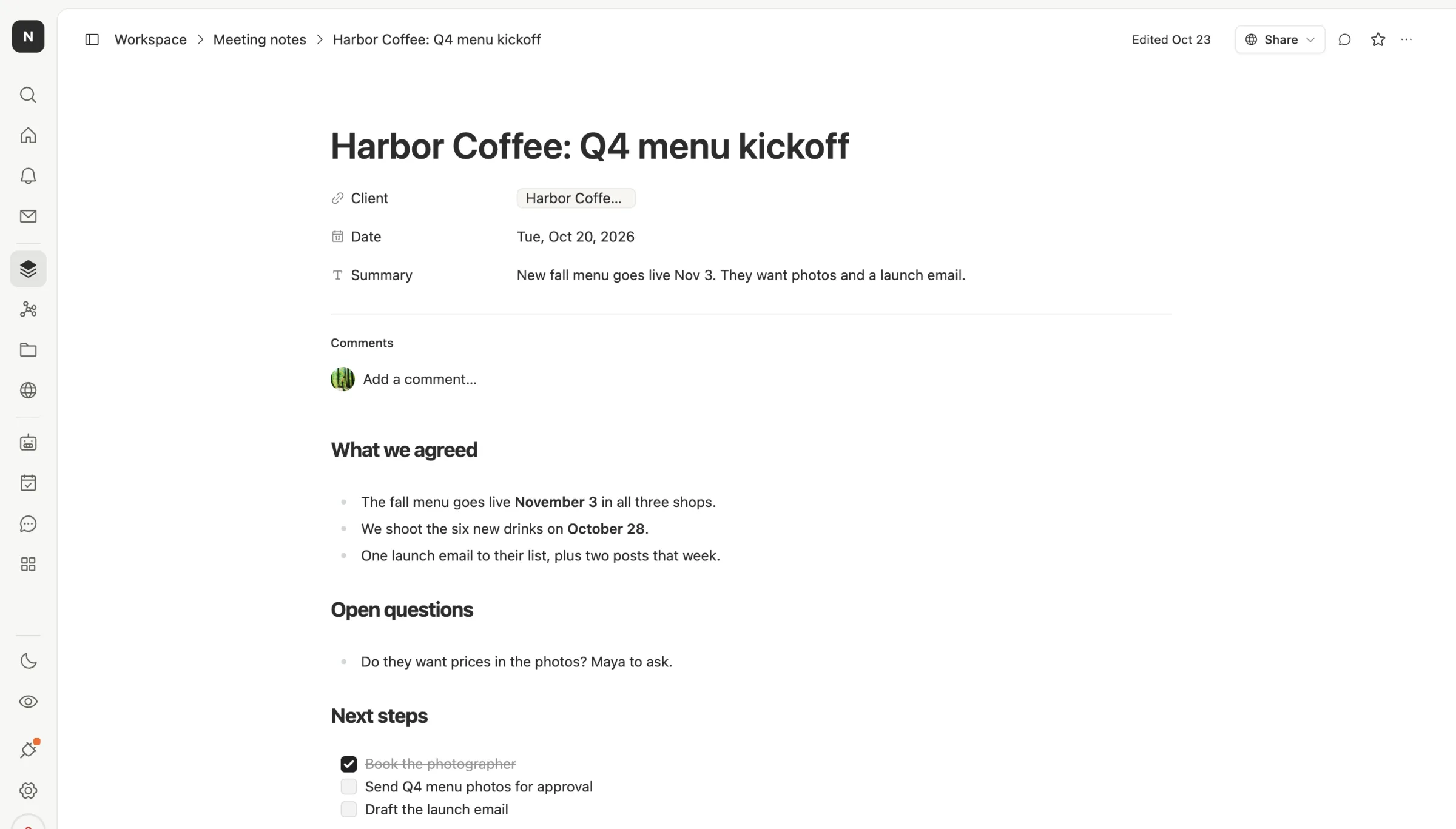
Relations are the part you redo. A CSV can't carry them, so add a relation column in Team Brain and link the rows again. If you had two related databases in Notion, bring both in first, then link them.
Team Brain is free for any number of people, with 10 GB of storage on the free plan. You only pay for the AI you use. See pricing.
Keep a copy on a schedule
A backup you made once is a backup from the past. Notion's page says a full workspace export can take up to 30 hours to process on a big workspace, and the email link expires after 7 days, so download it as soon as it arrives.
For one important database, a monthly CSV export is plenty. Put a reminder on the first of the month, export the default view with Include subpages on, and keep the last three zips.
Common questions
Can I export every view at once? No. Notion's help page says you can export the current view or the default view, not all of them together.
Why is my export a zip instead of a CSV? Because rows are pages in Notion. The zip holds the CSV plus one Markdown file per row page.
Can I export a database on the free plan? Notion's help page doesn't list a plan requirement for Markdown & CSV export. Exporting subpages into a PDF zip needs Business or Enterprise.
Will my Notion relations work in Team Brain? Not straight away. A CSV can't hold them. Bring the related tables in, then add a relation column and link the rows.
Can a guest export a database? Notion says guests need Full access to the page to see the export option.