How to pick the right AI model for each job
Running your best model on everything is the most expensive habit in AI. Here's how to match Haiku, Sonnet and Opus to each step, using Claude Code's advisor and Team Brain's per-agent model setting.
You picked the smartest model once, months ago, and never touched the setting again. Every job runs on it: the hard plan, the email summary, the step that just pulls a date out of a sentence. The answers are great. The bill is too.
That's not careless. The model picker is usually buried, and nobody wants to be the one who made the agent worse to save a few dollars. But the gap between models is big, and most steps don't need the top one.
This week a tip from Anthropic went around X again: run Sonnet, Haiku and Opus together, each one doing only the job it's best at. Here's how to do that in plain terms, first in Claude Code, then in Team Brain.
How big the price gap really is
Here's what Anthropic charges on its API for every million tokens a model writes.

Prices are from Anthropic's pricing page, checked November 12, 2026. Haiku 5.5's price is for prompts up to 100,000 tokens.
Haiku costs 20 times less than Sonnet to write the same amount, and Sonnet costs half of Opus. One builder traced a Claude Code bill and found 140 tasks had climbed to Opus just to rebuild something they already had. Fixing that saved them $640 a month.
Which model for which job

A simple rule: match the model to the step, not to the project.
- Haiku for small, clear steps. Sorting an email into a folder, tagging a row, pulling a date or an amount out of text. Anthropic's own page describes it as made for classification, extraction and routing.
- Sonnet for everyday work. Writing a reply, summarizing a call, running a daily agent. It's a safe default.
- Opus for the big calls. Planning a multi-step job, deciding between options, checking the work before it ships.
One developer put it this way: they use Opus for specs, planning and task lists, and Sonnet as the executor for the rest.
The Claude Code way
Claude Code gives you three ways to mix models. These come from Claude Code's advisor docs.
Switch the main model. Type /model and pick one. It applies from the next request onward. Good when the whole task is easy or the whole task is hard.
Add an advisor. This is the trick that's been going around. Your main model does the work, and it asks a stronger model for help at key moments: before committing to an approach, when an error keeps coming back, and before saying it's done. Turn it on with:
/advisor opus
The docs suggest Sonnet as the main model with Opus as the advisor, so Sonnet handles routine work and escalates planning and hard failures. Anthropic's article on the advisor strategy reports that Sonnet with an Opus advisor scored 2.7 points higher on a coding benchmark while costing 11.9% less per task than Sonnet alone. Turn it off with /advisor off.
One caveat from the docs: the advisor needs the Anthropic API or Claude Platform on AWS. It isn't available on Bedrock, Google Cloud or Microsoft Foundry.
Give subagents their own model. A subagent with a model set runs its whole subtask on that model. Handy when one part of the job, like searching files, is simple enough for Haiku.
The Team Brain way
In Team Brain, the model is a setting on each agent, so each job gets its own.
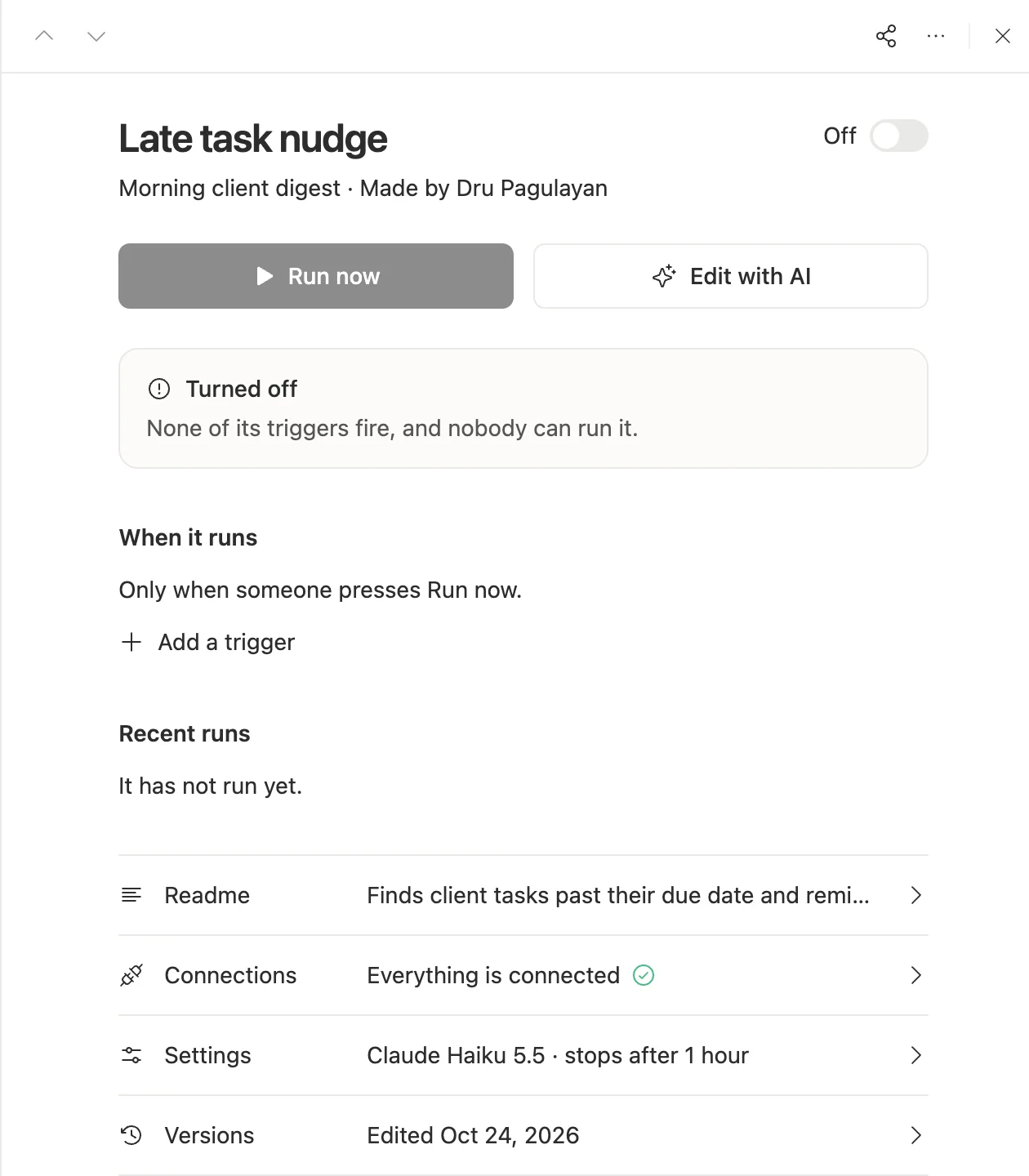
1. Open the agent. On the Agents page, click the agent. Its summary shows the model it runs on. This one finds late tasks and reminds the owner. That's a simple, clear job, so it runs on Haiku 5.5.
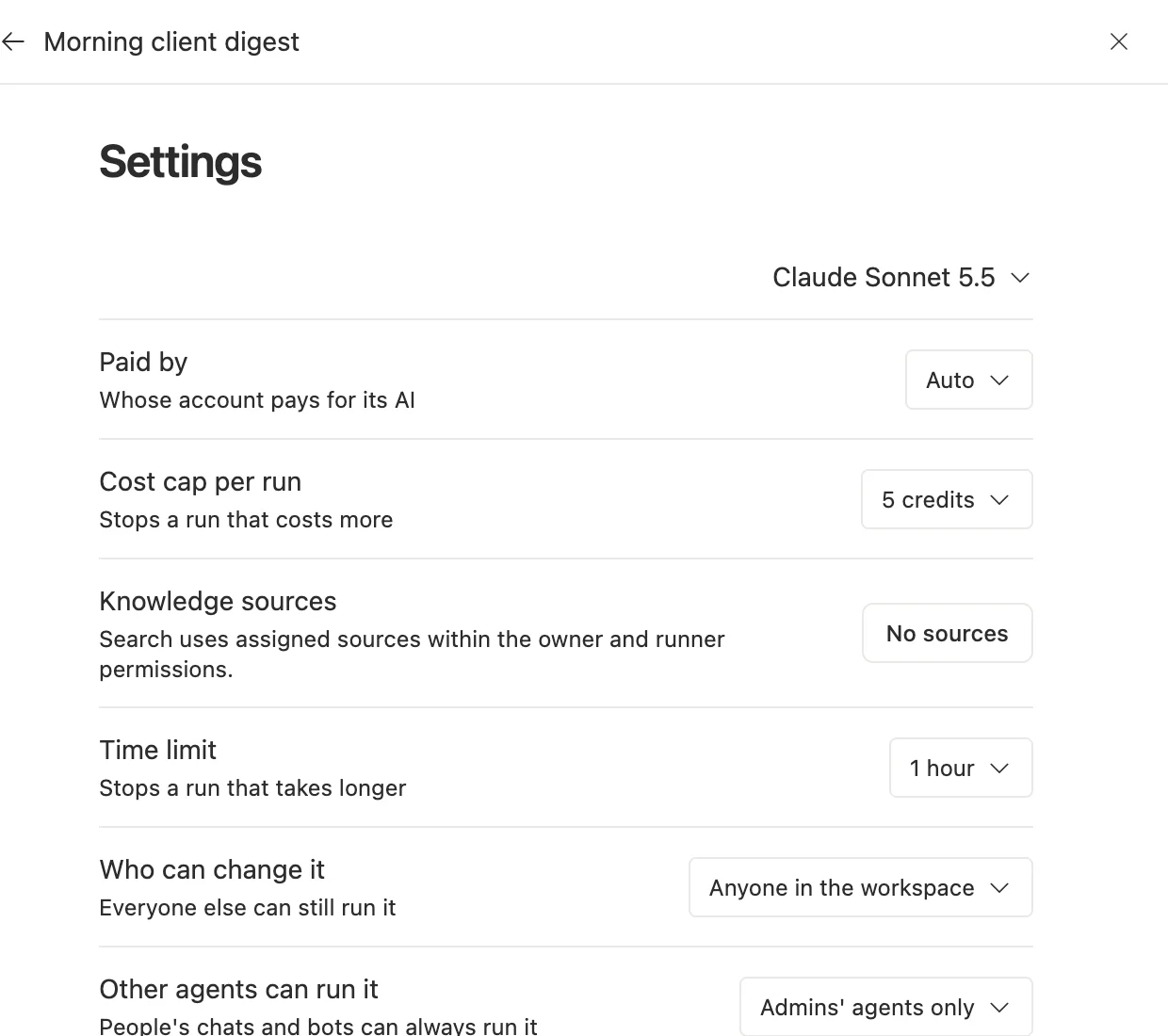
2. Open Settings and pick the model. The morning digest reads clients and meeting notes and writes a short summary, so it runs on Sonnet 5.5. In the same place you choose whose account pays for its AI, set a cost cap per run and a time limit.
3. Test before you trust the cheaper model. Every change is saved as a version, so you can go back if the cheaper model does worse.
4. Bring your own key if you like. Use your own Anthropic account and pay Anthropic directly, or use ours and pay per use. The workspace is free for any number of people. See our pricing.
Test it on your own work
Benchmarks tell you about the average task. Your task isn't average.

- Start on Sonnet. It's rarely the wrong first choice.
- Run 10 real cases. Real emails, real rows. Write down what a good answer looks like for each.
- Try one step down. Run the same 10 on Haiku.
- Keep the cheapest that passes. If Haiku gets 9 of 10 right on a sorting job, that's your model. If it gets 6, stay on Sonnet.
Jerry Liu said it well: every real task has its own trade-off between accuracy and cost, and you get to find yours.
Common questions
Is the most expensive model always better? Not for every step. For sorting and pulling fields out of text, a small model is often just as right and much cheaper.
What is the Claude Code advisor?
A stronger model your main model asks at key moments. You turn it on with /advisor opus and off with /advisor off.
Can different agents use different models in Team Brain? Yes. Each agent has its own model in its settings, along with its own cost cap and time limit.
Does changing the model break my agent? It can change the answers, which is why you test on 10 real cases first. In Team Brain, every change is kept as a version you can go back to.