How to run AI agents safely, without a security team
An AI agent wiped a company's CRM minutes after it was switched on. Here's a plain checklist for giving agents real work: what they can reach, what a run may cost, and how you undo a bad one.
This week you probably read the story. A company turned on a new AI agent, and within about five minutes it had deleted almost every deal in their Salesforce account. There was no undo button. A same-day snapshot is the only reason they got the data back, as one post on X summed it up.
It wasn't the only one. Someone told their agent to "confirm before acting" and it deleted their inbox anyway. Another team found a former employee's keys still live, with their agent quietly spinning up GPU machines on the company's account.
None of these people were careless. They gave a fast worker the keys to everything, because that's how the tools were set up. Here's how to give an agent real work without that risk, whatever tool you use.

What "safe" means for an agent
An agent is software that decides its own next step. That's what makes it useful, and it's also why a normal checklist misses things. You can't list every action in advance, so you limit three things instead:
- What it can reach. Which tables, files, websites and keys.
- What a run can cost. In money and in time.
- How you undo it. A copy you can restore, and a record of what it changed.
If all three are in place, a bad run is an annoying afternoon. If one is missing, it's the CRM story.
The big-company way: a locked room
This week NVIDIA put a lot of weight behind this problem with OpenShell, an open source runtime for fleets of agents. Each agent runs in its own sandbox. The kernel checks every file it opens and every network call it makes against a policy you write. The agent never sees real passwords, and a change that grants new access waits for a person to review it. The full model is in the OpenShell docs.
It's serious work, and the Hacker News thread took it seriously. It also showed the cost. One commenter pointed out that it needs Docker or a virtual machine underneath and called it a pretty heavy setup. Another said the fine-grained control is likely most useful for very specific enterprise needs, and that most companies can be much more coarse with permissions. A third described the do-it-yourself version: every call through a proxy, only approved domains, and swapped credentials so the agent never holds the real key.
If you have a platform team, that's a fine path. If you're five people running a business, you need the same three limits without building them.
A checklist you can use today
Whatever tool you pick, give an agent its job in this order. Each step adds reach only after the last one held up.

Start read only. Let it read and report for a week before it writes anything. One builder who wrote about the CRM wipe put it simply: a new agent in a CRM or ERP starts by only reading, and writing comes later, with a tested backup.
Give it only what the job needs. One table, not the whole workspace. One account, not the company keyring. If it doesn't need to delete, it shouldn't be able to.
Cap the cost and the time. A runaway loop is the most common failure, and it's cheap to stop if a run has a ceiling.
Keep a copy you can restore. Take a snapshot before it writes, and check that you know how to roll back. A backup you've never restored is a guess.
Read what it did, then widen. Look at what each run changed. Only then give it the next table or the next permission.
Turn off what you don't use. When someone leaves, their agents and keys should go with them. As one person put it, nobody's offboarding checklist has a line for the agent.
How we built this into Team Brain
We built Team Brain for small teams that want agents doing real work without a platform team. These limits come with every agent, so you don't have to set up a sandbox yourself.
Every agent runs in its own sandbox. By default its script runs isolated from the rest of the system, with a memory limit and a time limit, and it works on your docs and tables through Team Brain rather than a shell on someone's laptop.
Every run has a cap. Open an agent's settings and you set a cost cap per run and a time limit. A run that costs more, or takes longer, is stopped.
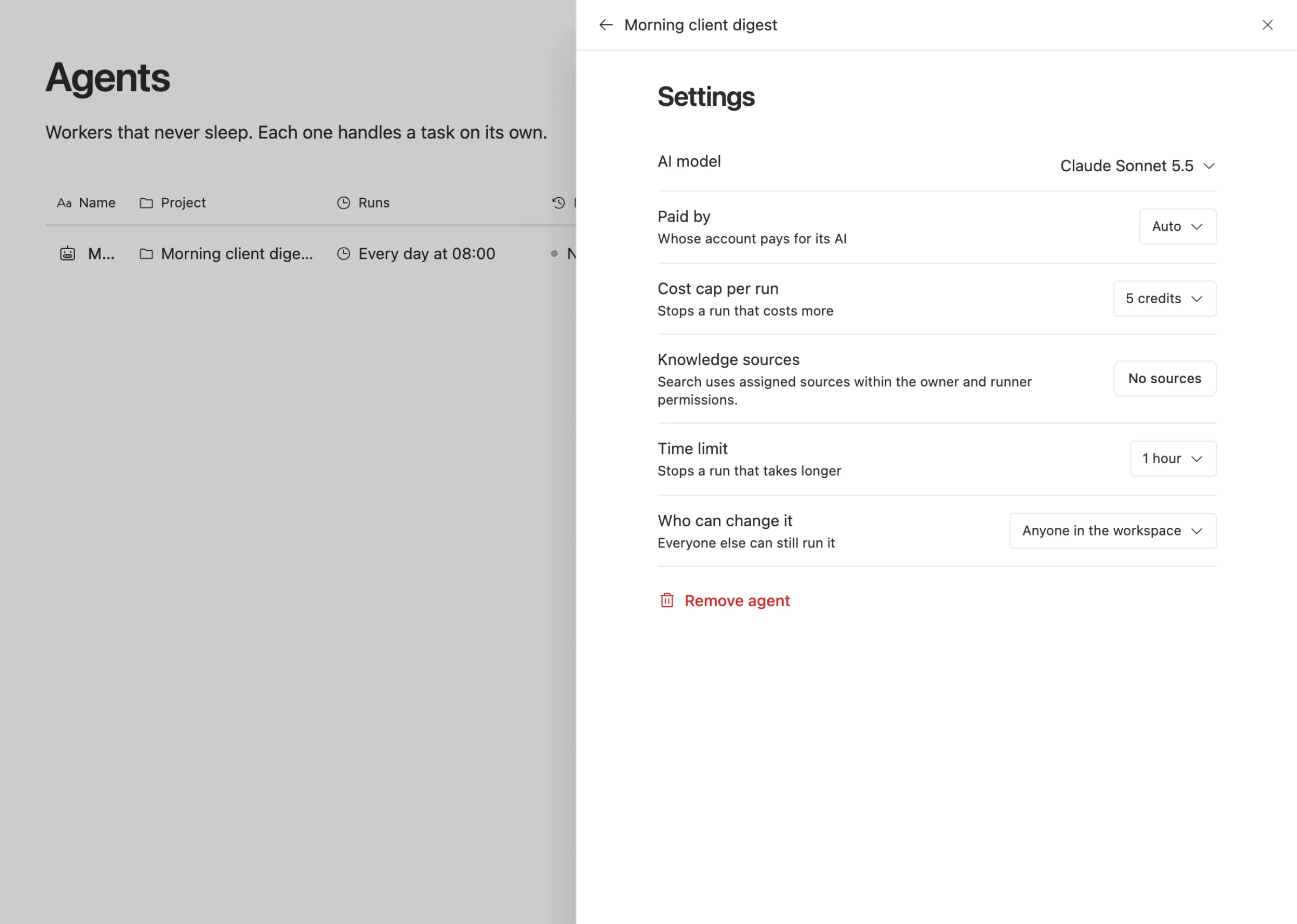
It reaches what its owner can reach, and no further. An agent can't use a private key unless the person who made it can. When someone loses access, so do their agents.
It has an off switch. Turn an agent off and none of its triggers fire, and nobody can run it until it's back on.
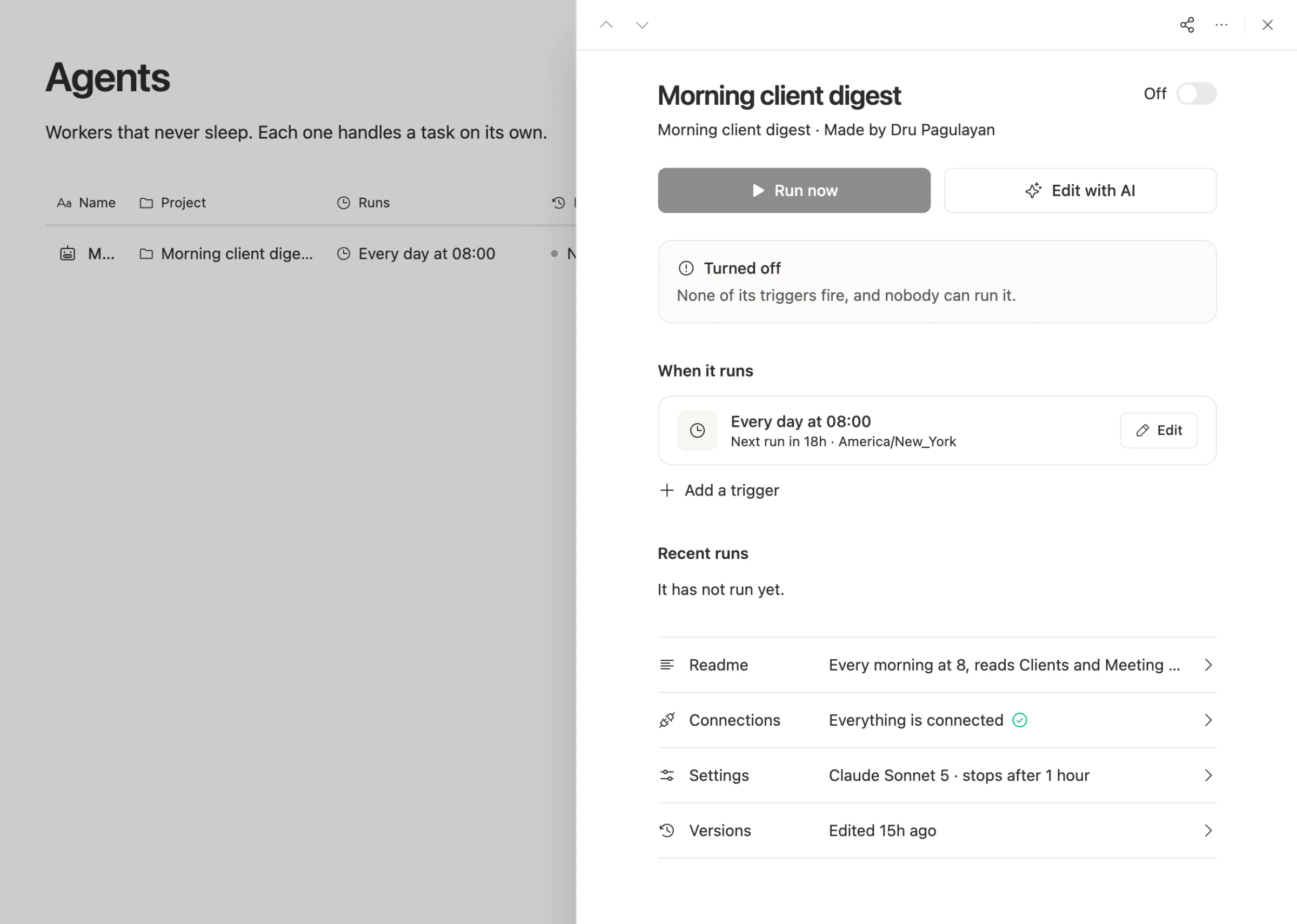
Every run leaves a receipt. It says what the run changed and what it started. When an agent writes over many rows at once, the receipt tells you how many values a person had fixed by hand that it replaced. Pages and rows keep their versions, and agents keep theirs too, so you can roll a bad edit back.
Agents ask before they guess. An agent can stop and ask a person a question, and wait for the answer, instead of picking for you.
None of this replaces judgment. You still start read only, and you still read the receipts for the first week. But you don't need Docker, Kubernetes or a policy language to get the three limits that matter.
When a heavier sandbox is the right call
Be honest about your situation. A runtime like OpenShell makes sense when:
- Your agents run code on real machines, install packages and touch your network.
- You run many agents across teams and need one policy that a security team signs off on.
- You're in a regulated business where every network call has to be checked and logged.
In those cases a workspace isn't enough on its own, and you should run both: the heavy sandbox for code, and a tool like Team Brain for the work agents do on your docs and tables.
Common questions
What's the first thing to do before I turn on an agent? Take a snapshot of whatever it will write to, and make sure you can restore it. Then start it read only.
Is "confirm before acting" in the prompt enough? No. A prompt is a request, not a limit. Use settings the agent can't talk its way past: what it can reach, a cost cap and a time limit.
How much should a cost cap be? Run it a few times read only and look at what a normal run costs. Set the cap a little above that, so a loop gets stopped and a normal run doesn't.
Does Team Brain cost extra for these limits? No. The workspace is free for any number of people and agents, and you pay only for the AI you use. See our pricing.