How to share Claude skills with your whole team
You wrote a skill that makes Claude work the way you do. Here's how to get it to everyone on your team, the four ways that exist today, and how to keep one copy that Claude Code and Codex both use.
You spent an afternoon on a skill. Maybe it writes the Friday client recap the way your agency likes it. Maybe it checks a pull request against your own rules before anyone else reads it. It works. Then a teammate asks for it, and you paste the file into a chat.
A week later you fix a mistake in it. Your copy is better now. Theirs isn't, and nobody knows.
That's not you being careless. A skill is a file, and files drift the moment there are two of them. Here's how to share one properly, starting with the ways Anthropic gives you, then how we do it in Team Brain.

What a skill is, in one minute
A skill is a folder with a SKILL.md file in it. The top of the file says what the skill is for. The rest is the steps, the rules and the opinions you'd give a new hire. Claude reads the short description all the time and loads the full steps only when the job comes up.
That last part is why people are moving their playbooks out of the main instructions file. One person on X called it one of the best tricks in Anthropic's own docs: keep step-by-step jobs in skills, so they don't load into every single session. Another put it more simply. A skill is where you write down your own opinions, so the AI reasons the way you would.
Those opinions are exactly what your team wants. So how do they get them?
The four ways Claude lets you share a skill today
1. Commit it to your repo. Put the folder at .claude/skills/<name>/SKILL.md in your project. The Claude Code skills docs say it plainly: commit it so your team gets it too. Everyone who pulls the repo gets the skill in Claude Code. The catch is that it lives in that one repo. Your writers, your sales lead and your ops person don't open repos.
2. Pack it as a plugin. Add a small plugin.json and people install your skills with one command. Matt Pocock moved his skills to a plugin so people stop syncing updates by hand. It's the cleanest way to share with strangers. Inside a small team it's one more thing to publish every time you change a line.
3. Share it inside Claude. On Claude's Team and Enterprise plans you can open a skill's menu and choose Share. Claude's help page on skills says shared copies are view-only and pick up your updates automatically. An owner can also publish a skill to the whole organization. Two limits to know: an owner has to turn sharing on first, and it only reaches people inside Claude.
4. Copy the file around. It works for a day. It's how most teams start, and it's why they end up with five versions.
Why one copy matters more than where it lives
Skills aren't tied to one AI any more. One builder found the SKILL.md they wrote for Claude Code runs in other agents without a single edit. That's good news, and it makes the drift problem worse. Your designer uses Claude. Your developer switched to OpenAI's Codex last month. Your skill now has to reach both, and stay the same in both.
Before anyone installs a skill they didn't write, it's worth a quick read too. A designer on X shared a checklist for exactly that. One shared copy means one place to do that review.
How to share a skill with Team Brain
In Team Brain a skill lives in your workspace, next to the tables and docs it talks about. You write it once. Anyone you share it with can use it, from Team Brain's own chat or from any AI app connected over MCP.

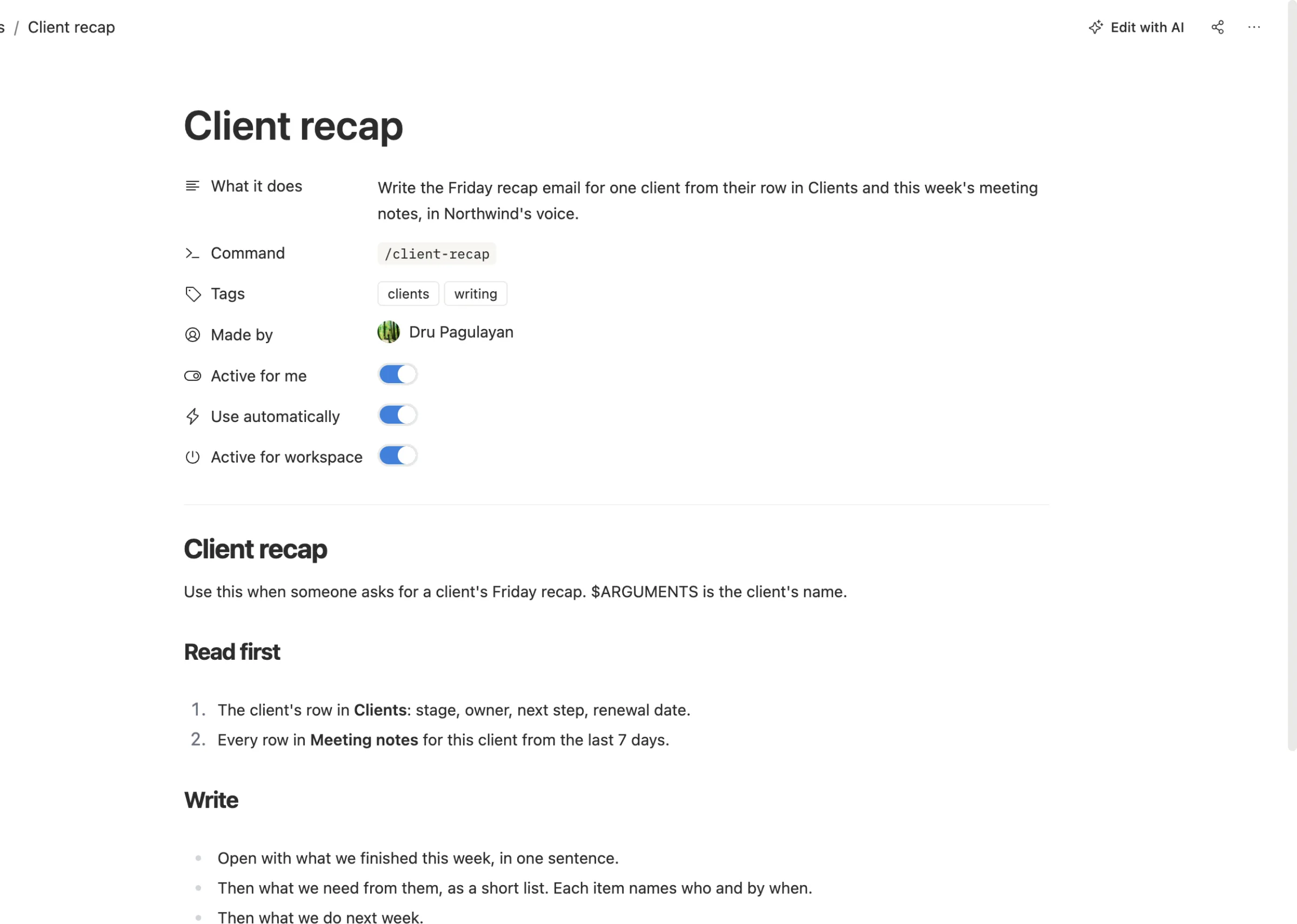
Step 1. Write the skill. Open Skills in the sidebar and choose New skill. Paste your SKILL.md, or write the steps the way you'd explain them to a new hire. Give it a one-line description. That line is how the AI decides when to use it.
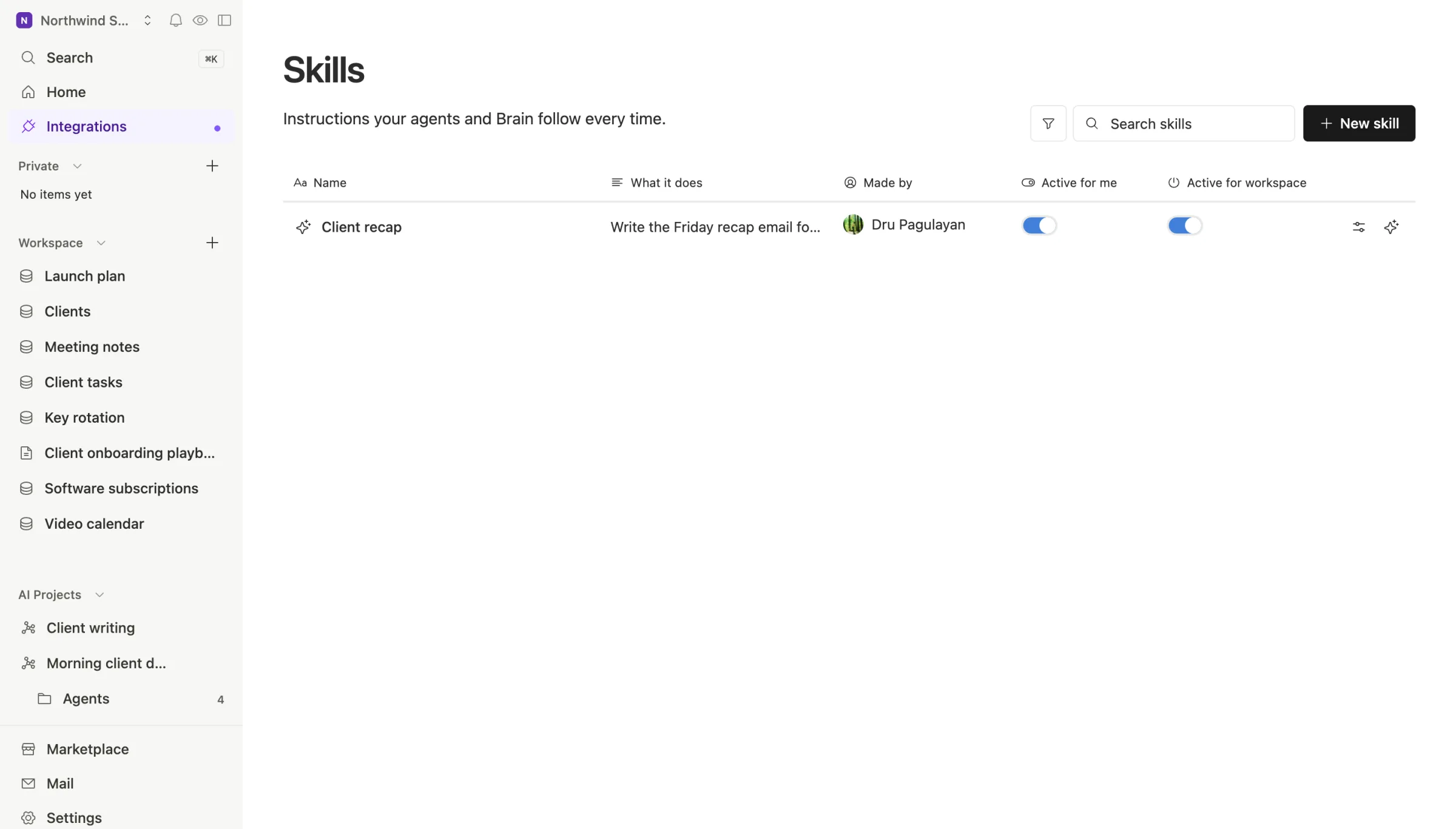
Step 2. Share it. A new skill is private to you. Open the share menu and pick the whole workspace or the people who should have it. Each person can still switch it off for themselves with Active for me.
Step 3. Connect your AI. Go to Settings, then Developer tools. Make a key, then add Team Brain to your tool. For Claude Code that's one line:
claude mcp add TeamBrain --transport http https://api.team-brain.com/mcp --header "Authorization: Bearer <your key>"
For Codex, add a server table to ~/.codex/config.toml with url = "https://api.team-brain.com/mcp" and your key in an environment variable, as OpenAI's MCP guide shows.
Step 4. Run it. Claude Code lists each MCP prompt as a command, so the skill shows up when you type /. Per the Claude Code MCP docs, you can also type /mcp__TeamBrain__client-recap Acme. In Codex, ask it to use the client-recap skill from Team Brain and it reads the skill from your workspace.
When you fix the skill next week, you fix it in one place. Everyone gets the new version the next time they start a session. Team Brain keeps the old versions too, so a bad edit is easy to undo.
Which way should you pick?
- Your team is all developers in one repo. Commit the skill. It's free and it versions with the code.
- You're sharing with the world. Make a plugin.
- Everyone lives in Claude on a Team plan. Use Claude's built-in sharing. It's right there.
- Your team uses more than one AI, or works outside a repo. Keep the skill in Team Brain. The workspace is free for any number of people, and you pay only for the AI you use, as our pricing page shows.
Common questions
Do I have to rewrite my skills for Team Brain?
No. A Team Brain skill is a SKILL.md with the same top section. Paste it in as it is.
Can a skill read our tables? Yes. When it runs through Team Brain, the AI can read and update the tables and docs you've given it access to. That's how the client recap above pulls this week's meeting notes.
What if someone shouldn't see a skill? Leave it private, or share it with named people only. A private skill shows up only for you and the workspace's admins.
Does it cost extra? No. Skills are unlimited on every plan.