How to write an agent skill (a SKILL.md) your AI actually follows
Jane Street's one-page tutor skill hit the top of Hacker News this week. Here's what a SKILL.md really is, how to write one in five steps, what to leave out, and how to share it with your whole team.
You've typed the same instructions into a chat three times this week. "Keep it under 150 words. Use first names. Don't say circling back." Each time the AI does it right, and each time it forgets by the next chat.
That's not you being bad at prompting. Chats don't remember. A skill is how you make them.
This week Jane Street put a skill called socratic-tutor on GitHub, and it climbed to the top of Hacker News. It's about 800 words of plain text. No code. It turns any AI into a strict tutor that asks one question at a time and won't hand you the answer.
Here's how to write one like it for your own work.
What a skill actually is
A skill is a text file called SKILL.md. The top has a name and a short description. The rest is instructions in plain language.
Anthropic turned it into an open standard, so the same file works in Claude Code, in other agent tools, and in Team Brain. Their skills docs put the idea simply: write one when you keep pasting the same instructions, checklist or steps into chat.
The clever part is when it loads. The AI always sees the short description. The full instructions load only when your request matches it. So you can have fifty skills without stuffing all fifty into every chat.

Some people on Hacker News pushed back that every skill is just a prompt. They're right. Another commenter answered the point well: if you keep a document for a process you repeat, isn't that what a skill is? A skill is a prompt you only write once.
Write one in five steps

1. Pick one job. A weekly recap, a code review, a client report. One job per skill. If you catch yourself writing "and also", that's a second skill.
2. Write when to use it. This is the description, and it's the line that matters most, because it's how the AI decides to switch the skill on. Lead with the job, then add the words people really type. Jane Street's starts with "when the user explicitly asks to be taught, quizzed, or drilled", lists phrases like "teach me" and "quiz me", and says it's not for a quick "what is X" question. That last part stops it firing when you didn't want it.
3. Say what to read first. Most jobs depend on something: a table, last week's notes, a file. Name it. A recap skill that doesn't know where the meeting notes live will make them up.
4. Write the rules. Short lines that say what to do. Then a short "never" list. Jane Street's best rule is one sentence: when the user is wrong, don't give the answer, ask a narrower question that shows the mistake. One person who'd used it for a week said most of the effect comes from that one line.
5. Test it twice. First, does it switch on when it should, and stay off when it shouldn't? Ask for the job in three different ways. Second, is the answer right? Anthropic's docs suggest comparing a fresh chat with the skill on and off.
What to leave out
Every line in a skill costs something each time it loads. Anthropic's docs say to keep SKILL.md under 500 lines and to state what to do rather than narrate why. In practice:
- Leave out the why. "Under 150 words" works. A paragraph about why clients hate long emails doesn't help the AI write a shorter one.
- Leave out what it already knows. You don't need to explain what an email is.
- Split the manual. If you have a long price list or style guide, put it in its own file and point to it from the skill.
Start small. One builder on X said their popular skills repo started as a single SKILL.md with a few rules about things that annoyed them. Annoyances make great rules, because you already know what wrong looks like.
The Team Brain way: write it once for the whole team
A skill on your laptop helps you. The trouble starts when five people on a team each write their own. One Hacker News commenter described it at their company: everyone reinventing the same ideas, with no time to check each other's.
In Team Brain, a skill lives in the workspace, so everyone and every agent uses the same one. Here's how to add one:
- Open Skills in the sidebar and click New skill.
- It opens a chat that starts with "Create a skill that". Describe the job in your own words, or paste a SKILL.md you already have.
- Read what it wrote. Fix any rule that's off with Edit with AI, or edit the text yourself.
- Share it with the workspace from the share button.
Here's one a small studio uses for its Friday client emails. It has a command, /client-recap, and two switches: On for me, and Use automatically, which lets Brain pick it up when your request matches.
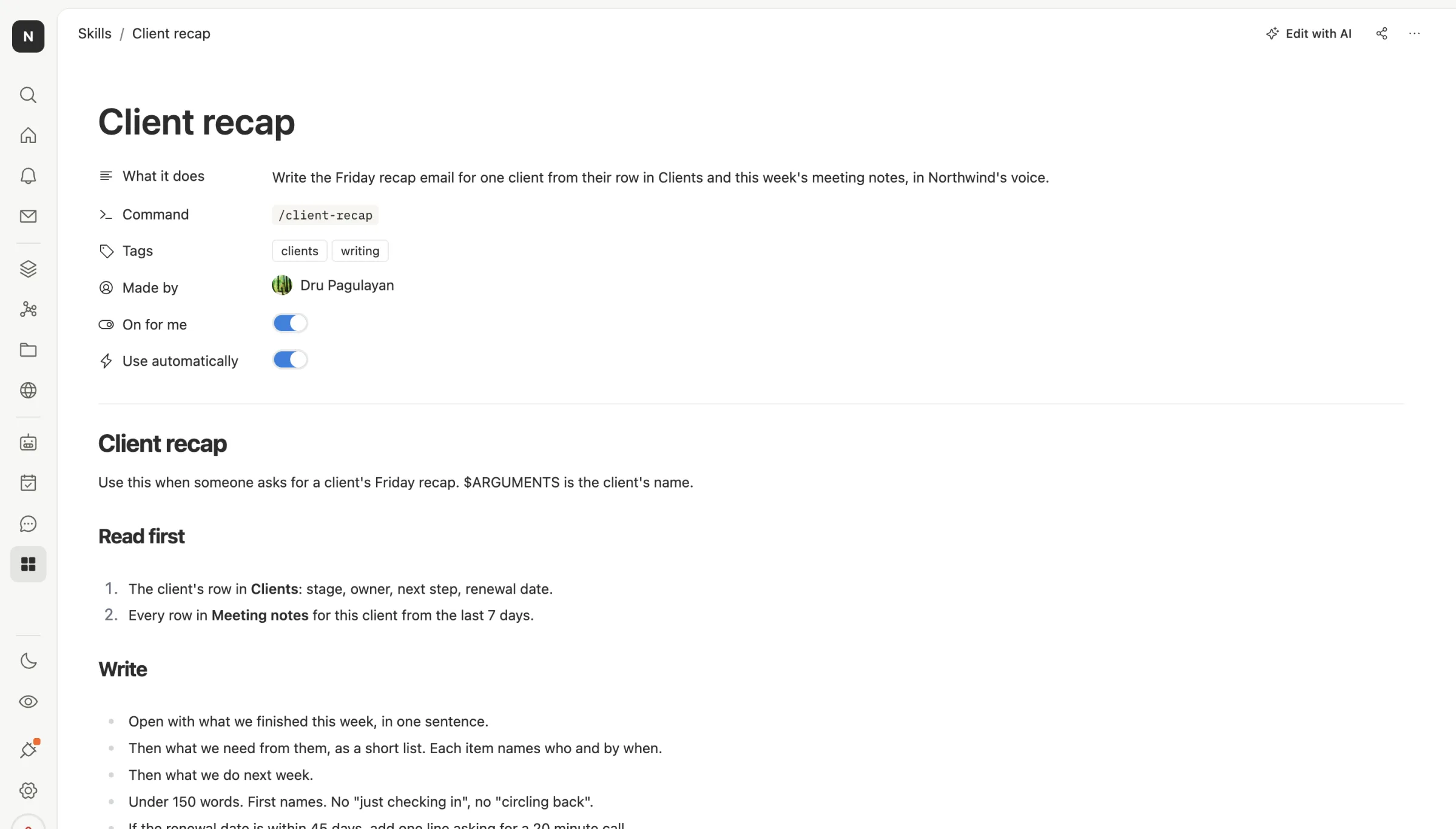
Notice how it reads. Read the client's row and the last week of meeting notes first. Then open with what got done, list what's needed and by when, stay under 150 words. Then a short never list: never promise a date the notes don't show, never mention another client, never send it.
The Skills page keeps them in one list, with tabs for your own, the workspace's, and the ones Brain learned from your chats.
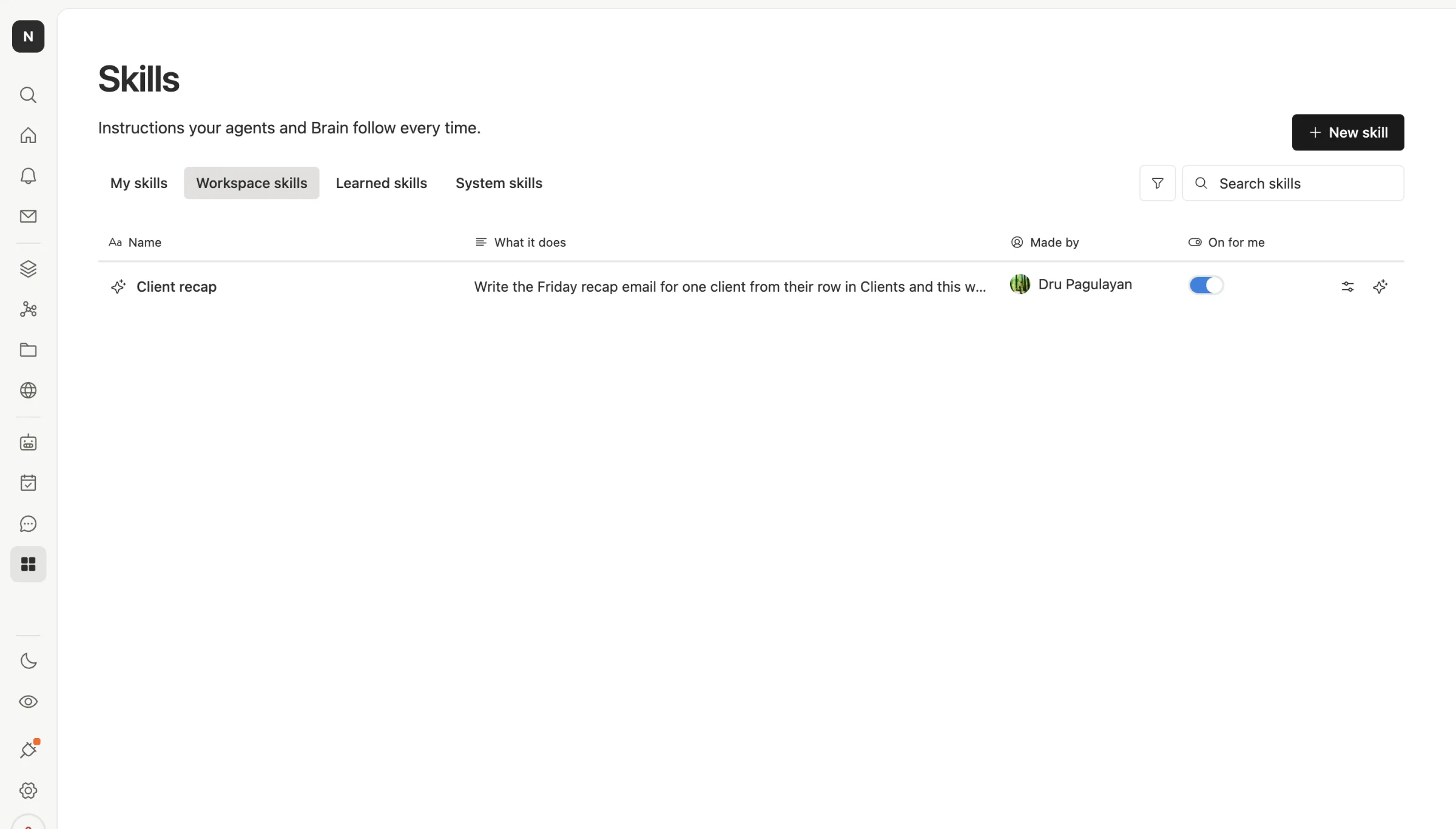
Agents can use skills too. Give an agent the recap skill and it writes in the same voice as everyone on the team, every Friday, without anyone pasting the rules in.
Skills in Team Brain are free to write and share. You pay only for the AI that runs them, or use your own AI account.
Common questions
Do I need to code to write a skill? No. It's plain text. Jane Street's tutor has no code at all.
Is a skill different from a prompt? The words are the same. The difference is you write it once, it loads only when it's needed, and everyone gets the same version.
How long should a skill be? As short as the job allows. Jane Street's is about one page. Anthropic's docs set the upper limit at 500 lines.
Can I bring a skill I wrote for Claude Code into Team Brain? Yes. Click New skill and paste it into the chat. It's the same SKILL.md format.
Why doesn't my skill switch on? Almost always the description. Lead with the job and add the phrases people actually type.