How a small team keeps its work when the apps it uses shut down
Arc shuts down on December 22. It won't be the last app your team loses. Here's how a small team can export what matters, check what the export misses, and keep its work somewhere with backups it controls.
Your designer runs her whole client research out of Arc. Each client has a Space, each Space has pinned tabs, folders of references and a few notes she typed into the sidebar. On Thursday she saw the news and posted one word in the team chat: "no."
The Browser Company said it will sunset Arc on December 22, 2026. People are upset, and they're allowed to be. One longtime user said Arc was the reason they'd never switch browsers again. Another said the company didn't need to do this, with a user base that adored it.
This post isn't about Arc. It's about the next one. Every team runs on apps that might not be here in two years, and the moment to plan for that is before the email arrives.
What Arc's users have to do, and by when
Here's what Arc's farewell page says, in order:
- October 22, 2026: no new Arc accounts. The newest release adds an export option.
- November 23, 2026: on mobile, Browse for Me and other AI features are turned off, and sign-in and tab syncing stop.
- December 22, 2026: the desktop apps stop working. Accounts are deactivated and personal data is deleted within 30 days.
To keep anything, you export it from Arc's settings (Advanced, then Export Data) or import it into Dia, the company's next browser, before December 22. After that date, the page says, Arc can no longer find or retrieve user data for data requests.
That's a fair warning: two months, a clear export, and a place to go. Many shutdowns give you less. One founder just closed a funded company after a hacker got in with an old admin key. Someone asked the question every customer should ask: what if you shut down?
Before the date, not on it
When an app you rely on announces a shutdown, do four things while it still runs:

Find the date. Put it in the team calendar with a reminder two weeks before.
Export now. The export works best while the app is fully alive and someone still answers support email.
Open the file. This is the step people skip. An export you've never opened is a hope, not a backup.
Give it a home you control. Move it somewhere you can see, search and back up yourself.
What an export really keeps
Exports are good at the stuff and bad at the setup. Text comes out. Rows come out. Files come out. The links between things, the automations, and who could see what usually don't.
Notion, which has one of the better exports around, says it plainly in its export help page: you can't instantly recreate a workspace by reuploading its export. One person flagged that easy-to-miss line as a reminder that "we can always export it" isn't a plan.

The best exports are boring on purpose. One app maker described his as a plain zip with readable JSON and the photos, so people can still open their year on any computer if the app disappears. That's the bar.
So for each tool your team uses, write down three things by hand, today: how it's set up, why it's set up that way, and who owns it. It takes ten minutes and it's the part no export saves.
How the studio runs it in Team Brain
Here's how the design studio from the top handles it now.
One place for the work that matters. Client research, meeting notes and decisions live in Team Brain as tables and pages the whole team can open. When a browser goes away, the links and notes that mattered aren't trapped in it.
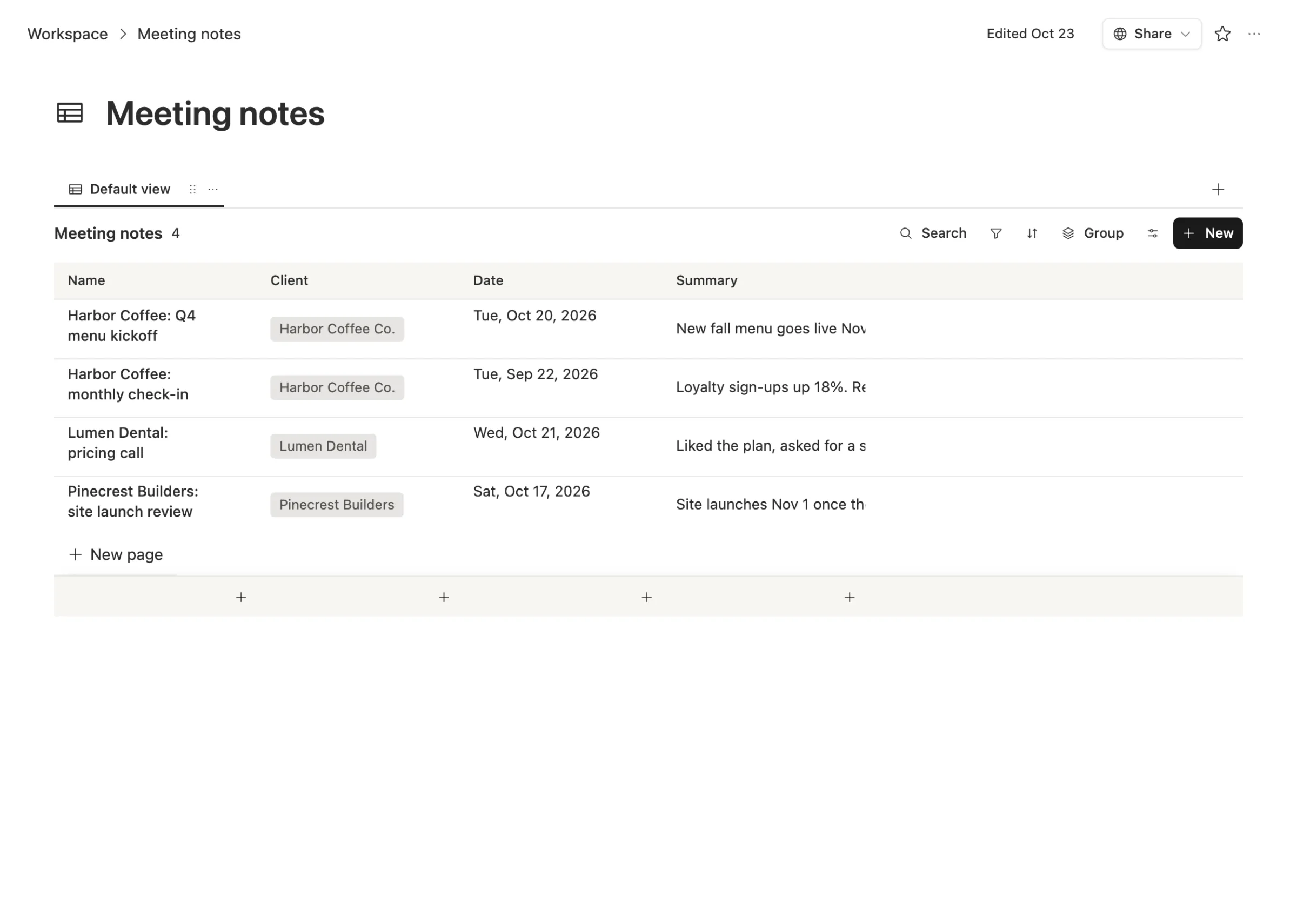
Bring the exports in. Team Brain imports Markdown, Word files, CSV, plain text, and a Notion export zip. When a tool shuts down, its export has a place to land.
Backups the team controls. Team Brain backs up the workspace on a schedule you pick, from every hour to once a month. Keep backups with us, or send them to your own S3 storage, such as Amazon or Cloudflare. Make one any time, download it, or go back to an old one.
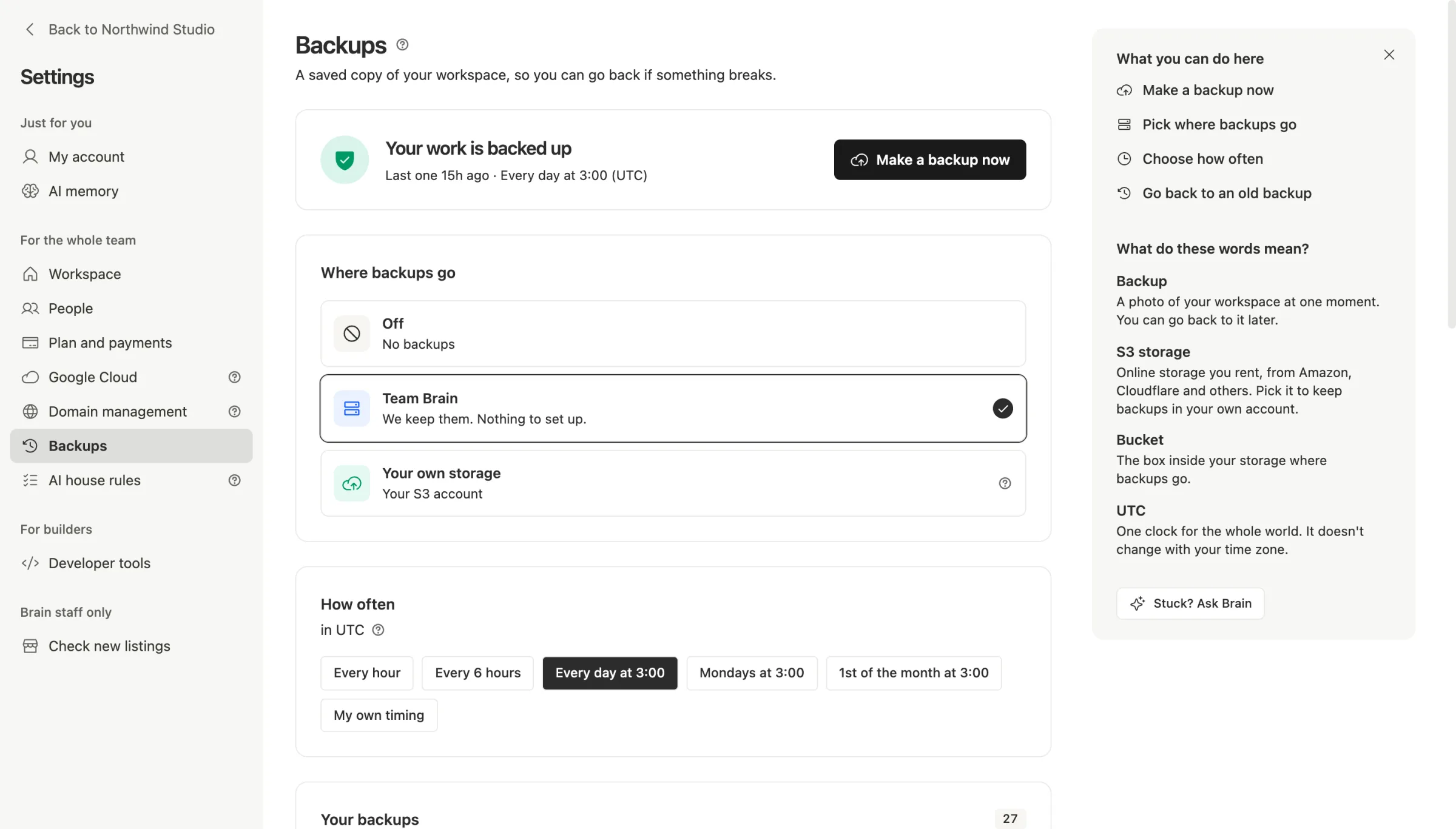
That last part matters, and it applies to us too. Team Brain is a young company. If you want to be sure you'd keep your work even if we disappeared, point backups at storage you own. And if you need it fully in your hands, the Custom plan lets you run Team Brain on your own server.
What it costs
The Team Brain workspace is free for any number of people and agents, with 10 GB of storage. Backups are included. You pay only for the AI you use. Running Team Brain on your own server is part of the Custom plan, priced on request. Details are on our pricing page.
Common questions
When does Arc stop working? December 22, 2026. Export your data or import it into Dia before then.
Is an export enough? It keeps your content, not your setup. Open the file, check what's missing, and write down how and why things were set up.
How do I avoid being stuck the next time? Keep the work that matters in one place you can back up yourself, and know how to get it out before you need to.
Can Team Brain back up to my own storage? Yes. Pick "Your own storage" in Backups and connect an S3 account. You can also download any backup.