How a small team shares API keys with its AI agents
After a week of leaked keys, here's how a five-person team can keep its OpenAI, Anthropic and Stripe keys in one place, decide who and which agents may use each one, and rotate a key without breaking anything.
Wednesday morning, someone on your team posts in the group chat: "Did anyone see the Railway thing? Do we need to rotate the OpenAI key?" Nobody's sure. The key was pasted into Slack in March, copied into two agent configs, saved in the hosting settings, and someone may have put it in a script on their laptop.
So you start the hunt. Where is it? Who has it? Which agents break if you change it?
You're not careless. This is just how keys spread on a small team. One founder joked it's the biggest mission ever to rotate them. Another woke to a security email and had to rotate 134 keys.
Why this week made it urgent
On October 21, Railway posted a security disclosure: an unauthorized party may have accessed customer environment variables, and for some of them the decrypted contents. Railway told every customer to immediately roll all environment variables, including any API keys stored there, and to review logs for unusual activity. It believes the attack was part of a series aimed at platform companies to get at AI provider keys.
It wasn't the only one. Days earlier, users of one AI coding service woke up to $400 and $1,700 in charges on keys they had only pasted into that one tool. Peter Yang's emergency checklist started with disconnecting apps and agents you don't use.
The lesson isn't "never use a hosting platform." It's that every copy of a key is one more place it can leak from, and agents make more copies than people do.

How keys spread on a small team
Here's the usual path at a five-person agency.
The founder makes an OpenAI key and DMs it to the person building the first agent. That person pastes it into the agent's settings. A month later a second agent needs it, so they copy it again. A contractor needs it for a weekend project, so it goes into a shared doc "for now." Then the hosting platform needs it as an environment variable.
Now one key lives in five places, and nobody has a list. When it leaks, you can't rotate it without finding every copy, and you can't find every copy without breaking something first.
People are starting to ask the right question. One builder now asks his agent before anything ships: where are the secrets, and who can see them? Another asked, honestly, who else can see a key once it's in an agent's context.
One key, one home
The fix is boring and it works: every key lives in exactly one place, and everything else refers to it by name.

This is the same idea behind 1Password's new 1Password for Agents, announced this week: when an agent hits a login, it asks for a credential, you approve, and 1Password fills it in so the agent never has the password. It's free for 1Password Individual and Family accounts. It's built for personal agents logging into websites, like Grok Bot and Muse, with Claude Duet and OpenAI coming soon.
For API keys your team's own agents use, you need the same rule inside your workspace.
How it runs in Team Brain
Here's how the agency sets it up in Team Brain.
One person adds the key, once. Open Integrations, pick the provider, paste the key. It's stored encrypted in the workspace. Nobody needs to DM it to anyone again.
They decide who can use it. Every key has a "Who can use it" setting: only me, specific people, or the whole workspace. It starts as only you, until you share it.
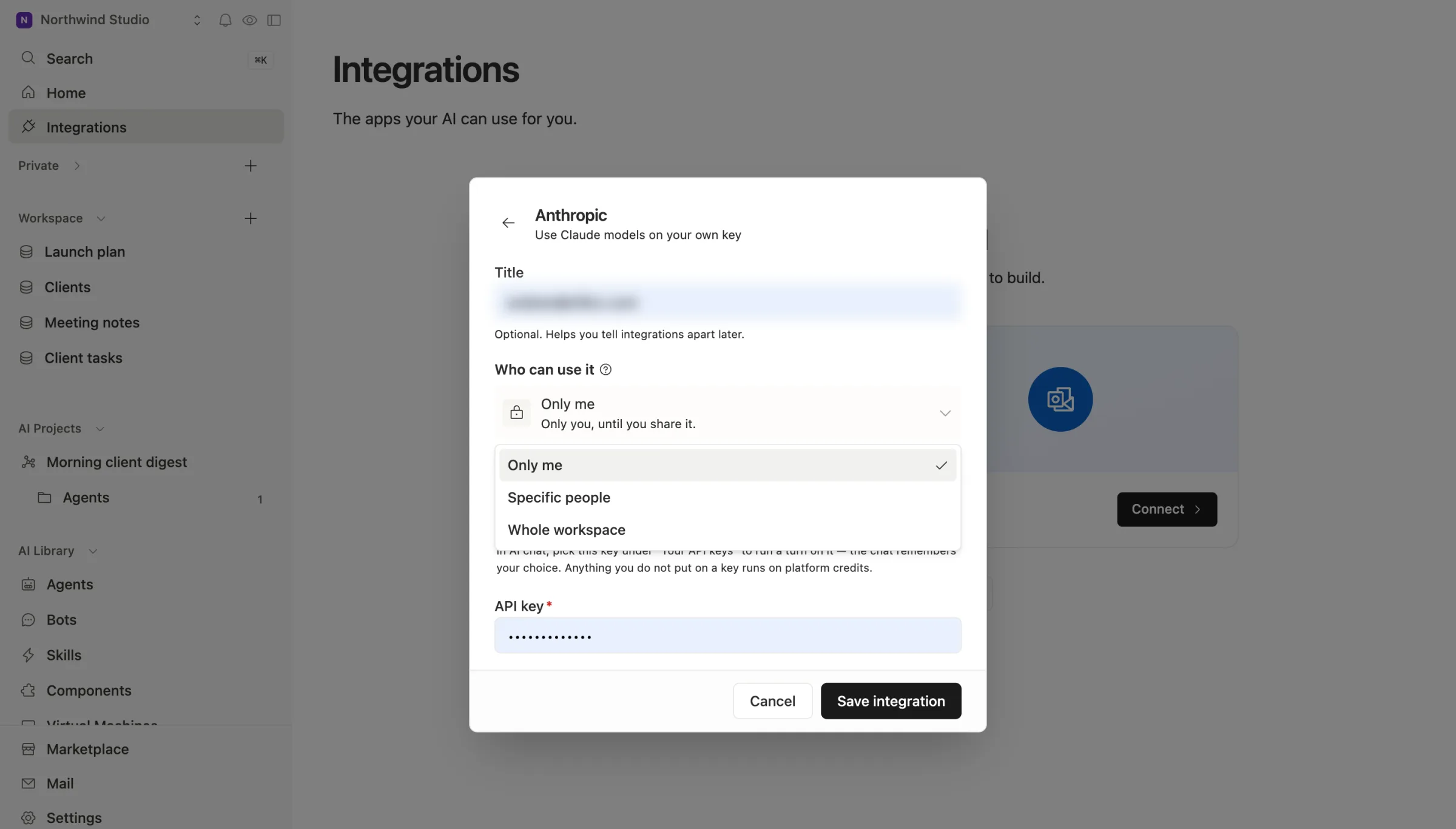
Agents follow the person, never more. A private key can be used only by the person who added it and the agents they own. An agent can't spend a teammate's private key, even if an admin made the agent. That's the rule that keeps a contractor's experiment from quietly running on the founder's key.
Each agent uses keys by name. An agent's script asks for "the OpenAI key." It doesn't carry its own copy. For each agent you can also pick which account it uses, if you have more than one.
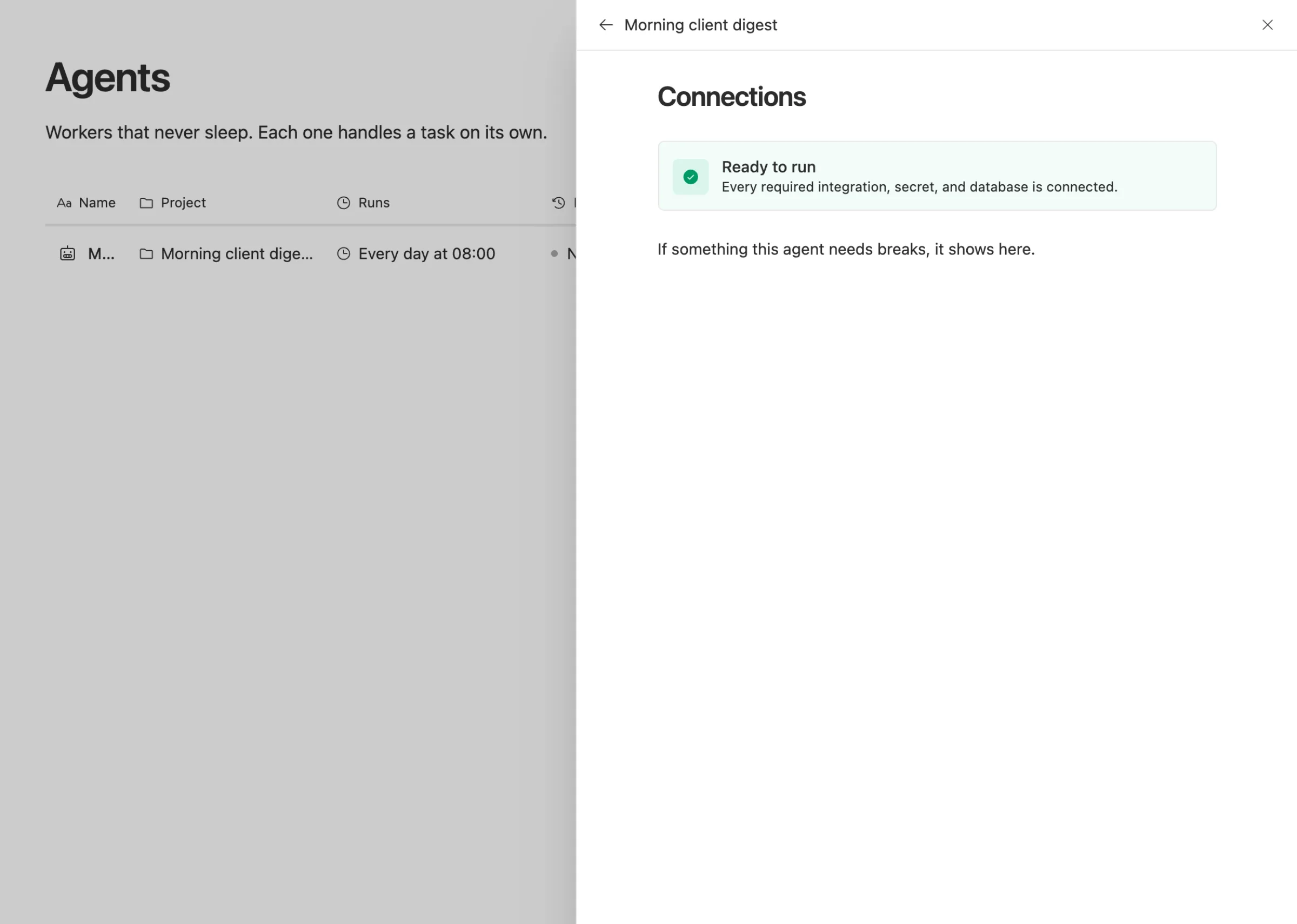
Each agent shows what it needs. Open an agent's Connections and it tells you whether every integration, secret and table it needs is connected, and what broke if not.
Rotating is one change. Make a new key at the provider, update it once in Team Brain, and revoke the old one. The agents ask for the key by name, so they pick up the new one on their next run.
Nothing is lost while a key is missing. If a key is removed or expires and an agent can't run, its triggers hold the events that arrive instead of dropping them, for up to seven days, and run them once the key is back.
What it costs
The workspace is free for any number of people and agents. You pay only for the AI you use, or you bring your own keys and pay the provider directly. See our pricing.
There's a second thing worth doing today, whatever tool you use: if your AI provider lets you set a spending limit on a key, set one. It's the cheapest insurance against a leaked key.
A checklist for this weekend
- List every place your AI and payment keys live: chat, docs, agent settings, hosting, laptops.
- Pick one home for each key, and delete every other copy.
- Rotate any key that was ever pasted into chat or stored on a platform that had an incident.
- Set a spending limit on every AI key where the provider allows it.
- Disconnect agents and apps nobody uses.
- Write down who owns each key, so the next rotation takes minutes.
Common questions
Is it safe to give an AI agent an API key at all? It's as safe as where the key lives. Keep one copy, limit who can use it, set a spend limit, and you can rotate it in minutes if you need to.
What's the difference between this and 1Password for Agents? 1Password for Agents signs your personal agents into websites without showing them your password. Team Brain holds the API keys your team's agents use for their work and decides who may spend each one. Many teams will want both.
What happens to my agents when I rotate a key? In Team Brain, update the key once. Agents ask for it by name, so their next run uses the new one.
Who can see a private key? Only the person who added it can use it, along with the agents they own. The workspace owner can see that it exists, but can't spend it.