Team Brain vs Asana
Looking for an Asana alternative? Here's how Team Brain compares on price, seats, docs and AI agents, why a team of seven pays Asana for ten seats, and when Asana is still the right call.
Friday afternoon. You open Asana to update your tasks before the weekly check-in. Mark two done, move one, add a comment saying where the other one stands. Then you open the doc where the actual work lives and copy the same update into it, so the client sees it too.
Asana isn't the problem. It's very good at tasks. The problem is that tasks are only half your work, and keeping the other half in sync is a job nobody signed up for. One person on Hacker News said the thing they hate doing most is updating Jira and Asana, so they now have AI summarize their work and do it.

The short answer
Stay on Asana if your team mostly runs projects as tasks, timelines and handoffs, and your rules and forms are already built.
Pick Team Brain if your tasks, notes and client data keep drifting apart, if you're paying for seats you don't use, or if you'd rather an agent did the status updates. Team Brain is free for any number of people, and you pay only for the AI you use.
What each one really is
Asana is a task list that grew into a work planner. Projects hold tasks. Tasks get owners, dates, timelines, rules and forms.
Team Brain is a workspace your agents work in. Docs and databases sit side by side, and a task list is just one database. Agents read and update your docs and tables on a schedule, when a row changes, or when an email comes in.
That difference matters more now that people hand chores to AI. One builder on Hacker News described an agent that reads their email, pulls out what needs doing, and adds it to an Asana list. It works, but it's one more tool reaching into another. In Team Brain the agent, the list and the notes it reads from are in the same place.
What it costs, side by side
| Asana | Team Brain | |
|---|---|---|
| Free plan | Personal: up to 2 users | Unlimited people and agents, 10 GB |
| Paid plans | Starter $10.99, Advanced $24.99 per user a month | No seats. You pay for the AI you use |
| Billed monthly | Starter $13.49, Advanced $30.49 per user | No seats |
| How seats are sold | 1 at a time up to 5 users, then in steps of 5 up to 30 | Nothing to buy per person |
| AI | AI Teammates: 5 requests per user a month, up to 50 per account on Starter. AI Studio credits by plan | Pay per use, or bring your own AI account |
| Guests | Unlimited free guests on paid plans | Everyone is free |
Asana prices are from Asana's pricing page, billed yearly unless noted, checked October 26, 2026. Team Brain's are from our pricing page.
The seat steps are the part most people miss. Asana sells seats one at a time up to five users, then in steps of five up to thirty. So a team of seven buys ten seats.

Put in your own team. This calculator counts each person once, so round up to Asana's next step of five if you're over five people:
- Asana Advanced
- $249.9
- Asana Starter
- $109.9
- Team Brain
- $0plus the AI you use
That's $1,318.8 a year in seats you wouldn't pay.
Solo founders feel this too. One wrote that minimum seat counts are one of the best ways companies get free money, since they were about to pay Asana for two seats when they only needed one.
Tasks and notes in one place
In Team Brain, a task is a row in a database. Every row has its own page, so the notes, files and discussion for a task live inside it, not in a separate doc.
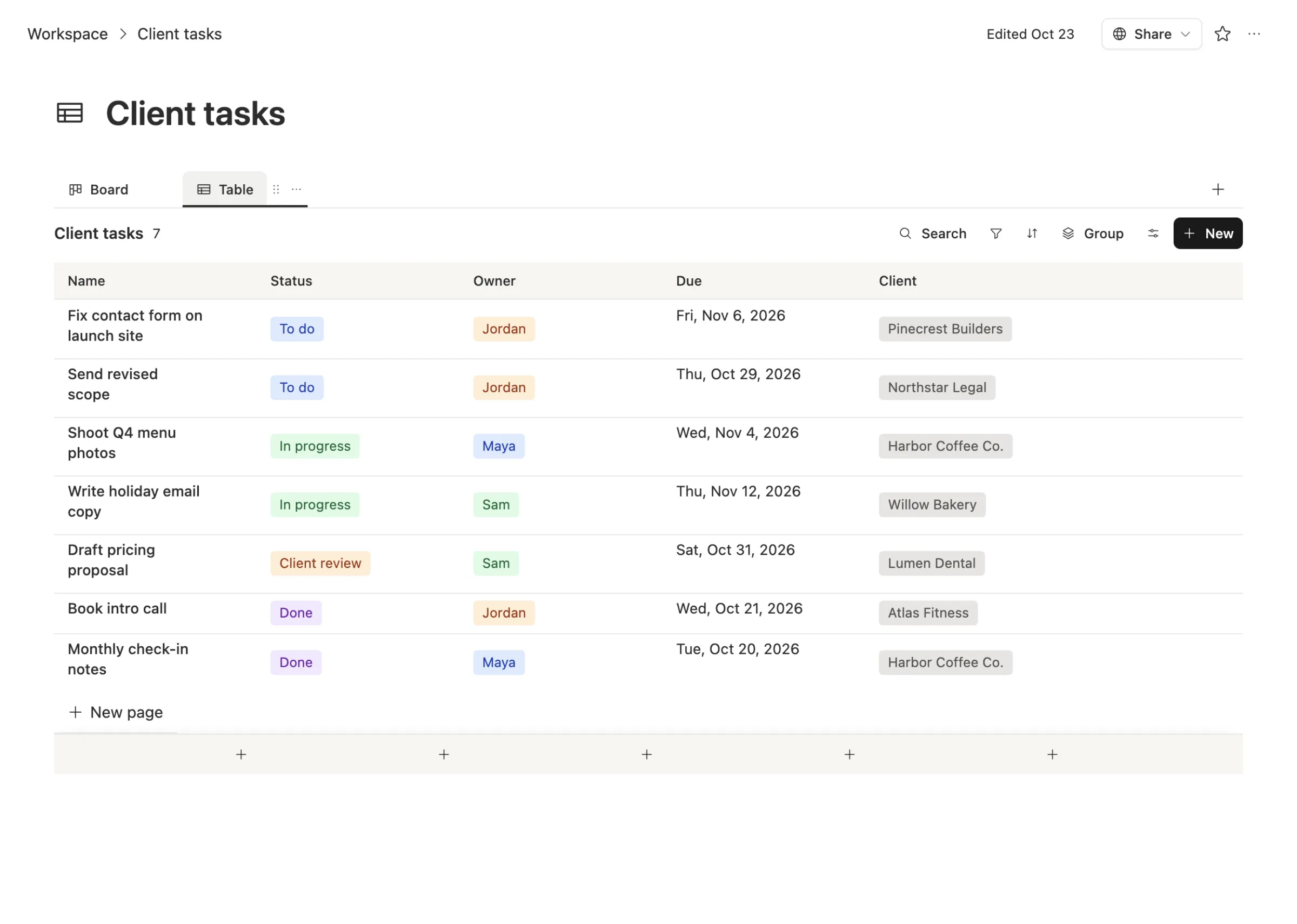
The same rows show up as a board when you want to see what's stuck. The client column links to a Clients table, so opening a client shows every task and every meeting note for them. Nobody copies a status from one tool to another, because there's only one.
An agent writes the update for you
Status updates are a chore because someone has to read everything and summarize it. That's a job an agent does well.
This agent runs every morning at 8. It reads the Clients table and the meeting notes, and writes one short digest: renewals coming up, next steps that are due, and what was said in yesterday's meetings.
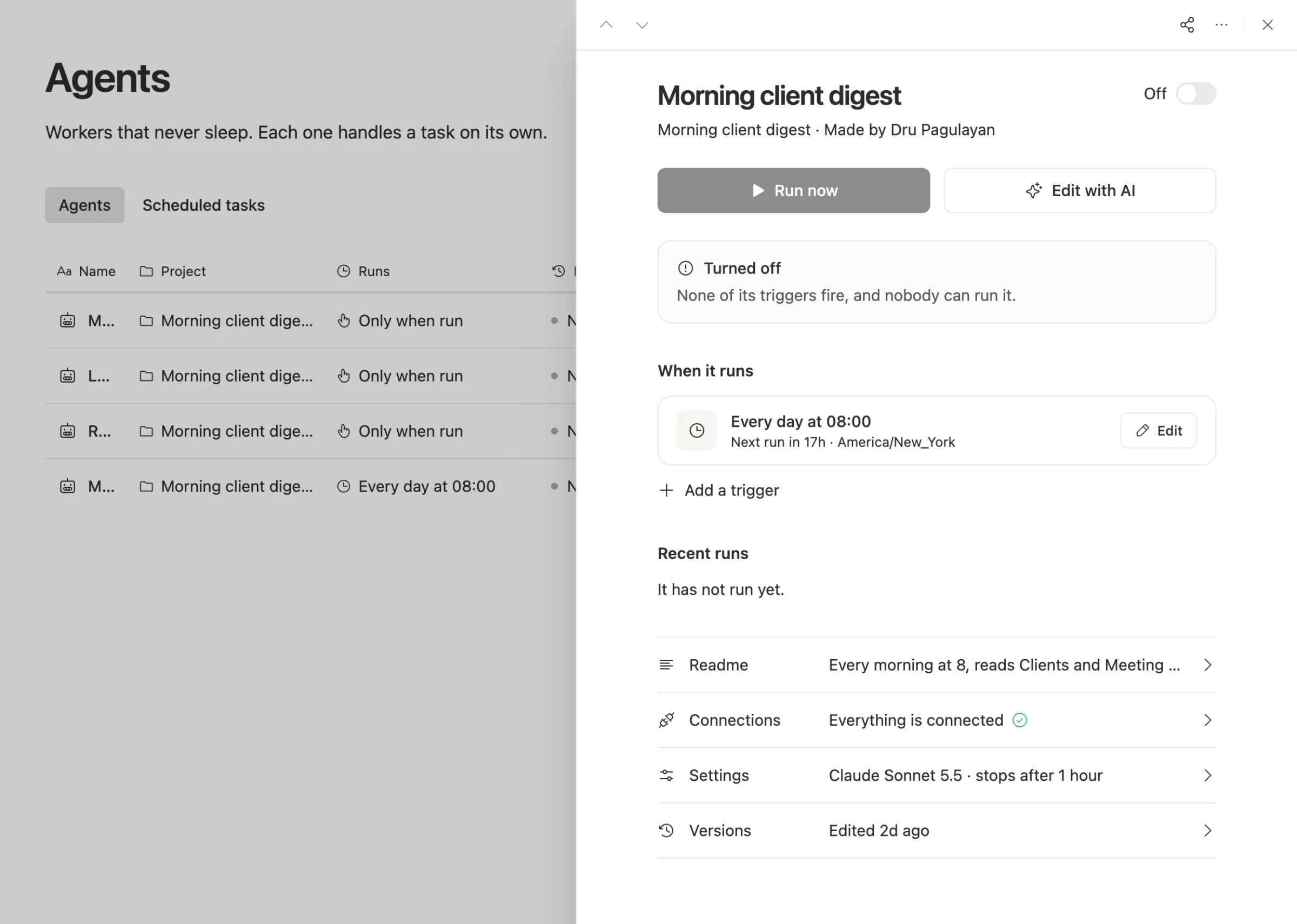
Each agent shows when it runs, what it ran last, the model it uses, and a cost cap per run. You can run it on your own AI account, so a Claude or ChatGPT plan you already pay for can do the work.
When to stick with Asana
We'd rather you pick right than pick us.
- You plan projects on timelines with dependencies. Asana's Starter plan includes timeline and Gantt views, and teams that live in them should think hard before moving.
- Your rules and forms are built and working. Asana's paid plans include unlimited automations and forms. Rebuilding a working setup has a real cost.
- Lots of outside people join your projects. Asana's paid plans include unlimited free guests.
- Your team just finished rolling it out. Don't move again this quarter. Come back when the bill or the copying starts to hurt.
What breaks when you switch
What moves cleanly: tasks, owners, due dates, sections and custom fields, exported as a spreadsheet, become rows and properties in a Team Brain database.
What you rebuild: rules, forms, timelines and integrations. In Team Brain those become agents, views and connected apps.
Move one project first. Run it next to Asana for a week, then move the rest.
Common questions
Is Team Brain cheaper than Asana? For most teams, yes. The workspace is free for any number of people, and you pay only for the AI you use. Seven people on Asana Starter pay for ten seats, $109.90 a month billed yearly.
Does Team Brain have task boards? Yes. A task list is a database, and you can see it as a table, a board and other views.
Can I bring my own AI? Yes. Connect your own AI account and pick the model, or use ours and pay per use.
Can I try it next to Asana? Yes. Import one project from a spreadsheet export and run both for a week.