Team Brain vs Attio
Attio is a sharp, AI-native CRM that charges per user. Team Brain keeps your clients next to your docs, tasks and agents, with no seats. Here's what each one costs, what each is best at, and when to stick with Attio.
You set up Attio for the founders. Then the account manager needed in. Then the designer who sits on every client call. Now you're picking which teammate gets a seat this month, and the CRM that was meant to hold everything only holds what three people typed into it.
That's not a planning mistake. Attio is very good at being a CRM, and CRMs charge per person. The question is whether your team's client work fits inside a CRM at all.

The short answer
Stick with Attio if your team sells all day from email and calls. It builds contacts from your inbox and calendar on its own, fills in company details, and on Pro it runs email sequences and records calls.
Pick Team Brain if your client list is one part of the work, next to docs, meeting notes, tasks and the AI agents doing the boring parts. The workspace is free for any number of people, and you pay only for the AI you use.
What each one really is
Attio is a CRM built for the AI era. It syncs your email and calendar, enriches every company, and lets you build workflows and ask its agent, Ask Attio, about your deals. People who use it tend to like it. One founder said Attio is probably everything you want from a CRM if you're not building your own.
Team Brain is a workspace your agents work in. Your clients are one table. Meeting notes, tasks, docs and skills sit right beside it, and agents read and update all of it on a schedule, when a row changes, or when an email lands.
The difference shows up in who uses it. A CRM is for the people who sell. A workspace is for everyone who touches the client.
What it costs, side by side
Attio changed how it prices this year. Each paid plan is a base price that includes one user, plus a price for every extra user.
| Attio | Team Brain | |
|---|---|---|
| Free plan | $0 for up to 3 users, 50,000 records | $0, unlimited people and agents, 10 GB |
| Paid plans | Plus $40 a month with 1 user, then $35 per extra user, up to 10 users. Pro $100 with 1 user, then $79 per extra user | No seats. You pay for the AI you use |
| Biggest plan | Ultra, $1,000 a month with 5 users, yearly only, then $189 per extra user | Custom, on request |
| Records | 250,000 on Plus, 1,000,000 on Pro | No charge per record |
| AI | Credits per plan: 100 Ask Attio credits on Free, 500 on Plus, 1,000 on Pro | Pay per use, or bring your own AI account |
Attio's prices are from Attio's pricing page on yearly billing, checked November 13, 2026. Monthly billing is higher: Plus is $50 with $44 per extra user. Team Brain's are from our pricing page.
For a five-person team, that's how it adds up each month:

Your team isn't five people? Put in your own number:
- Attio Plus (up to 10 users)
- $180
- Attio Pro
- $416
- Team Brain
- $0plus the AI you use
That's $2,160 a year in seats you wouldn't pay.
Per-seat pricing is the part people push back on. One founder compared five CRMs for the same five-person team and summed up the pattern: add a teammate, pay again. Another team paid $550 a year for Attio but mostly used it through their AI to track client messages and scan the pipeline, so they moved the job somewhere simpler.
Your clients, next to the work about them
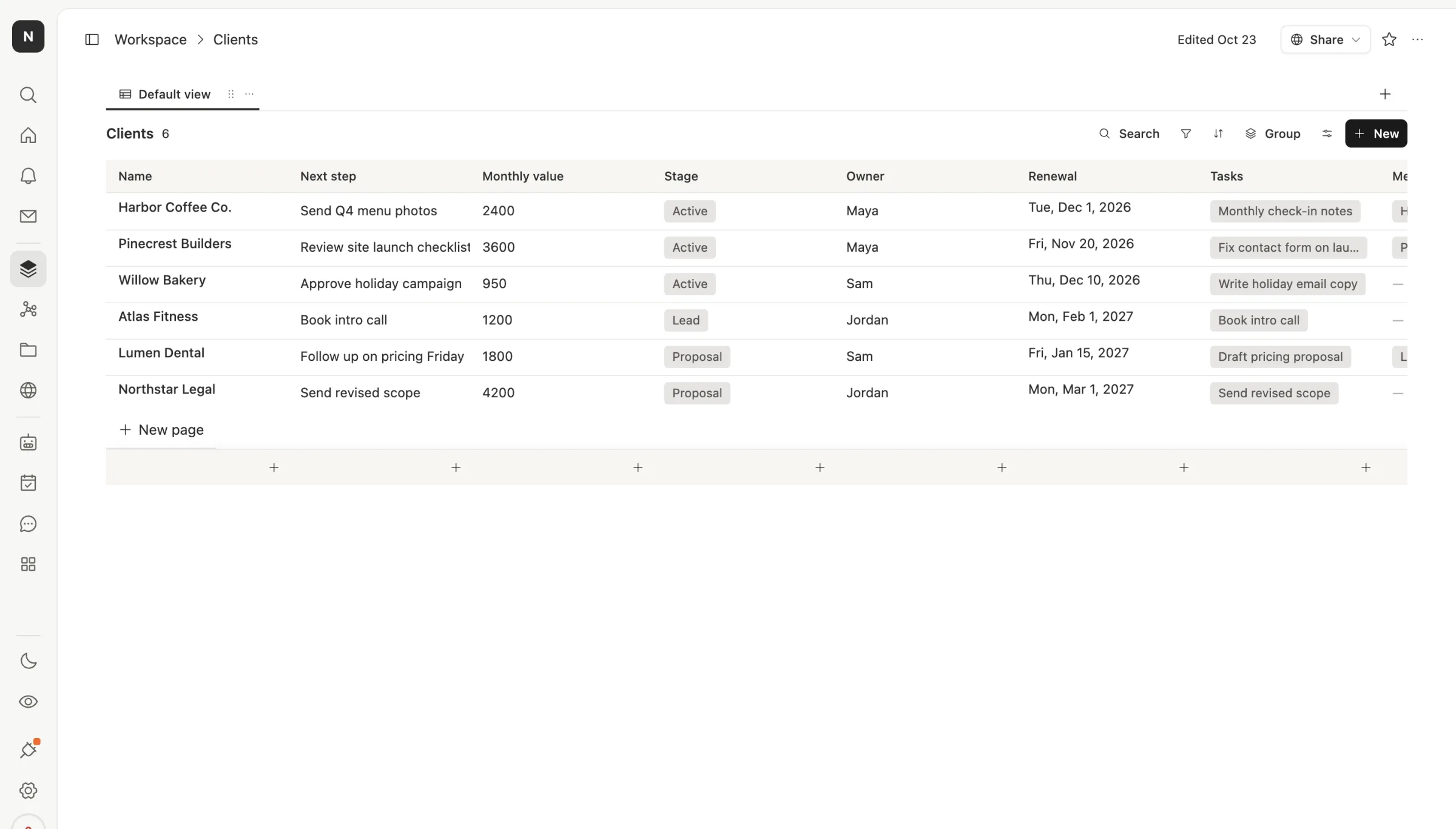
In Team Brain the client list is a plain table. Each client has its next step, monthly value, stage, owner and renewal date, plus links to its open tasks and every meeting note.
The meeting notes are their own table, and each note links back to its client. Open a client and its notes are right there. Open a note and you're one click from the client.
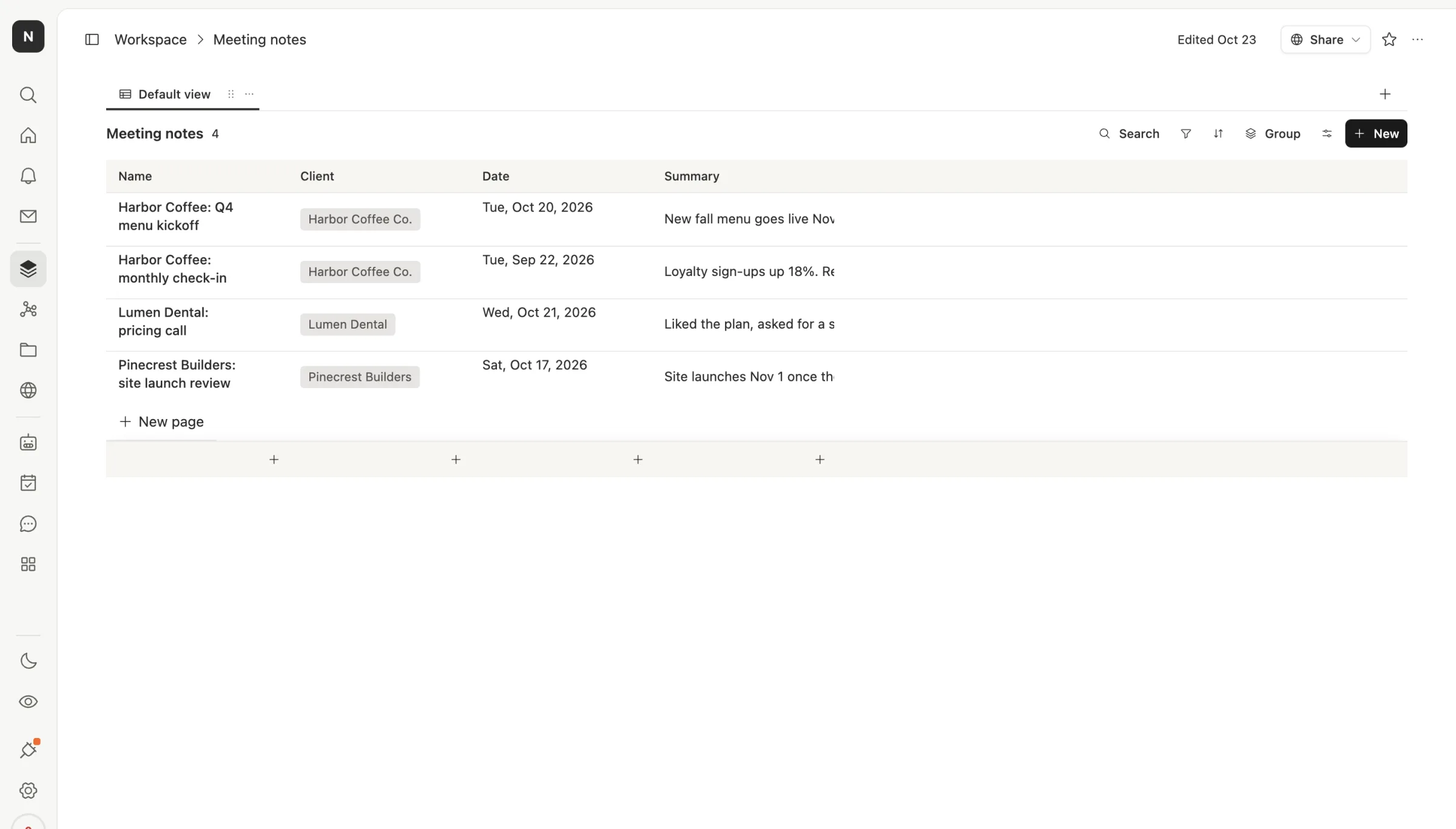
Because everyone on the team can open it at no cost, the designer adds the notes from the call they ran. The account manager updates the next step. Nobody waits for the person with the seat.
Agents that keep the list fresh
The bigger shift is who updates the table. In Team Brain you can set an agent to run every morning, read the Clients and Meeting notes tables, and write a short digest of renewals coming up and next steps that are due. Another can turn a pasted call transcript into a meeting note linked to the right client.
Attio has agents and workflows too, and they spend workspace credits: 250 a month on Free, 1,500 on Plus and 10,000 on Pro. Team Brain agents spend the AI they use, either from our pay-per-use credits or straight from your own AI account with the model you pick.
When to stick with Attio
We'd rather you pick right than pick us.
- Your team sells all day from email and calendar. Attio builds and fills contacts from your inbox on its own. That's real work saved, and Team Brain doesn't log every email to a contact the same way.
- You need sequences and call recording. Attio Pro includes both. If outbound is your engine, keep them.
- Three people or fewer use it. Attio's free plan fits three users and 50,000 records. If that's you, there's nothing to fix.
What breaks when you switch
Your records come across as a CSV: companies, people, deals and their fields. Bring them into Team Brain as tables and link them.
What you rebuild: Attio workflows, email sync, enrichment and any sequences. Most small teams only run a few workflows. Write down which ones actually fire each week, rebuild those first as agents, and leave the rest.
Move one list first, usually active clients. Run both side by side for two weeks, then cancel the seats you no longer need.
Common questions
Is Team Brain a CRM? Not a sales CRM in the Attio sense. It's a workspace where your client list sits next to docs, notes, tasks and agents. For small teams that track a few dozen clients, that's usually the part they needed.
Is Team Brain cheaper than Attio? The workspace is free for any number of people. A five-person team on Attio Plus pays $180 a month on yearly billing before extra credits.
Can Team Brain sync my email like Attio? Not in the same automatic way. If logging every email to a contact is the core of your work, Attio is the better fit.
Can I bring my own AI? Yes. Connect your own AI account and pick the model, or use ours and pay per use.