Team Brain vs Basecamp
Basecamp is calm, flat-priced and loved by clients. Here's how it compares with Team Brain on price, user caps and what each one is for, when to stay with Basecamp, and what you rebuild if you switch.
Every client has a Basecamp project. The to-dos are there, the messages are there, the files are there. Then someone asks a simple question: which clients renew before Christmas, and what's each one worth? Nobody can answer it from Basecamp, so somebody keeps a spreadsheet on the side. Now there are two places to update.
That's not a mistake on your part. Basecamp was built for projects, not records. It's very good at the first and doesn't try to do the second. Here's how it compares with Team Brain, fairly.

The short answer
Stay with Basecamp if your work is projects with clients, you like its calm way of working, and your team fits under its user caps.
Pick Team Brain if you also need records: clients, deals, renewals, subscriptions, anything that wants columns, filters and totals. Or if you want AI agents doing the routine updates, and don't want to count users.
What each one really is
Basecamp is a set of project tools. Each project gets a message board, to-dos, a schedule, docs and files, and a chat. It's opinionated on purpose. Its makers have argued for years that software should be simple and fairly priced. Jason Fried once put it bluntly: software should not be expensive, period. Basecamp's flat prices come from that belief.
Team Brain is a workspace of tables and docs. A client is a row with its own fields: stage, owner, renewal date, monthly value. That row is also a page, and it links to the meeting notes and tasks about that client. AI agents can read and update those rows on a schedule, when a row changes, or when an email comes in.
Both now speak to AI. Basecamp's pricing page lists official ChatGPT and Claude connectors with full MCP support, and CLI access for agents you run yourself. DHH said they've submitted a connector for review with Anthropic. Team Brain connects to Claude, ChatGPT, Codex and others over MCP too, and also runs agents inside the workspace.
What it costs, side by side
| Basecamp | Team Brain | |
|---|---|---|
| Free plan | One project, up to 3 users, 1 GB | Unlimited people and agents, 10 GB |
| Paid plans | Freelancer $29, Pro $79, Pro Plus $99, Pro Unlimited $199 a month, yearly | No seats. You pay for the AI you use |
| User caps | 5, 10, 15, or unlimited on Pro Unlimited | None |
| Project caps | 3, 8, 12, or unlimited on Pro Unlimited | None |
| Clients and guests | Every person counts toward the cap | Share a page or table by link |
| AI | Connectors and CLI for your own agents | Pay per use, bring your own AI, or connect over MCP |
Basecamp's numbers come from Basecamp's pricing page, checked October 28, 2026. Pro Unlimited is $329 a month if you pay monthly. Team Brain's are on our pricing page.
Basecamp's flat price is a real strength. You won't get a surprise bill for one more hire. The catch is the caps. Its FAQ says every person you add is counted, so clients count too. An agency of twelve with four clients logging in is sixteen people, one more than Pro Plus allows:

Projects work the same way. Pro holds eight active projects. Archived ones don't count, so a busy agency ends up archiving and unarchiving to stay under the line.
Records next to the projects
Here's the question from the top, answered in Team Brain. Every client is a row, with its stage, owner, next step, renewal date and monthly value:
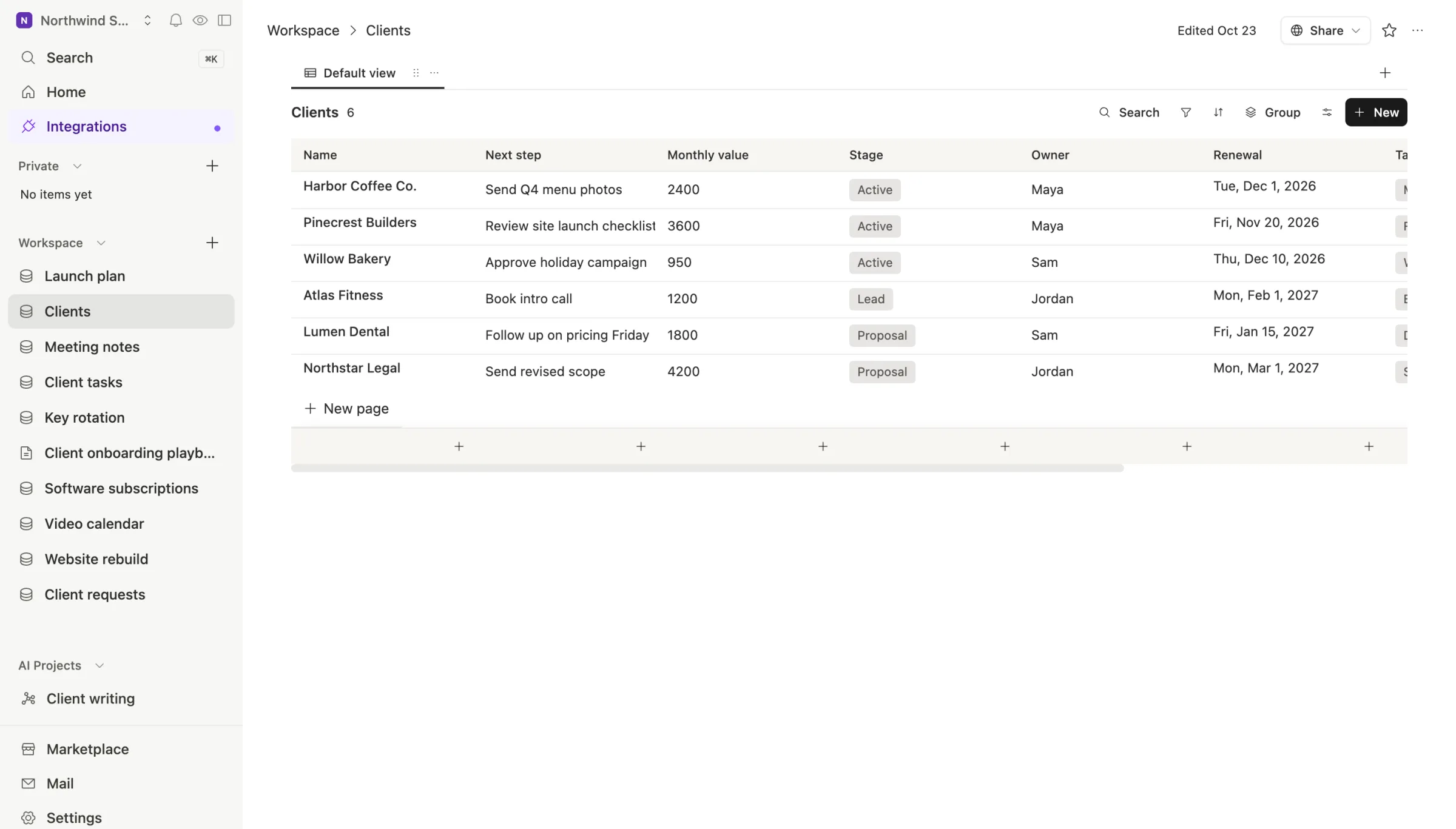
Sort by renewal date and you have your Christmas list. Group by stage and you have your pipeline. Open a client and the tasks and meetings about them are linked right there:
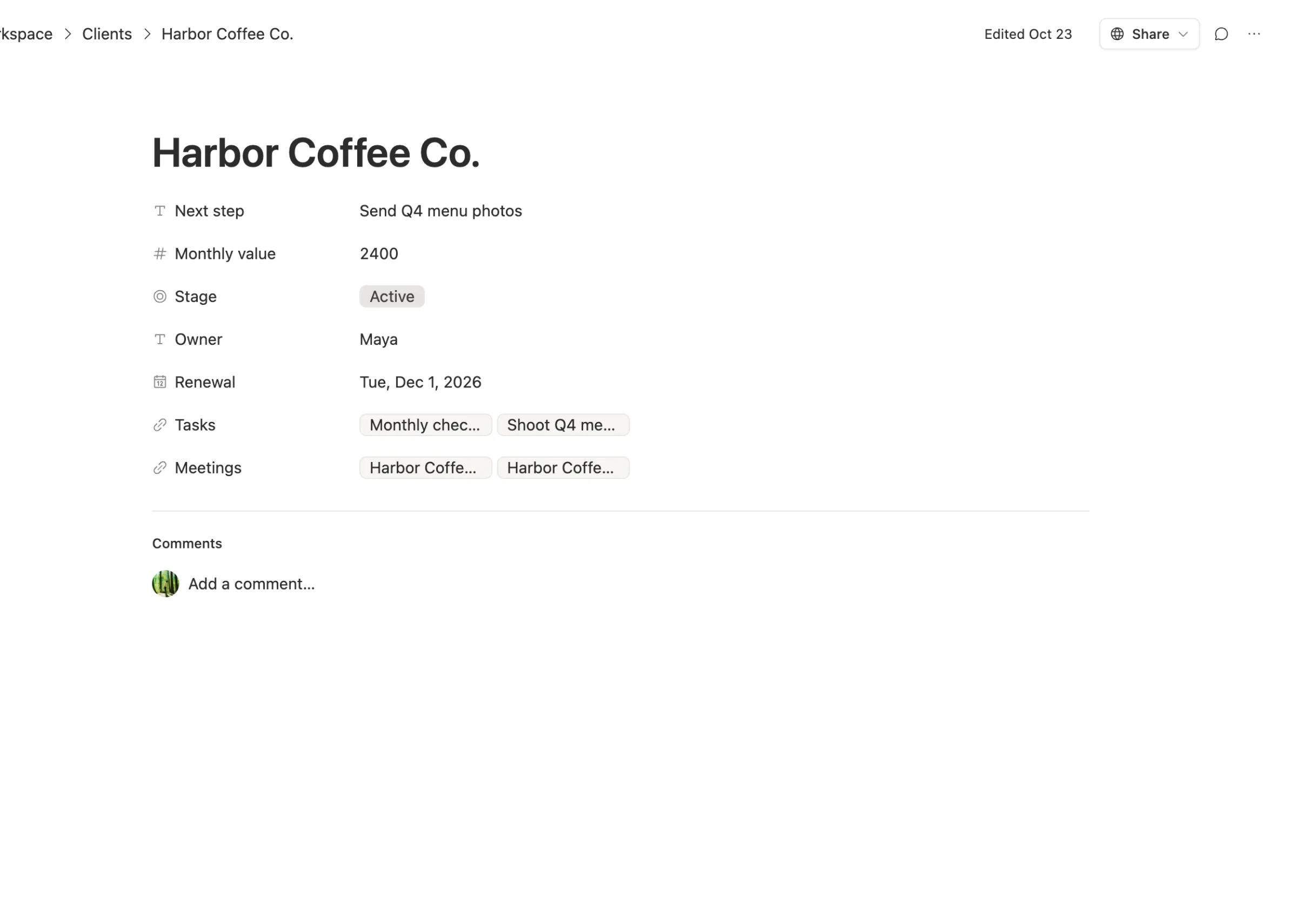
No side spreadsheet. The project work and the facts about the client sit in one place.
When to stay with Basecamp
We'd rather you pick right than pick us.
- Your clients already live in it. One person on Hacker News said clients and execs love the simplicity of Basecamp. That goodwill is hard to rebuild.
- Half your clients only use email. Another said the killer feature was that clients can reply to Basecamp's emails without ever logging back in. If that's how your clients work, keep it.
- You like how they treat customers. DHH has said they've never raised prices on existing Basecamp customers. Some people pay for that kind of steadiness, and that's a fair reason to stay.
- You never need records. If nobody asks "which clients, how much, by when", Basecamp's tools may be all you need.
What breaks when you switch

The export is a copy, not a database. Per Basecamp's help page on exporting, only the account owner can export, from Adminland. You get a full HTML copy of any project, a selection, or the whole account, and an email when it's ready. That's great for keeping a record. It isn't a spreadsheet, so live to-dos and client facts are easier to re-enter than to convert.
Client access. Decide who outside your team needs to see what, before you move. In Team Brain you can share a single page or table by link instead of adding every client as a person.
Habits. Move one client's work first. Keep Basecamp running for a month while both teams get used to it.
Common questions
Is Team Brain cheaper than Basecamp? The workspace is free for any number of people, so the only cost is the AI you use. Basecamp's paid plans run from $29 to $199 a month on yearly billing.
Does Team Brain have message boards and to-dos? It has docs, comments, and tables you can use as to-do lists or boards. It doesn't copy Basecamp's exact set of project tools.
Can AI work in both? Yes, in different ways. Basecamp gives your own AI tools a way in. Team Brain does that too, and also runs agents inside the workspace that update your tables on their own.