Team Brain vs ChatGPT Business
ChatGPT Business gives every person on your team a seat with a smart assistant. Team Brain gives the team one place where the work lives and agents keep it moving. Here's what each costs and when to pick which.
Someone on your team asked ChatGPT to summarize a client call. The summary was good. Then it sat in their chat history, and on Thursday you asked the same question about the same call in your own chat, from scratch.
Nobody did anything wrong. ChatGPT is a great assistant for one person at a time. The trouble is that a team's work isn't a chat. It's a list of clients, a pile of notes and a set of next steps that everyone needs to see.
This week OpenAI made ChatGPT a bigger part of how businesses run. It launched a way for shops to claim their business inside ChatGPT and answer customers there. That's a different product from ChatGPT Business, the plan your team pays for. But it raises the same question for a small team: where should your own work live?

The short answer
Stick with ChatGPT Business if your team mostly asks questions, drafts writing and codes with Codex, and each person's work is their own.
Pick Team Brain if your team shares work: clients, tasks, notes, follow-ups. Tables and docs sit in one workspace, agents keep them up to date on their own, and nobody pays for a seat.
Plenty of teams will keep both. That's fine, and we'll show where each one fits below.
What each one really is
ChatGPT Business is a seat for each person. OpenAI's own help page calls it a self-serve plan for teams that want a shared ChatGPT workspace. Each seat gets ChatGPT, ChatGPT Work and Codex, with GPTs, Projects, apps, company knowledge and deep research. Its pricing page also lists ChatGPT Space to work with your team and agents, and Dots, its always-on agents, for Premium seats only.
Team Brain is a workspace that agents work in. Your clients are a table. Your meeting notes are docs linked to those clients. An agent reads both, writes to both, and runs on a schedule, when a row changes or when an email arrives. You pick the AI model, and you can bring your own OpenAI key.
The difference is where the result ends up. In ChatGPT, the answer lands in a chat. In Team Brain, it lands in the row everyone already looks at.
What it costs, side by side
| ChatGPT Business | Team Brain | |
|---|---|---|
| Standard | $20 a seat a month yearly, $25 monthly | Free workspace |
| Premium | $100 a seat a month yearly, $125 monthly | No plans to climb |
| Minimum | 2 seats | None |
| Over the limit | Buy workspace credits | You pay for the AI you use |
| Always-on agents | Premium seats only | Any agent, any person |
ChatGPT prices are from OpenAI's ChatGPT Business overview, checked November 12, 2026. The page says pricing may differ by country. Team Brain's are from our pricing page.
Here's what that means for a team of ten:

Your team isn't ten people? Put in your own number:
- ChatGPT Business, Premium seats
- $1,000
- ChatGPT Business, Standard seats
- $200
- Team Brain
- $0plus the AI you use
That's $2,400 a year in seats you wouldn't pay.
Seats aren't the only catch. One founder summed up what AI really costs a small team: seats run $20 to $25 a person, and heavy use usually hits a limit, not a bigger bill. In the UK, a reader on Hacker News noticed two Premium seats cost more than one personal Pro plan. And seats are a thing to manage. One owner said that on renewal day they couldn't change seats and paid for two they didn't want.
Where Team Brain is different
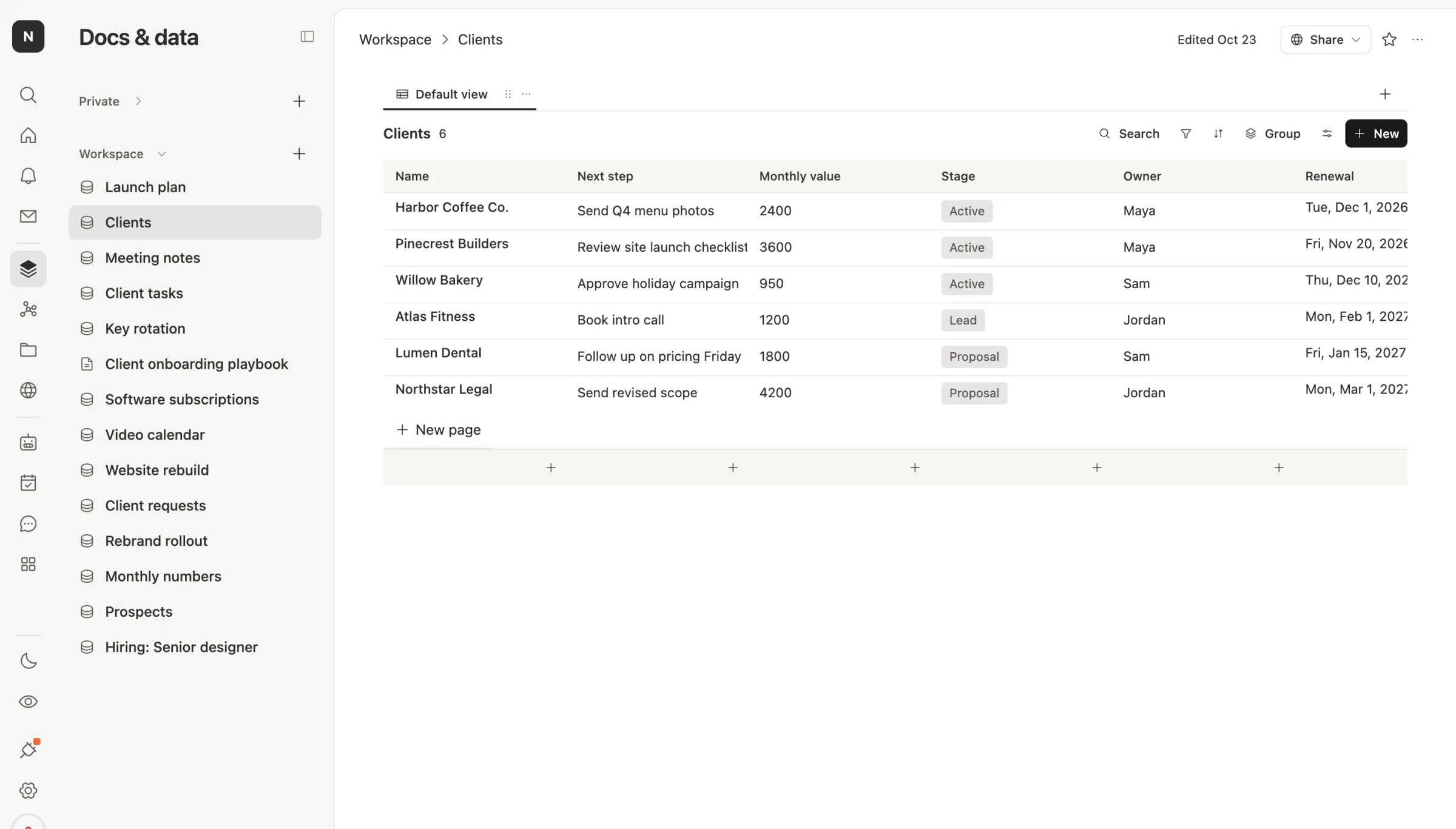
The work is a table, not a chat. Here are Northwind Studio's clients. Each one has a next step, a stage, an owner and a renewal date. Everyone sees the same list.
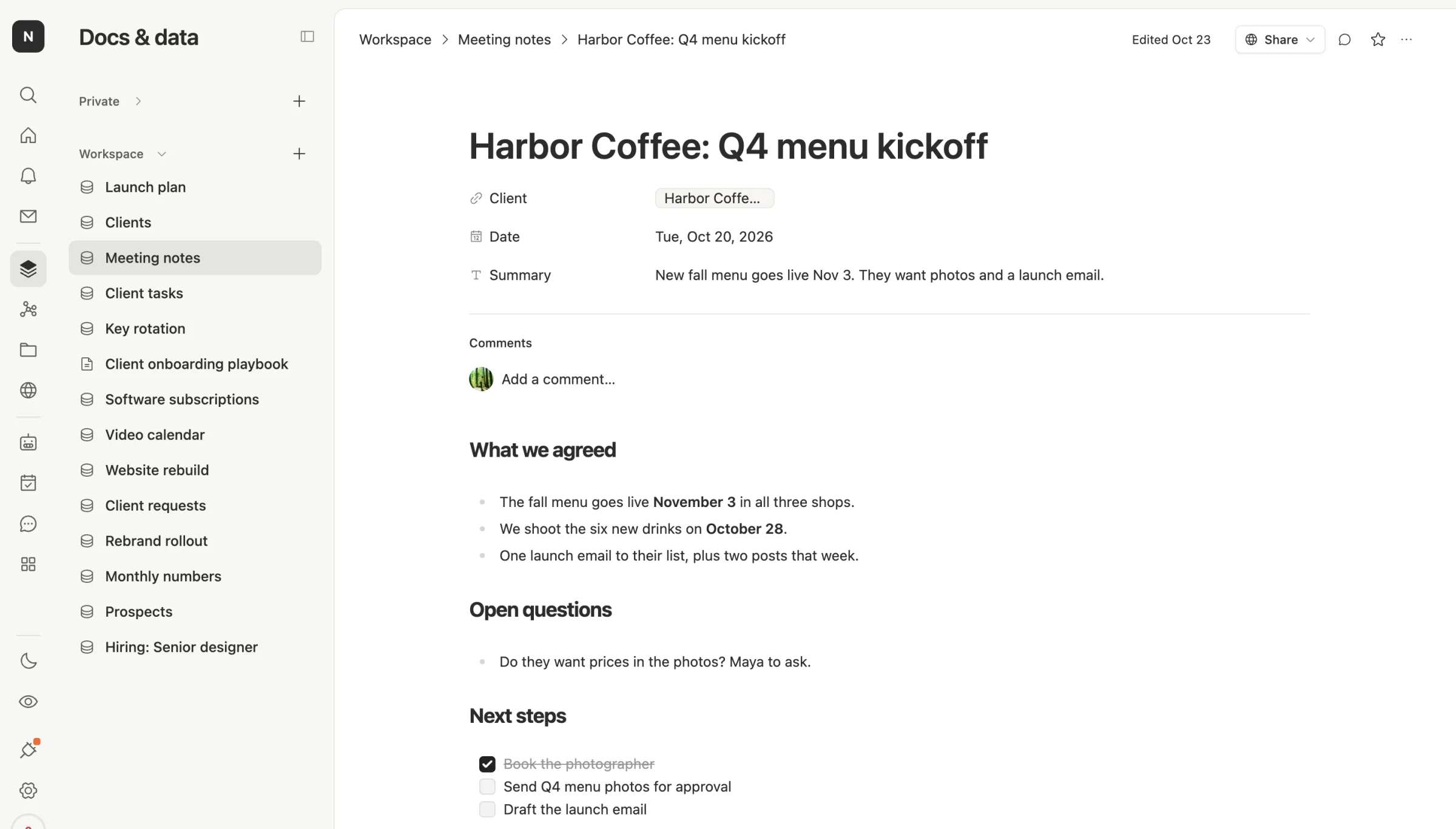
Notes sit next to the client they're about. A meeting note is a doc with the client, the date and a one-line summary on top, then what you agreed and the next steps. Ask about Harbor Coffee next month, and the answer is already here.
Agents do the follow-up. An agent can read new notes every morning and write a short digest, or remind an owner two weeks before a renewal. It writes into your tables, so the next person sees the change without asking.
Everyone gets the same agents. In ChatGPT Business, Dots are for Premium seats. In Team Brain, any agent works for the whole team, and there are no seats to buy.
You pick the model. Use OpenAI, Anthropic or another provider, through us or with your own key. One builder on X noticed ChatGPT Business seats now sign into other tools and asked whether that replaces an API bill. In Team Brain the answer is simple: your key, your bill, your model.
When to stick with ChatGPT Business
We'd rather you pick right than pick us.
- Your team mostly chats. Quick questions, writing, research and code. ChatGPT is very good at that, and one seat each is simple.
- You live in Codex. A Standard seat includes Codex. If your team is mostly engineers, that's a lot of value for $20.
- You need OpenAI's admin and security story. SSO, central billing and a promise not to train on your data are all part of the plan.
- Your work already lives somewhere else. If clients sit in a CRM and notes in a wiki you like, a chat seat on top may be all you need.
Some people try both and keep one. A Hacker News reader with entry plans from both OpenAI and Anthropic said they get more use out of Claude. Taste matters. Try the thing with your own work before you commit.
What changes when you add Team Brain

You don't have to switch everything. Most teams keep ChatGPT for quick questions and move the shared work.
What moves: your client list, your tasks and your meeting notes. Start with one table. Paste in the list you keep in a spreadsheet, then add notes as you go.
What stays: each person's own chats. Chat history doesn't move between tools. If an old chat holds something the team needs, paste it into a doc so everyone can find it.
What you set up once: the agents. Describe the job in plain words, like "every morning, list renewals in the next two weeks," and the agent runs it.
Common questions
Is Team Brain a ChatGPT replacement? Not for one person's quick questions. It replaces the part where a team's work gets lost in separate chats.
Can I use OpenAI's models in Team Brain? Yes. Pick an OpenAI model for any agent or chat, and bring your own key if you'd like to pay OpenAI directly.
Do I need a seat for every person? No. The workspace is free for any number of people. You pay only for the AI you use.
What about Businesses in ChatGPT? That's OpenAI's new listing for shops and service businesses, so customers can find you inside ChatGPT. It's separate from ChatGPT Business and from Team Brain.