Team Brain vs Claude Meetings
Claude Meetings joins your Google Meet call and builds docs while you talk. Team Brain is where the notes, the client and the follow-ups live after. Here's how they differ, what each costs, and why many teams will use both.
You had four calls on Thursday. In one of them, someone said "let's write that up" and nobody did. By Monday the plan lived in three people's heads, and all three remembered it a little differently.
So when Anthropic announced Claude Meetings, a lot of people sat up. Claude joins the call, listens, and builds the doc while you're still talking. One person summed up the shift well: most note takers give you a summary after the call, and Claude does the work during it.
That's a real step forward. But the call is one hour of a client's life. The question this page answers is what happens to that hour on Tuesday, next month, and when the person who ran the call is on vacation.

The short answer
Use Claude Meetings if your team already pays for Claude Team or Enterprise, meets on Google Meet, and wants a doc or a whiteboard drafted live while people talk.
Use Team Brain if you need one place where every meeting note sits next to the client it's about, with tasks that have an owner and agents that follow up.
Use both if you want both. They don't do the same job. Claude helps in the room. Team Brain keeps the work after everyone hangs up.
What each one really is
Claude Meetings is Claude as a guest in your call. Per Anthropic's Use Claude Meetings help page, you connect Google Calendar, pick a meeting and click Add Claude. It shows up as a visible participant and posts a notice in the chat. Say "Claude" and a question, and it answers in the Meet chat. Say "Claude, make a doc" and it builds one your teammates can edit while the call goes on. After the call, a meeting page holds the summary, action items, transcript and anything it built. It keeps the transcript, not the audio.
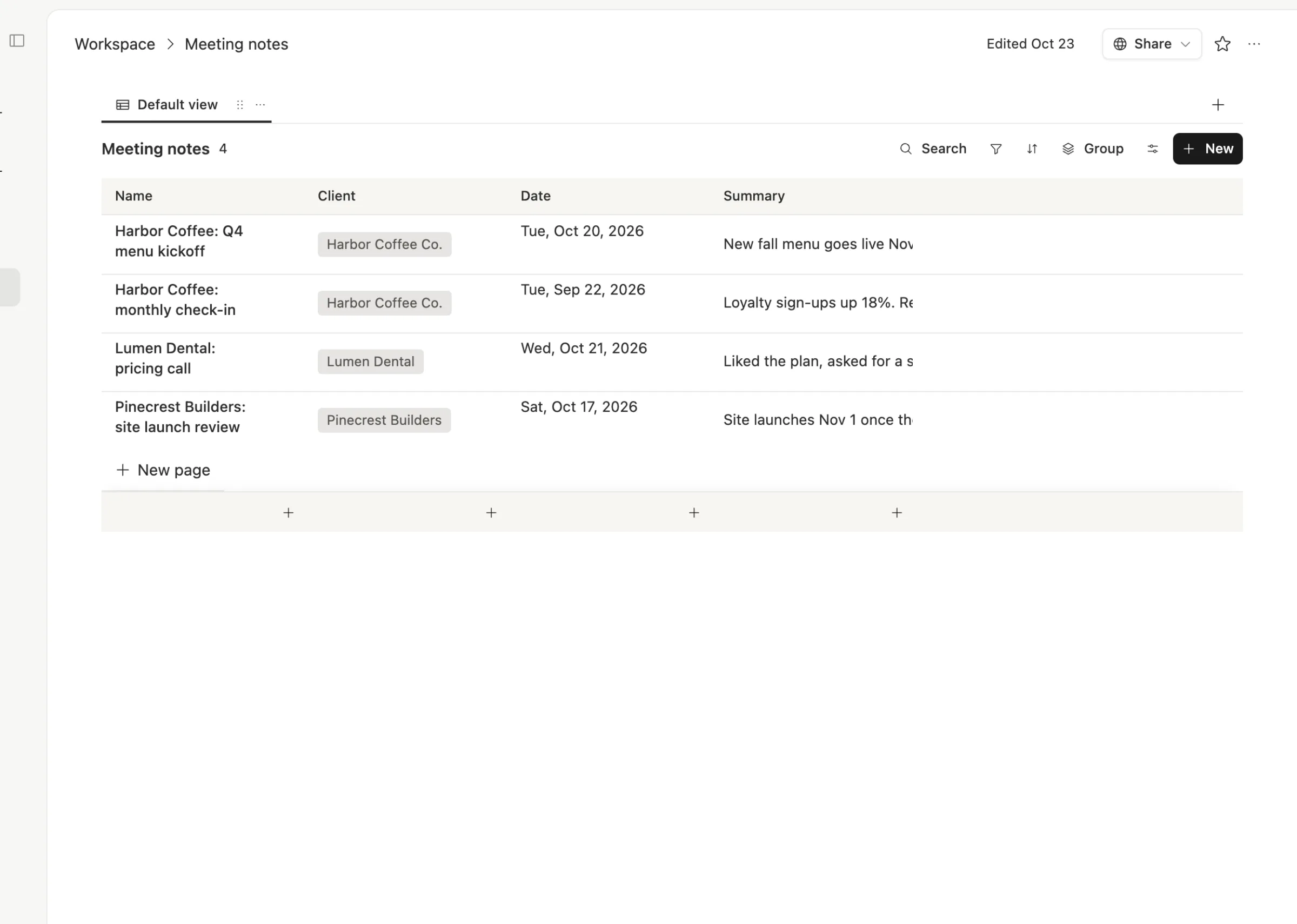
Team Brain is a shared workspace your agents work in. Tables, docs and pages live side by side. A meeting note is a row in a Meeting notes table, linked to the client, with the date and a one-line summary on top. Agents read and update it on a schedule, when a row changes, or when an email lands.
The simplest way to say it: Claude Meetings makes the meeting better. Team Brain makes the week after it better.
What it costs, side by side
| Claude Meetings | Team Brain | |
|---|---|---|
| How you get it | Included in Claude Team and Enterprise, in beta | Free sign up |
| Seat price | Team $20 a seat a month yearly, $25 monthly. Enterprise $20 a seat plus usage, 20 seat minimum | $0 a seat |
| Notes and transcripts | Included | Paste in any transcript or notes |
| Docs built in the call | Free through February 10, 2027 | Not in the call |
| Video apps | Google Meet only for now | Works with notes from any call |
| Outside guests | Allowed by default on Team, off by default on Enterprise | Share any page or table with guests |
Claude Meetings details are from the help page and Anthropic's launch post. Prices are from Claude's pricing page, checked November 15, 2026. Team Brain's are on our pricing page.

To be fair, a Claude seat buys a lot more than meetings: chat, Claude Code, Cowork and the desktop app. If your team already pays for it, Claude Meetings comes along at no extra cost during the beta. Put in your own numbers:
- Claude Team, standard seats
- $200
- Claude Team, premium seats
- $1,000
- Team Brain
- $0plus the AI you use
That's $2,400 a year in seats you wouldn't pay.
Before you call it the end of note takers
The launch got loud fast. One post said Claude mass murdered 100 startups again. A calmer one asked people to check where it works and who gets it first. That's the better read. Today it's:
- Google Meet only. Anthropic says other video apps are coming soon. If your clients send Zoom or Teams links, it can't join those calls yet.
- Team and Enterprise only. Pro and Max plans don't get it.
- Careful with outsiders. On Enterprise, Claude stays out of calls with an outside guest unless an owner allows it, and it leaves if one joins halfway. When guests are allowed, they don't get the meeting page or the recap email.
- Inside your Claude org. The meeting page can be shared with others in your organization. The help page doesn't describe a way to share it outside.
- Not for every org yet. During the beta it's off for orgs with zero data retention, HIPAA-ready setups or customer-managed keys.
None of this is a knock on it. It's a beta, and it's very good at the moment it's built for.
Where Team Brain is different
The note lands next to the client. In Team Brain every meeting is a row, linked to the client it was about. Open the client and you see every call you've had with them, not just this one.
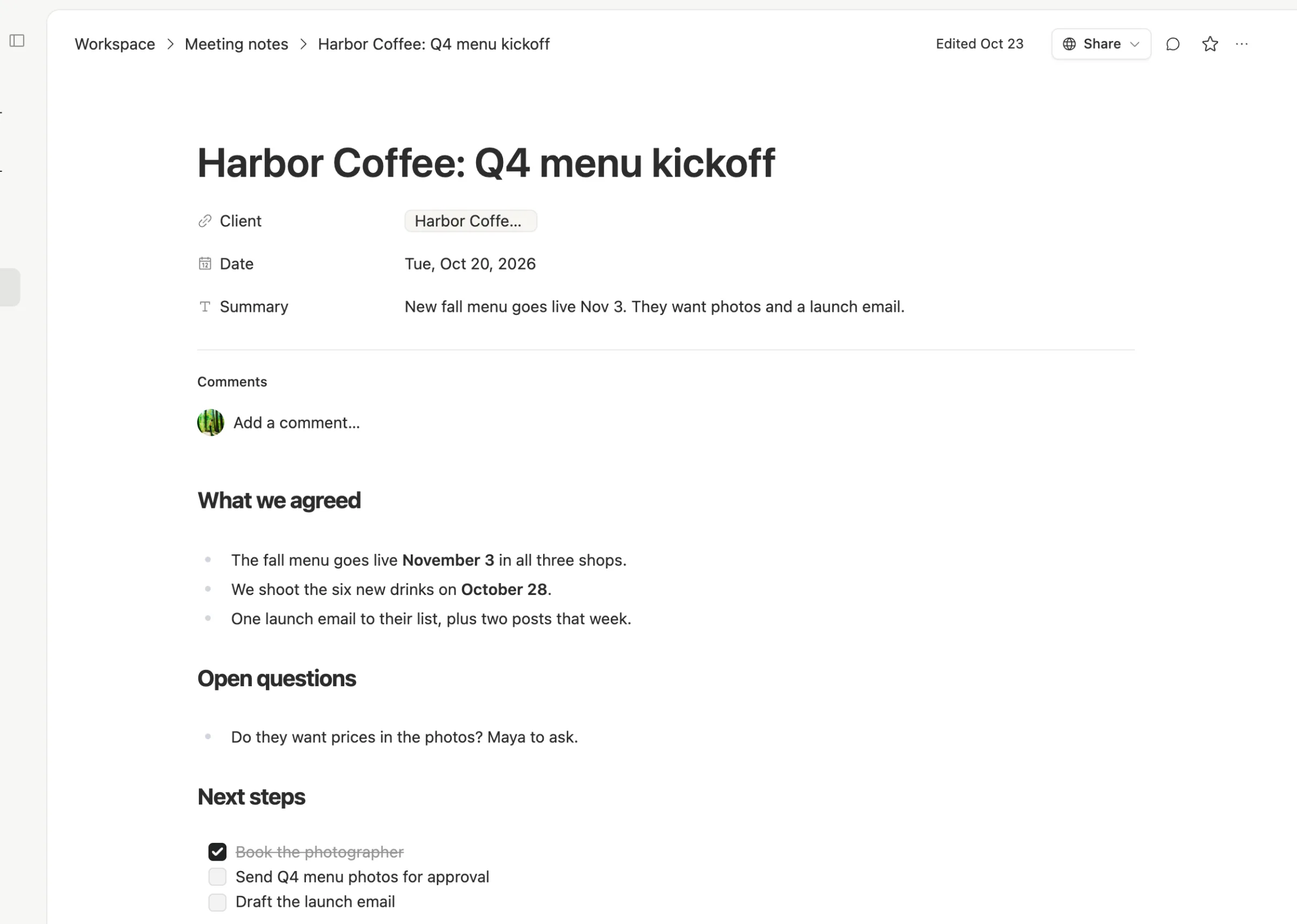
Next steps become work. Open a note and the facts sit on top, with next steps anyone on the team can tick off. Ask the AI chat to turn them into rows on your task board, each with an owner and a date.
Agents follow up when people forget. An agent can check the board every morning and nudge the owner once when a task is late. It runs the same way whoever ran the call.
Nobody pays a seat. Your contractor, your client and the person who only reads the notes can all be in the workspace for free. You pay for the AI you use, or bring your own AI account.

When to stick with Claude Meetings alone
- Your team already lives in Claude. Projects, chats and skills are there, and the meeting page fits right in.
- The value is in the room. Workshops, planning sessions, design reviews, where a live whiteboard beats any summary.
- Every call is internal and on Meet. That's exactly where it works best today.
- You don't track clients or tasks anywhere yet. Start with the recap. Add a workspace when the follow-ups start slipping.
What changes when you add Team Brain
Nothing has to break. Keep Claude in your calls.
What moves: the recap. Paste the summary and action items into a meeting note row under the client. You can set up an agent that takes a pasted transcript and files it for you.
What you rebuild: the follow-up. Next steps become tasks with an owner and a date, and a small agent watches the dates.
What stays in Claude: the live doc, the whiteboard, and the questions you ask during the call.
Common questions
Is Team Brain a Claude Meetings alternative? For what happens after the call, yes. Team Brain doesn't join your video call or transcribe it. If you want that, use Claude Meetings or the note taker you have, and bring the notes into Team Brain.
Does Claude Meetings work with Zoom? Not yet. The help page covers Google Meet, and Anthropic says other video apps are coming soon.
Can my clients see the Claude meeting page? No. Outside guests don't get the meeting page or the recap email. In Team Brain you can share a single page or table with a client by link.
Is Team Brain free? The workspace is free for any number of people and agents. You pay only for the AI you use. See pricing.