Team Brain vs Claude Sheets, Whiteboards and Data
Anthropic just put spreadsheets, whiteboards and dashboards inside Claude. Here's what they do well, where a team outgrows them, what each costs, and how Team Brain compares.
You asked Claude for a hiring budget this week, and it handed you one: tabs, formulas, totals. It took a minute. Then you looked at it and thought, now what? Who else sees this? Who updates it when an offer goes out?
That's the question this launch raises. On November 10, Anthropic rolled out Claude Whiteboards, Claude Sheets and Claude Data. Claude's own post put it simply: think a plan through on a board, build a tracker in a sheet, tell a story with your data. Within a day, one account counted 8 million views and said most people opened them once and closed them.
That's not a knock on the tools. A sheet you can make from one sentence is genuinely useful. The trouble is the step after: a tracker only helps if your team works from it every day, and somebody keeps it current.

The short answer
Use Claude Sheets when you need a quick tracker, budget or plan, you already pay for Claude, and the sheet is mostly yours.
Use Claude Data when your numbers sit in a warehouse or CRM and you want a live dashboard people can read.
Pick Team Brain when the tracker is something the whole team lives in: clients, tasks, hiring, renewals. The tables, the docs and the agents that keep them current share one workspace, and nobody pays for a seat.
What Anthropic actually launched
Here's what Anthropic's own article says, in plain words.
Claude Sheets is a spreadsheet Claude builds and edits with you, with tabs, formulas, formatting and drop-downs, often from one prompt. It's in beta, and the article says it has simple spreadsheet features for now. You can export to Excel or CSV, or carry on in Airtable, Asana, monday.com or Smartsheet.
Claude Whiteboards turns a plan you talk through into a board your team can edit together in real time. It's in beta too.
Claude Data is the old Claude Dashboards under a new name, now generally available. It needs a data connector, such as a warehouse or a CRM, and it can share a live dashboard with people who don't have access to the source.
All three come with every paid plan, and on Team plans they're on by default. What the article doesn't describe is Claude doing work on its own. The only scheduled thing is how often a dashboard refreshes its data.
What it costs, side by side
| Claude | Team Brain | |
|---|---|---|
| Personal | Pro $17 a month yearly, $20 monthly | Free workspace |
| Team seats | Standard $20, Premium $100 a seat a month yearly | No seats |
| Team size | 2 to 150 people | Any number of people |
| Sheets and whiteboards | Included, in beta | Tables, docs and spreadsheets included |
| Work on a schedule | Not described | Agents on a schedule, on a change or an email |
Claude's prices are from Claude's pricing page, checked November 12, 2026. Monthly billing is $25 for a Standard seat and $125 for Premium. Team Brain's are from our pricing page.

If your team already pays for Claude, Sheets costs you nothing extra. If it doesn't, here's the bill for your own team size:
- Claude Team, Premium seats
- $1,000
- Claude Team, Standard seats
- $200
- Team Brain
- $0plus the AI you use
That's $2,400 a year in seats you wouldn't pay.
Where Team Brain is different
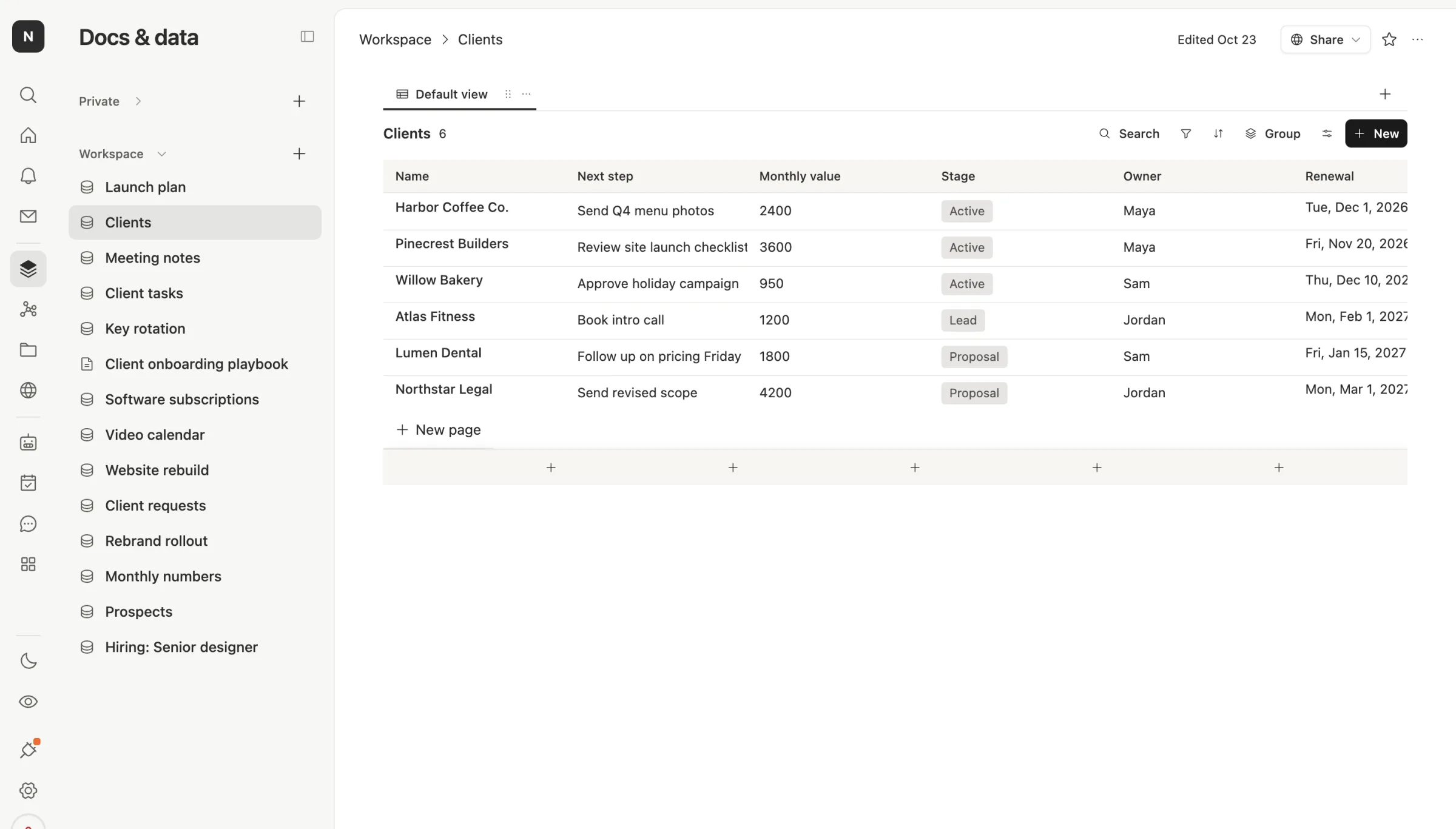
A tracker your team lives in. Northwind Studio's clients are a table with a next step, a stage, an owner and a renewal date. It's the same list for everyone, with board, calendar and timeline views on the same rows.
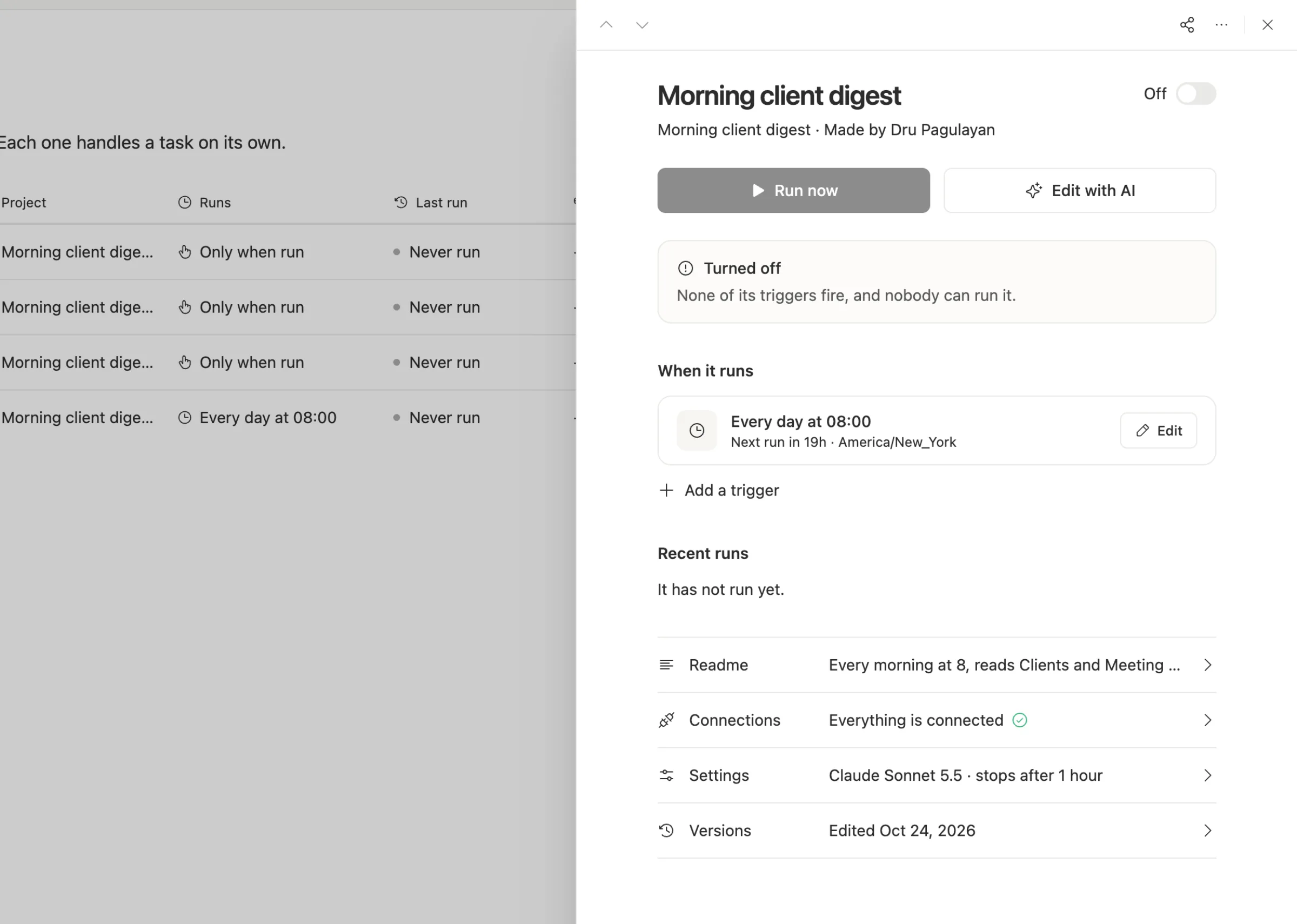
It keeps itself current. This is the big one. A sheet is as fresh as the last person who opened it. In Team Brain, an agent can read your tables every morning, write a digest, flag a renewal or update a row when an email comes in. Here's one that runs every day at 8:
Rows link to everything else. A client row links to its meeting notes, its tasks and its files. A sheet is a grid; it doesn't know that row 4 is the same client as a doc somewhere else.
Spreadsheets too, when you want a grid. Team Brain has its own spreadsheets with formulas, and you can bring in an Excel or CSV file or export one. So the budget and the client list can live side by side.
Use Claude anyway. Team Brain works with Claude, not against it. Pick a Claude model for any agent, bring your own Anthropic key, or connect Team Brain to Claude so Claude can read and update your tables from its own chat.
One builder made the wider point well. The official line is that your work can now stay in Claude, and they think that points the wrong way: the question isn't who draws the best board, it's where your work should live. We agree, and our answer is a workspace that isn't tied to one model.

When to stick with Claude Sheets
We'd rather you pick right than pick us.
- The sheet is a one-off. A budget for one meeting, a comparison for one decision. Make it in Claude, export it, move on.
- Your team already pays for Claude Team. Sheets and Whiteboards are on by default, so try them first.
- You need live dashboards over a warehouse. Claude Data connects to warehouses and CRMs. If your numbers live there, that's its home turf.
- You run workshops. Whiteboards in real time, with Claude sorting sticky notes by theme, is a nice way to run a retro.
What changes when a sheet becomes a table
If you start in Claude Sheets and outgrow it, the move is short. Export the sheet as CSV, bring it into Team Brain as a table, and give each column a real type: a date, a person, a stage. Then link it to the docs it belongs with.
What doesn't move is the conversation that built the sheet, and anything that depends on a Claude connector. Keep those in Claude. Most teams end up using both: Claude to think and draft, Team Brain to hold the work and run the follow-up.
Common questions
Is Claude Sheets free? It comes with every paid Claude plan. There's no separate price on Anthropic's page.
Can Claude Sheets update itself? Anthropic's article doesn't describe scheduled work. In Team Brain, agents update tables on a schedule, when a row changes or when an email arrives.
Can I use Claude inside Team Brain? Yes. Pick Claude models for your agents and chats, and bring your own Anthropic key if you'd like to pay Anthropic directly.
Can I move a Claude Sheet into Team Brain? Yes. Export it to CSV or Excel from Claude, then import it into Team Brain as a table or a spreadsheet.