Team Brain vs Confluence
Looking for a Confluence alternative? Here's how Team Brain compares on price, search, docs and AI agents, what each costs for a 25-person team, and when Confluence is still the right home for your docs.
A new hire asks where the onboarding steps are. Someone sends a Confluence link. The page was last edited fourteen months ago, two of the people it names have left, and the real steps live in a Slack thread nobody can find.
Your team didn't stop caring about docs. The wiki just sits apart from the work, so it goes stale the day after someone writes it. And when you search it, you get every page that mentions the word except the one you need.

The short answer
Stay on Confluence if your engineering team lives in Jira, your spaces and permissions are set up, and the wiki gets read.
Pick Team Brain if your docs and your actual data (clients, tasks, notes) live in different tools, if search keeps failing you, or if you want AI agents to keep pages and tables up to date. Team Brain is free for any number of people, and you pay only for the AI you use.
What each one really is
Confluence is a wiki that sits next to Jira. You make spaces, fill them with pages, and link them to Jira issues. Atlassian now bundles databases, whiteboards and its Rovo AI into the plans.
Team Brain is a workspace your agents work in. Docs and databases sit side by side in one tree. A doc can link to a client row, and the row links back. Agents read and write both on a schedule, when a row changes, or when an email comes in.
People's frustration with Confluence is rarely the editor. One Hacker News commenter called it slow but pretty simple, a standard wiki. Another called it bloated and unwieldy. The complaint that comes up most is search: one person said their Confluence search is barely usable, and another said it's good at finding things in PDFs but not the page you know exists.
What it costs, side by side
| Confluence | Team Brain | |
|---|---|---|
| Free plan | Up to 10 users, 2 GB storage | Unlimited people and agents, 10 GB |
| Paid plans | Standard $7.15, Premium $14.10 per user a month | No seats. You pay for the AI you use |
| Storage | 250 GB on Standard, unlimited on Premium | 10 GB free, 10 TB on Custom |
| AI | Rovo: 25 credits per user a month on Standard, 70 on Premium | Pay per use, or bring your own AI account |
| Automation | 100 steps per user a month on Standard, 250 on Premium | Agents, priced by the AI they use |
Confluence prices are from Atlassian's Confluence pricing page, billed monthly for a team of 25, checked October 26, 2026. Atlassian's per-user price changes with team size and drops on yearly billing, so check the page for yours. Team Brain's are from our pricing page.
Confluence's free plan is generous up to ten people. Past that, every person who needs to read or write is a paid user:

Put in your own team:
- Confluence Premium
- $352.5
- Confluence Standard
- $178.75
- Team Brain
- $0plus the AI you use
That's $2,145 a year in seats you wouldn't pay.
Docs that sit next to the work
The reason wikis go stale is distance. The client list is in one tool, the tasks in another, and the playbook in a third. Updating the playbook is always the last thing anyone does.
In Team Brain, the playbook is a doc in the same tree as the tables it talks about.
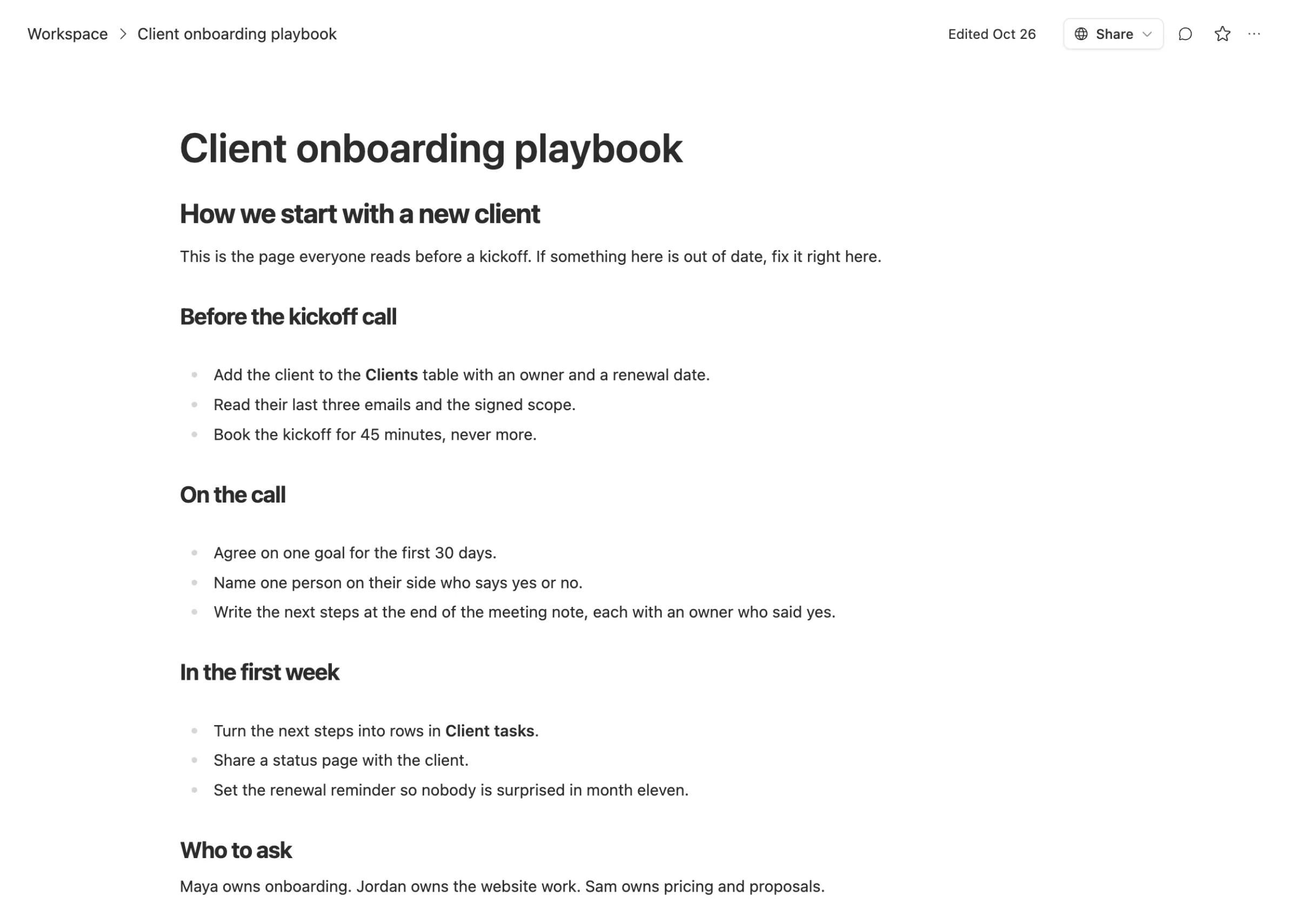
When it says "add the client to the Clients table," the Clients table is right there:
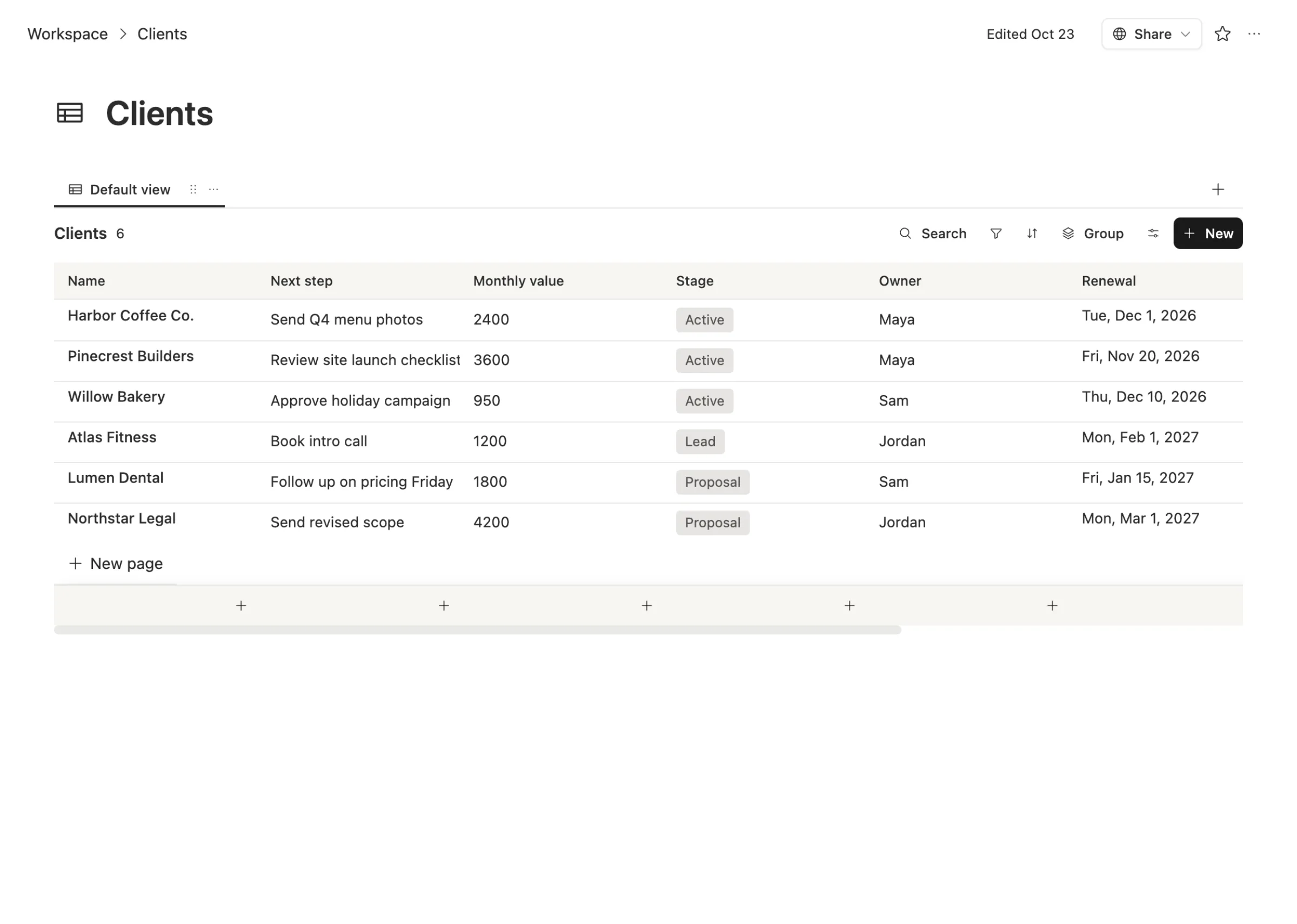
One search covers the doc, the rows and the meeting notes. And you can ask the AI chat a question in plain words, like "who owns onboarding and what's due this week?", and it answers from your pages and tables, with links back to them.
AI that writes into your workspace, not just about it
Atlassian's Rovo adds AI search, chat and agents to every paid Confluence plan, metered in credits per user. That's useful if your team already lives in Confluence and Jira.
The worry people raise is the opposite problem: AI filling the wiki with more text nobody reads. One developer said a colleague kept pasting AI answers into Confluence pages, and much of it went out of date fast. Another said reviewing Confluence pages of raw AI output had become part of their job.
Team Brain agents are built to do one job and stop. One can update the next step on a client row after a call. Another can write a short morning digest from yesterday's meetings. A third can remind a task owner once when something is late. Each shows its schedule, its runs, the model it uses and a cost cap, so you can see what it wrote and what it cost.
When to stick with Confluence
We'd rather you pick right than pick us.
- Your engineers live in Jira. Confluence's links to Jira issues are its home turf. If that's most of your docs, stay.
- You need lots of spaces with fine-grained permissions. Confluence's Standard plan adds advanced permissions and free guest access, and big companies rely on that setup.
- You're ten people or fewer. Confluence's free plan covers up to ten users. If it's working, there's no bill to save.
- Years of pages are linked together. Moving a big, well-linked wiki is real work. Only do it if the pain is bigger than the move.
What breaks when you switch
What moves cleanly: page text, headings, lists, tables and images. Export a space and bring the pages over as docs.
What you rebuild: page trees and links between pages, Jira links, macros and permissions. Plan to fix internal links by hand on the pages people actually read.
Start with the ten pages your team opens most. Move those, point people to them, and leave the rest as an archive.
Common questions
Is Team Brain cheaper than Confluence? Past ten people, usually yes. The workspace is free for any number of people, and you pay only for the AI you use. Twenty-five people on Confluence Standard pay $178.75 a month on monthly billing.
Can Team Brain replace Confluence and our spreadsheets? For most small teams, yes. Docs and databases live in one workspace, linked to each other.
Does Team Brain search work across docs and tables? Yes. One search covers docs, database rows and notes, and the AI chat can answer questions from them.
Can I bring my own AI? Yes. Connect your own AI account and pick the model, or use ours and pay per use.