Team Brain vs Grok Bot
Grok Bot is a strong personal agent with its own cloud computer. Team Brain is a shared workspace where a team's agents work on the same tables and docs. Here's how they compare, what each costs, and when to use both.
You made your first Grok Bot a few weeks ago. Now you have six. One plans your day, one drafts replies, one builds a report every Monday. They're good, and you're not alone: Hiten Shah posted that he's made 81 bots since August.
Then a teammate asks where the Monday report lives, and whether their bot can update the same client list yours does. That's the moment this comparison is for.

The short answer
Stick with Grok Bot if you want one strong assistant for your own work: your inbox, your calendar, your errands on the web, phone calls you hate making.
Pick Team Brain if your team needs one place where the work lives: shared tables, docs and agents that everyone can see and check.
Use both if you like Grok. Team Brain can run its agents on a SuperGrok or X Premium+ plan you already pay for.
What each one really is
Grok Bot is a personal agent with its own computer. xAI's docs describe Bots as AI teammates with names, jobs and context that builds up over time. Each Bot works on a persistent cloud computer with a browser, files and a terminal, so work keeps going while your laptop is closed. All your Bots share that one computer and its logins.
It's moving fast. The Grok Bot changelog for October 22 added Pages: reports, memos and dashboards a Bot builds and keeps up to date. Ben Lang listed a week of launches, from Pages to an iPhone button to talk to your Bot.
Team Brain is a workspace your team and its agents share. Tables, docs and pages live in one place. Agents read and update them on a schedule, when a row changes, or when an email lands. Every person sees the same data, and every agent run leaves a record of what it changed.
The difference is where the work ends up. A Grok Bot's work lives with the Bot and its computer. Team Brain's work lives in tables and docs the whole team owns.
What it costs, side by side
| Grok Bot | Team Brain | |
|---|---|---|
| Cheapest plan with it | Premium, $30 a month | Free, $0 |
| Bigger plans | Super $100, Ultra $200 a month | Custom plan on request |
| Teams | From $30 per user a month | No seats. Unlimited people and agents |
| Usage | Weekly pool, 4x to 50x the Plus plan | Pay per use, or bring your own AI |
| Who pays | Every user | Nobody pays a seat |
Grok prices are from xAI's pricing page, checked October 24, 2026. The $8 Plus plan doesn't include Grok Bot. When weekly usage runs out, Cursor's Grok Bot plans page says extra usage is paid from prepaid credit or on demand. Team Brain's prices are on our pricing page.
For a team, the seat is what adds up:

Put in your own team:
- Grok Teams
- $300
- Grok Super for everyone
- $1,000
- Team Brain
- $0plus the AI you use
That's $3,600 a year in seats you wouldn't pay.
To be fair to xAI, Grok plans bundle a lot more than Grok Bot: Grok chat, image and video, Cursor, and X features. If your team uses those, the seat buys more than an agent.
Where Team Brain is different
The data is shared, not copied. In Team Brain, the client list is one table. Your agent and your teammate's agent both read and write that same table, and everyone sees the change.
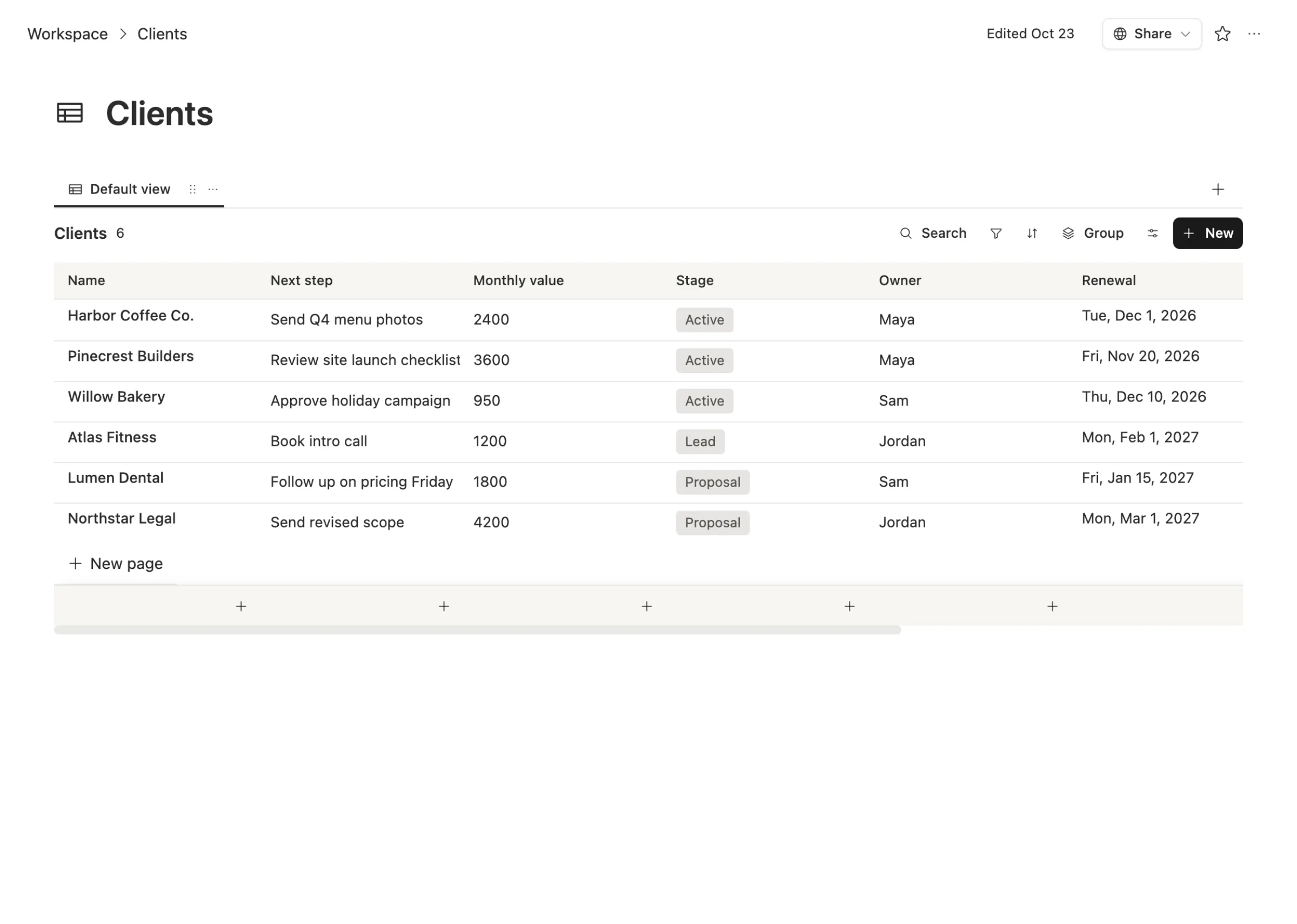
Agents are team members you can check. Each agent has an owner, a cost cap per run, a time limit, and a page that shows when it runs and what each run did. You don't have to ask a bot what it did last Tuesday. You open its runs.
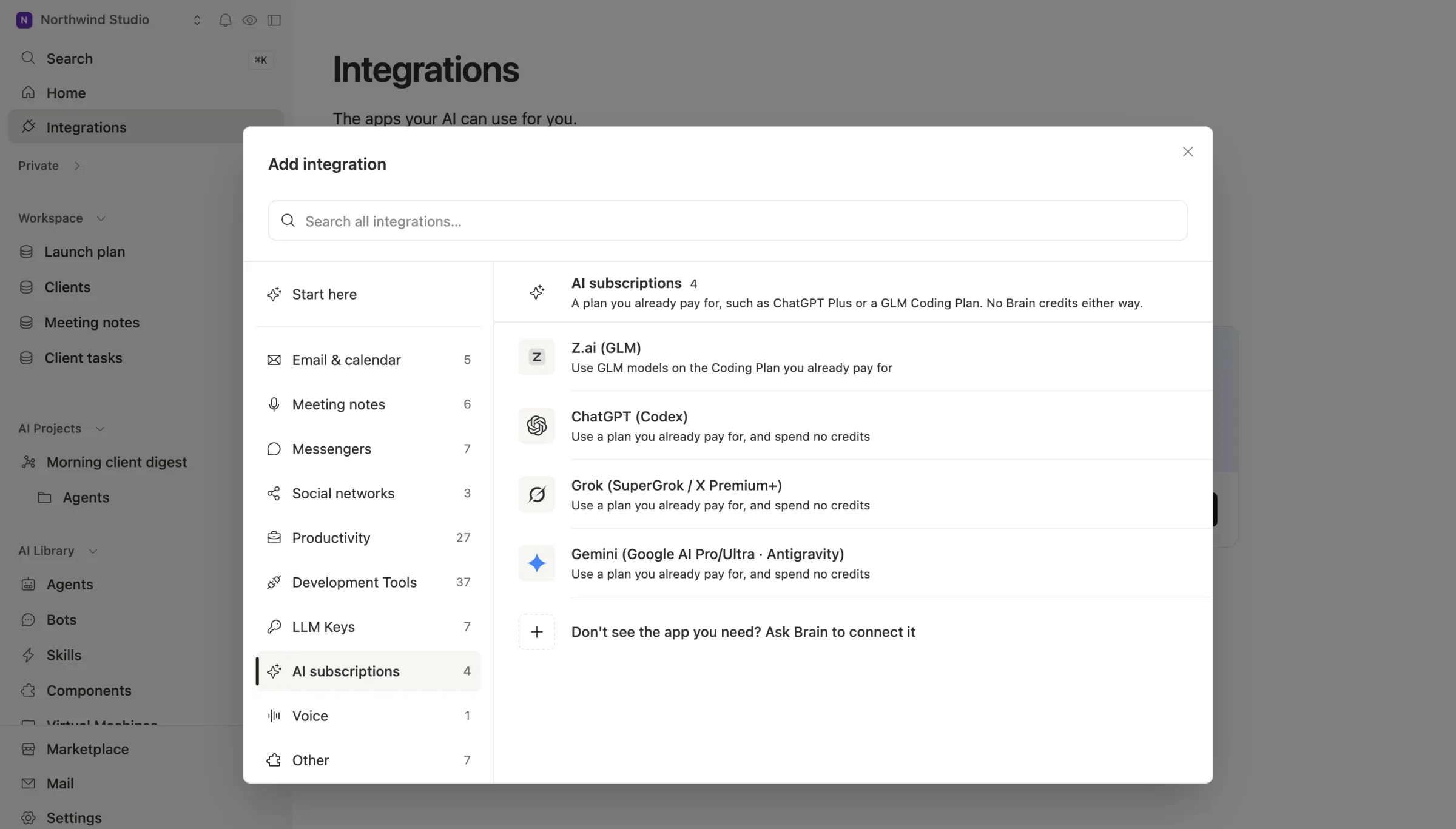
You pick the AI. Each agent picks its model: Claude, GPT, Gemini or Grok. Pay per use, bring your own key, or connect a plan you already pay for. That includes Grok:
When to stick with Grok Bot
We'd rather you pick right than pick us.
- You want an assistant that lives on a real computer. Every Grok Bot account gets a persistent cloud machine with your logins on it, ready for any site. Team Brain can give an agent a machine too, but it's built around shared tables and docs, not personal browsing.
- You live on your phone and on X. Tagging @bot on X, the iPhone action button, voice calls with your Bot. Team Brain isn't built for that.
- It's just you. If nobody else needs to see the work, a personal agent is simpler than a shared workspace.
- You already pay for Premium or Super for Grok and X anyway. Grok Bot comes with it.
What breaks when you switch
You don't have to switch. Most teams who like Grok Bot should keep it for personal errands and move only the shared work.
What moves easily: anything that's really a table or a doc. Client lists, task lists, meeting notes, the Monday report.
What you rebuild: Bot routines and skills become Team Brain agents. Describe the job once and the agent is built from that. Anything that needs a live browser session stays with Grok Bot.
What you keep: your Grok plan. Connect it to Team Brain and your agents can run on it.
Common questions
Is Team Brain a Grok Bot alternative? For shared team work, yes. For a personal assistant that uses its own computer and phone, Grok Bot does things Team Brain doesn't.
Can Team Brain agents use Grok models? Yes. Pick Grok as an agent's model, pay per use, bring an xAI key, or connect a SuperGrok or X Premium+ plan.
Does Grok Bot work for teams? Yes. xAI's teams page lets a member share a Team Bot with everyone or certain people. Each member's chat with it stays private, and it notes that a separate Grok Bot spend cap isn't available today.
Is Team Brain cheaper? The workspace is free for any number of people and agents. You pay only for the AI you use, or run it on a plan you already have.