Team Brain vs HubSpot
HubSpot's founders are back and calling it a re-founding. If you're a small team wondering whether you need a full CRM, here's how HubSpot and Team Brain compare, what each costs in year one, and when HubSpot is the right call.
You signed up for HubSpot's free CRM two years ago. It was perfect for two people. Now you're five, someone wants sequences, someone else wants the pipeline report, and the upgrade page has a seat price, a credit count and a one-time onboarding fee you didn't see coming.
You didn't outgrow it wrong. HubSpot is a big, capable product, and its free tier is generous. The question is how much of it a small team actually uses, and what it costs to get the part you need.
This week the question got louder. HubSpot's co-founder Brian Halligan came back as CEO on November 12 and called it a re-founding, with a new line: the customer relationship harness. Big changes are coming. Here's where things stand today.

The short answer
Stick with HubSpot if marketing, sales and service all run through it: email campaigns, sequences, a shared inbox, a help desk and reports across all of them.
Stay on HubSpot free if you're two people. HubSpot's free tools are free for up to 2 users, with no card.
Pick Team Brain if what you need is a client list, the notes and tasks that go with it, and agents that keep it current, without paying per seat. The workspace is free for any number of people, and you pay only for the AI you use.
What each one really is
HubSpot is a customer platform with hubs. Marketing Hub, Sales Hub, Service Hub, Content Hub and more, all on one contact database. You buy the hubs you need, at a tier, per seat.
Team Brain is a workspace your agents work in. Your client list is a table you shape yourself. Meeting notes, tasks and docs sit next to it and link to each row. Agents read and update those tables on a schedule, when a row changes, or when an email comes in.
What it costs, side by side
| HubSpot Free | Sales Hub Starter | Sales Hub Professional | Sales Hub Enterprise | Team Brain | |
|---|---|---|---|---|---|
| Starting price | $0, up to 2 users | $7 a seat a month | $90 a seat a month | $150 a seat a month | $0, any number of people |
| One-time onboarding | None | None | $1,500, required | $3,500, required | None |
| HubSpot Credits | None listed | 500 | 3,000 | 5,000 | You pay for the AI you use |
HubSpot prices are the "starts at" figures on HubSpot's Sales Hub pricing page with annual billing selected, checked November 14, 2026. The page also shows $20 a seat for Starter and $100 for Professional, depending on how you pay, and says discounts are for new customers only. Team Brain's prices are on our pricing page.
Here's the first year for a five-person sales team:

Starter is cheap and good. The jump comes at Professional, where most of the automation lives, and the onboarding fee lands in the same month.
Put in your own team:
- Sales Hub Starter
- $35
- Sales Hub Professional
- $450
- Team Brain
- $0plus the AI you use
That's $420 a year in seats you wouldn't pay.
Seat prices aren't the whole story. On SaaStr's show this week, a marketer said HubSpot's new pricing took one small marketing team from $1,300 to $3,700 a month: seat prices went down, but "everything is now a credit." Credits are worth checking before you sign. And one founder complained in 2024 that waiving the $1,500 onboarding fee meant passing an exam.
Your client list, shaped like your business
HubSpot gives you its contact, company and deal records, and you add properties to them. Team Brain gives you a blank table that becomes whatever your list needs.
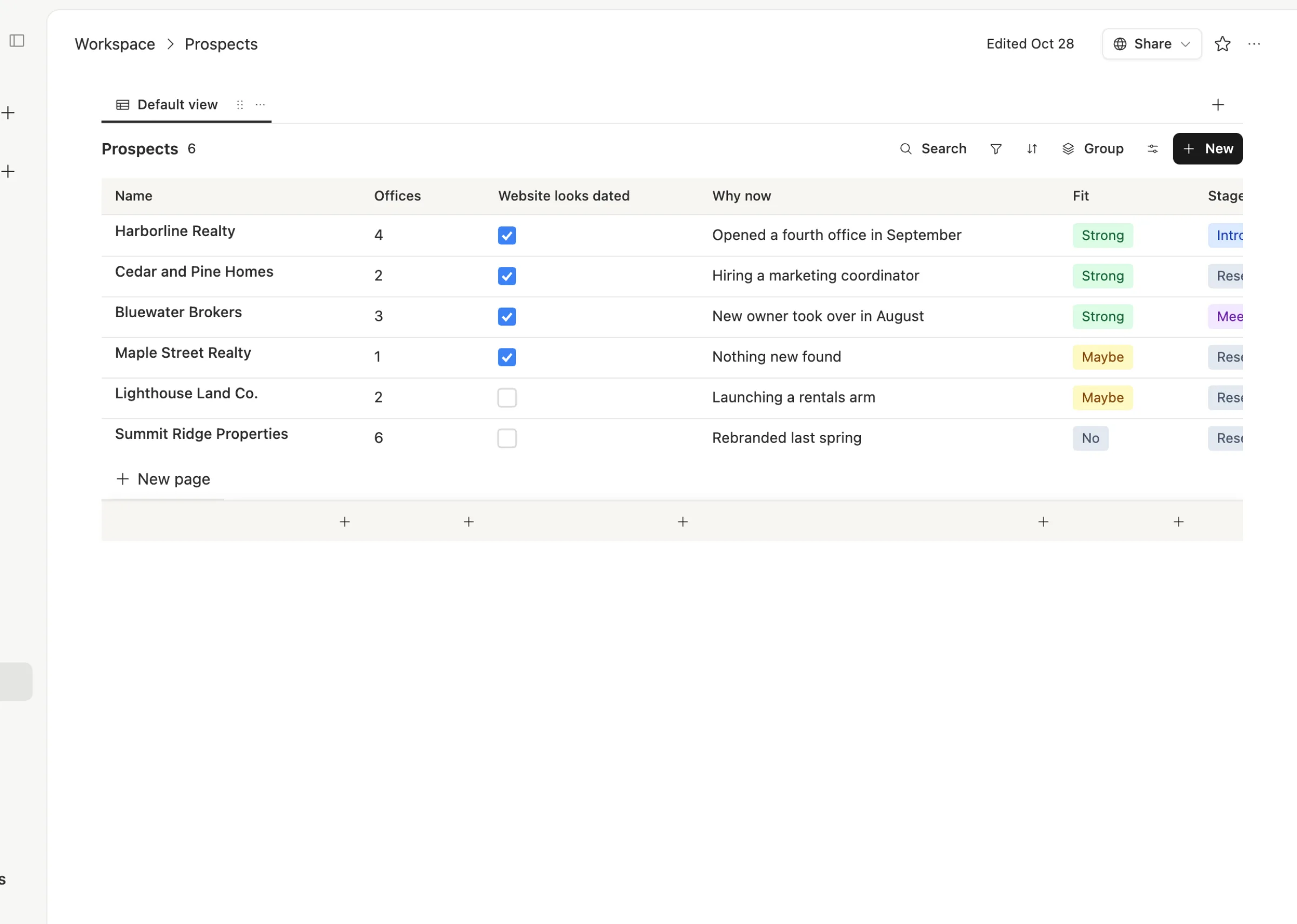
Here's a Prospects table for a small studio that sells to real estate offices. The columns are the ones that matter to them: how many offices, whether the website looks dated, why now is a good time, how good a fit, and the stage.
Every call note links to the client it's about, with what you heard and the next steps as a checklist:
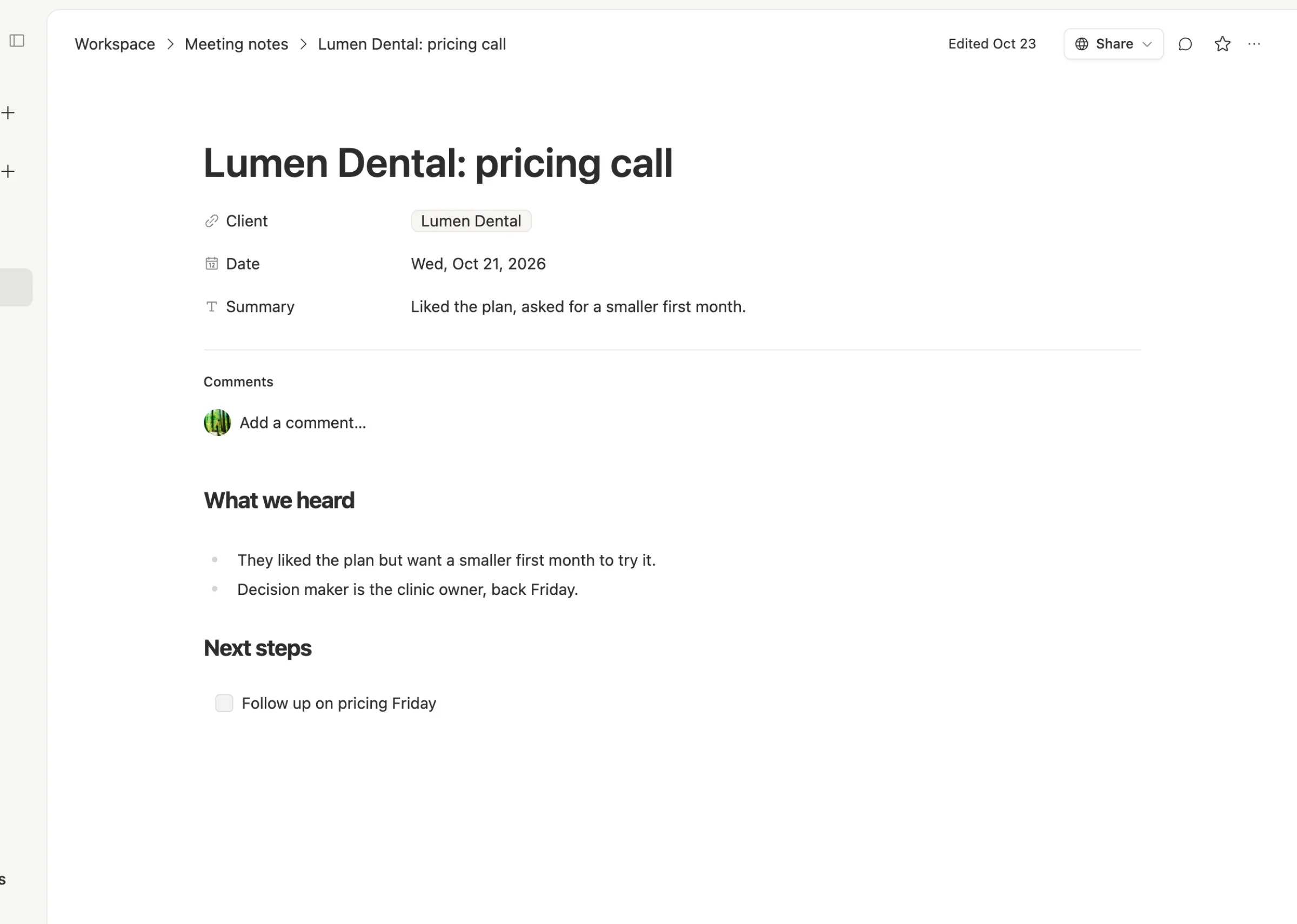
An agent can read both every morning and tell you whose next step is due and which proposals have gone quiet for a week. It writes into the same tables your team uses, so nothing lives in a separate report.
The AI question
HubSpot's own users are asking for this shift. One long-time customer said what they want is for every part of HubSpot to be changeable through MCP and a command line, and that the message they got last year was that HubSpot didn't want them using AI in Claude. The new CEO's posts suggest that's changing, with HubSpot inside Claude front and center.
Team Brain was built the other way around. Agents are a first-class part of the workspace, they run on a model you pick, and you can bring your own AI account.
When to stick with HubSpot
We'd rather you pick right than pick us.
- You run marketing email from your CRM. Lists, campaigns, landing pages and forms tied to the same contacts are HubSpot's home ground.
- You have a support team. Service Hub gives you a help desk, tickets and a shared inbox. We don't try to replace that.
- You've already invested in it. One power user said they love HubSpot but it took a lot of trial and error and someone internal doing the setup. If that work is done and it runs, switching has a real cost.
What breaks when you switch
What comes across cleanly: contacts, companies, deals and their fields, by CSV export.
What you rebuild: email sequences, workflows, forms and reports. Email history and logged calls come across as text at best.
So start with the part that hurts. If it's the client list and notes, move those first and keep HubSpot free for email until you're sure.
Common questions
Is HubSpot free? HubSpot's free tools are free for up to 2 users. Paid Sales Hub plans start at $7 a seat a month on Starter, according to HubSpot's pricing page.
Does HubSpot charge an onboarding fee? Yes, for Professional ($1,500) and Enterprise ($3,500), as one-time fees listed on its pricing page.
Can Team Brain send marketing email like HubSpot? No. Team Brain is where your client list, notes, tasks and agents live. Keep the email tool you use today.
Is Team Brain a CRM? It can be. A client table, linked notes and tasks, and agents that keep them current cover what most small teams use a CRM for. See Team Brain vs other tools.