Team Brain vs Jira
Jira is built for software teams with a process to run. Small teams often just need a board, a few fields and someone to follow up. Here's how Jira and Team Brain compare, what each costs past 10 users, and when Jira is still the right call.
You wanted to log one bug. You opened Jira, picked a project, picked an issue type, filled in a field you've never understood, and got a red message about a required component. Ten minutes later you dropped the bug in Slack instead.
That's not you being lazy. Atlassian built Jira for software teams that run a real process, with sprints, workflows and permissions. If your team is six people trying to ship, a lot of that is weight you carry for nothing. One person on X summed up the feeling: Jira is a lot of clicking through endless menus instead of getting things done.

The short answer
Stick with Jira if you run real sprints, have more than one team shipping the same product, need strict workflows and permissions, or live inside the Atlassian tools already.
Pick Team Brain if you're a small team that needs a board for bugs and tasks, a page for each one, docs next to them, and agents that follow up. No seats, so everyone you work with can join.
What each one really is
Jira is a work tracker with a process engine. Every item moves through a workflow you design. Its pricing page lists boards, user roles and permissions, automation steps, and Rovo, Atlassian's AI for search, chat and agents, from the Standard plan up.
Team Brain is a workspace your agents work in. A bug board is just a table with a board view. Each bug is a page with its own fields and notes. Docs, clients and tasks sit in the same workspace and link to each other. Agents read and update the tables on a schedule or when something changes.
The simplest way to say it: Jira gives you a process. Team Brain gives you a place, and you add only the process you need.
What it costs, side by side
| Jira | Team Brain | |
|---|---|---|
| Free plan | Up to 10 users, 2 GB, 150 automation steps a month | $0, unlimited people and agents, 10 GB |
| Paid plans | Standard $8.48, Premium $15.56 per user a month, monthly billing | No seats. You pay for the AI you use |
| AI | Rovo included from Standard, with monthly Rovo credits per user | Pay per use, or bring your own AI account |
| Automation | 400 steps per user a month on Standard, 750 on Premium | Agents, priced by the AI and run time they use |
| Storage | 250 GB on Standard, unlimited on Premium | 10 GB free, 10 TB on Custom |
Jira's numbers are from Jira's pricing page with monthly billing, checked November 15, 2026. The page says yearly billing saves up to 17%. Team Brain's are on our pricing page.
The free plan is generous until you hire your eleventh person. Then everyone becomes a paid user at once.

Your team isn't twelve? Put in your own numbers:
- Jira Standard
- $101.76
- Jira Premium
- $186.72
- Team Brain
- $0plus the AI you use
That's $1,221.12 a year in seats you wouldn't pay.
Where Team Brain is different
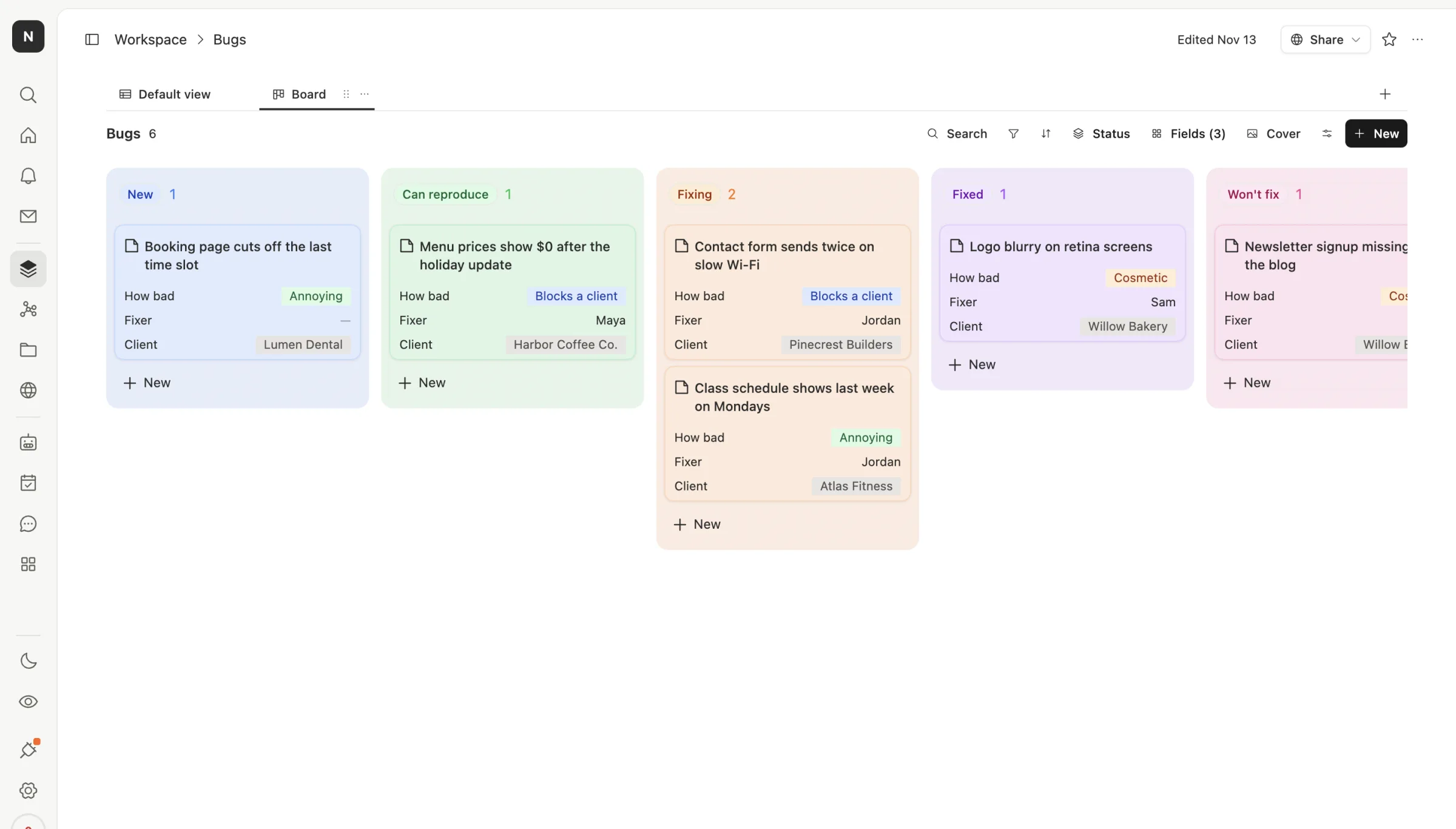
A board without the setup. Here's a small studio's bug board in Team Brain. Five columns, three fields on each card: how bad it is, who's fixing it, and which client it's for. That's the whole configuration.
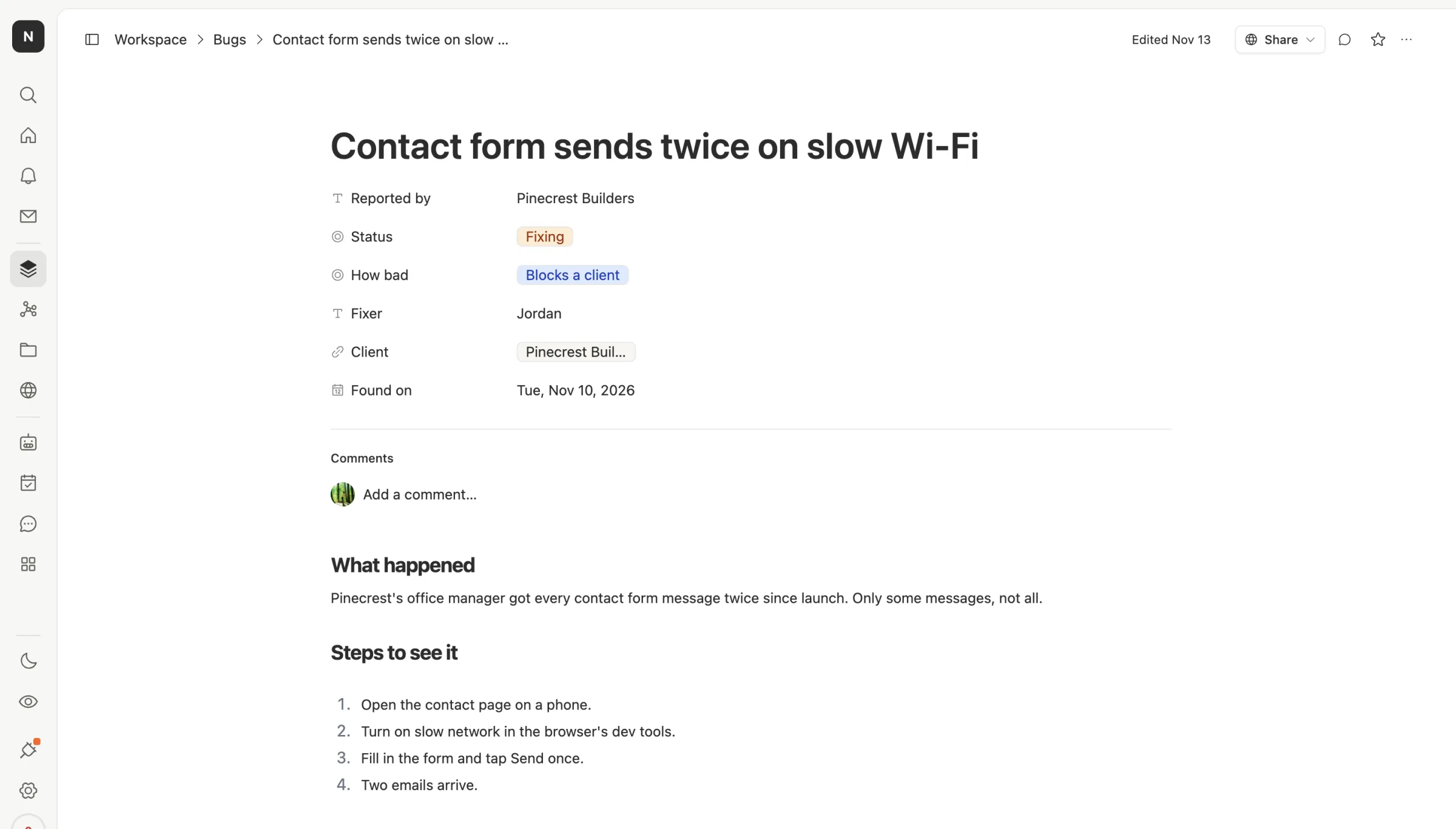
Each bug is a page, not a form. Open a card and you get the fields on top and room to write below: what happened, the steps to see it again, a screenshot. Anyone can read it without learning a ticket language.
Docs and clients live next door. The bug links to the client it affects. The client links to meeting notes and tasks. You don't need a second tool for the wiki.
Agents follow up. An agent can check the board every morning and nudge the fixer once when a bug sits too long, or write a short weekly summary of what was fixed. You cap what each run can spend.
Nobody pays a seat. Your contractor, your client and the founder who only reads the board can all join for free.
When to stick with Jira
We'd rather you pick right than pick us.
- You run real sprints. Story points, velocity, backlogs and releases are what Jira does best.
- Several teams ship one product. Cross-team workflows and permissions at scale are hard to build anywhere else.
- You're deep in Atlassian. Confluence, Bitbucket and Jira Service Management work together, and leaving one means rethinking all of them.
- Your agents already work in it. Some teams have given their agents a Jira board and like the result. If that works, keep it.
And be honest about the switch. As one person put it, one does not simply leave Jira. If your process lives in custom workflows, plan the move like a project.
What breaks when you switch

What moves: your work items, as CSV. Atlassian's guide to exporting work items says to open Filters, then View all work items, run your search, and choose Export. It supports up to 10,000 items per export, so split bigger searches by created date.
What comes in: in Team Brain, click the + next to Workspace, choose Import files, and drop in the CSV. Each file becomes a table, up to 1,000 rows and 60 columns, so split large exports into a few files.
What you rebuild: workflows, automations and links to other tools. Rebuild only the ones you still use. Most small teams find they need far fewer than they had.
Common questions
Is Team Brain a Jira alternative? For small teams tracking bugs and tasks without heavy process, yes. For multi-team software delivery with sprints and strict workflows, Jira is still stronger.
Does Team Brain do sprints? Not as a built-in feature. You can add a sprint column and a board grouped by it, but there's no velocity chart or release tracking.
Is Jira free for small teams? Up to 10 users, per its pricing page. The eleventh user moves you to a paid plan.
What does Team Brain cost? The workspace is free for any number of people. You pay only for the AI you use. See pricing.