Team Brain vs Lindy
Lindy is an AI assistant that works your inbox, calendar and meetings, billed per active user in credits. Team Brain is a workspace where agents work in your team's tables and docs, with no seats. Here's how they compare and when to pick each.
You tried an AI assistant for your inbox and it was great. Meeting notes showed up on their own. Replies were drafted before you opened the thread. Then you wanted the same thing for the team, and the bill turned into a seat for every person.
That's a fair moment to stop and ask what you actually need: an assistant for each person, or agents that do the team's shared work?
Lindy is very good at the first. Team Brain is built for the second. This page compares them honestly.

The short answer
Stick with Lindy if the work is personal: your inbox, your calendar, your meetings, your follow-ups. It talks to you over iMessage, remembers your context, and connects to thousands of apps.
Pick Team Brain if the work is shared: a client list, a bug board, a content calendar, a weekly report. Agents read and write the same tables and docs your team uses, and nobody pays a seat.
What each one really is
Lindy is an AI assistant per person. Its pricing page lists iMessage with your assistant around the clock, meeting recording and notes, computer use, 3,000+ integrations, MCP support, and persistent workspace context. People who use it for one recurring job tend to like it. One person on Hacker News said they use it to send periodic email updates on specific topics, and it works flawlessly.
Team Brain is a workspace your agents work in. Docs and tables sit side by side. An agent runs on a schedule, when a row changes, when an email lands, or when another app calls it, and writes its results straight into your tables and docs where the whole team sees them.
The difference is where the result lands. Lindy's work lands in your inbox and calendar. Team Brain's lands in the team's shared records.
What it costs, side by side
| Lindy | Team Brain | |
|---|---|---|
| Free | $50 in credits that last 7 days | Free workspace, unlimited people and agents, 10 GB |
| Paid plan | Team, $29.99 a month for every active user | No seats. You pay for the AI you use |
| What's included | 3,000 credits per user, pooled across the team | Pay per use, or bring your own AI account |
| More usage | $10 per 1,000 credits | Billed by what the AI actually uses |
| Model | Choose your model for each task | Pick the model per agent, or run on your own AI account |
Lindy's prices are from Lindy's pricing page, checked November 13, 2026. Team Brain's are from our pricing page.

Lindy explains what a credit buys in plain terms. An everyday ask, like a summary or a drafted reply, is 2 to 250 credits. Deep work, like researching a competitor and writing the report, is 250 to 1,000. A big build, like a dashboard from your CRM, is 1,000 to 2,500. So 3,000 credits can go fast if one person runs a few research jobs.
Lindy has also said the model matters a lot for credits. When it switched some agents to a cheaper model, it found 40 to 50 percent fewer credits on average. That's true everywhere: the same job costs very different amounts on different models.
Want to try your own team size?
- Lindy Team
- $239.923,000 credits per user
- Team Brain
- $0plus the AI you use
That's $2,879.04 a year in seats you wouldn't pay.
Where Team Brain is different
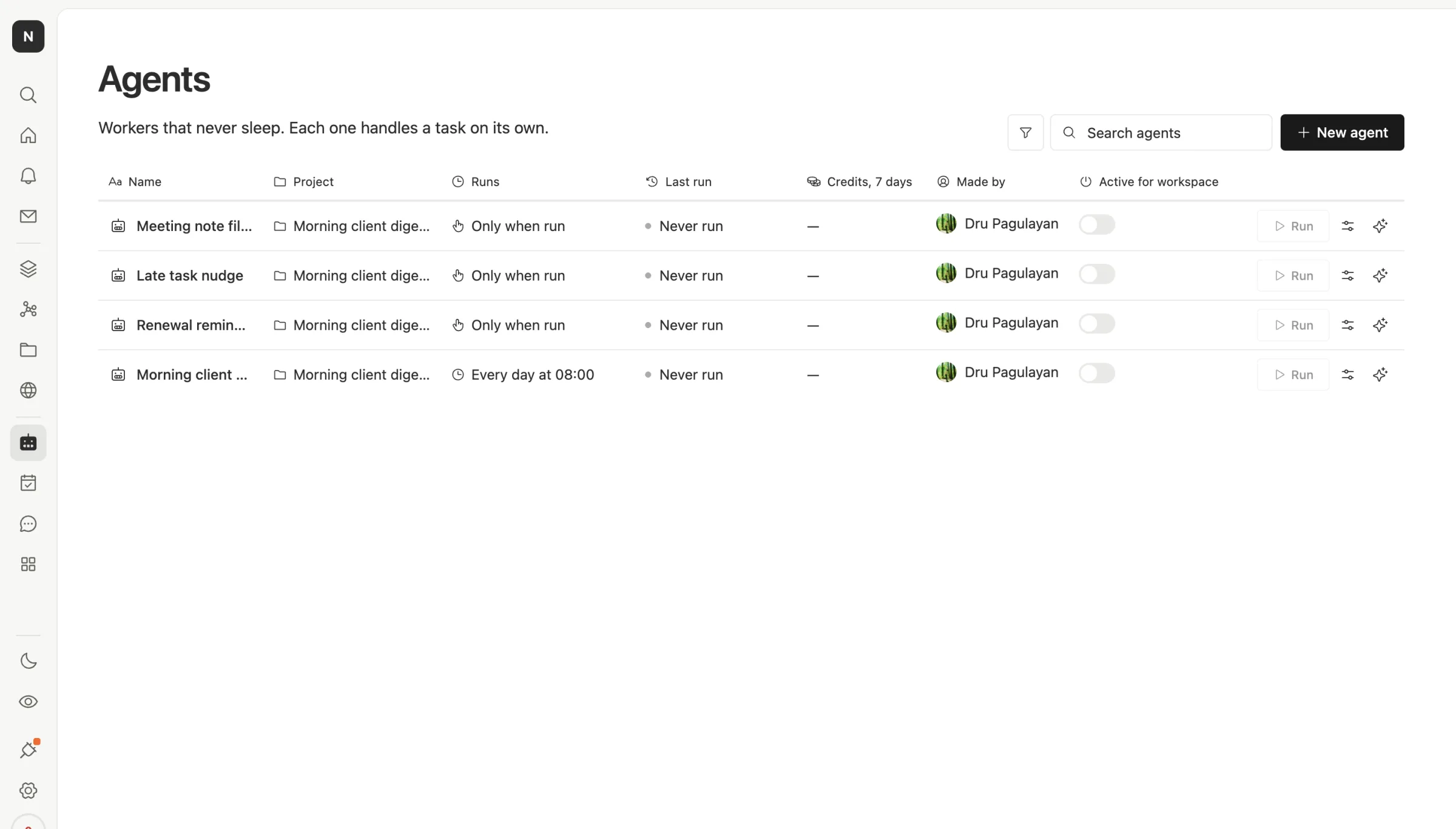
In Team Brain every agent sits in one list with how it runs, when it last ran, and what it spent in credits over the last seven days. Nothing hides in someone's personal account.
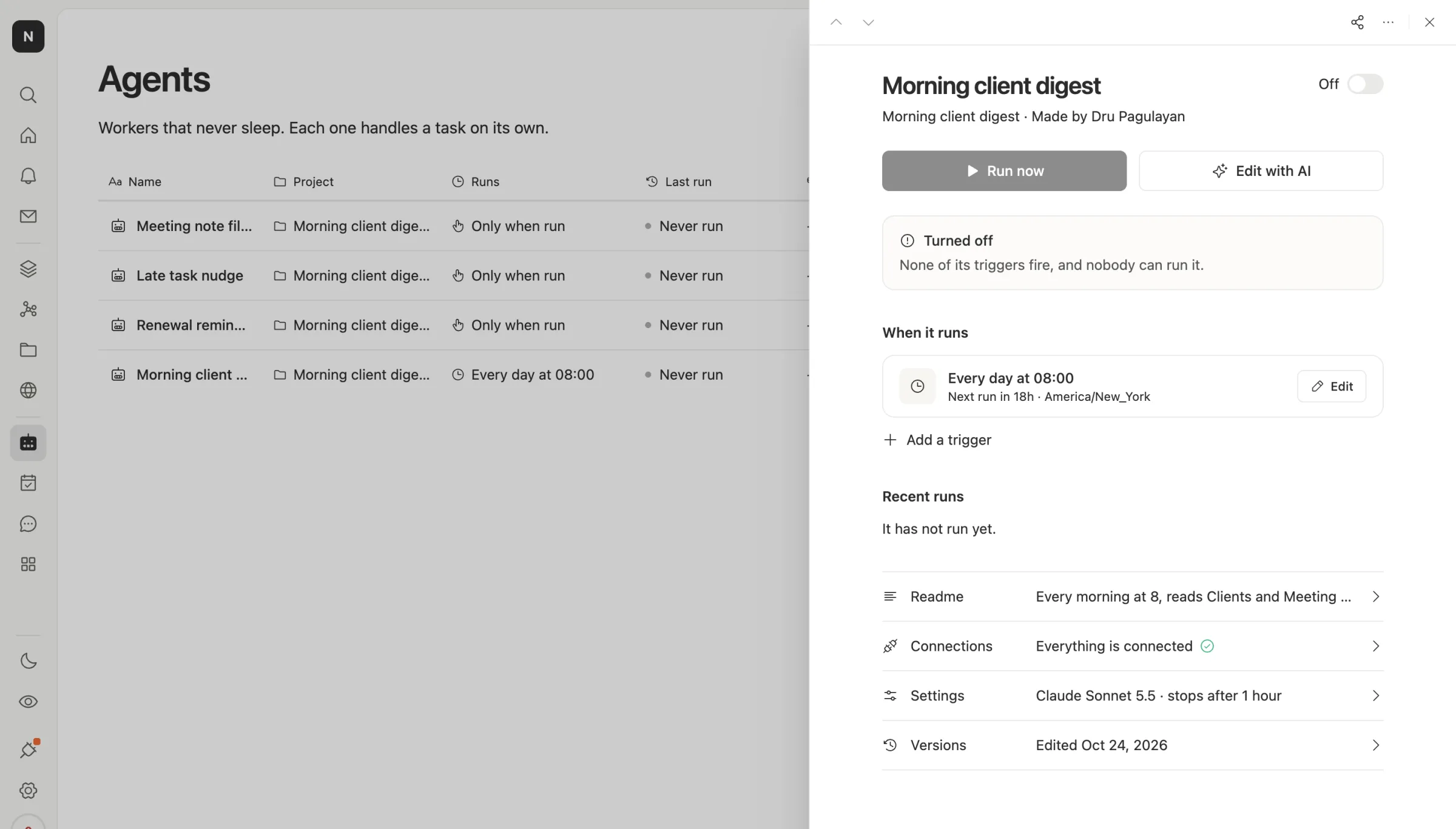
Open one and you see exactly when it runs, its readme, its connections, its model and its versions. This one is set to run every day at 8:00, read the Clients and Meeting notes tables, and write a short digest of renewals and next steps.
Three things follow from that:
- The output is shared. The digest lands where the team works, not in one person's inbox.
- The cost is visible per agent. You can see which agent spends what, and pick a cheaper model for the simple ones.
- You can run it on your own AI account. Connect your own key or subscription, and the agent spends that instead of credits.
When to stick with Lindy
We'd rather you pick right than pick us.
- The job is one person's inbox and calendar. Lindy is built around that, including iMessage and meeting notes, and it's polished there.
- You want it to work across thousands of apps out of the box. Lindy lists 3,000+ integrations. If your job hops between many tools, that breadth matters.
- It's just you. One Team seat at $29.99 with 3,000 credits is simple and predictable for a single person.
Not everyone finds a perfect fit. One founder said they started building their own email assistant because neither Superhuman nor Lindy were working for a CEO's level of email. That's not a knock on Lindy as much as a reminder: try your hardest real day before you commit.
What changes when you switch
Plan to rebuild your agents rather than move them. That's usually quicker than it sounds, because the instructions are the valuable part and you can copy them.
Start with the jobs that produce something the team shares: a weekly report, a digest, a list that gets updated. Rebuild those as Team Brain agents that write into a table. Keep personal inbox help where it is until you're sure.
Common questions
Is Team Brain an AI assistant like Lindy? Not in the same way. It's a team workspace with agents that work in your tables and docs. You can chat with Brain inside it, but it isn't built around one person's iMessage.
Is Team Brain cheaper than Lindy? The workspace has no seats, so a team of any size starts at $0 and pays for the AI it uses. Lindy Team is $29.99 per active user a month with 3,000 credits each.
Can I pick the model? Yes, in both. In Team Brain you pick it per agent, or run agents on your own AI account.
Can I use both? Yes. Plenty of teams keep a personal assistant for email and run shared work in a workspace.