Team Brain vs Microsoft Loop
Loop is Microsoft's answer to Notion, and its full workspaces now come only with the Copilot business plans. Here's how it compares with Team Brain, what each costs a small team, and when you should stay with Loop.
You started a Loop workspace for the new client project. It worked well for a week: a page for the brief, a task list, some notes from the kickoff call pasted into Teams. Then someone asked where the client's contract dates were, and the answer was a spreadsheet in someone's OneDrive. Then Microsoft 365 went down for most of a day, and Loop went with it.
You didn't pick wrong. Loop is a good editor, and if your company already lives in Outlook and Teams, it's right there. The question is whether it's the place you want your team's work to live, and what it costs to keep it there.

The short answer
Stick with Loop if your company already pays for a Microsoft 365 plan that includes it, your files live in OneDrive and SharePoint, and what you need is shared pages and checklists next to Teams.
Use Loop components only if all you want is a live list or table inside a Teams chat or an Outlook email. Those need a OneDrive or SharePoint license, not a workspace.
Pick Team Brain if you want pages and real linked tables in one place, agents that keep them up to date, and no per-seat bill. The workspace is free for any number of people, and you pay only for the AI you use.
What each one really is
Loop is a set of live pages that travel through Microsoft 365. A Loop component is a small block, like a list or a table, that you paste into a Teams chat or an email and everyone edits in place. Microsoft's own docs explain that each one is a .loop file saved in the creator's OneDrive. A Loop workspace gathers pages and components into one shared space for a project.
Team Brain is a workspace your agents work in. Docs and tables sit side by side. A table is a real database: columns with types, rows that link to rows in other tables, and views for table, board, calendar and more. Agents read and update both on a schedule, when a row changes, or when an email comes in.
A Japanese knowledge-management consultant put the gap plainly on X: moving from Notion to Loop is a big step down in features, and most teams that use Loop well use it for Teams meeting agendas, notes and tasks, not as the whole company's knowledge base. That matches what we hear. Loop is strongest as the notepad next to the call.
What it costs, side by side
Loop itself has no separate price. You get workspaces through your Microsoft 365 plan, and Microsoft's business plan comparison only ticks "create shareable project workspaces with Microsoft Loop" for the two Copilot plans.
| Microsoft 365 Business Standard | Business Standard with Copilot | Business Premium with Copilot | Team Brain | |
|---|---|---|---|---|
| Price | $14 a user a month | $23.50 a user a month | $32 a user a month | $0, any number of people |
| Loop workspaces | Not included | Included | Included | Docs and tables built in |
| Also includes | Outlook, Teams, Word, Excel, 1 TB per user | Same, plus Copilot in the apps | Same, plus security tools | Agents, 10 GB of storage |
| AI | AI chat and agents | Copilot in Word, Excel, Outlook, Teams | Copilot in Word, Excel, Outlook, Teams | Pay per use, or bring your own AI account |
Microsoft prices are paid yearly, from Microsoft's business plans page, checked November 14, 2026. Team Brain's are from our pricing page.
Here's what that means for a team of ten that wants Loop workspaces:

To be fair, those Microsoft plans also buy you email, Word, Excel and Teams. If you need those anyway, the real question is the $9.50 a user between Business Standard and Business Standard with Copilot. Put in your own team:
- Business Standard with Copilot
- $235
- Business Premium with Copilot
- $320
- Team Brain
- $0plus the AI you use
That's $2,820 a year in seats you wouldn't pay.
Real tables, linked to your notes
Loop gives you tables you can paste anywhere. Team Brain gives you tables that know about each other.
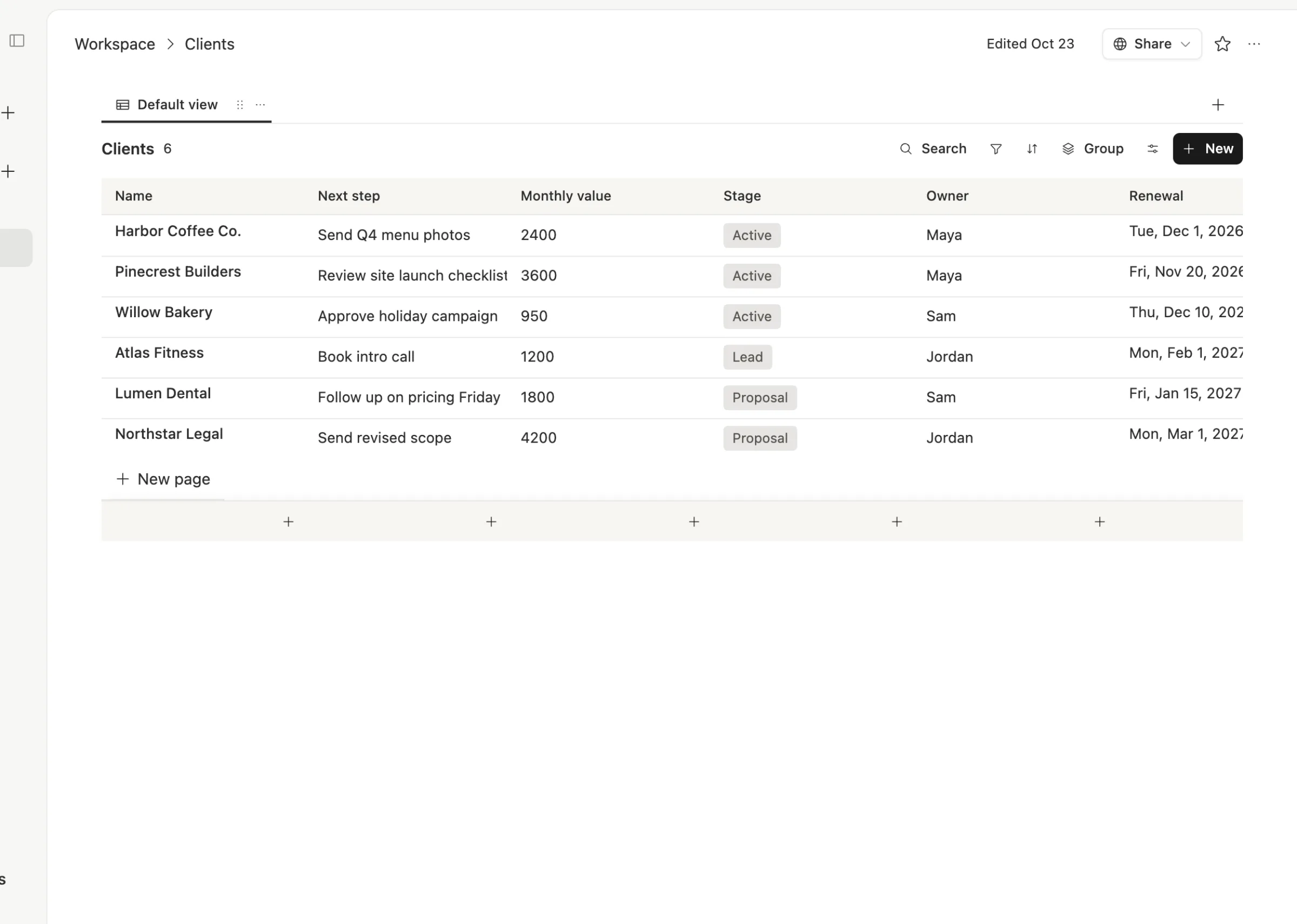
Here's a Clients table. Every client has a stage, an owner, a monthly value and a renewal date, and each row links to the meeting notes and tasks about that client.
Open a meeting and you see which client it was for, the date, a one-line summary, and the notes underneath, with the next steps as a checklist.
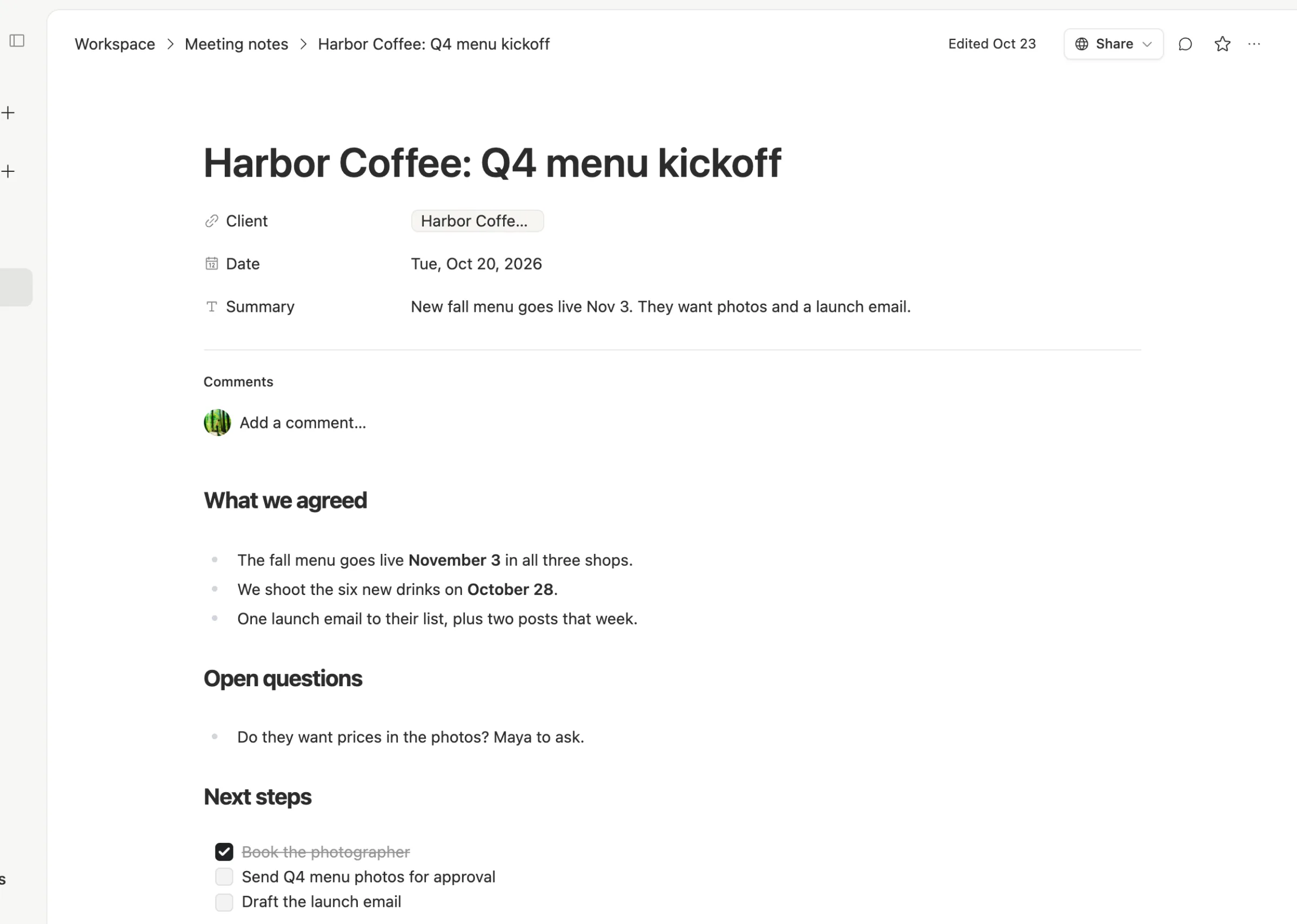
Because the meeting knows its client, an agent can write you a short digest every morning: which renewals are coming up and which next steps are overdue. That's the part Loop doesn't do on its own.
It doesn't share an outage with your email
This week's Microsoft 365 outage took out Exchange Online, and plenty of what sits on top of it. One person in Japan wrote that losing Outlook and Copilot hurt, but losing Loop too was a quiet extra pain. On Hacker News, one admin made the point that SharePoint and Exchange are the linchpin: every Microsoft 365 product leans on them.
That's not a knock on Microsoft. Any cloud service can have a bad day, including ours. But if your notes, your client list and your email all live in one company's cloud, one bad day stops all three.
When to stick with Loop
We'd rather you pick right than pick us.
- You already pay for a Copilot business plan. Loop workspaces are included, your files are already in OneDrive, and your IT person already manages it.
- Your team works inside Teams all day. Loop components in a chat are hard to beat for a quick shared list. Plenty of people like Loop's editor, and one person said they moved client work to Loop and kept personal notes elsewhere.
- You need Microsoft's compliance tools. If your company relies on Microsoft's retention and admin policies for everything, keeping pages in the same place makes that simpler.
What breaks when you switch
What moves cleanly: page text, headings, checklists and simple tables. Copy them in, or export and import.
What you rebuild: Loop components embedded in Teams chats and emails stay in Microsoft, since they're files in someone's OneDrive. Links people saved will still point there. Any table you want linked to other tables, you set up once as a real database in Team Brain.
So start with the one project that keeps outgrowing its Loop page, usually the one with a client list or a tracker. Move that first. Leave the meeting-chat components where they are.
Common questions
Is Microsoft Loop free? Loop components work with a OneDrive or SharePoint license. Creating Loop workspaces comes with the Microsoft 365 Business Standard with Copilot plan at $23.50 a user a month, or Business Premium with Copilot at $32, paid yearly.
Does Team Brain replace Outlook or Teams? No. Team Brain is where your docs, tables and agents live. Keep the email and chat you use today.
Can Team Brain do linked tables like a database? Yes. Columns have types, rows link to rows in other tables, and links can go both ways.
Can I bring my own AI? Yes. Connect your own AI account and pick the model, or use ours and pay per use. See the one-on-one comparisons at team-brain.com/vs.