Team Brain vs monday.com
Looking for a monday.com alternative? Here's how Team Brain compares on price, boards, docs and AI agents, what each one costs for a 10-person team, and when you should stay on monday.com.
It's renewal week. The monday.com invoice lands, and someone does the math: twelve seats, but four people only open it to check one board. Meanwhile the project notes live in Google Docs, the client list lives in a spreadsheet, and every status update is somebody copying a line from one into the other.
You didn't set it up wrong. monday.com is good at boards. Your work just grew past boards, and the bill grew with every person you added.

The short answer
Stay on monday.com if your team runs on boards, your automations are built and working, and the per-seat bill doesn't hurt.
Pick Team Brain if your boards, docs and client data keep drifting apart, if you're paying seats for people who barely log in, or if you want AI agents doing the routine updates on their own. Team Brain is free for any number of people, and you pay only for the AI you use.
What each one really is
monday.com is a board that grew a platform. You start with a board of items and columns, then add views, automations, dashboards and apps from its marketplace.
Team Brain is a workspace your agents work in. Docs and databases sit side by side. A database can be a table or a board, and agents read and update both on a schedule, when a row changes, or when an email comes in.
That difference shows up in the small things. One person on Hacker News pointed out you still can't change the width of the first column on monday.com, even though, in their words, it claims to replace spreadsheets. Small, but it's the kind of thing that tells you what a tool was built for first.
What it costs, side by side
| monday.com | Team Brain | |
|---|---|---|
| Free plan | Up to 2 seats, 3 boards, 3 docs | Unlimited people and agents, 10 GB |
| Paid plans | Basic $9, Standard $12, Pro $19 per seat a month | No seats. You pay for the AI you use |
| Smallest paid team | 3 seats | One person |
| AI | 1,000, 2,000 or 3,000 AI credits a month by plan | Pay per use, or bring your own AI account |
| Automations | Standard: 250 automation actions and 250 integration actions a month | Agents, priced by the AI they use |
| Viewers | Unlimited free viewers from Basic | Everyone is free |
monday.com prices are from monday.com's pricing page, billed yearly, checked October 26, 2026. Monthly billing costs more; the page says yearly saves 18%. Teams over 40 seats get a quote. Team Brain's are from our pricing page.
Here's what that means for a team of ten:

Put in your own team:
- monday.com Pro
- $190
- monday.com Standard
- $120
- Team Brain
- $0plus the AI you use
That's $1,440 a year in seats you wouldn't pay.
The seat isn't the only cost. Someone on Hacker News wrote this week that their company pays for 100 tools, including three CRMs, one of them monday.com, and they can't get anyone to cut a single one. Another said their org still pays for monday.com even though no one uses it, because the team that does the work picked Asana instead.
Boards and docs in one place
In Team Brain, a board is just one view of a database. The same rows show up as a table when you need to sort and edit in bulk, and as a board when you want to see what's stuck.
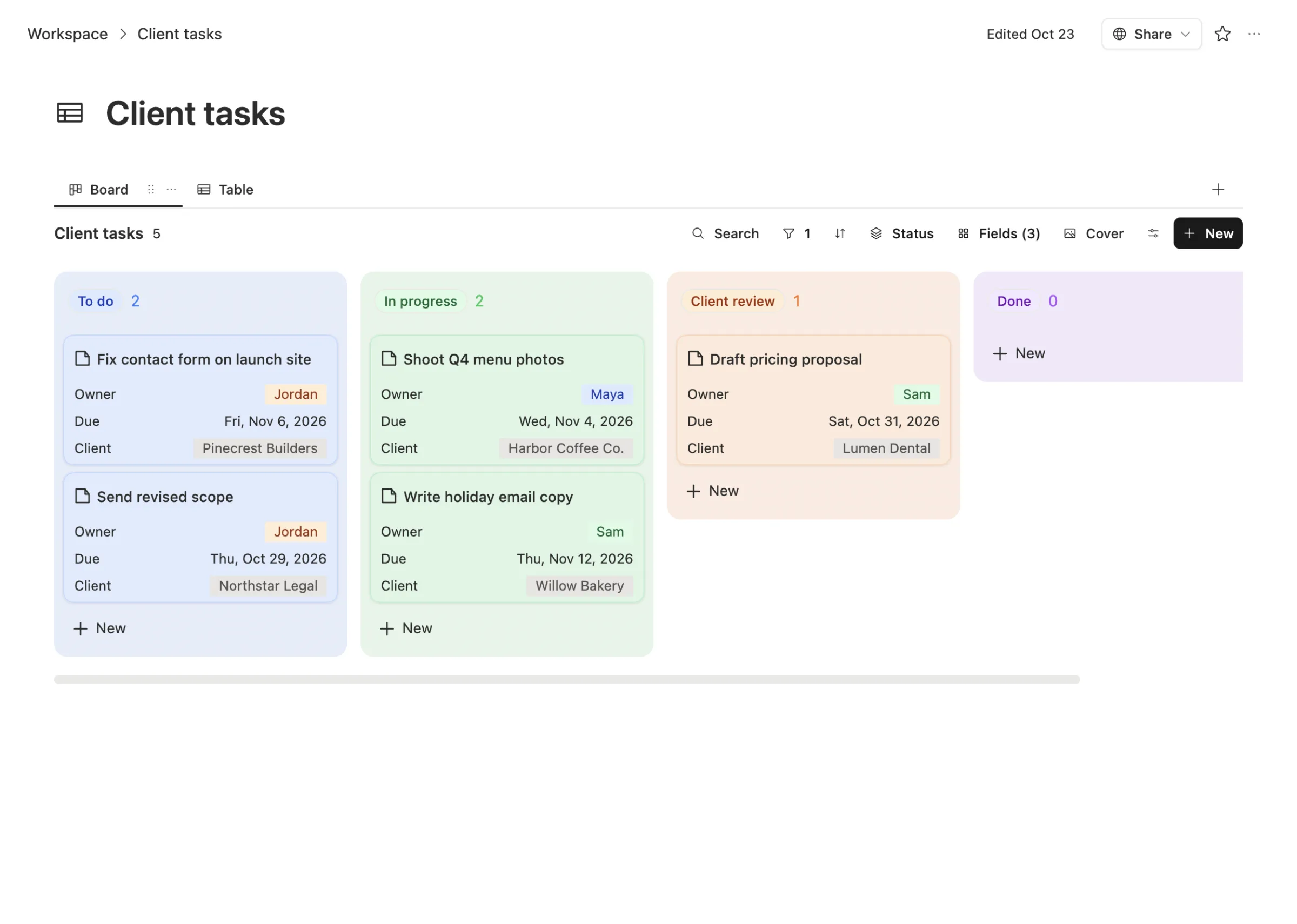
Each card links to the client it's for, and the client links back to every meeting note and every task. So "what's going on with Lumen Dental?" is one click, not three apps.
Agents that update the board for you
Boards go stale because people are busy. Somebody finishes the work and forgets to drag the card. A due date slips and nobody notices until the client does.
In Team Brain, an agent can watch the board for you. This one checks client tasks, finds the ones past their due date, and reminds the owner once.
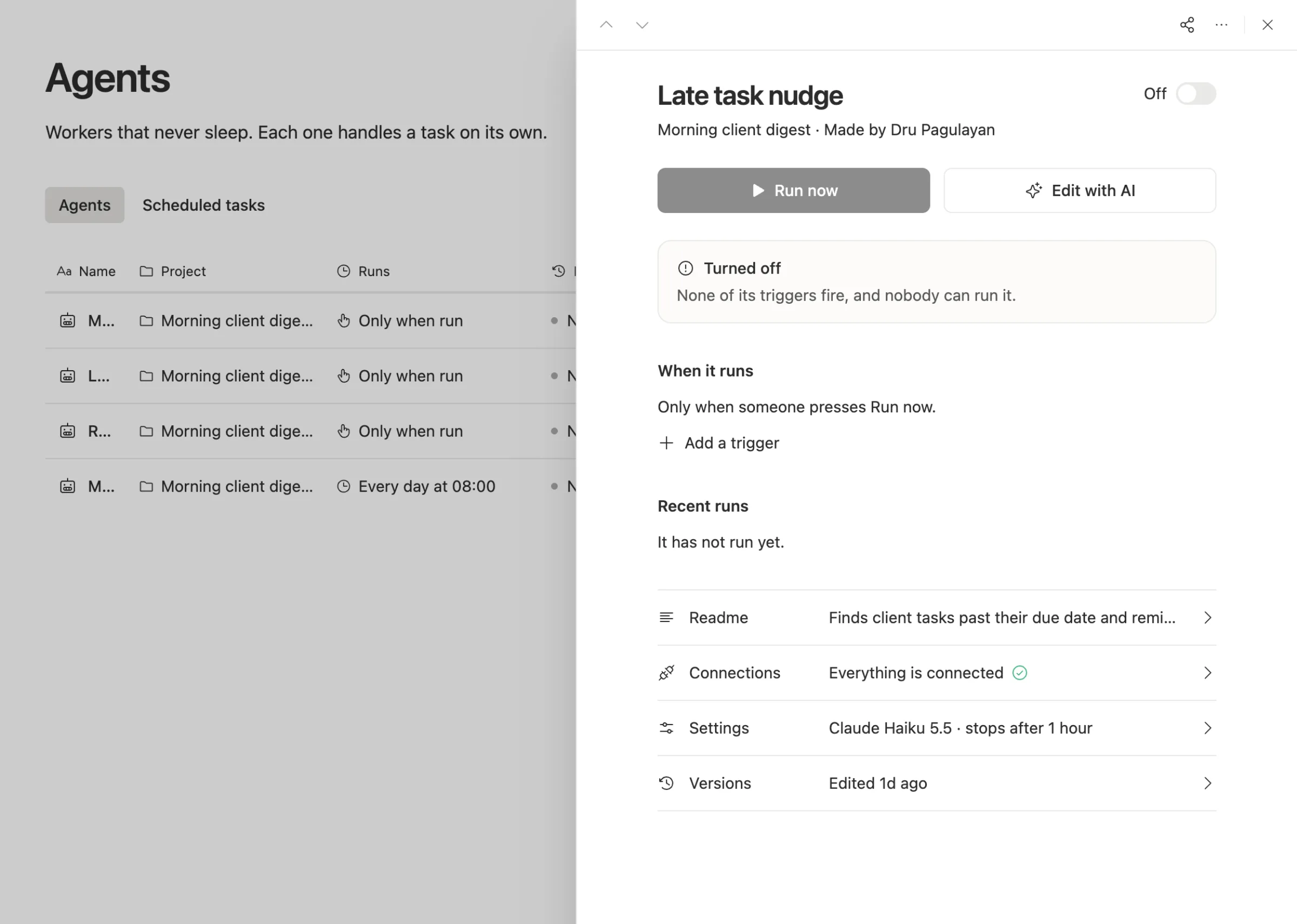
Each agent shows its schedule, its recent runs, the model it uses, and a cost cap per run. A small job like this one runs on a cheap model, so it costs very little.
There's a bigger shift under this. One Hacker News comment put it well: per-seat software is under pressure because if an agent can do the work of more than one person, the number of seats a team needs shrinks. A price that grows with headcount fits that world badly.
When to stick with monday.com
We'd rather you pick right than pick us.
- Your boards and automations are built and working. Rebuilding dozens of automations has a real cost. If nothing hurts, don't move.
- You lean on its marketplace apps. If a monday.com app runs part of your process, check that you can replace it before you plan anything.
- Most of your people are viewers. monday.com gives free viewers from Basic up, so a team with a few editors and many readers may already pay little.
- You just finished a rollout. Moving again this quarter isn't worth it. Come back when the bill or the gaps start to hurt.
What breaks when you switch
What moves cleanly: your items and columns, exported as a spreadsheet, become rows and properties in a Team Brain database. Docs move as docs.
What you rebuild: automations, dashboards, integrations and any marketplace apps. In Team Brain those become agents, views and connected apps, so plan a day to set up the few that matter.
Start with one board. Move it, run it for a week next to the old one, then move the rest.
Common questions
Is Team Brain cheaper than monday.com? For most teams, yes. The workspace is free for any number of people, and you pay only for the AI you use. Ten people on monday.com Standard pay $120 a month before any extra AI.
Does Team Brain have boards? Yes. Any database can be shown as a board, a table and other views, all on the same rows.
Can I bring my own AI? Yes. Connect your own AI account and pick the model, or use ours and pay per use.
Can agents do what monday.com automations do? Most of them, and more, because an agent can read a doc or an email and decide what to write. Simple rules still work as simple agents.