Team Brain vs n8n (and its new Nod agent)
n8n runs fixed workflows between apps, and its new Nod agent runs errands on one person's computer. Here's how both compare with Team Brain, what each costs, and when to stay on n8n.
You built the workflow on a Sunday. A form comes in, a row lands in a sheet, a message goes to Slack. It worked. Then someone asked for one small change, and you were the only person who knew which box to open.
That's not a skill problem. n8n is good at what it was made for: steps that never change, wired between apps. The trouble starts when the work is a team's, the steps need judgment, and the person who built it is on holiday.
This week the question got a new twist. n8n Labs launched Nod, an open source agent with its own computer. People on X were quick to say what's new about it: it does the errand instead of explaining how, on your machine, with the AI provider you pick. So now there are two n8n answers, and it's worth seeing where each one fits.

The short answer
Stay on n8n if your work is a set of fixed steps between apps, someone on the team is happy to own the canvas, and you like running it on your own server.
Try Nod if you want one personal assistant that clears your own errands: invoices, call prep, cancelling a trial you forgot.
Pick Team Brain if the work belongs to a team. The tables, the docs and the agents that keep them filled live in one workspace, anyone can see what each agent did, and you pay only for the AI it uses.
What each one really is
n8n is a workflow canvas. You drag nodes, connect them, and each trigger starts one run. One builder put the appeal well: when a flow owns Sheets and Gmail, they want one execution to equal one run, with error triggers and a test mode they control.
Nod is a personal agent. It's free and Apache 2.0 licensed. Its own page says it runs on a Mac with macOS 14 or later, Windows 11 in preview, or your own server, and that today there's one owner per Nod. It also needs the computer running it to stay on and awake.
Team Brain is a shared workspace that agents work in. Your clients, tasks and notes are tables and docs. An agent reads them, writes to them, and runs on a schedule, when a row changes, when an email arrives, or when another app calls it. Everyone on the team sees the same agents and the same results.
What it costs, side by side
| n8n | Nod | Team Brain | |
|---|---|---|---|
| Free option | Community edition, self-hosted | The app is free | Free workspace, 10 GB |
| Paid plans | Starter 20 euros, Pro 50 euros, Business 667 euros a month | None | No plans to climb. You pay for the AI you use |
| What's counted | Workflow executions | Your AI provider's bill | AI use, and computer time when an agent needs one |
| People | Unlimited users on paid plans | One owner today | Unlimited people and agents |
| Sharing workflows | Not in the free community edition | Not yet | Built in |
n8n prices are from n8n's pricing page, billed yearly, and the free edition's limits are from n8n's community edition docs. Nod's are from the Nod page. All checked November 12, 2026. Team Brain's are from our pricing page.

Execution caps are the part that sneaks up on you. A workflow that checks something every five minutes runs about 8,600 times a month, which is more than three Starter plans' worth of runs. That's why so many people self-host. One hosting company made the case plainly: hosted automation plans charge per run, so the bill grows with usage, while your own server stays flat.
Self-hosting is free, but read the fine print. In the community edition, workflows and credentials can't be shared, and only the person who made them can open them. For a team, that's the whole problem.
Where Team Brain is different
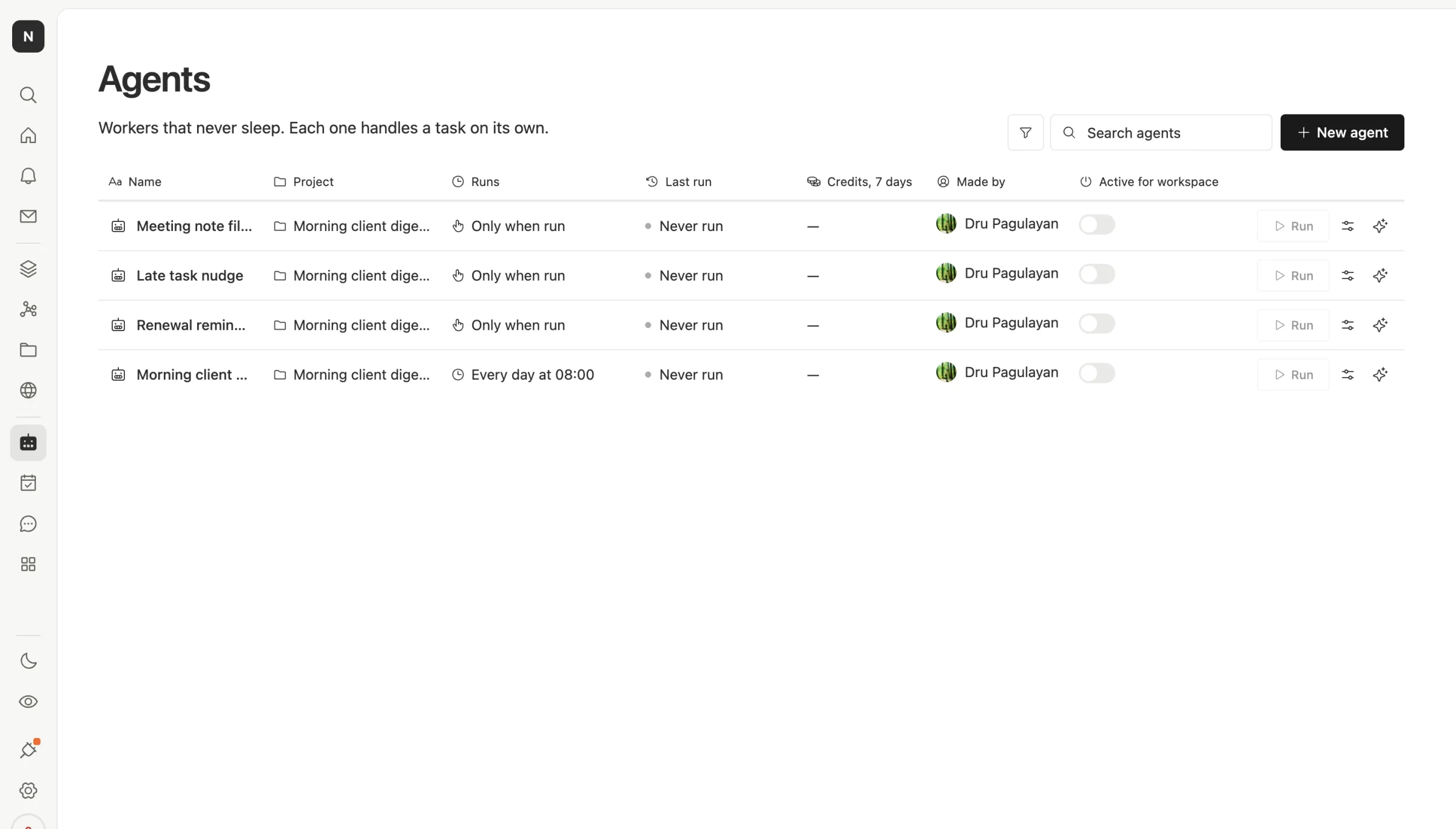
The work and the agent sit in one place. In n8n, your data lives in a sheet or a database the workflow talks to. In Team Brain, the table is right there. Open the Agents page and you see every agent, its project, when it runs, when it last ran and who made it.
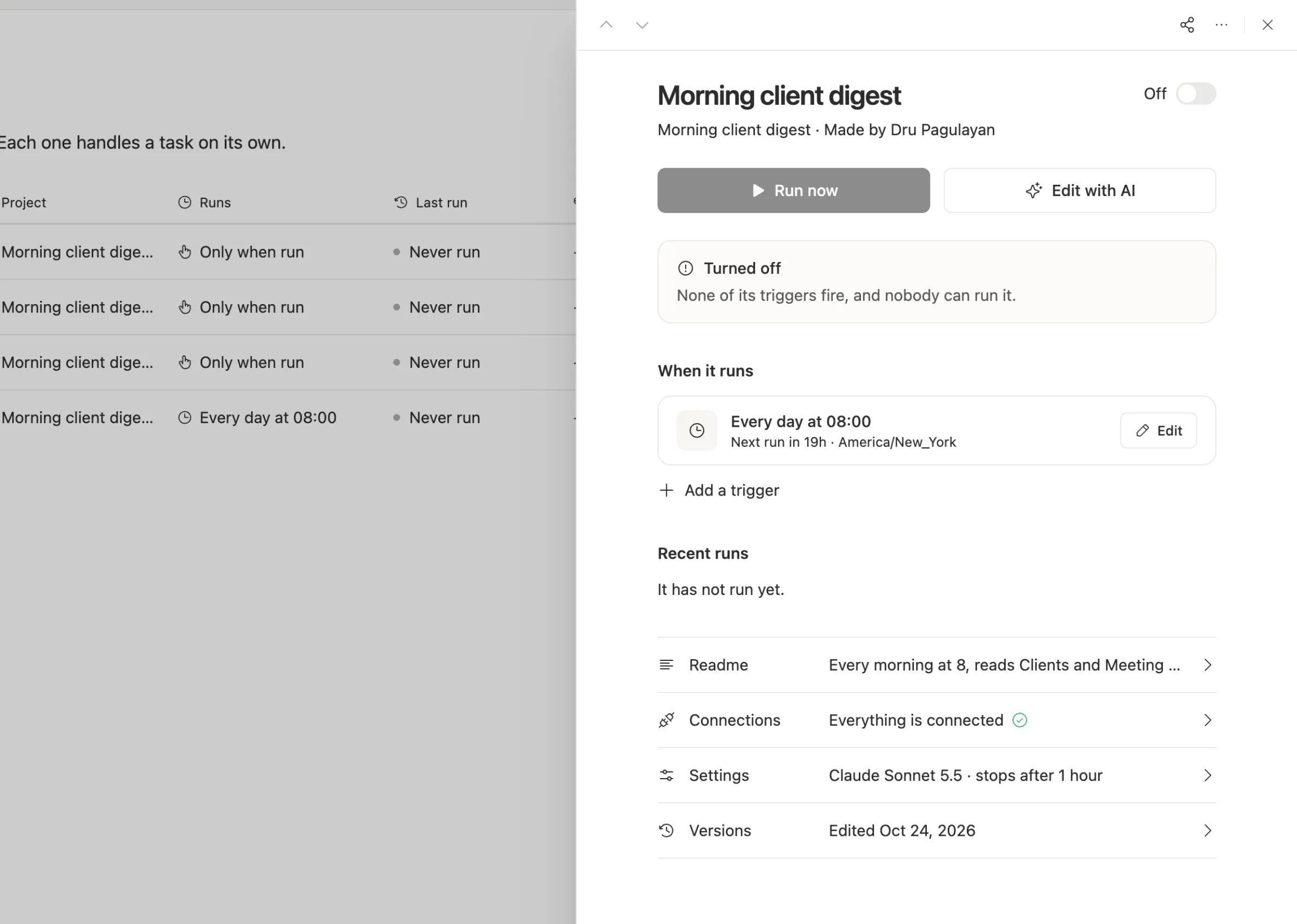
Anyone can read what an agent does. Each agent has a plain readme, the trigger that starts it, its recent runs, and its settings. You don't need to trace a canvas to know what happens at 8 in the morning.
Agents handle the steps that need judgment. A workflow is great when you know every step. When a step is "read this email and decide which client it's about," you either add an AI node and hope, or you hand the whole job to an agent that can read your tables. One engineer spent three weeks turning 40 workflows into agents and found the known, fixed steps were the easy part.
Limits are set per agent. Each agent has a model, a cost cap per run and a time limit, so a loop can't run up the bill overnight.
A computer when the job needs one. Like Nod, an agent can work on a real computer with a browser. The difference is that it's shared: it runs on ours, not on a laptop that has to stay awake, and you pay for the time it runs.
When to stick with n8n
We'd rather you pick right than pick us.
- Your flows are fixed and high volume. Thousands of identical runs a day, no judgment in them, is exactly what a self-hosted n8n does cheaply.
- You need your own server. n8n's community edition runs anywhere for free. Team Brain can run on your own server only on a Custom plan.
- One technical person owns automation. If that person is happy and nobody else needs to touch it, the canvas is fine.
- You just want a personal assistant. For your own errands, Nod is free and new, and worth a try before you change anything.
It's also fair to say workflow tools get hard at scale no matter who makes them. A founder building a WhatsApp ordering system said orders, payments and confirmations start to break as volume grows. A startup running n8n in production planned to move to plain backend code: they liked its run history and integrations, but found parallel steps flaky, hosted pricing expensive and version control weak.
What breaks when you switch

What comes with you: your data, the apps you connect, and your AI account. Team Brain lets you bring your own AI keys, so you keep the model you already pay for.
What you rebuild: each workflow's steps, its error handling and retries, and the saved logins it uses. There's no importer for n8n workflows. Most teams find they don't need a copy anyway. They describe the job to an agent in plain words, and the agent does it.
So start small. Pick one workflow your team runs every day, rebuild it as an agent, and run both for a week. Turn the old one off only when the new one has matched it every day.
Common questions
Is Team Brain an n8n replacement? For team work that lives in tables and docs, yes. For thousands of fixed, identical runs between apps on your own server, n8n is still a good fit.
Is Nod a Team Brain competitor? Partly. Nod is one person's assistant on one computer. Team Brain is where a team's work and its agents live together.
Do I pay per run in Team Brain? No. The workspace is free. You pay for the AI each run uses, or connect your own AI account.
Can my whole team edit the agents? Yes, with rules. You decide who can change each agent, and every change is kept as a version you can go back to.