Team Brain vs Smartsheet
Smartsheet is a strong project planner with real Gantt charts. Here's how it compares with Team Brain on price, who pays, and what each one is for, when to stay with Smartsheet, and what an export leaves behind.
The plan lives in a sheet. Dates, owners, status, a Gantt chart that looked great in the kickoff. Three weeks later, half the team updates it on Monday morning and the other half updates a spreadsheet the client sent, because that's what the client reads. Someone copies one into the other before every status call.
You didn't set it up wrong. One freelancer on X described the same pull: every client project ends up in a spreadsheet, because clients send Excel. Smartsheet is built to be a better sheet for planning. The question is whether planning is most of your work, or one part of it.

The short answer
Stay with Smartsheet if your work is scheduled projects with real dependencies, you live in Gantt charts, and you have a project office that runs on reports and dashboards.
Pick Team Brain if your plan is one table among many: clients, requests, notes, docs. Or if you'd rather not pay for every editor, and want AI agents to keep the rows up to date.
What each one really is
Smartsheet is a spreadsheet that grew into a project tool. You get grid, Gantt, card and calendar views, and the Gantt chart is a real one with dependencies. People compare it to Microsoft Project more than to a Kanban board. One team on Hacker News described building Gantt, table and Kanban views over the same filtered data. That's its sweet spot.
Team Brain is a workspace of tables and docs. A plan is one table. Every row is also a page you can write in, and it can link to rows in other tables, like the client it's for. Table, board, calendar, list and gallery are views of the same rows. AI agents can read and update them on a schedule, when a row changes, or when an email comes in.
What it costs, side by side
| Smartsheet | Team Brain | |
|---|---|---|
| Free plan | None. 30-day free trial | $0, unlimited people and agents, 10 GB |
| Paid plans | Pro $9, Business $19 per Member a month, yearly. Enterprise is custom | No seats. You pay for the AI you use |
| Who pays | Every Member. Contributors, who view and comment, are free | Nobody pays a seat |
| Limits | Pro: up to 10 Members, 20 GB, 250 automations a month. Business: 3 Members minimum | No charge per row |
| AI | AI features on every plan; connect outside AI over MCP on Business | Pay per use, bring your own AI, or connect over MCP |
Smartsheet's numbers come from Smartsheet's pricing page, checked October 28, 2026. On monthly billing, Pro is $12 and Business $24. The page also says Pro is only available to new customers. Team Brain's numbers are on our pricing page.
Smartsheet deserves credit for free Contributors: people who only view, comment and fill in forms don't need a seat. The bill grows with the people who edit. For a team of twelve editors, Pro is out because it stops at ten:

Your team is a different size? Put in your own numbers:
- Smartsheet Business
- $228
- Smartsheet Pro (up to 10)
- $108
- Team Brain
- $0plus the AI you use
That's $1,296 a year in seats you wouldn't pay.
A plan that sits next to everything else
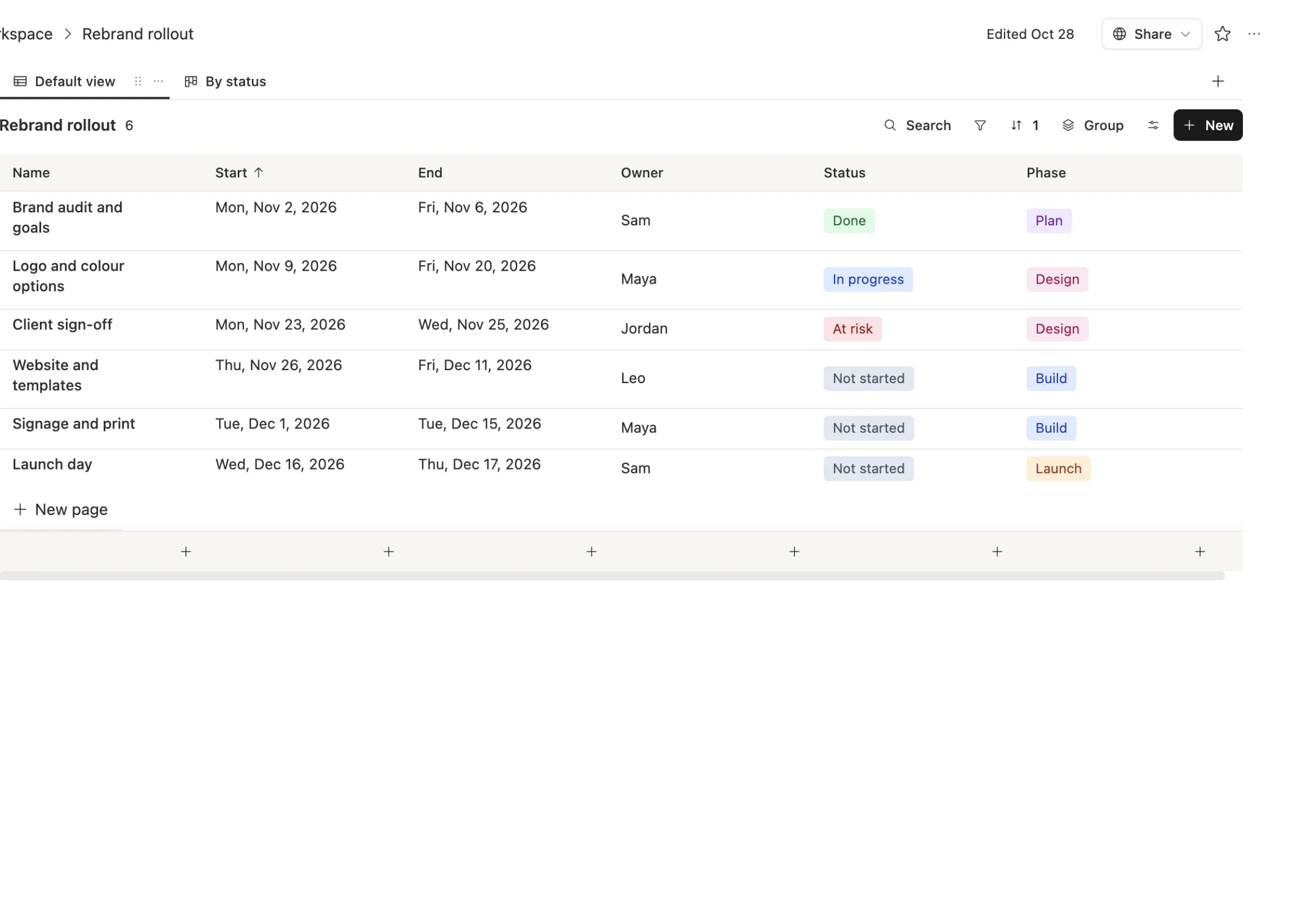
Here's a rebrand plan in Team Brain, sorted by start date, with owner, status and phase:
The same rows as a board, grouped by status, so the one at risk is hard to miss:
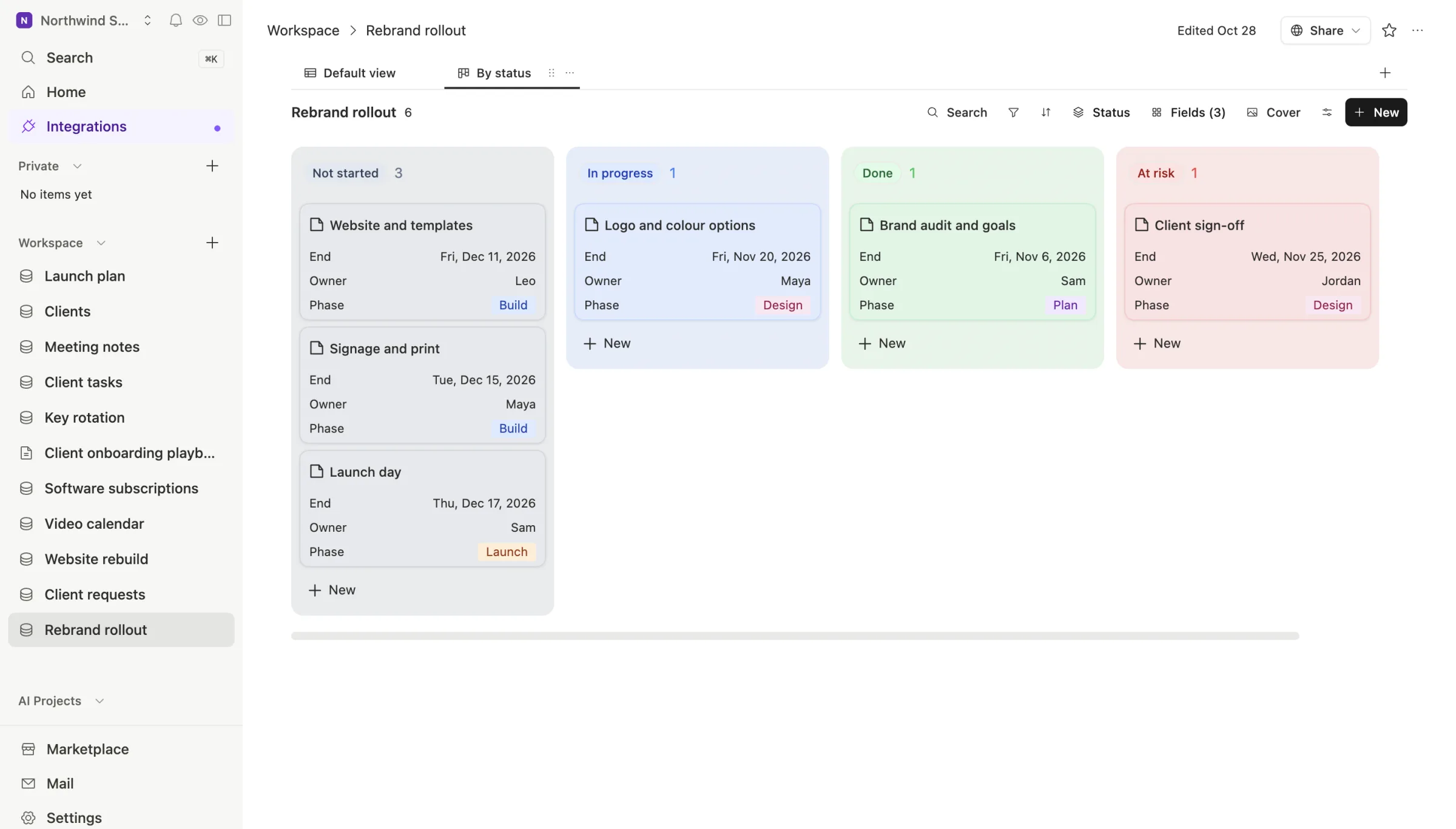
The difference shows up around the plan. The client in your Clients table links to this plan. The kickoff notes sit inside the task they're about. An agent can post a Monday summary of what's at risk without anyone copying cells.
When to stay with Smartsheet
We'd rather you pick right than pick us.
- You need a real Gantt chart. Smartsheet's Gantt has dependencies and exports to Microsoft Project. Team Brain doesn't draw dependency lines between tasks. If your schedule depends on them, stay.
- Lots of people only view and comment. Free Contributors make Smartsheet cheap for a small editing team with a big audience.
- You run a project office on reports and dashboards. Rebuilding years of reports is real work. Count it before you move.
What breaks when you switch

The export. Per Smartsheet's help page on exporting, you can export a sheet to Excel, Google Sheets, PDF, or, for a Gantt chart, Microsoft Project. Groupings, summary rows and attachments are left out. Save the Excel file as CSV, put the task name in the first column, and import it into Team Brain. Your dates, owners and status come across as columns.
The logic. Automations, dashboards and cross-sheet formulas don't travel in a spreadsheet file. Write down the ones you still use and rebuild those.
The people. Decide who edits and who only views before you move, and move one plan first. When a tool raises its price, as one person on X put it, finding a close replacement fast saves a lot of wasted trials. Doing it one plan at a time saves the rest.
Common questions
Does Team Brain have a Gantt chart? Not with dependencies. You get table, board, calendar, list and gallery views of the same rows. If you need dependency lines, Smartsheet is the better fit.
Is Team Brain cheaper than Smartsheet? The workspace is free for any number of people, so you pay only for the AI you use. Smartsheet charges every editing Member, from $9 a month on Pro.
Can I bring my Smartsheet data into Team Brain? Yes. Export to Excel, save as CSV and import it. Team Brain picks a type for every column.