How to use Claude Code and Codex on the same project
Lots of developers now switch between Claude Code and Codex in the same week. Here's how to keep one set of rules, one task list and a clean handoff, so the second tool doesn't start from zero.
You're halfway through a fix in Claude Code when you hit the usage limit. So you open Codex in the same folder and type "keep going." It reads the code. It doesn't know what you were trying to do, which approach you already threw out, or that the client said no captcha. You spend ten minutes explaining it all again.
Then tomorrow you do it the other way round.
This week a lot of people on X were arguing about which one to pick. One freelancer who uses both every day put it well: Codex does exactly what you asked, Claude Code does what you meant, plus three things you didn't. They still can't pick one, so they use both. Plenty of people do. The tools aren't the problem. The gap between them is.
What each tool remembers, and what it doesn't
Both tools start every session fresh. What they know comes from files in your repo.

Claude Code reads CLAUDE.md. Per Anthropic's memory docs, it can also read an AGENTS.md, but only when there's no CLAUDE.md in your folder or above it. The same page warns that files over 200 lines take up more room and may be followed less closely.
Codex reads AGENTS.md. OpenAI's AGENTS.md guide says it walks from the project root down to your folder, joins the files it finds, and stops at 32 KiB by default.
So if you keep both files, they drift. Peter Yang called the split pretty annoying, and he's right. Another builder put the real cost plainly: when CLAUDE.md and AGENTS.md drift, the handoff between tools breaks.
And neither file holds the thing you need most at a handoff: where the work stands right now.
Step 1: keep one rules file
Make AGENTS.md the one file you edit. It holds your stack, your commands, how you test and the rules you care about.
Then pick one of two setups:
- Delete
CLAUDE.md. Claude Code falls back to readingAGENTS.mdon its own. - Keep a short
CLAUDE.mdthat imports it. Put@AGENTS.mdon its first line, and add only the things that are truly Claude-only below it. Anthropic's docs describe this import for exactly this case.
Keep it short. As Vox pointed out, both limits push the same way: Claude follows a long file less closely, and Codex skips anything past its cap. Move long step-by-step jobs into skills instead.
Step 2: keep one task list both tools can read
Rules tell a tool how you work. They don't say what's half done. That lives in your head, in a chat that's about to close, or in a NOTES.md someone forgets to commit.
We keep it in Team Brain, in a plain table that both tools can read and write over MCP. Each task is one row: what it is, its status, which tool touched it last, the branch, and the next step.
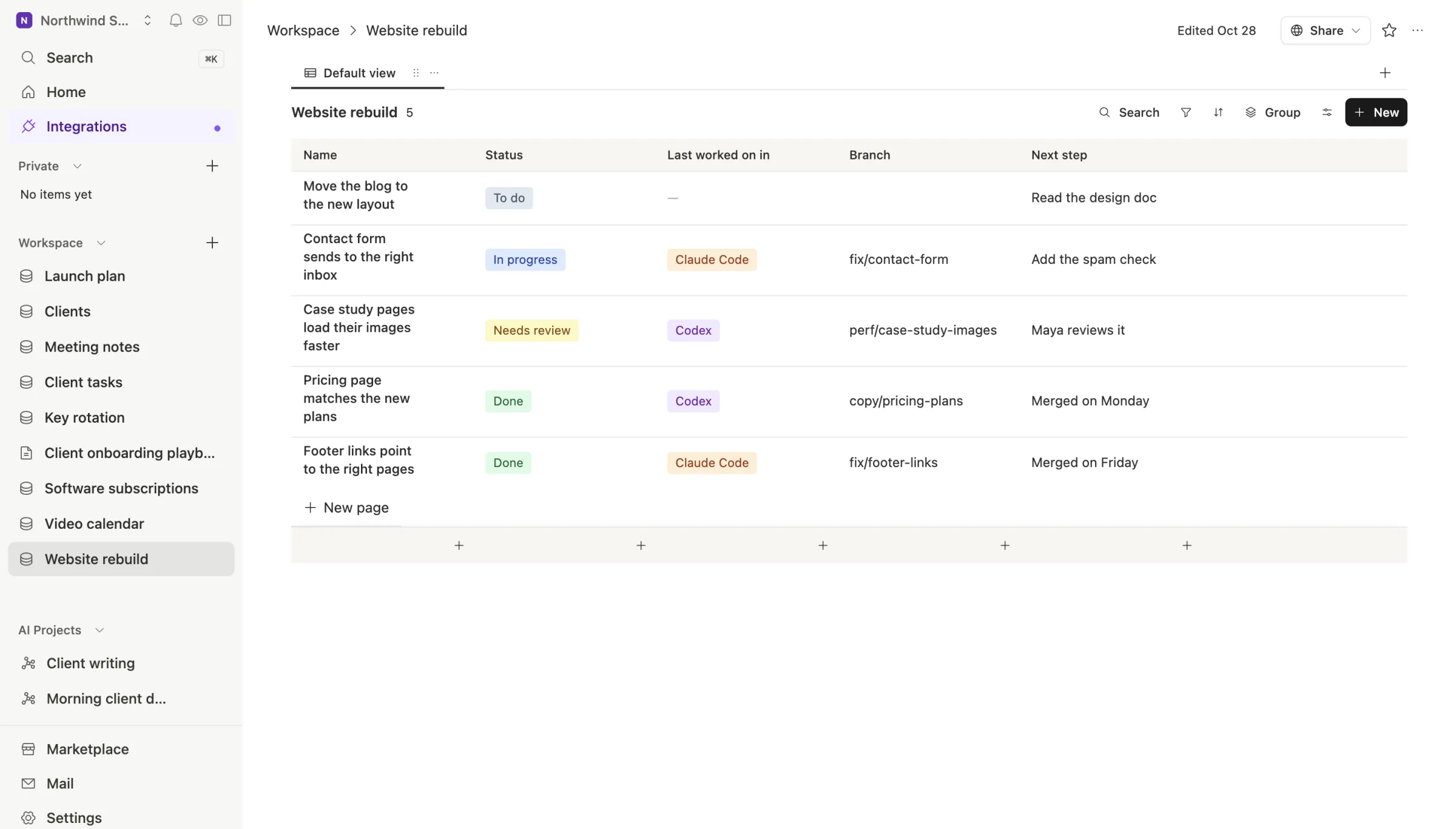
To connect it, go to Settings, then Developer tools, and make a key. For Claude Code:
claude mcp add TeamBrain --transport http https://api.team-brain.com/mcp --header "Authorization: Bearer <your key>"
For Codex, add a server table to ~/.codex/config.toml with url = "https://api.team-brain.com/mcp" and your key in an environment variable, as OpenAI's MCP guide shows. Now both tools see the same table.
Step 3: write the handoff before you stop
This is the habit that saves the ten minutes. Before you close a session, or when you see the limit coming, ask the tool to write its handoff into the task's row. Add one line to AGENTS.md so both tools do it without being asked:
Before you stop, update this task's row in the Website rebuild table:
status, next step, and a short note on where it stands, what's left and what to watch.
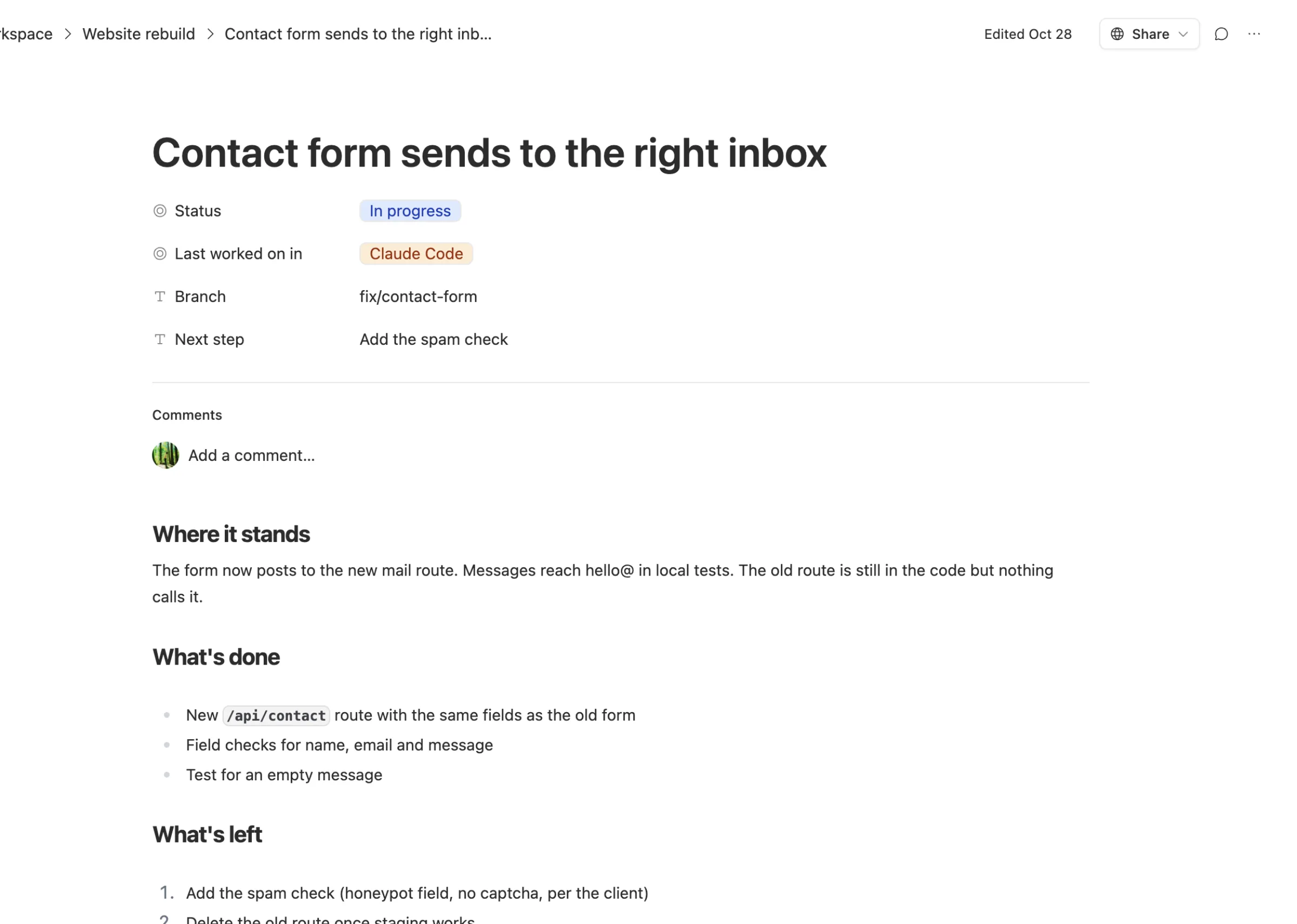
A good handoff is short. Where it stands. What's done. What's left, in order. One thing to watch out for. Why the last session stopped.
Step 4: read it before you start
When you open the other tool, start with one line: "Read the Contact form task in Team Brain, then carry on." It reads the row, sees the next step, and starts there.

That's the whole loop. One file for how you work. One table for what's going on. A note at every switch.
Other ways people bridge the gap
You don't need Team Brain for this, and some people solve it in other ways. One developer built a free tool that lists recent sessions from both tools so you can continue one in the other. Others keep a handoff file in the repo. That works when you're alone on one machine and remember to commit it.
Where a shared table wins is when there's more than one person, or more than one machine. Your teammate sees the same rows you do. So does Team Brain's own chat, and any agent you run on a schedule. The workspace is free for any number of people, and you pay only for the AI you use, as our pricing page shows.
Common questions
Do I have to use both tools? No. Even with one tool, a written handoff saves you when a session ends halfway through a job.
Will the tools change my code differently?
Yes, and that's often why people use both. Keeping the rules in one AGENTS.md keeps the house style the same either way.
Does Anthropic or OpenAI need to support Team Brain? No. Both tools speak MCP, the open way AI apps connect to outside tools. Team Brain is one MCP server they connect to.
Can I share skills between them too? Yes. See how to share Claude skills with your whole team.