Team Brain vs Trello
Trello is still the simplest board around. Here's how it compares with Team Brain on price, limits and views, when you should stay on Trello, and what breaks if you switch.
Your board started with three lists and five people. Now it has eleven lists, two of them called "Done" and "Done (old)." Someone wants to see every job by client, so a teammate copies the cards into a spreadsheet every Friday. Then the eleventh person joins and Trello asks you to pick a plan.
That's not you outgrowing a toy. Trello does one thing very well, and your team needs a few more things now. Here's how it compares with Team Brain, honestly.

The short answer
Stay on Trello Free if you're ten people or fewer, one board does the job, and nobody asks for reports.
Pay for Trello Premium if your team loves cards, needs table and calendar views, and the per-person price is fine.
Pick Team Brain if the board is only part of the work: you also keep notes, client records and docs, you want the same data as a board one minute and a table the next, and you'd rather pay for the AI you use than for seats.
What each one really is
Trello is a board that grew views. Cards on lists is the heart of it. Premium adds table, calendar, timeline, dashboard and map views on top. Power-Ups plug in extra features on every plan.
Team Brain is a workspace where the board is one view. Every card is a row in a table, and every row is also a page you can write in. Board, table, calendar, timeline, gallery and list are all views of the same rows. Docs sit next to them, and AI agents can read and update them on a schedule, when a row changes, or when an email comes in.
Trello's simplicity is real, and it's hard to copy. One developer said that years later it's still surprisingly hard to build a clone of its core feel. We agree. If the board is all you need, that feel is worth a lot.
What it costs, side by side
| Trello | Team Brain | |
|---|---|---|
| Free plan | $0, up to 10 collaborators and 10 boards per Workspace | $0, unlimited people and agents, 10 GB |
| Paid plans | Standard $5, Premium $10, Enterprise $17.50 per user a month, yearly | No seats. You pay for the AI you use |
| Table, calendar, timeline views | Premium and Enterprise | Every plan |
| AI | Included from Standard up | Pay per use, or bring your own AI account |
Trello's prices and limits come from Trello's pricing page and its help page on exporting data, checked October 28, 2026. Monthly billing costs more: Standard is $6 and Premium $12.50. Team Brain's numbers are on our pricing page.
Here's what that means for a team of twelve, two more than Trello's free plan allows:

Your team isn't twelve people? Put in your own numbers:
- Trello Standard
- $60
- Trello Premium
- $120
- Team Brain
- $0plus the AI you use
That's $720 a year in seats you wouldn't pay.
The jump that surprises people is the views. Table and calendar views are on Premium, not Standard. So the moment someone asks "can I see all of these in a list, sorted by due date?", the price doubles.
One set of rows, every view
In Team Brain the board you know is still there. Here's an agency's client requests, grouped by list:
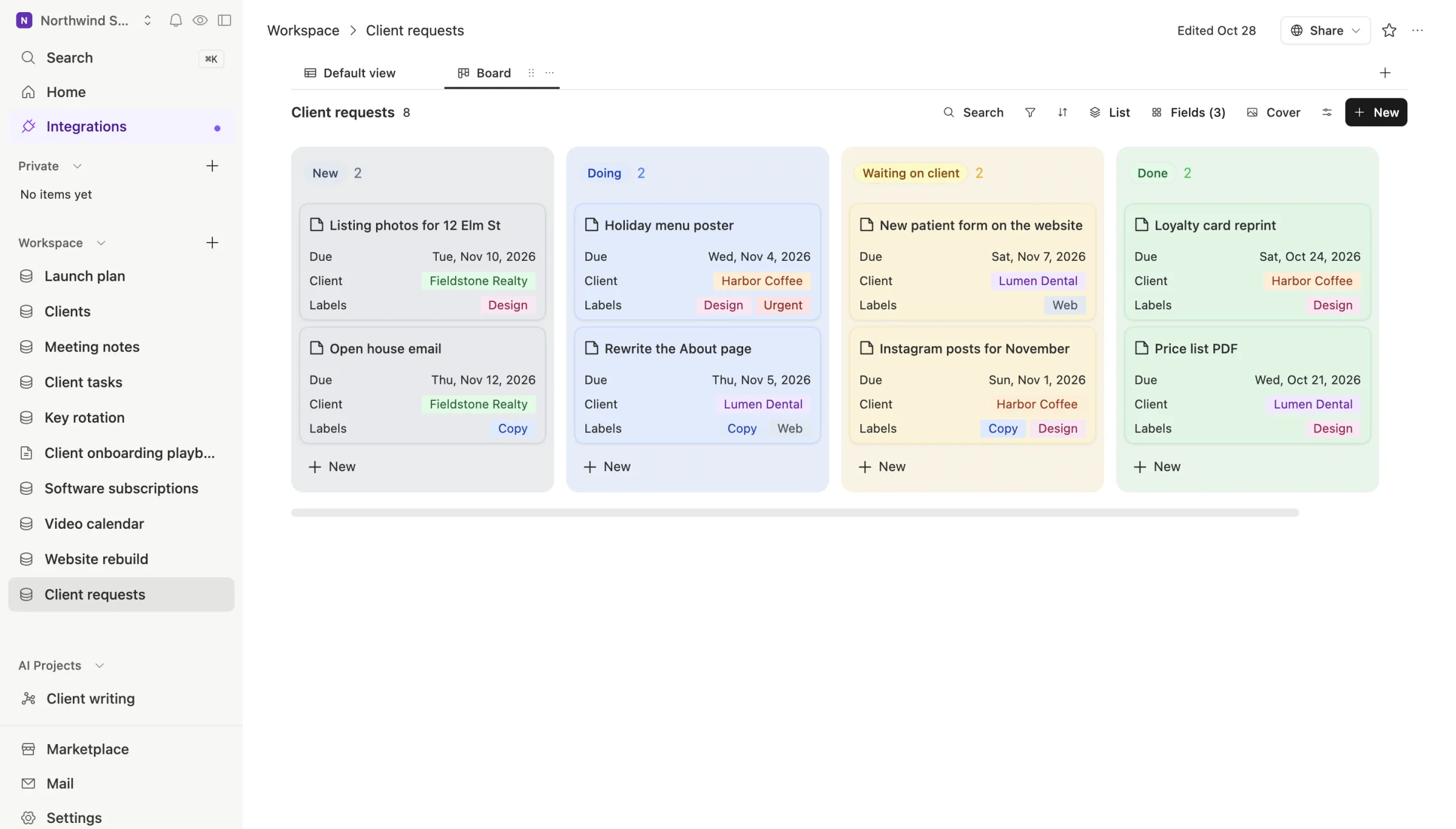
Switch to the table and it's the same rows, ready to sort and filter. Open a card and it's a full page, with its fields on top and room to write below:
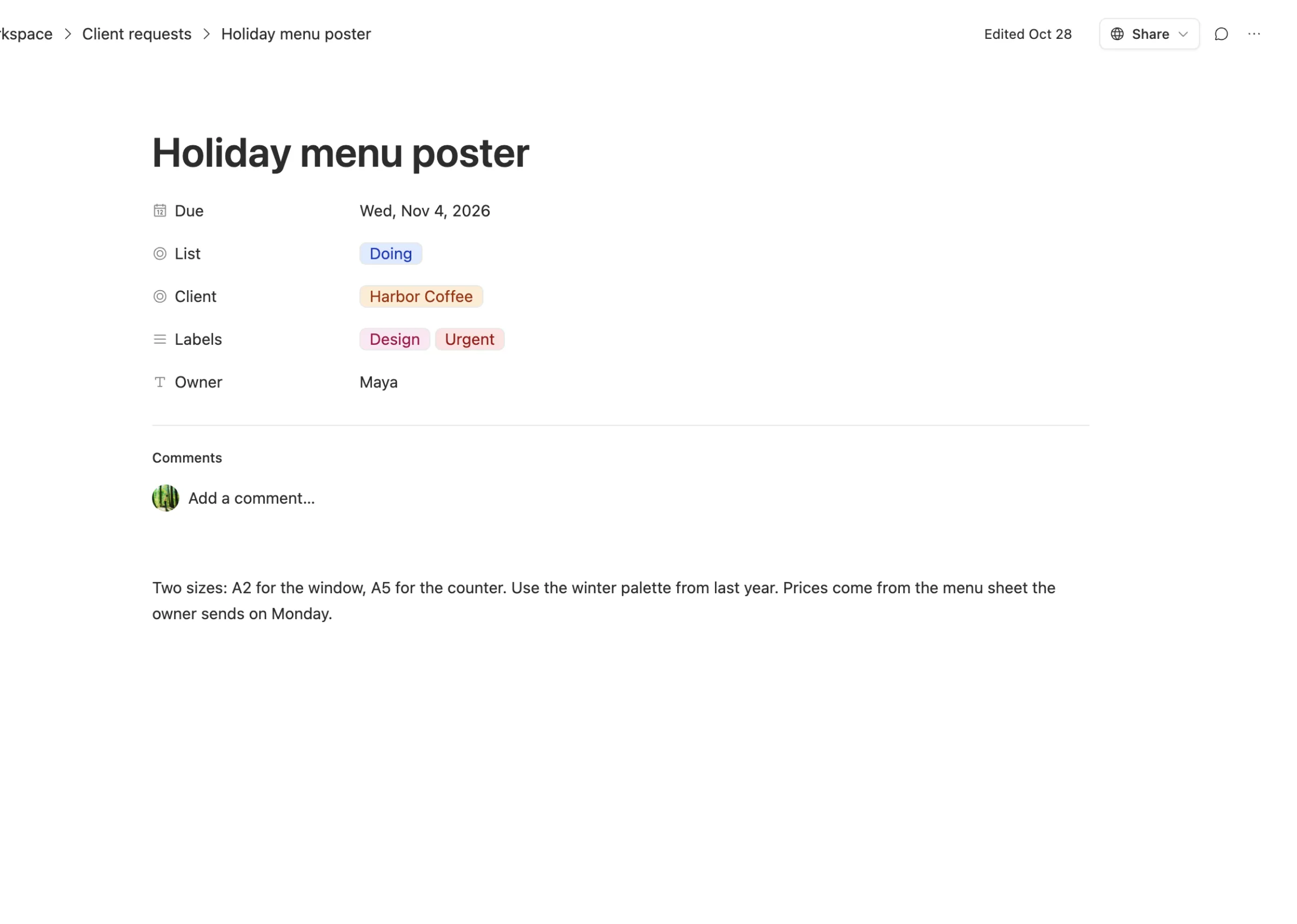
That's the difference that matters day to day. The Friday spreadsheet goes away, because the table is already there. The brief doesn't live in a separate doc, because the card is the doc.
When to stay on Trello
We'd rather you pick right than pick us.
- The board is the whole job. If your team moves cards and that's it, Trello is quick, familiar and free for up to ten people.
- You live on your phone. One person on Hacker News said the only reason they hadn't left was that Trello's mobile app works really well for them.
- Your team isn't technical and likes it. A developer whose team just moved from Jira to Trello said the less technical execs find it much easier to check status. That's worth protecting.
- You've built a lot on Power-Ups and automations. Rebuilding them is real work. Count it before you move.
What breaks when you switch

Getting the data out. CSV export is a Premium feature. On Free and Standard you get JSON. Comments aren't in the CSV, and Inbox cards don't export at all. Our guide on how to export a Trello board to CSV walks through each option.
Links in other places. One engineer on Hacker News put this well: a reference to a Trello card does no good once the project has moved off Trello. Search your docs and code for card links before you switch, and decide which ones need a new home.
Habits. People know where their cards are. Move one board first, keep Trello open read-only for a few weeks, and only then move the rest.
Common questions
Does Team Brain have a Kanban board like Trello? Yes. Any table can be shown as a board, grouped by any select column, like a status or a list.
Can I import my Trello board? Yes, through a CSV. Team Brain uses the first column as the card title and picks a type for every other column.
Is Team Brain free for a team bigger than ten? Yes. The workspace is free for any number of people. You pay only for the AI you use.
Does Trello have AI? Trello's pricing page lists AI on its Standard and Premium plans. In Team Brain you can use our AI and pay per use, or connect your own AI account.