Team Brain vs ClickUp for small teams
ClickUp does almost everything, and you pay for every person who opens it. Here's how Team Brain compares, what each one costs a 10-person team, and when you should stay with ClickUp.
You open ClickUp to check one task. The page takes a moment. You find the task, but the brief for it lives in a Doc two clicks away, the client's details sit in a spreadsheet, and the conversation about it happened in Slack. So you check all three.
That's not you being disorganized. ClickUp set out to be the one app for everything, and it ships a lot to get there. The catch is that a tool which does everything asks a lot of the people who use it every day.

The short answer
Stay with ClickUp if your team runs sprints, logs hours against tasks and plans with Gantt charts. Those are its home ground.
Pick Team Brain if your work is tasks tied to clients, notes and records, and you want agents doing the repeat work. The workspace is free for any number of people, and you pay only for the AI you use.
What each one really is
ClickUp is a task manager that grew into everything. It started with tasks and lists. It now has Docs, Chat, Whiteboards, Forms, dashboards and its own AI called Brain. One user put it plainly on Hacker News: their company curses it daily, because it tries to be an everything app and stumbles on the basics.
A small startup found the web app so slow that they built their own editor on top of ClickUp's API to reach the few parts they cared about. That's a team doing extra engineering just to use the tool they pay for.
Team Brain is a workspace your people and your agents share. Docs and tables sit side by side. A task is a row in a table, and that row is also a page, so the brief lives inside the task. Agents read and update the same tables on a schedule, when something changes, or when an email comes in.
What it costs, side by side
| ClickUp | Team Brain | |
|---|---|---|
| Free plan | $0, 60 MB storage, unlimited free members | $0, unlimited people and agents, 10 GB |
| Paid plans | Core $9, Business $17 per user a month, billed yearly | No seats. You pay for the AI you use |
| Who pays | On paid plans, every person inside your company | Nobody pays a seat |
| AI | Brain² included, 1,000 credits per user a month on Core, 1,500 on Business | Pay per use, or bring your own AI account |
| More AI | $10 per 10,000 credits | Your own AI account, at your provider's price |
ClickUp's prices and credits come from ClickUp's pricing page, checked October 23, 2026. The page also lists regular prices of $12 for Core and $25 for Business. Team Brain's come from our pricing page.
One line on ClickUp's page matters more than the rest. Guests are for people outside your company, and anyone inside it is billed as a paid user. So a teammate who only checks their tasks twice a week still costs a full seat.
Here's what that means for a team of ten:

Your team isn't ten people? Put in your own numbers:
- ClickUp Business
- $170
- ClickUp Core
- $90
- Team Brain
- $0plus the AI you use
That's $1,080 a year in seats you wouldn't pay.
A project tool maker gave good advice to anyone thinking about leaving ClickUp: before you compare features, count how many of your people only log time, and check which plan holds the feature you need. Those two numbers decide the bill more than any feature list.
Tasks that carry their own context
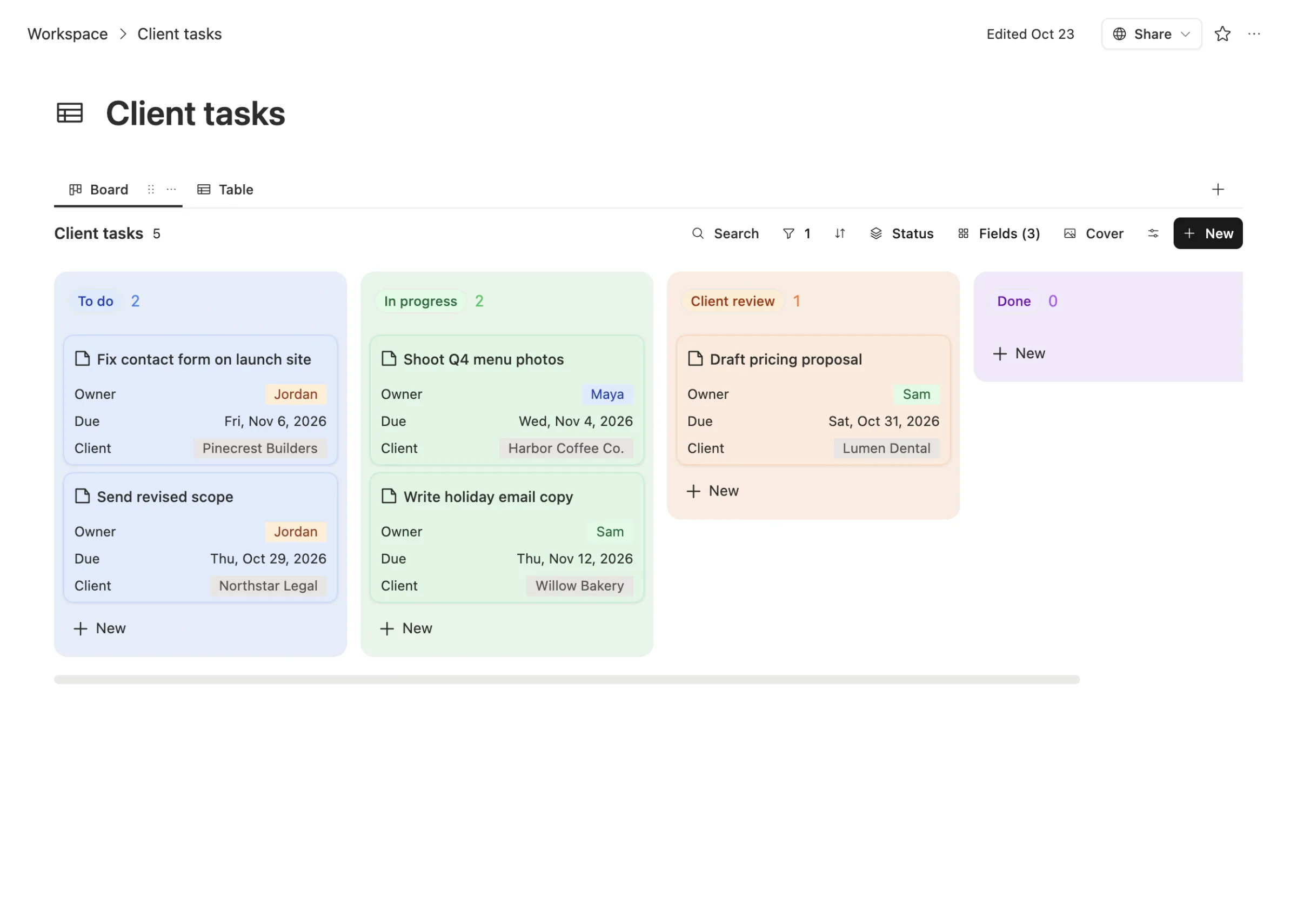
In Team Brain, your tasks are a table with a board view. Each card shows the owner, the due date and the client it's for, and the client is a real link to your Clients table, not a typed name.
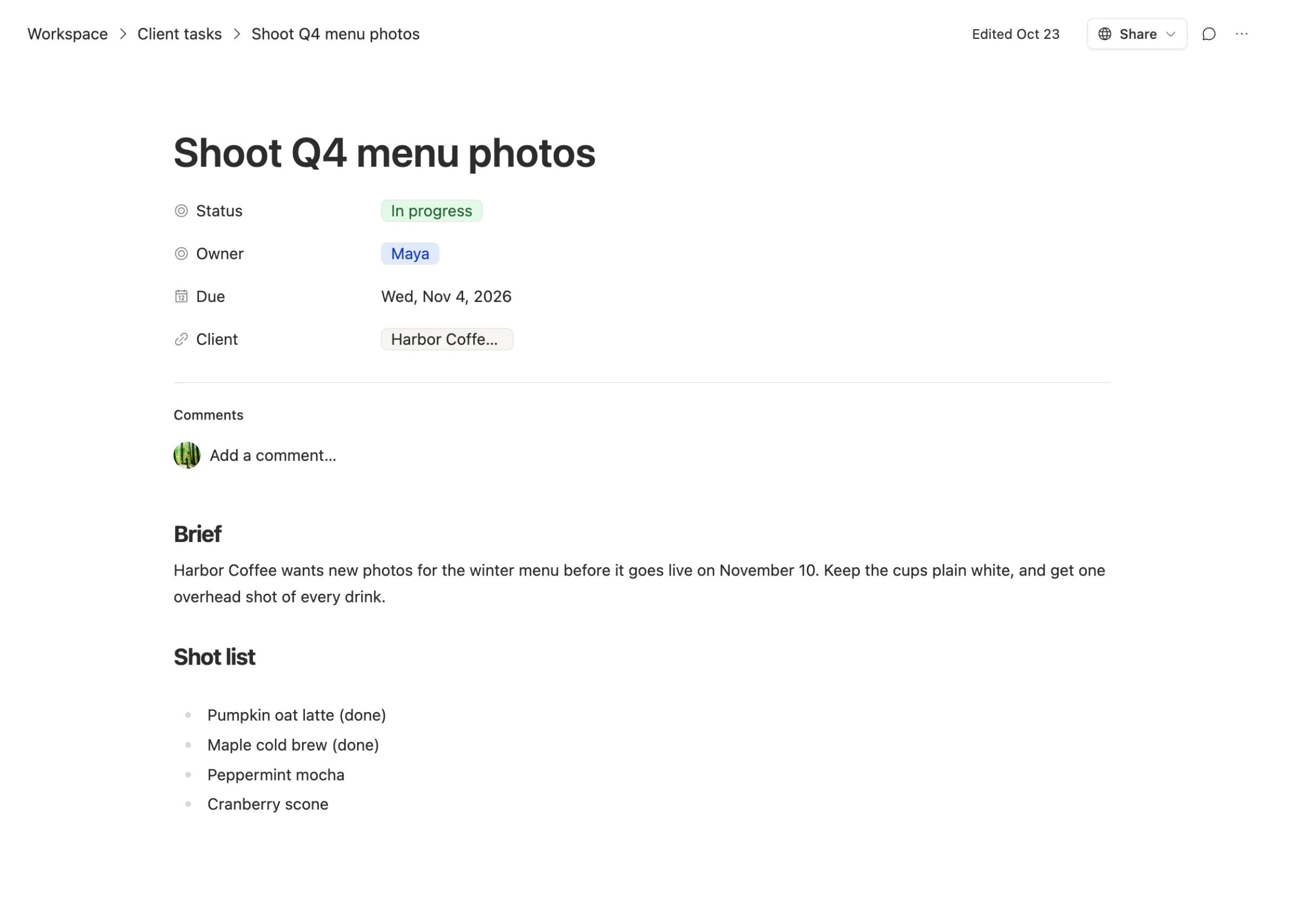
Open a task and the brief is right there, under the fields. No second Doc to find, no link to paste back.
The same table has six views: table, board, list, calendar, gallery and timeline. Switch between them without copying anything.
Agents do the busywork
ClickUp has put real work into AI. Every plan includes Brain² and a monthly pool of credits that runs its Super Agents, AI fields and automations. One user called the AI tooling pretty great, then said the controls change depending on which part of the app you're in, which makes it hard to steer.
People are also pointing outside agents at ClickUp. One builder had a coding agent restructure an agency's whole ClickUp account, work that would've taken each employee a couple of hours.
That's the bigger question now. It isn't only "which tool will my team learn?" It's "which tool can my agents work in, and what does each run cost?"
In Team Brain, agents run on their own: every morning, when a row changes, or when an email lands. They write straight into your tables and docs. You can run them on your own AI account with the model you pick, so a busy month costs what your provider charges, not a credit price set by someone else.
When to stay with ClickUp
We'd rather you pick right than pick us.
- You run sprints and log hours. ClickUp's sprints, time tracking, timesheets and resource planning are built in and deep. If your team bills by the hour, that matters.
- You live in Gantt charts. Big projects with dependencies are where ClickUp earns its price.
- Everyone already uses it, and uses it well. If ClickUp is working and the team likes it, the cost of a switch is real.
The last one is worth taking seriously. Switching has a cost in both directions. One team moved from Jira to ClickUp and moved back six months later, and called the switch back painful. A move costs more than the price difference shows.
What breaks when you switch
ClickUp lets you export, but not everything in one go, and not everyone can do it. Its own help pages say only owners and admins can export task data on most plans, and the free plan can only export five List, Table or Form views.

What comes across cleanly: tasks, their fields, owners and due dates. ClickUp's task export also includes comments and attachment links. In Team Brain, go to Settings, then Import, and connect ClickUp. Your tasks come in as one table per list.
What you rebuild: automations, dashboards and forms. Docs export one at a time, as PDF, HTML or Markdown, because ClickUp doesn't offer a bulk export for them yet.
So start small. Move one list your team uses every day, run it for a week, then bring the rest.
Common questions
Is Team Brain related to ClickUp Brain? No. ClickUp Brain is the name of ClickUp's built-in AI. Team Brain is a separate workspace from a separate company.
Is Team Brain cheaper than ClickUp? For most teams, yes. The workspace is free for any number of people, and you pay only for the AI you use. Ten people on ClickUp Core pay $90 a month before any extra AI credits.
Can I bring my own AI? Yes. Connect your own AI account and pick the model, or use ours and pay per use.
Does Team Brain have a board view like ClickUp? Yes. Every table can show as a board, list, calendar, gallery or timeline.
See how we compare with the tools teams often pair with ClickUp: Team Brain vs Notion and Team Brain vs Airtable.