Team Brain vs Notion and Airtable
One workspace instead of two. Lots of teams run Notion for docs and Airtable for data, and pay twice. Here's how Team Brain compares to both, what each one costs, and when you should stick with them.
Your meeting notes live in Notion. Your clients live in Airtable. Every Monday someone copies a name from one into the other, pastes a link back, and hopes nobody renamed anything since last week.
You didn't do anything wrong. Notion is great at pages. Airtable is great at rows. You just ended up needing both, so now you pay for both, search in both, and keep both in sync by hand.

The short answer
Stick with Notion if your team mostly writes: wikis, notes, project pages, with a few small tables.
Stick with Airtable if your team mostly works records: orders, leads, inventory, with forms and automations on top.
Pick Team Brain if you need both, or if you want AI agents doing the boring parts on their own. Docs and tables live in one workspace, the workspace is free for any number of people, and you only pay for the AI you use.
What each one really is
Notion is a doc that grew tables. You start with a blank page. A database is one more block on it.
Airtable is a table that grew apps. You start with a grid, then build forms, interfaces and automations on top.
Team Brain is a workspace your agents work in. Docs and tables sit side by side, and agents read and update both on a schedule, when a row changes, or when an email comes in.
One person on X put the Notion trade-off well: it's good when you want docs, tasks and a simple database in one place and don't mind building the structure yourself. That's the gap we built Team Brain for. The structure comes with the work, and agents keep it filled in.
What it costs, side by side
| Notion | Airtable | Team Brain | |
|---|---|---|---|
| Free plan | $0, trial of Notion AI | $0, up to 5 editors, 1,000 records per base | $0, unlimited people and agents, 10 GB |
| Paid plan | Plus $10, Business $20 per member a month | Team $20, Business $45 per editor a month | No seats. You pay for the AI you use |
| Full AI | Business plan, Custom Agents on credits | Credits included per editor | Pay per use, or bring your own AI account |
| Record limits | None listed on the pricing page | 50,000 per base on Team, 125,000 on Business | No charge per record |
| Who pays | Every member | Every editor | Nobody pays a seat |
Notion and Airtable prices are from Notion's pricing page, Airtable's pricing page and Airtable's plan limits, on yearly billing, checked October 23, 2026. Team Brain's are from our pricing page.
Here's what that means for a real team. Ten people who all write docs, three of whom manage the client data:

Your team isn't ten people? Put in your own numbers:
- Notion Business
- $200
- Notion Plus and Airtable Team
- $160
- Team Brain
- $0plus the AI you use
That's $1,920 a year in seats you wouldn't pay.
The row cap is where Airtable bites. Hit 50,000 records in a base on Team and it stops taking new ones until you archive, split it, or pay $45 an editor for Business. One builder on X hit the limit, saw the $20 a user price, and exported a CSV and left.
Notion's catch is the other way around. Every member is a seat, even people who only read, and Custom Agents bill credits at $10 per 1,000 on top.
Docs and data in one place
In Notion, a table lives inside a page. In Airtable, docs live somewhere else. In Team Brain, a meeting note sits right next to the client it's about, and the client's row links back to every note.
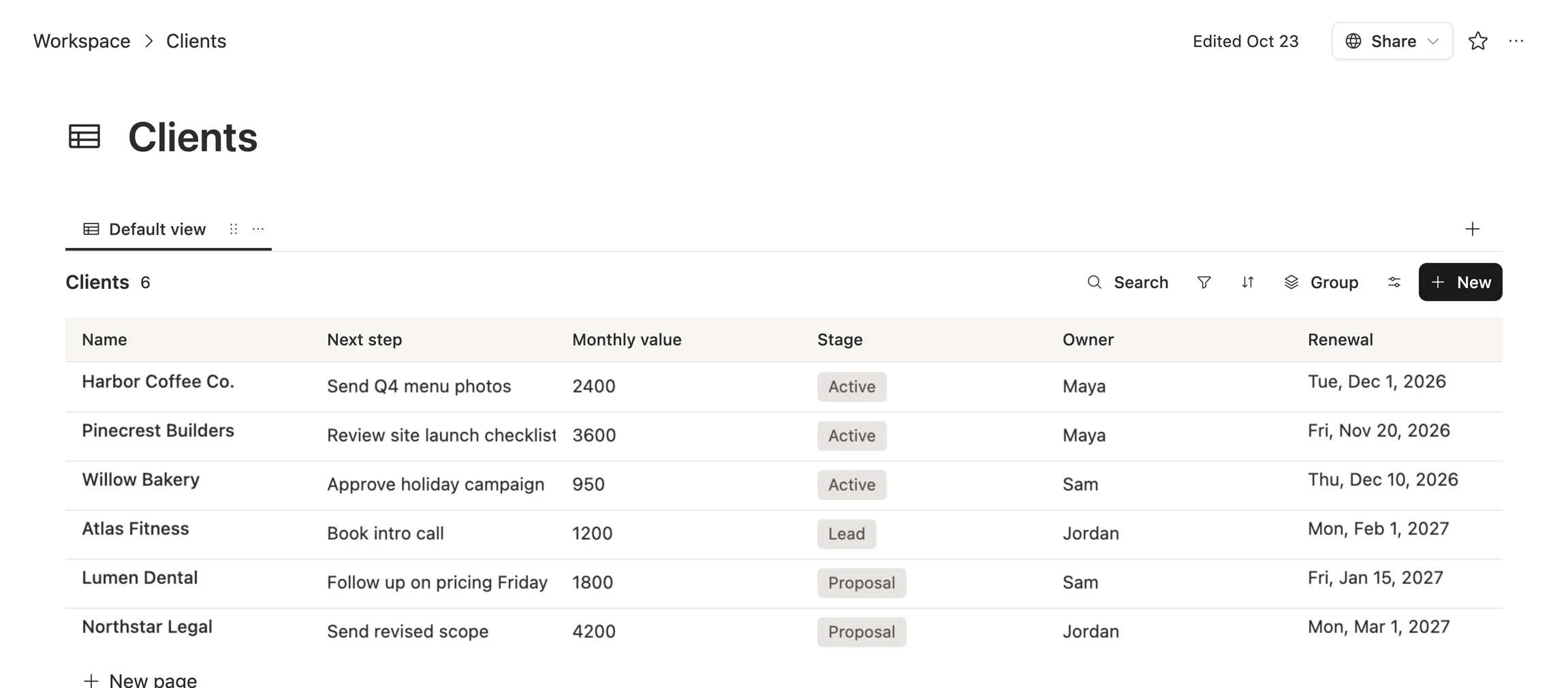
Open any client's meeting and the notes sit right under the facts that matter:
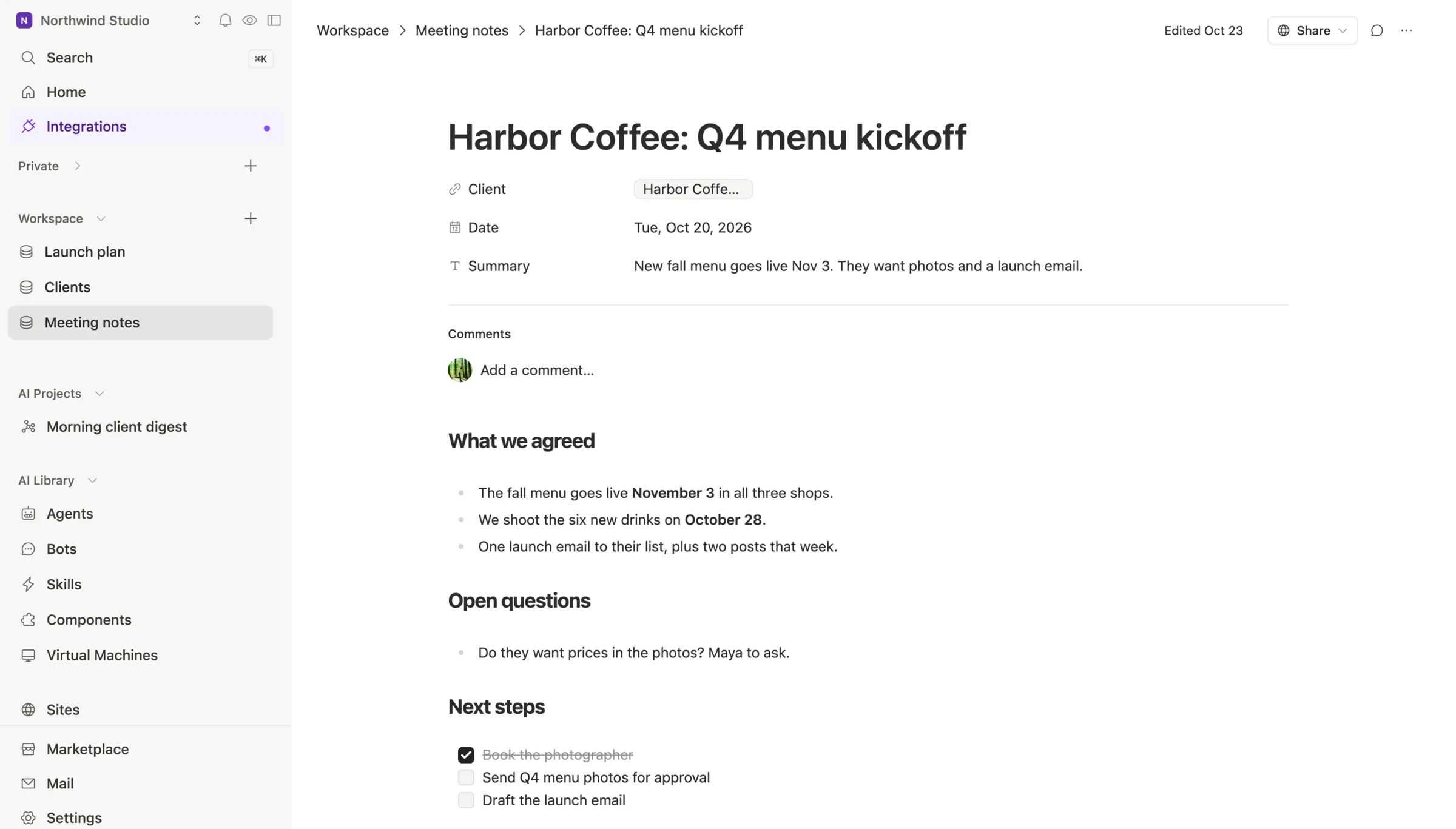
No copying names across tools. No pasting links back. One search finds the note and the row.
Agents that do the boring parts
A year ago this comparison was about views and formulas. Now the bigger question is which tool your AI can work inside.
Notion bundles Notion Agent, AI Meeting Notes and Enterprise Search into Business, and on Business and Enterprise its Custom Agents can connect to tools like Linear, GitHub, Stripe and Jira.
Airtable rebuilt itself around Omni, an AI builder you talk to. Describe what you want and it builds the base, the interface and the automation.
Team Brain agents run on their own: every morning, when a row changes, when an email lands, or when another app calls them. They write straight into your tables and docs, and you can run them on your own AI account with the model you pick.
People already feel this shift. One person said setting up Notion by hand always felt like a mental tax, but their agents love it. Another called Notion a memory every one of their agents can read and edit. So don't only ask "which tool will my team learn?" Ask "which one can my agents work in, and what does each run cost?"
When to stick with Notion or Airtable
We'd rather you pick right than pick us.
- Your team lives in one big wiki and rarely touches tables. Notion has years of templates and a huge community behind it.
- You run a heavy operations base with complex forms, interfaces and dozens of automations already built. Airtable is polished there, and rebuilding all of it has a real cost.
- You've just finished a migration. Moving again this quarter isn't worth it. Come back when the bills or the limits start to hurt.
What breaks when you switch
A Notion consulting agency wrote up moving a media company off Airtable: 20 years of data, about 49,000 records across 13 bases and 270 people. The lesson works for any move, including one to Team Brain. The data moves. The logic doesn't.

What comes across cleanly: tables, records, text, documents and attachments.
What you rebuild: automations, forms, dashboards, linked records, rollups and formulas.
So move one table first. Keep only what you still use, test it on a sample, then move the rest in phases and check every record.
Common questions
Can Team Brain replace both Notion and Airtable? For most small teams, yes. Docs, linked tables, views, formulas and agents live in one workspace. If you depend on a very large Airtable setup or a giant Notion template library, read the section above first.
Is Team Brain cheaper? The workspace is free for any number of people, and you pay only for the AI you use. A 10-person team paying for Notion Plus and three Airtable Team editors spends $160 a month before any AI.
Does Team Brain cap records? There's no charge per record. The free plan includes 10 GB of storage.
Can I bring my own AI? Yes. Connect your own AI account and pick the model, or use ours and pay per use.
See the full one-on-one comparisons: Team Brain vs Notion and Team Brain vs Airtable.